1014 world clock with globe map center powerpoint template
Try Before you Buy Download Free Sample Product
Audience
Editable
of Time
Our 1014 World Clock With Globe Map Center Powerpoint Template will excite your grey cells. They will catch the best frequency.
People who downloaded this PowerPoint presentation also viewed the following :
Content of this Powerpoint Presentation
Description:
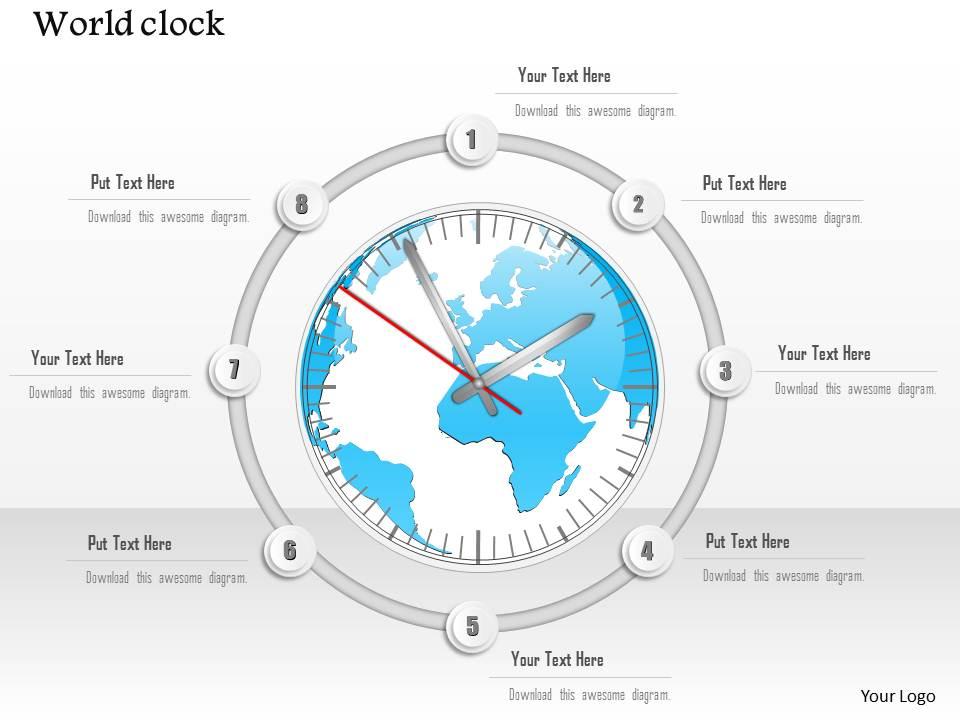
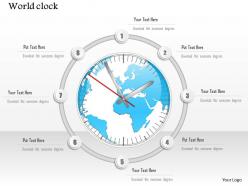
The image displays a PowerPoint slide titled "World clock," featuring a large clock face with a map of the world in its center. The hands of the clock are positioned as if indicating a specific time. Around the clock, there are eight points where text can be inserted, each accompanied by a prompt "Put Text Here" and a repeated directive "Download this awesome diagram."
Use Cases:
This slide template can be used in various industries for presentations where time, global operations, or international themes are involved:
1. Transport and Logistics:
Use: Discussing global shipment times and logistics.
Presenter: Logistics Manager
Audience: Supply chain personnel, clients
2. Technology:
Use: Explaining global server times and IT infrastructure.
Presenter: IT Director
Audience: Technical staff, global teams
3. Finance:
Use: Illustrating international market hours and trading times.
Presenter: Financial Analyst
Audience: Traders, investment bankers
4. Travel and Tourism:
Use: Showing world time zones and flight scheduling.
Presenter: Travel Agent
Audience: Travelers, tourism staff
5. Telecommunications:
Use: Planning global communications and operation times.
Presenter: Network Operations Manager
Audience: Global service managers
6. Education:
Use: Teaching about time zones and Earth's rotation.
Presenter: Geography Teacher
Audience: Students, educational staff
7. International Business:
Use: Coordinating multinational meetings and business hours.
Presenter: Global Operations Manager
Audience: Multinational company employees
1014 world clock with globe map center powerpoint template with all 5 slides:
Our 1014 World Clock With Globe Map Center Powerpoint Template have the effect of an elixir. Energy flow gets a big boost.
FAQs for 1014 world clock with globe map
A World Clock PowerPoint template should include interactive time zone maps, real-time digital displays, customizable city selections, visual time difference indicators, and professional formatting options. These features enable presenters to streamline global meeting coordination, enhance international project management, and deliver clear scheduling communications, with many multinational organizations finding that visual time representations significantly improve cross-border collaboration efficiency.
Customizable elements in World Clock PowerPoint templates enhance engagement by enabling personalized branding, relevant timezone selection, interactive visual elements, and audience-specific content alignment. These features allow presenters to create more targeted experiences, with businesses finding that customized templates improve audience retention, facilitate better cross-timezone communication, and ultimately deliver more impactful presentations.
Effective visual design for global time zones includes color-coded regions, clear geographical mapping, consistent typography for readability, intuitive clock layouts, and strategic use of contrasting colors to differentiate zones. These design principles enhance comprehension by creating visual hierarchy, reducing cognitive load, and enabling quick reference across multiple time zones, with many international organizations finding that well-designed time zone presentations streamline global meeting coordination and improve cross-cultural business communications.
A World Clock PowerPoint template facilitates international business strategy discussions by visualizing time zones, scheduling considerations, market operating hours, regional coordination requirements, and global workflow synchronization. This visual framework enables teams to strategically plan market entries, coordinate cross-border operations, and optimize international partnerships, while ensuring realistic timeline expectations and enhancing global project management across multiple territories.
Animated world clocks enhance presentations by displaying real-time global scheduling, creating visual engagement, demonstrating international scope, improving time zone coordination, and adding professional polish to business content. These dynamic elements help multinational companies, consulting firms, and project management teams communicate across time zones more effectively, while showcasing global operations and strategic international presence to stakeholders.
A World Clock PowerPoint template supports educational content by enabling interactive timezone comparisons, visual time difference demonstrations, and real-world geography connections through major city displays. These templates enhance student engagement by illustrating global business operations, international communication timing, and cultural awareness concepts, with many educators finding that visual timekeeping tools significantly improve comprehension of geography fundamentals.
Common mistakes include overcrowding slides with too many time zones, using inconsistent time formats, failing to account for daylight saving changes, selecting fonts too small for visibility, and neglecting to update times for presentation accuracy. These oversights can confuse global audiences and undermine professional credibility, while strategic template use enhances international communication, streamlines scheduling coordination, and ultimately delivers clearer presentations that resonate across diverse markets and time zones.
The World clock PowerPoint template adapts through customizable color schemes, font selections, layout configurations, and content depth adjustments to match audience expectations and professional standards. Corporate audiences benefit from sleek, branded designs with data-driven insights, academic presentations leverage detailed annotations and research-focused layouts, while casual settings utilize vibrant colors and simplified formats, ultimately enabling presenters to maintain engagement and credibility across diverse professional environments.
World clock PowerPoint presentations can reference atomic clock networks, GPS satellite feeds, international time zone databases, regional daylight saving schedules, and business calendar systems. These data sources enable organizations to streamline global operations by synchronizing meetings, coordinating project timelines, and managing international workflows, with many multinational companies finding that accurate time reference enhances cross-border collaboration and operational efficiency.
A World Clock template enhances audience comprehension by visually displaying multiple time zones simultaneously, showing real-time scheduling challenges, and illustrating the complexity of coordinating across global teams. This visual approach helps audiences immediately grasp logistical considerations in international projects, with many presenters finding that displaying concurrent times for New York, London, Tokyo, and Sydney effectively demonstrates the strategic planning required for successful global collaboration and seamless cross-cultural communication.
Color theory enhances World Clock PowerPoint templates by establishing visual hierarchy, improving readability across time zones, and creating intuitive associations between regions and data. Through strategic color selection, presenters streamline audience comprehension, minimize cognitive load when processing multiple time displays, and deliver more engaging global presentations, with many international organizations finding that consistent color coding ultimately enhances cross-cultural communication effectiveness.
Interactive elements in World Clock templates enhance audience participation by enabling real-time timezone comparisons, clickable city selections, and dynamic scheduling demonstrations that allow audiences to actively explore global time differences. These features transform passive presentations into engaging experiences, with many international businesses finding that interactive scheduling tools and collaborative timezone planning significantly improve meeting coordination and cross-cultural communication effectiveness.
Historical context in World Clock PowerPoint presentations should include time zone evolution, standardization milestones, technological developments, and global business expansion timelines. These elements enhance understanding by connecting current multinational operations to their historical foundations, with organizations in finance, logistics, and telecommunications finding that contextual awareness improves strategic planning and cross-cultural collaboration effectiveness.
A World Clock template helps event planners coordinate schedules by displaying multiple time zones simultaneously, enabling clear visualization of participant availability, meeting windows, and optimal timing across regions. This streamlines scheduling for global teams, webinars, and international conferences, with many organizations finding that visual time zone references reduce scheduling conflicts, minimize confusion, and ultimately enhance participation rates while delivering more inclusive collaborative experiences.
Innovative approaches include interactive timeline comparisons across regions, visual journey mapping of global operations, synchronized milestone tracking for international projects, and comparative analysis dashboards showing real-time performance metrics. These methods enhance stakeholder understanding by illustrating cross-timezone challenges, operational efficiencies, and strategic timing decisions, with many organizations finding that visual time-based storytelling significantly improves project comprehension and global coordination efforts.
-
Colors used are bright and distinctive.
-
Commendable slides with attractive designs. Extremely pleased with the fact that they are easy to modify. Great work!