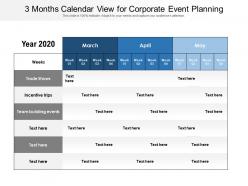
3 months calendar view for corporate event planning

3 months calendar view for corporate event planning
Slide 1 of 2
Favourites Favourites

Try Before you Buy Download Free Sample Product

Audience Impress Your
Audience
Editable 100%
Editable
Time Save Hours
of Time
The Biggest Sale is ending soon in
0
0
:
0
0
:
0
0
Presenting 3 Months Calendar View For Corporate Event Planning slideshow.. Made up of high-resolution graphics. Easy to download and can be saved in a variety of formats. Compatible with the Google Slides and PowerPoint software. You can alter the style, size, and background of the slide icons as per your needs. Useful for business owners, students, and managers. It can be viewed on a standard screen and widescreen without any fear of pixelation.

FAQs for 3 months calendar view for

Obviously hit the big stuff first - event dates, venue booking deadlines, catering contracts. But seriously, build in buffer time for literally everything because Murphy's Law is real. Track your guest list cutoffs and when marketing needs to launch. Budget approvals are crucial too (learned that one the hard way). Post-event stuff like surveys and expense reports? Super easy to forget when you're drowning in pre-planning. Color-coding by priority helps you see what's urgent at a glance.

Honestly, it's a total lifesaver because everyone stops playing that annoying email tag game. You'll see who's doing what, catch deadline conflicts early, and never have to explain catering status five times in one day again. The accountability factor is huge too – suddenly nobody can pull the "wait, that was mine?" card. I'd set up those auto-notifications because watching your team actually coordinate properly is pretty satisfying. Oh, and it becomes like your go-to reference so people stop bugging you with random questions every five minutes.

Look, most people just cobble together a few different tools instead of finding one magic solution. Asana's timeline view is actually pretty solid for seeing how event phases stack up. Monday.com and Trello work great too. You'll still need Google Calendar or Outlook for the actual scheduling part though - bit of a pain but that's just how it goes. Oh, and if you're doing huge corporate events constantly, Cvent or Eventbrite have calendar features built in. But they're way too much for regular stuff. I'd honestly start with whatever your team's already comfortable with and just add pieces as needed.

Honestly, check it every few days if things are crazy busy. Weekly works for most people though - I'd set a reminder for like Tuesday or Friday. Monthly is way too long, trust me on that one. Venues double-book themselves all the time, speakers flake out, budgets get slashed. You don't want surprises hitting you last minute. The main thing is just being consistent about it. Pick a day and stick with it. Review your deadlines, flag anything that looks sketchy. Doesn't have to be perfect, just regular.

Honestly, automated reminders are your best friend here - set them up for like 30, 14, and 7 days out. Get a shared calendar going that people will actually look at (good luck with that lol). Weekly status emails work too. But here's the thing - some people just tune out digital stuff completely, so throw in some face-to-face checkpoint meetings. Don't put all your eggs in one basket either. Mix it up between email, Slack, whatever you use. Oh, and designate someone as the official nagger who can follow up when people go radio silent.

Oh totally! Your audience has natural rhythms you gotta work with. Spring's when everyone's pumped for conferences, summer's weird with vacations but perfect for outdoor stuff. Fall is honestly the golden time - people are back from vacation but not yet stressed about holidays. Winter's rough because you're competing with holiday parties and frozen budgets. Don't forget industry timing though - like, never plan anything for retail clients in December, they're dying. I'd dig through your last few years of attendance data by month. You'll spot patterns pretty quick, then just plan around those high-energy windows.

Okay so basically think of it as your money tracker for the whole year. Instead of randomly booking stuff and then freaking out when everything's expensive, you can actually see where your budget's going. Spread your big events across different months - trust me, you don't want everything happening at once. Early bookings = better deals too. I learned this the hard way when I waited too long on venue stuff. The calendar shows you spending patterns so when your boss asks why you need more money, you've got real numbers to back it up. Definitely worth setting up now.

Dude, color-coding saved my sanity with event planning. I assign different colors to meeting types - blue for conferences, red for deadlines, green for department stuff. Makes scanning so much easier! Before this I was constantly missing things (still cringe thinking about that vendor deadline I blew). Categories are clutch too since you can filter out the noise. Like, I don't need to see HR events when I'm planning marketing stuff. Start with maybe 3 colors max or you'll go overboard - trust me on that one. Game changer for spotting scheduling conflicts too.

Ugh, learned this one the hard way - never underestimate how much buffer time you need between things. At least 2-3 weeks of cushion, seriously. Also check if there's big industry conferences or holidays happening because good luck getting anyone important to show up. Oh and definitely run dates by department heads first - saved my butt so many times. Internal stuff can bite you too, like if there's board meetings or some huge company initiative stealing everyone's attention. Seasonal timing matters way more than you'd think, especially around budget cycles or whatever your company's crazy busy periods are.

Honestly, past event feedback is like gold for planning your next one. Track what bombed and what killed it - if your holiday party sucked because everyone was buried in deadlines, try scheduling it way earlier. I keep this random spreadsheet after every event (yeah I'm that person but it actually saves my butt). Note attendance patterns and when people bail. Block out dates around major conferences or holidays that'll compete with you. Also check what venue issues popped up last time. The trick is getting feedback while it's still fresh in people's minds, not like three months later when they've forgotten everything.

Okay so linking your event calendar with whatever project management tool you're already using is seriously a game changer. All your deadlines live in one place - venue bookings, catering stuff, speaker confirmations, the whole mess. When something changes, it updates everywhere automatically so your marketing team isn't launching campaigns at weird times. Finance can actually see budget deadlines coming. No more "wait when's that conference again" slack messages every five minutes (thank god). The best part? You'll spot resource conflicts right away instead of scrambling last minute. Just start with your current PM tool and bolt the calendar integration on.

Honestly, just bake extra time into everything from day one - I do like 15-20% buffer for each part. Keep some cash set aside for random stuff that pops up. The thing that saved my butt multiple times? Having backup vendors already lined up with prices figured out. Because trust me, someone WILL flake at the worst possible moment. Get a decent project management app that can shuffle your timeline around and ping everyone when things change. Oh and have your Plan B totally mapped out before anything goes sideways. Future you will be so relieved you did this prep work instead of winging it.

Okay so first figure out your audience, budget, and how many people you're expecting. Then check if there's any big holidays or conferences happening that same weekend - learned that one the hard way lol. Location is huge too. Make sure people can actually get there and park without wanting to murder you. A strip mall spot might work for casual stuff, but don't do your fancy company party there. Also look into their AV setup and catering situation beforehand. Book popular venues like 3-6 months out if you can. Oh, and definitely have a backup date ready when you're talking to them!

Honestly, a shared calendar is a game-changer because everyone can see who's doing what and when stuff's due. No more "wait, I thought you were handling that" drama. When Sarah's Q3 summit tasks are right there for everyone to see, along with Mike's vendor deadlines, people actually stay on top of their stuff. It's like peer pressure but in a good way? Plus you catch problems early since everyone can spot when one person's delay might mess up the whole timeline. Do weekly check-ins where people update their progress – keeps everyone honest and moving forward.

Track attendance rates, budget vs actual spend, and if you stuck to your timeline - those are your main health checks. Session attendance and survey scores matter too. Revenue stuff if you're selling tickets or getting sponsors. Honestly? I'm weirdly obsessed with tracking how many events actually finish on time because it tells you SO much about your planning skills. Oh, and networking participation rates are solid gold for engagement data. Pick like 4-5 metrics your boss actually cares about and log them consistently. You'll start seeing patterns across events that'll make you look like a planning genius.

Ratings and Reviews

0% of 100
Review Form
Write a review
Most Relevant Reviews

No Reviews