Agenda diagram with six various business agendas powerpoint slides

Rating:
100%
Slide 1 of 4
Favourites Favourites

Try Before you Buy Download Free Sample Product

Audience Impress Your
Audience
Editable 100%
Editable
Time Save Hours
of Time
The Biggest Sale is ending soon in
0
0
:
0
0
:
0
0
Rating:
100%
Provides a clear expression of the idea being portrayed in the presentation graphics. Prepared by the professional experts keeping in mind all the presentation skills. Constructive for the users like business and marketing professionals highlighting primary six agendas. PPT templates can be viewed on a wider screen as per the needs of the user. Presentation slides can be edited to a large extent including the text, color and directions.

Content of this Powerpoint Presentation

Description:

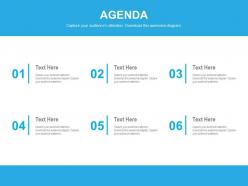
The image depicts a PowerPoint slide designed to present an agenda with six items. The title "AGENDA" is prominently displayed at the top, suggesting that the slide is meant to outline the key points or topics to be discussed in a meeting, workshop, or event.

Below the title, there are six distinct sections numbered from "01" to "06," each with a placeholder for text labeled "Text Here." These sections are meant for the presenter to fill in with the specific agenda items or discussion points. The numbers are arranged in two columns and three rows, indicating a sequence or order for the agenda topics.

The design is clean and professional, with a calming blue color scheme that's easy on the eyes. Each agenda item box has a vertical line connecting the number to the text box, giving the slide a structured and organized appearance.

Use Cases:

An agenda slide is a fundamental component in presentations for structuring content across a variety of industries, ensuring a focused and organized discussion.

1. Software Development:

Use: Outlining phases of product releases or sprint planning.

Presenter: Scrum Master

Audience: Development Team, Product Owners

2. Academic Conferences:

Use: Detailing the schedule of presentations and discussions.

Presenter: Conference Organizer

Audience: Researchers, Academics

3. Healthcare Administration:

Use: Listing topics for a healthcare facility's operational meeting.

Presenter: Hospital Administrator

Audience: Department Heads, Medical Staff

4. Construction Management:

Use: Setting out stages for a construction project briefing.

Presenter: Project Manager

Audience: Contractors, Engineers, Architects

5. Financial Services:

Use: Discussing agenda items for financial planning or review.

Presenter: Financial Advisor

Audience: Clients, Portfolio Managers

6. Hospitality Industry:

Use: Sequencing service improvement strategies in a management meeting.

Presenter: Hotel Manager

Audience: Department Managers, Staff Representatives

7. Professional Workshops:

Use: Organizing workshop sessions and activity timings.

Presenter: Workshop Facilitator

Audience: Participants, Guest Speakers

FAQs for Agenda diagram with six various business

So agenda diagrams are just visual layouts showing your presentation flow - could be flowcharts, timelines, whatever works. Put it near the start so people know what's coming. Most presenters skip this but honestly? Big mistake, especially for longer talks when people's minds wander or someone walks in halfway through. You can circle back to it between sections too, which is kinda nice for keeping everyone on track. Oh and actually USE it during your presentation - don't just throw it up there and forget about it. Keep the design clean and simple.

Basically it gives people a roadmap so they don't get lost (which is the worst). I always highlight where we are in the presentation - keeps everyone on track. Creates anticipation too instead of watching people's eyes glaze over midway through. The visual breaks up boring text slides, gives brains a rest. Here's what works: check off sections as you finish them. Sounds dumb but it actually builds momentum and shows you're making progress. People can see the finish line coming which honestly makes everyone happier.

Put the meeting objective right at the top of your diagram, then list out your main topics with how much time each one gets. I always add arrows or something to show how topics connect - makes it way easier to follow. Mark where you need decisions or actual deliverables, and write down who's running each part. Oh, and build in extra time because honestly? Meetings never stick to schedule. The whole point is making it visual so people can glance at it and immediately get what's happening and what they're supposed to do.

Design totally makes or breaks agenda retention. Clear sections and visual breaks? Game changer. I swear, half the agendas I see look like someone copy-pasted everything into Word and hit print. People zone out instantly. But group related stuff together, use white space, throw in some color for key points - suddenly brains can actually process it. Your audience will reference it during meetings instead of staring at their phones. Also helps if you don't make it look like a legal document, honestly. Try visual hierarchy next time and watch the difference.

Honestly, the biggest trap is overcomplicating things. Don't cram every detail into each box - people zone out when it gets messy. Time estimates are tricky too... that "5-minute check-in" always becomes 15, so build in buffer time. I used to go overboard with fancy colors and graphics (looked cool but nobody could follow it). Keep the flow logical, test it with someone first. Oh, and avoid making it so complex that half the room gets lost. Simple beats pretty every time when you're trying to actually run a meeting.

Honestly, color and typography are game-changers for agenda design. Use contrasting colors to make important stuff pop - helps people scan through without getting lost. I always go bold/bigger fonts for main topics, then scale down for the smaller details. Don't make my mistake of sizing everything the same though, it looks messy as hell. Good hierarchy basically walks people through your info step by step. Stick to 2-3 colors tops and pick readable fonts. You want someone to glance at it and immediately know what's happening when.

I'd go with **Lucidchart** or **Miro** for agenda diagrams. Lucidchart has solid meeting flow templates, but Miro's collaboration stuff is honestly pretty sweet if you're working with a team. **Canva** is another option - way more visual and user-friendly than the other two. You can also just use **PowerPoint** or **Google Slides** with their SmartArt tools if you don't want to learn something new. I always end up tweaking things forever in Lucidchart though, so maybe that's just me. Try the free version first and see what clicks.

Yeah, definitely customize those diagrams! Academic stuff needs numbered sections and clear methodology - keep it formal and structured. Business presentations should focus on time blocks and decision points with obvious timelines. Creative ones are where you can actually have fun - throw in colors, icons, maybe some sketches. Honestly, I've seen some pretty boring creative presentations that could've used way more visual punch. Match your style to whoever's watching. Start with a basic template, then just adapt it. The complexity should fit what your audience expects, not what looks coolest to you.

Think of agenda slides as giving your audience a heads up about what's coming. Nobody wants to sit there wondering if you're halfway done or just getting started - it's torture honestly. When people can see the roadmap upfront, they'll know which parts to really pay attention to based on what matters to them. Short sentences work here. You can break up longer sections mentally and prepare for topic shifts. Always throw it near the beginning, maybe slide 2 or 3. Then you can circle back to it if people seem lost later.

Start with your big topics, then add just enough detail so people aren't walking in blind. I always think of it like - what would I want to know beforehand? Use bullet points instead of long sentences, and group similar stuff together. Complex topics? Break them down into maybe 2-3 smaller pieces, tops. Honestly, most people just skim agendas anyway, so make it scannable. Ask yourself what your team actually needs to prep for. Keep tweaking it until someone could glance at it and immediately get the flow. The goal is clarity without information overload.

Oh, tons of options! Try timeline diagrams that flow sideways, or those circular ones where everything radiates from the center - they actually look pretty cool in presentations. For digital stuff, clickable flowcharts work great. Swim lane diagrams are perfect when multiple teams are involved since you can show who owns what. Here's a weird one that actually works: Kanban boards for longer workshops. You move items through "to discuss," "discussing," "done" columns. Honestly, anything beats those boring bullet point lists everyone defaults to. Just match whatever format to your meeting type and you'll be golden.

Get feedback right after you present - people forget details fast. Just ask a few quick questions about whether the agenda diagram made sense. I'm terrible at remembering to do this honestly, but it's so worth it when you actually follow through. Look for patterns in what people say. Did everyone stumble at the same transition? Was the timeline confusing? Write down the good stuff too, not just what bombed. Before your next presentation, run the updated version by someone you trust. Oh and keep notes somewhere - I've definitely recreated the same fixes multiple times because I forgot what worked.

Honestly, everything's going digital now - clickable timelines beat boring bullet points every time. People are throwing in tons of visual stuff too: icons, color coding, mini charts right in the flow. Gantt charts are everywhere suddenly (kinda overkill but whatever). The coolest part? Attendees can actually mess around with agendas beforehand - add their own questions, vote on what matters most. Makes meetings way less one-sided. You should try Miro or Figma for your next big one. Trust me, your team won't zone out as much when they can actually interact with something instead of staring at another boring slide deck.

Yeah, cultural stuff can totally throw off how people interpret your agenda diagrams. Time perception is huge - some cultures see time as flexible, so those rigid step-by-step flows feel weird to them. Others expect everything chronologically ordered. Hierarchy's another thing - certain cultures need clear authority levels shown, while others want everything flat. Oh, and colors/symbols mean completely different things depending where you are (red = danger vs. good luck, etc). I'd definitely test these with team members from different backgrounds first. Honestly might be worth making separate versions for different regions if you're going global.

Dude, interactive agenda diagrams are such a huge upgrade from boring PDFs nobody reads. You can throw in clickable sections that expand with details, timers for each topic, even live polls. People actually engage instead of checking their phones the whole time. Your team can navigate however they want and dig deeper into stuff that matters to them. The real-time feedback is clutch too - you can pivot if something's dragging on. Honestly just start with hover details or expandable bits. Way better than staring at static documents. Trust me, people will actually participate for once.

Ratings and Reviews

100% of 100
Review Form
Write a review
Most Relevant Reviews
  1. 100%

    by Craig Moreno

    Really like the color and design of the presentation.
  2. 100%

    by Domingo Hawkins

    Qualitative and comprehensive slides.

2 Item(s)

per page: