Annual Business Financial Report Dashboard Snapshot

Rating:
90%
Annual Business Financial Report Dashboard Snapshot
Slide 1 of 7

or

Favourites Favourites

Try Before you Buy Download Free Sample Product

Audience Impress Your
Audience
Editable 100%
Editable
Time Save Hours
of Time
The Biggest Sale is ending soon in
0
0
:
0
0
:
0
0
Rating:
90%
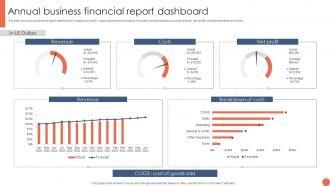
This slide shows annual financial report dashboard of company to monitor yearly business performance. It includes various indicators such as revenue, net profits, costs and breakdown of cost Introducing our Annual Business Financial Report Dashboard snapshot set of slides. The topics discussed in these slides are Revenue, Costs, Net Profit, Breakdown Of Costs. This is an immediately available PowerPoint presentation that can be conveniently customized. Download it and convince your audience.

FAQs for Annual Business Financial

Okay so first thing - put your most important metrics right up front with big, bold numbers that jump out immediately. Visual hierarchy is everything here. Don't make the rookie mistake of cramming tons of stuff onto one screen (seriously, I've seen some disasters). Keep your layout clean, use the same colors and fonts throughout. Real-time data updates are pretty much non-negotiable these days. Interactive filters let people dig deeper when they need specifics. Oh, and this is huge - test it with actual users first! What seems obvious to you might totally confuse them.

Honestly, good data viz is a game changer for dashboards. Nobody wants to stare at spreadsheet rows all day - your stakeholders will literally fall asleep. Charts and graphs let you catch trends super fast instead of hunting through numbers. I'm partial to bar charts for comparing stuff, line graphs when you're tracking changes over time. Heat maps work great for spotting patterns too. The whole point is telling a story that makes sense. Raw data tables just don't cut it anymore. You'll see way faster decision-making once people can actually understand what they're looking at.

UX can make or break your dashboard, honestly. Think about it - if people can't figure out what they're looking at, they'll just ignore it completely. You want clear visual hierarchy and the important stuff front and center. Test with real users early because what makes sense to you might totally confuse them. Also, consider their actual workflow - like, what decisions are they trying to make? Poor UX means they waste time deciphering instead of acting on the data. Oh and intuitive navigation is huge. I've seen so many dashboards that are just... digital mess basically.

Start with what decisions your audience actually needs to make. Pick 3-5 metrics that directly impact those choices - don't just dump everything you can track onto one screen. I've seen way too many dashboards that look like Christmas trees and honestly, nobody ends up using them. Think about your users' daily workflow. What would genuinely help them take action? Real-time data sounds cool but it's expensive and usually overkill. Begin with your core metrics, then only add more if people specifically ask. Simple wins every time.

Set up automated validation rules and refresh schedules first - that's your safety net. Alerts should ping you when numbers look weird or data goes stale. Trust me, presenting outdated metrics to execs is brutal (been there!). Document what each calculation actually means so there's no confusion later. Oh and definitely assign owners to different dashboard sections. Having someone eyeball the data weekly catches issues fast. Short sentences work. Longer ones with natural flow keep things readable. Don't overthink it - just make sure someone's always watching your back on data quality.

Just figure out what each person actually needs first. Executives want the big picture stuff - KPIs, trends, that kind of thing. Managers need the day-to-day numbers they can actually do something about. Sales and marketing teams? Totally different data needs, obviously. Set up role permissions so people only see what's relevant to them. Most tools let you create different views from the same data anyway. Honestly, the layout should match how they actually work each day. Here's what I'd do: ask each team what decisions they're making regularly, then build dashboards around that. Way more useful than just throwing every metric at them.

Ah ok so for dashboards - Tableau's super easy drag-and-drop but pricey. Power BI is way cheaper and works great if you're already using Microsoft stuff. Then there's Plotly Dash which is awesome if you know Python and want total control over everything. Though honestly? Most people go crazy adding bells and whistles they'll never touch. I'd say figure out what data you're working with first and who's actually gonna use this thing. Then just pick whatever handles those basics well instead of getting distracted by all the shiny features.

So don't just build your dashboard and walk away - that's how you end up with a mess nobody uses. Set up quarterly check-ins with your team to see what metrics actually matter anymore. Seriously, I've watched dashboards become junkyards of random charts that made sense two years ago but now? Useless. When priorities change, add new stuff. Ditch what people ignore. Move things around based on how folks actually navigate it. Oh, and create some kind of feedback system so users can tell you what sucks or what's missing. Keeps everything relevant instead of just... existing.

Honestly, the worst thing you can do is stuff everything onto one screen. Users just get lost and bounce. Different chart types everywhere? Total mess. I've seen so many dashboards that look super impressive but are basically unusable because someone went crazy with the fancy stuff. Put your most important numbers up front where people can actually find them. Those vanity metrics might look cool but they're worthless if nobody makes decisions from them. Oh, and figure out what your users' top 3 questions are first - build around that and ignore the rest.

Honestly, real-time data is a game changer for dashboards. You'll catch problems the second they pop up instead of finding out about them way too late. No more awkward moments presenting old numbers while everyone's looking at you weird. Start with your most important metrics first though - don't try to make everything real-time at once or you might crash something. Your data sources need to actually handle the constant updates without dying on you. I learned that one the hard way lol. But yeah, it beats manually refreshing reports all day like some kind of caveman.

Honestly, color choice can make or break your dashboard. I'd stick to maybe 3-4 colors tops - any more and it gets messy fast. Use darker shades for your main metrics, lighter ones for background stuff. Creates a nice hierarchy without thinking too hard about it. Skip the red/green thing though, colorblind folks will hate you for it (trust me on this one). Make sure there's good contrast so people can actually read your data. Oh, and definitely test it with real users first - I've seen so many dashboards that look slick but confuse the hell out of anyone trying to use them quickly.

CSS Grid or Flexbox are your best bet here - they handle responsive stuff automatically. Design for mobile first, then work your way up to desktop. On small screens, stack everything vertically instead of squishing it all together (I made that mistake way too many times). Use percentages or viewport units, not fixed pixels. Browser dev tools are fine for testing but nothing beats checking on real phones. Oh, and make sure your text stays big enough to actually read - some developers go crazy with tiny fonts. Bottom line: your data needs to be useful no matter what device someone's using.

Dude, templates are a lifesaver - no more starting dashboards from zero every single time. Your whole team's stuff will actually look cohesive instead of like everyone just winged it. They've got the important widgets already built in, so you won't forget key metrics. Honestly, even dashboard pros use them because why reinvent the wheel? If you're just getting started, they're perfect since you get all the best practices without having to learn them the hard way. Just grab whichever one's closest to what you need and tweak it from there.

Honestly, bounce rates are what I obsess over first - they tell you so much. Track your daily active users, session time, which widgets people actually click on. Most of the analytics stuff is pretty straightforward. But here's the thing - user interviews are where you'll find the real problems. Are people making better decisions? Finding what they need without getting lost? I'd throw up some quick 1-10 usefulness surveys too. Support tickets are gold for this btw. Give it like 2-4 weeks then dive into everything. Oh, and don't forget to check if it's actually moving the business metrics you built it for.

Honestly, you'll want to keep an eye on AI that spots weird patterns in your data automatically - saves so much time. Real-time collaboration is huge too since teams need to comment and discuss stuff right in the dashboards. Oh, and mobile-first design is basically required now because let's be real, we're all checking numbers on our phones constantly. Voice commands are getting pretty cool - just ask "what were yesterday's conversion rates?" instead of hunting through menus. Natural language search means even non-tech people can type questions normally. I'd mess around with AI dashboard tools now before you're playing catch-up later.

Ratings and Reviews

90% of 100
Review Form
Write a review
Most Relevant Reviews
  1. 100%

    by Thomas Garcia

    Innovative and attractive designs.
  2. 80%

    by Johnson Morris

    I was never satisfied with my own presentation design but SlideTeam has solved that problem for me. Thank you SlideTeam!

2 Item(s)