




 0 Comment
 Customer Reviews

"Success is the sum of small efforts, repeated day in and day out." – Robert Collier, American author and creator of New Metaphysical thought school.
If an employee doesn't do as well as expected, it doesn't always mean the end of the road. Instead, it makes way for planned growth. This is where the Performance Improvement Plan (PIP) Action Plan process comes in. With clear PIP Action Plan steps, dates, and results, a well-written PIP helps workers get back on track with the organization's goals.
Often, managers have trouble setting goals for the PIP Action Plan, ensuring everyone is on the same page and setting clear standards. Luckily, tools such as organised slide themes can make this process go more quickly.
At SlideTeam, we offer many presentation themes that can help HR workers and team leaders. Our Top 10 Employee PIP Templates are meant to make making a PIP Action Plan easier by giving you premade files with areas that you can change.
These templates not only help you show the PIP Action Plan rules clearly, but they also help you get everyone on your team on the same page.
PIPs are also more than just papers; they need to be followed through on. This is where the Top 5 Action Plan Implementation Templates from SlideTeam come in handy. These templates help you make a specific PIP Action Plan implementation plan with tasks, due dates and Action Plan timelines.
Using SlideTeam, ensure that the information is clear, consistent and has an effect. They help leaders come up with ideas for the PIP Action Plan, review the PIP Action Plan and give useful feedback on the PIP Action Plan. It's also helpful to be able to record changes so that the PIP Action Plan can be evaluated over time and used as a guide in the future.
Let's explore all the templates.
Template 1: Transform Ideas into Action with Our Pip Plan Presentation
The professional vibe is given off by the dark, modern background with images of skyscrapers in cities gives you PIP the greatest chances of success. The brush-stroke green block adds some creativity and sharpness. It sets the tone for knowledge and effective leadership by showing the speaker's name and title. This first slide sets the tone for power and clarity, making sure that the audience is comfortable with the structured, problem-focused method that will come next.
[product_image id=1457104]
Template 2: Introduction to PIP Plan Presentation Template
The parts of a Performance Improvement Plan are shown in this slide: Set goals, evaluate resources, make a schedule and look over the results. The user is led through the organised planning process by clear explanations of each step. The green brushstroke design keeps the design current and clean while drawing attention to the main text. This slide shows strategic purpose and planning by giving a clear, step-by-step outline. Be supremely confident in the skill and clarity of the improvement plan that is being presented through this slide.

Template 3: Identifying Transformable Ideas
This slide stresses the importance of looking at current projects to find creative, useful solutions that meet the needs of the audience. It tells users to focus on ideas that will have an effect, use resources efficiently, and be possible within the time frames that are available. This turns ideas into plans that can be put into action. This slide showcases careful analysis and insight by showing a realistic, value-driven approach to planning. It gives people confidence in the planning and carrying out process by reassuring them that their goals will be met in a clear and planned way.

Template 4: Evaluating Ideas for Actionability
This slide covers characteristics of ideas, such as acceptability, time frame, resources, effect, usefulness, scalability, and how easy it is to use. Each of these things makes sure that the idea is useful, in line with goals, ready for resources and likely to be understood and used. Giving an organised framework for judging ideas shows that you are taking a thoughtful and organised approach. It shows strategic alignment, planning and vision, which shows a strong dedication to achieving useful, significant results that are tailored to the specific needs of the organisation.

Template 5: Setting Clear Objectives and Goals
This slide shows the important steps that need to be taken to set goals successfully: describing targets, setting deadlines, figuring out what resources are needed, tracking progress, setting priorities for actions, reviewing regularly and getting the team involved. Using this organised method to set and track goals, you can showcase that you are skilled and dedicated to getting things done quickly.

Template 6: Breaking Down Ideas into Tasks PPT Template
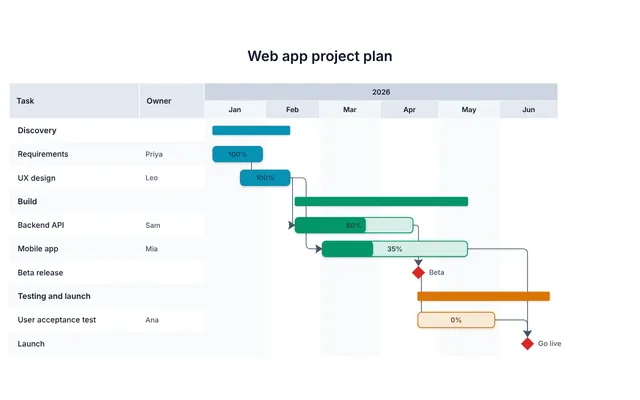
A Gantt chart showcases an organised schedule for completing a job. It has four main steps: making a list of tasks (Jan–Jun), setting due dates (July–Oct), assigning jobs (Mar–Jun), and tracking work (Jun–Sep). The graphic mapping of each step over months makes the order and length of time more clear. Giving a detailed, time-bound list of who is responsible for what shows that you are good at planning and ready to get things done. It makes sure that each job is planned out for clear results of alignment, clarity and responsibility throughout the project lifecycle.

Template 7: Budgeting and Resource Allocation PPT Template
This slide showcases a table that showcases how much money was budgeted, spent and is left over for four resources (A to D). It also has sections on saving money, going over budget and making the best use of resources. These tips help keep an eye on spending, find people who are wasteful and make the best use of resources. Using an organised financial outline shows that you are honest, planning responsibly and having control over your budget. It shows a dedication to keeping on budget and getting the most out of resources.

Template 8: Leveraging Team Collaboration Tools
This slide depicts an organization's purpose, vision and ideals for working together as a team. The goal is to improve communication and project management through tools and the values are quality, openness and inclusion. The vision is to be innovative and work as a fluid team. It shows a forward-thinking workplace where working together is organised and valued, which encourages dependability and skill in project completion.

Template 9: Celebrating Milestones and Achievements
This slide lists things that were achieved, such as reaching goals, getting good feedback, growing the team, making more money, coming up with new ideas and getting better at what you do. It shows that it has a history of getting good results, implementing new strategies and encouraging constant team growth. Bringing attention to real results and progress strengthens the organization's strength and dependability. It shows that promises are kept and progress is being made, which boosts trust in future success and the ability to work together.

Template 10: Engaging Stakeholders in the Process
This slide shows some good ways to involve stakeholders: Finding key partners, keeping communication clear, getting feedback on a regular basis, involving stakeholders in choices, and celebrating shared goals. Using these methods will make sure that everyone is clear, working together and understanding throughout the whole job.
This method shows responsibility and dependability by involving partners and considering their opinions. It builds a mindset of openness and a common goal, showing that everyone's opinion counts and that growth is a team effort.

Create the Right Atmosphere
If the PIP Action Plan works, it can be a turning point for both the individual and the company. It makes people more responsible, pushes them to get better and creates an atmosphere of high achievement. Using ready-to-use show slides from SlideTeam makes sure that the process is smart and streamlined, from making the PIP Action Plan to evaluating it. These models give you the organisation and clarity you need whether you want to set goals for your PIP Action Plan or look over plans.
PS: Want to learn more about how to make a PIP that works well? Check out our list of the Top 10 Performance Action Plan Templates to get tools you need to help you with your PIP journey.
FAQs on PIP Action Plan
-
What is a PIP (Performance Improvement Plan)?
A PIP is an official document that spells out clear goals, strategies, and due dates for an employee who is not meeting standards to do so. It has clear standards and is reviewed on a frequent basis. The goal is not punishment, but growth, with a focus on change, direction and making sure everyone knows what is expected of them on the job. It helps both the boss and the worker work together.
-
What does a PIP action plan include?
A full PIP action plan has clear performance problems, measurable goals, detailed steps to improve, due dates for each job, frequent feedback on the action plan and reviews of the action plan on a regular basis. It also includes naming who is responsible for what, writing down every step and setting up a final PIP Action Plan review to see how much progress has been made.
-
What are common reasons for placing an employee on a PIP?
People are often put on a PIP because they consistently do not do their job, miss deadlines, are not accountable, or do not meet certain job standards. It is sometimes used when an employee has a lot of promise but needs organised help to work towards team goals. Behavior problems or not being able to handle changes are some other possible reasons. A well-written PIP Action Plan makes sure that these problems are dealt with in a positive way.