




 0 Comment
 Customer Reviews

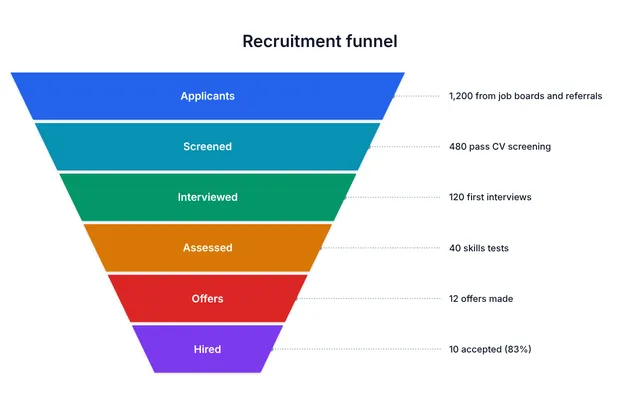
A Pyramid Infographic is one of the easiest ways to explain information. It helps people quickly see what’s most important and how the workflow moves. Studies show that we remember about 80% of what we see, but only 20% of what we read! That's why infographics make such a big difference.
Back in 1943, psychologist Abraham Maslow used a pyramid to explain what drives people. The pyramid made a complex idea easy to understand. This diagram is still used in business, education, and marketing today.
Businesses deal with a lot of data, strategies, and priorities that can confuse people if shown in plain text. A pyramid infographic helps put this information in order. Other advantages of using knowledge pyramid are:
- Clear to follow – They break down tough info into simple steps.
- Set priorities – Show what’s most important first, and what comes later.
- Easy to share – Teams, clients, or investors can understand it quickly.
- Sticks in mind – Pictures are easier to remember than plain text.
- Helps decisions – Gives a clear structure so leaders and teams can act faster.
These pyramid infographics let you organize ideas step by step and show which tasks or goals carry the most weight. Moreover, they not only look professional but they make your message clear, simple, and memorable.
To help you out, we have created Pyramid Infographic Templates. These presentations offer professional layouts, made using different designs, layouts and icons. They will help you explain your topic clearly and make a positive impression. Moreover these are 100% editable, so you can change any element to suit your style.
Check out some of our most downloaded Pyramid Infographic Templates and download the one best for your business-
Template 1: Seven Level Pyramid
This PPT Deck presents layered diagrams which will help you present different business sequential processes. The layouts will help you visualize these processes in seven steps. Use them to explain hierarchical inheritance, revenue plans, reinforcements, churn and retention rates and more. The pyramid shape makes it easy to see how each level builds on the one before it. The framework is excellent for explaining complex ideas simply instead of using a long list of bullet points. Download now!
[product_image id=436515]
Template 2: Upside Down Pyramid
This PPT Bundle includes 12-slides featuring upside-down step pyramids. It is based on Jan Carloz original concept: customers come first (the broadest part of the pyramid) and business grows by supporting employees who work closest to them (narrower parts). Use these visual tools to represent concepts where the most important information is at the top, and the details narrow down toward bottom. This framework is great for decision making and problem solving, as it starts with the goal and then outlines the supporting data. Get it now!
[product_image id=228975]
Template 3: Strategic Pyramid PPT Infographic Template
How do you explain the workflow of your business effectively? This PPT Template presents a strategic pyramid based on common business methodology. It breaks down high-level goals into daily bite sized tasks. The framework explains how different levels of planning and action connect within a company. The primary benefit of this layout is aligning the organization by connecting the big-picture vision with smaller tasks. It helps different departments understand how their work contributes to the company's overall goals. Get it now!

Template 4: Pyramid Infographics and Icons
Want to present a proportional relationship? This PPT Slide presents a tiered structure, which will help you explain step by step processes. The process pyramid explains the process visually, which makes it easy to understand. The business pyramid represents a foundation that builds up to a final point or a broad concept that narrows down to a specific one. It contains strategic layers which present different levels or categories. It can be used to show stages of projects, sales pyramid, customer journey etc. Get it now!

Template 5: Pyramid Infographic For Success
Want a visual guide to explain step-by-step processes effectively? This PPT Template presents a success pyramid. It explains various processes by dividing them into five different levels. The framework uses icons as visual cues and provides context for each stage. Use it to present product strategies, marketing funnels, project management and more! For instance, it can be used for employee training by the HR department, showing 5-steps of employee growth, going from skill training at base level all the way to the top goal which could be senior manager. Get it now!

Template 6: Internal Security Steps Pyramid for Laptop
Want to strengthen your cybersecurity efforts? This multi-level chart will help you safeguard your devices against threats. It visually displays layers of defence, explaining how security is a multi-layered system rather than a single solution. The priority pyramid is divided into 4 coloured layers. Its base describes the most fundamental step (Email Scans) which is the broadest. While the tip of the pyramid is the highest level of production (Firewall). This framework simplifies confusing topics and promotes best practices. Get it now!

Template 7: Content Brand Pyramid PPT Infographics
Want to reform your brand’s identity? This PPT Design presents a hierarchy chart which will help you align your brand’s message. It helps companies understand what they stand for and how to communicate that message consistently to their audience. The pyramid works from the bottom up, building a comprehensive view of the brand. You can use this framework for defining startup projects identity, rebranding, product development and more. It will help teams develop new products and features that naturally fit your brand. Get it now!

Template 8: Six Staged Business Pyramid Option Infographics
Use this eye-catching PPT Template and present any complex concept easily. The visual shape of the pyramid intuitively conveys the idea of ‘building on a foundation’. The layout offers a six staged business pyramid. Use it to show logical sequences, where each step is dependent on the previous one. The base is the most fundamental, and the levels build up in complexity or value. The framework uses visual diagrams which are more memorable than a list of bullet points. Furthermore, you can use it for product pyramid development lifecycle, customer relationship management etc. grab now!
Template 9: 3 Examples Pyramid Infographic Template
Want to switch up your basic organizational pyramid? This PPT Design presents a unique and creative take on standard pyramid infographics. It’s a 3D, cylindrical pyramid design that is broken into three different colored stages. The text boxes on the sides will help you clearly explain each stage. You can use it for building business growth strategies, product feature prioritization, corporate social responsibility (CSR) and a lot more. Get it now!

Template 10: Three Levels of Management in a Pyramid Infographic
Use this PPT Framework and visually represent different levels of management in a company. The pyramid shape is used to show that as you move from the bottom to the top, the number of people decreases, but the scope of responsibility and authority increases. The layout is divided into three levels. For instance, you can use it for organizational restructuring and onboarding. Explain the new reporting structure, which helps new hires understand the organizational chart and who is responsible for different decisions. Get it now!

Template 11: Vision, Objectives, and Mission Pyramid Infographic for Business Model
Use this PPT Slide and visually map out the business's strategic framework, starting from vision all the way to specific targets. Unlike a traditional pyramid, this one is an inverted and step-based pyramid. This layout will help you illustrate a top-down flow of the business model. The template is a five-stage, cascading design. Each step is a distinct, numbered block with an icon and a text placeholder. Use this framework and improve your business performance along with goal settings. Get it now!

Template 12: Three Levels of Decision Making in a Pyramid Infographic
How are business decisions made within an organization? This PPT Template presents a three level goal hierarchy pyramid. It explains the pecking order of decision making authority from the daily operations to high-level strategy. The layout is divided into 3 sections, including operational, tactical and strategic. Each level has a distinct color and icon, making it easy to see the progression. For instance, use it for cross-departmental collaborations where different teams need to understand who makes what types of decisions. Get it now!

From Base to Peak, Simplify Complex Ideas!
Pyramid infographics make tough ideas simple. Instead of using stuffed reports, they explain information layer by layer using bullet points. This helps the audience to follow and remember information better. They can be used for different business communication. Our Pyramid Infographic Templates are designed to save you time and effort while still looking professional. You can easily edit them to fit your needs and present your ideas with impact. Try them today!
P.S- Want specific performance pyramid templates? Click here and check them out!
Pyramid Infographic FAQs
1. What key information is best represented using pyramid infographics?
Pyramid infographics show information that has different levels, steps, or priorities. They can be used for things like:
- Business goals and strategies
- Sales funnels
- Employee growth or training stages
- Customer journeys
2. How can pyramid shapes simplify complex hierarchical data visualization?
A pyramid is easy to follow because it starts broad at the bottom and narrows at the top. This shape shows order and flow step by step. It helps people answer:
- What comes first and what comes later?
- How do small details connect to bigger goals?
- Which tasks need to be completed first?
3. Which industries most commonly use pyramid infographics for
Communication?
Many industries use pyramid infographics in their business communications. For example:
- Business and Marketing
- Education
- Healthcare
- Human Resources