




 0 Comment
 Customer Reviews

The perfect example of hiring was provided during the 2012 London Olympics, where the organizers hired more than 70,000 volunteers to conduct this event.
The recruitment department hired them based on passion, skills, and reliability. Furthermore, the HR team assigned each volunteer a scorecard to track their performance. This kept the staff accountable and aided the performance-based reward system later.
This smooth staff management happened because the organizers had prepared the complete hiring and onboarding strategies before the event.
If you want to use scorecards to gauge your employees' performance, explore SlideTeam's Recruitment Weekly Scorecard Templates.
These 100% customizable presentation themes will help you concentrate on every stage of your recruitment funnel, streamlining the entire process.
Let’s explore!
Template 1: Recruitment Weekly Scorecard PowerPoint Deck
Do you want a powerful weekly hiring performance tracker for your company? Explore our PowerPoint Deck to develop robust plans for improving recruitment efficiency.
Several presentation themes are available, and you can feature detailed scorecards, conversion rate analyses, cost per hire breakdowns, and recruiter performance evaluations.
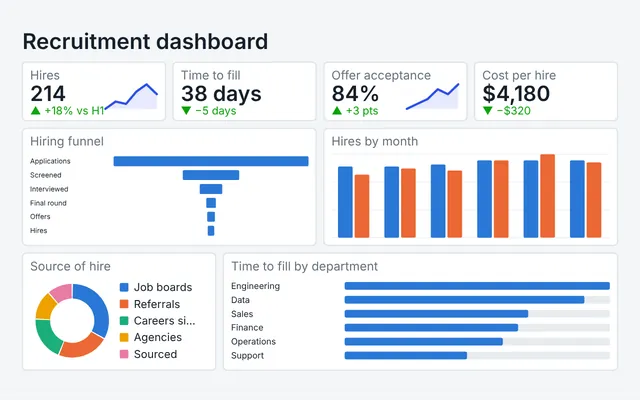
Additionally, some professional charts and diagrams will help you showcase metrics, such as time to fill, hiring sources, candidate decline reasons, and departmental hiring trends.
Furthermore, you can concentrate on the recruiting funnel analysis to display which areas demand more effort.
These tools also allow your team to track open positions, onboarding progress, and quality-of-hire metrics.
You can download this PowerPoint Bundle from the link below to generate a professional talent acquisition report for your human resource department.
[product_image id=492931]
Template 2: Weekly Recruitment Scorecard of Recruiter Performance PowerPoint Layout
Our PowerPoint Theme offers a platform where you can show your audiences a detailed breakdown of recruiter performance.
You can measure various attributes, such as quality of hire ratings, new hires, terminations, revenue impact due to vacant roles, diversity hiring, and employee satisfaction.
After analyzing them, the HR teams can look for hiring trends and make appropriate decisions.
Furthermore, this tool offers an easy-to-read format that will help you highlight the vital aspects of talent acquisition.
Additionally, recruitment industry professionals can use this scorecard to improve retention rates and enhance hiring quality. It also helps companies reduce revenue loss by addressing hiring gaps and refining recruitment strategies.
Download this PowerPoint Template from the link below to maximize recruitment efficiency with this powerful weekly recruitment analytics tool.

Template 3: Weekly Recruitment Conversion Rate Scorecard with Average Cost of Hiring PowerPoint Preset
Our PowerPoint Preset lets you convey various recruitment parameters to your teams.
You can show recruitment performance, track conversion rates, calculate cost per hire, and assess hiring efficiency for various departments.
This presentation theme helps you generate detailed insights into recruiter conversion rates so your teams can measure hiring effectiveness at different levels.
Furthermore, there is a section dedicated to hiring costs by seniority level, where your team can mention budget-conscious decisions for new hires.
Additionally, you can leverage the recruitment funnel to have a clear perspective on candidate progression from applications to final hires.
Likewise, the time-to-fill analysis will aid you in streamlining hiring timelines for different departments.
Download this PowerPoint Theme from the link below to stay ahead of your hiring goals with this insightful weekly hiring dashboard.

Template 4: Weekly Recruitment Scorecard with Total Commission PowerPoint Framework
Do you want a professional tool that mentions the weekly recruitment scorecard with the total commission? Explore our PowerPoint Preset to portray your company's hiring trends.
In fact, you can begin the conversation with candidate vs. client decline rates, recruitment funnel efficiency, and sourcing effectiveness.
You can elaborate on important recruitment metrics, including the percentage of CVs submitted, candidate interviews, client interviews, offers made, and successful placements.
The exceptional feature of this presentation theme is that you can compare client and candidate decline side-by-side to identify areas for improvement.
Furthermore, you can communicate the details regarding the recruitment funnel so that the HR department can focus on the most effective recruitment channels.
Download this PowerPoint Framework from the link below to generate a true recruitment progress report.

Template 5: Recruitment Weekly Scorecard with Cost Per Hire PowerPoint Preset
Are you searching for a tool through which you can portray weekly recruitment costs to your HR teams? Leverage our PowerPoint Preset to calculate the same by calculating expenses for external and internal sources on a single platform.
In fact, you can convey your thoughts about measuring the cost per hire over multiple weeks to optimize your hiring strategies.
Furthermore, you can depict various parameters, such as the visual representation of external and internal costs, to identify spending patterns and adjust the recruitment budgets accordingly.
Additionally, you can perform a breakdown by each department, such as production, marketing, and customer care, to see where the most costs are incurred.
Download this PowerPoint Theme from the link below to enhance your hiring strategy with this robust staffing performance sheet.

Template 6: Weekly Recruitment Funnel Scorecard with Total Interviews PowerPoint Framework
Our PowerPoint Theme offers a professional base through which you can show the recruitment funnel.
You can easily concentrate on the number of applications, interviews, assessments, and hires. The HR teams can monitor and extract the conversion rates of all these parameters.
Furthermore, this presentation theme will help gauge the average length of each stage, i.e., reviewing applications and final hires.
When you perform this activity, it will help to identify areas that may need optimization for a faster hiring process.
Additionally, you can communicate about the recruitment cycle length for each recruiter and compare it to highlight performance differences.
Download this PowerPoint Framework to improve your hiring efficiency with this workforce acquisition report.

We have curated the list of exceptional HR scorecard templates for you. Click here to learn more.
Template 7: HR Weekly Recruitment Scorecard with Open Positions PowerPoint Slide
Various job vacancies happen in an organization; therefore, if you want to keep everything in order, you can use our PowerPoint Preset.
You can start the conversation by tracking applicants, candidates added, and new hires.
Furthermore, this tool will help you generate a weekly breakdown of new hires so that your HR teams remain on top of recruitment targets.
Additionally, you can further the discussion by visualizing the total number of employees, including temps and interns.
In the next section, the focus can be on comparing candidates in the interviewing phase with those added, which helps identify bottlenecks.
At the end of this presentation theme, you can categorize each department's hiring progress, such as accounting, engineering, IT, legal, and marketing.
You can download this PowerPoint Theme from the link below. Use it to provide the complete candidate pipeline summary to your human resource department.

Template 8: Weekly Recruitment Trend Scorecard with Sources and Departments PowerPoint Slide
Our PowerPoint Slide will provide you with the optimum platform to discuss recruitment trends and hiring performance for multiple departments.
You can show the weekly hiring rate and the number of new employees so that the HR teams can monitor the progress over time.
Furthermore, this presentation theme will help you prepare data on various recruiting sources, including referrals, social media, and advertisements.
There is a different section under which you can describe the detailed breakdown by department, such as sales, engineering, technical support, etc.
Moreover, the individual tracking of new hires per week section provides transparency and allows HR professionals to identify new trends or gaps in the recruitment process.
Download this PowerPoint Template from the link below to convey the employee hiring tracker to your teams.

Template 9: HR Recruitment Weekly Scorecard with Hired Candidates PowerPoint Framework
Our PowerPoint Preset offers an exceptional platform where you can describe a detailed snapshot of the hiring process with your teams.
In the first section, you can track the total number of applicants, shortlisted, hired, and rejected applicants.
The second section, regarding open positions, can be highlighted in a pie chart diagram so that the HR department can easily manage the workforce.
Besides this, you can focus on the breakdown of applications received from different sources, including referrals, social media, and job portals.
Additionally, a recruitment funnel visual will aid your teams in monitoring each stage of the process, such as applications, interviews, and final hires.
Download this PowerPoint Template from the link below to work on the recruitment progress report.

Click here to get the best recruiting scorecard templates for your HR teams.
Template 10: Weekly Department Recruitment Scorecard with Applicant Details PowerPoint Theme
Our PowerPoint Theme is an excellent place to develop proper strategies for each department's weekly recruitment performance.
You can leverage this tool to convey ideas to your HR teams regarding open positions in different departments, such as production, marketing, IT, etc.
In the Applicant Details section, you can mention detailed applicant information, including email, job title, and current status, so that the HR teams can quickly identify each candidate's status.
When your recruitment departments understand the number of applications received per department, they can assess where to focus their efforts to fill vacancies faster.
Download this PowerPoint Slide from the link below to maximize your recruitment success with this talent-sourcing metrics tool.

Track Workforce Performance
In conclusion, a recruitment scorecard should be given priority when looking for a new candidate in the market. This way, you can easily track what type of new ideas the new individual brings to the company.
Therefore, you can explore SlideTeam's Recruitment Weekly Scorecard Templates, which are 100% customizable and built by industry experts that offer everything from detailed scorecards to recruitment funnel analysis.
The time has come to transform your recruitment strategy with SlideTeam’s powerful solutions.