




 0 Comment
 Customer Reviews

“You can't do the same thing repeatedly and expect different results,” this piece of anecdotal wisdom is especially true for social media marketing. If a certain marketing strategy isn’t performing well, it’s your job to replace it with a method that works better.
But how do you know which strategies are working unless you’re keeping an eye on your social media analytics? That’s where a social media report comes in.
Collecting and analyzing data about your top-performing posts, your audience, and, yeah, even your humiliating flops, is the secret to improving your social media performance. Without this information, it’s almost impossible to grow your following or achieve your social media goals.
Social Media Status Report is where data meets strategy in a dance that can skyrocket your online presence to new heights. Gone are the days of aimless posting and hoping for the best. In the digital arena, knowledge is power, and power comes from understanding the story your data is eager to tell. With the right insights, every click and like becomes a step towards achieving your goals.
WHAT IS A SOCIAL MEDIA STATUS REPORT?
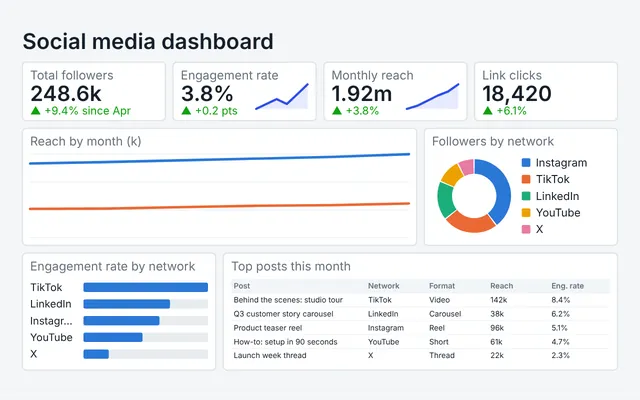
A social media status report is a presentation that includes data and insights gathered with the purpose of evaluating a brand's performance on multiple media platforms. Through social media analytics reports, marketers can glance at their strategies' effectiveness in achieving their social media goals. . It aims to translate raw data into actionable insights. The reporting goes beyond just tallying likes and followers; it delves into engagement rates, audience demographics, content reach, and the effectiveness of platforms and campaigns.
Social media reports are pretty much the only way to demonstrate the value of your social marketing efforts to your team and your boss. From staff morale to increased budgets to growing your team, it’s critical to have data that shows the importance of your work to the organization.
Building social media reports is easy with templates. It’s time to whip up some social media reports to prove your worth and set your social strategy on track for success. We’ve got you 100% editable and content ready templates. The customizable nature of the templates provides you with the flexibility to edit your presentations. The content-ready slides give you the much-needed structure.
Let's explore these Social Media Status Report Templates!
Template 1: One-Page Monthly Social Media Status Report
The PPT Template is a summary of a company’s social media presence over the course of a month. It breaks down engagement rate, user impressions, social media post statistics, and recent social media activity updates. The slide details a social media platform overview, including average engagement rate, link clicks, and likes. The PPT Slide tracks monthly social media user impressions, which will enable you to see follower growth, impressions, link clicks, and engagement. A graph depicts click-through rate over the last six months. The slide highlights monthly social media post statistics. This section includes the number of posts, reach, comments, shares, and saves. The most recent social media updates are then listed by date and update. This all-in-one report allows users to see how their social media efforts are performing at a glance. Download Now!

Template 2: One-Page Facebook Social Media Status Report
Make maximum use of your Facebook presence with this data-packed one-pager! You can see your follower growth, engagement levels, and reach at a glance. Use this PPT Template to gain insight into fan acquisition, impressions, clicks, and engagement by post to identify content that truly connects. The Slide records data on demographics and device usage to optimize your Facebook strategy for maximum impact. This report includes page likes, fans, views, new follower gains and losses, average engagement and click-through rates, day-by-day post impressions, average engagement per post, page impressions by age group, customer device usage, and concludes with key takeaways – all in one clear and actionable format. Download Now!

Template 3: One-Page Social Media Advertising Agency Status Report
The PPT Template is a visual tool that can be used to communicate the progress of social media advertising campaigns to clients and other stakeholders. The template is divided into sections including an overview, project scope, risks and action planning, returning and new visitor status, advertising structure with cost breakdown, website bounce rate, advertising strategies, and company sales improvement. Each section provides a concise snapshot of a specific area of the campaign. Use the project scope section to outline the goals of the campaign, and the advertising strategies section lists specific tactics that are being used to achieve those goals. Use the PPT Template to keep clients informed about the progress of their campaigns and to identify any areas that need improvement.

Template 4: One-Page Twitter Social Media Status Report
Use this PPT Template to identify trends and track the progress of social media campaigns. It includes sections on follower count, tweet activity, pageviews by application, tweet sentiment trend, hashtag performance, and top campaigns. Use the tweet activity section to track the number of unique tweets, the number of tweets and retweets, and the total number of impressions. The pageviews by application section in the Design Layout will enable you to track the percentage of pageviews that come from each application, such as Twitter app, Chrome, and Firefox. The tweet sentiment trend section enables you to record the percentage of tweets that are positive, neutral, or negative. In the hashtag performance section, you can list the most popular hashtags and the ones that are used by your company account. The top campaigns section shows the campaigns that have the highest click-through rates (CTRs) and cost-per-click (CPC). Download Now!

Template 5: One Page Social Media Performance Status Report
Use the PPT Template to summarize your social media performance for a specific period. The Slide includes sections on social media followers, post engagement rate, social media metrics, and referral traffic. The follower section records the total number of followers across platforms, with a graph illustrating follower growth over time. In the engagement rate section, you can highlight the percentage of users who liked, commented on, or shared your social media posts. The social media metrics included in the temple are clicks, likes, shares, and impressions, for a chosen time frame. The referral traffic section illustrates how many visitors came to your website from social media. Get your hands on the template and start to track progress over time and identify areas for improvement in your social media strategy.

Measure, Fix, and Grow!
A social media status report is the best way to distill the key metrics your social media team is tracking on a daily, weekly, monthly, quarterly, and/or annual basis.
Since social media encompasses so much, gathering and reporting on the data and channels that you've determined are most important for your business provides a lens of focus for your social media marketing team, and delivers a necessary high-level overview for leadership.
Social media doesn't just affect marketing. Prospects ask questions, customers write reviews, and thought leaders follow you for company news. Because social media coincides with every aspect of your organization, gathering and distributing the state of your social media channels is a move that shows transparency and encourages cross-company alignment. Use the templates to cater to your social media reporting demands. You can also use this social media report template to report on campaign-level analytics. If your social media account is serving as a cog in a larger company initiative, this report shows to what extent social media contributed to the project's success.