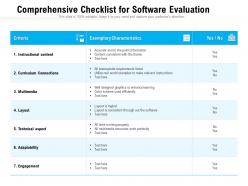
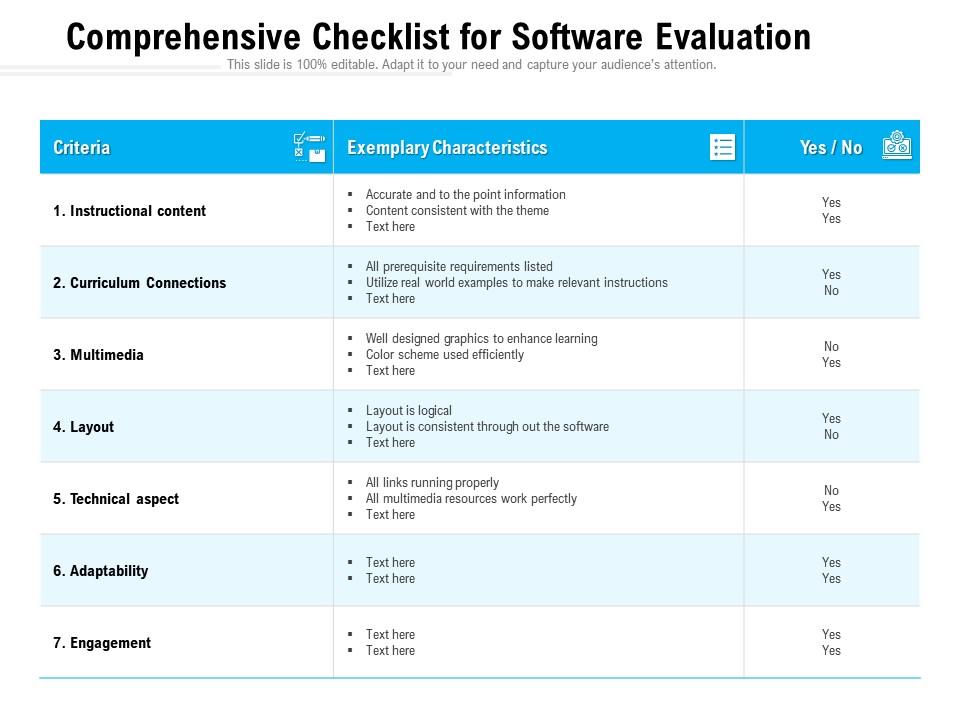
Comprehensive checklist for software evaluation
Try Before you Buy Download Free Sample Product
Audience
Editable
of Time
Our Comprehensive Checklist For Software Evaluation are topically designed to provide an attractive backdrop to any subject. Use them to look like a presentation pro.
People who downloaded this PowerPoint presentation also viewed the following :
Comprehensive checklist for software evaluation with all 2 slides:
Use our Comprehensive Checklist For Software Evaluation to effectively help you save your valuable time. They are readymade to fit into any presentation structure.
FAQs for Comprehensive checklist
Start with the basics - solid scheduling and dependency tracking that won't make you want to throw your laptop. Real-time chat and file sharing are non-negotiable too, trust me on this one. Budget tracking becomes huge when you're running multiple projects (and honestly, who isn't these days?). Don't sleep on integration features either - connecting to your current tools will save your sanity later. Oh, and here's what I'd do: pick 3-4 platforms and test them with a smaller project first. Way better than committing blind and regretting it six months in.
Yeah, UX and interface design are huge when picking software. Your team won't use it if it's confusing or clunky - honestly, I've watched perfectly good tools die because the interface was garbage and people just gave up on them. Bad design kills productivity fast. Test it with your actual users, not just the people making decisions. They'll tell you if the navigation makes sense or if the workflows are weird. Short trial runs save you from expensive mistakes later. Oh, and make sure it matches how your team actually works - forcing new processes is usually a nightmare.
Think of scalability like buying jeans - you want room to grow without looking ridiculous. Make sure whatever you pick can handle way more users and data than you need right now. I learned this the hard way when our system crashed during a busy season (not fun explaining that to the boss). Ask vendors how their pricing works at 2x and 5x your size - some get crazy expensive fast. Also get real examples of performance at higher loads. Trust me, "good enough for now" becomes a nightmare later when you're scrambling to replace everything while trying to run your business.
Dude, support and SLAs will literally save your sanity. Features mean nothing if you can't get help when stuff breaks - and trust me, it always does at the worst times. Test how fast they respond during your trial period. Get response times and escalation paths nailed down in writing before you sign. Multiple ways to contact them is huge too. I've watched people lose their minds over software that worked great but had garbage support. Oh, and don't just take their word for it - actually reach out with a question to see what you're dealing with.
Here's what I'd test for performance stuff: response time (how snappy it feels), throughput (transactions per hour), CPU/memory usage, and error rates. Scalability testing is huge too - trust me, you don't want your app crashing when it gets popular. Oh and test with realistic scenarios, not perfect conditions that'll never happen in real life. The key thing? Set your benchmarks upfront so you actually know if you passed or failed. Otherwise you're just collecting random numbers that don't mean much.
Honestly, integration stuff can totally make or break your decision here. First thing - map out what systems you absolutely need it to talk to before you even start looking at demos. Check if they have ready-made connectors for your main tools, or if you'll be stuck paying developers to build custom ones (been there, not fun). APIs, database connections, file transfers - whatever works. Bad integration basically means you're creating data islands and doing way too much manual copying between systems. Also think about what you might want to connect later, not just what you need right now.
Definitely check they've got end-to-end encryption - both when data's sitting there and moving around. Multi-factor auth is a must, plus role-based access so random people can't see everything. SOC 2 or ISO 27001 certs are good signs they actually care about security. You'll want solid backup systems too because things go wrong at the worst possible times, trust me. Oh, and make sure their data retention stuff matches what you need compliance-wise. Honestly, I'd just make a quick questionnaire to send all the vendors - way easier to compare apples to apples that way.
Reviews are where you'll actually see how software works in real life - demos never show the messy stuff. Multiple people complaining about the same bug? That's your warning sign right there. Those testimonials on company websites are obviously handpicked, so I'd skip those. Check out G2 or Capterra instead for more honest feedback. Oh, and focus on reviews from companies that match your size and industry since their problems will probably be your problems too. Short reviews are usually useless, but the detailed ones tell you everything.
So basically, licensing models control your costs and how much say you get in your software. With subscriptions, you're paying forever - seriously, add up 5 years and you might cry. Perpetual licenses hit harder upfront but then you own that version, though you won't get new features. SaaS automatically updates but you're at their mercy for price hikes. I'd honestly run the numbers for like 3-5 years minimum. Don't forget to factor in how many users you'll probably add - that subscription cost can spiral fast if your team grows.
Look, customization is what separates software that works FOR you vs software that makes you bend over backwards. You want to be able to tweak workflows, add custom fields, change reports - basically make it fit your actual processes. This matters even more if you're in a specialized industry. Rigid software is the worst - I've watched entire teams create these ridiculous workarounds just because their system wouldn't budge. Short answer: find something with good configuration options and API access. You'll thank yourself later when you're not doing everything manually because your software is stubborn.
Dude, you HAVE to do trials and demos first. Marketing stuff is basically useless - you need to see how it actually works with your real data and processes. I've seen so many companies skip this step and regret it later. Your team needs to get their hands dirty with it, not just have IT mess around for five minutes. Test out the scenarios you'll actually use day-to-day. You'll find weird bugs or missing features that nobody mentioned. Plus when people try it themselves, they're way more likely to actually use it once you buy it.
When you're working with a tight budget, you'll have to get real about priorities fast. Focus on must-haves first - the nice-to-haves can wait. I'd definitely weight the money stuff heavier in your checklist: total ownership costs, setup fees, monthly expenses. Hidden costs are the worst and they always pop up later, so dig into those too. Maybe look at doing it in phases instead of all at once? That way you're not dropping everything upfront. Honestly, being realistic about what you can actually afford now versus later will save you so much stress.
For data security, you'll want SOC 2 Type II as your baseline. GDPR matters if you're dealing with EU users, plus any industry stuff - HIPAA for healthcare, PCI DSS for payment processing. Don't just take their word on compliance though. Ask for actual certificates and audit reports because vendors love dropping buzzwords without backing them up. WCAG 2.1 AA for accessibility is pretty much expected now too. Honestly, skip the box-checking mentality. Match their specific compliance to what you actually need. A side-by-side comparison matrix helps tons when you're juggling multiple vendors.
Honestly, track record beats flashy demos every time. Check how long they've been around and if they're financially solid - you don't want them going under next year. Look for customers your size too. Don't just trust their references though. Hit up review sites and forums where people actually vent when stuff breaks (way more honest). Also see if they've randomly ditched products before - that's a red flag. Make a basic scorecard with years in business, how many customers stick around, and support response times. Takes the guesswork out of it.
Definitely check if they have mobile apps or at least a decent web interface that works on phones. Some of these platforms are absolutely awful on mobile - learned that the hard way. Test the main features you'd actually use while you're out and about. Does it sync properly with the cloud? Can your team approve stuff remotely or check dashboards when they're traveling? Oh, and see if it works with your VPN setup if you have one. Honestly, don't just trust their marketing screenshots. Actually pull it up on your phone during the trial and click around.
-
Professional and unique presentations.
-
Great quality slides in rapid time.
-
Topic best represented with attractive design.
-
Very unique and reliable designs.
-
The content is very helpful from business point of view.
-
Very well designed and informative templates.
-
Informative design.
-
Really like the color and design of the presentation.
-
Very unique and reliable designs.