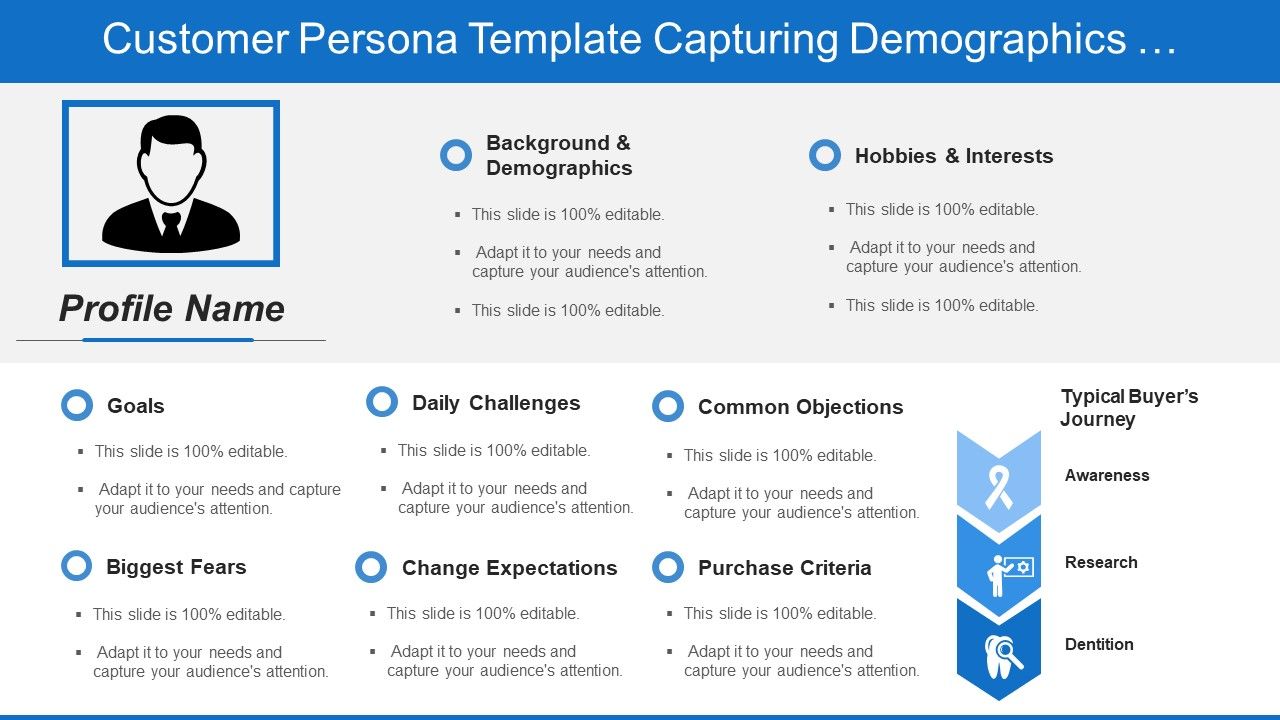
Customer persona template capturing demographics goals and buyers journey

Rating:
80%
Slide 1 of 5
Favourites Favourites

Try Before you Buy Download Free Sample Product

Audience Impress Your
Audience
Editable 100%
Editable
Time Save Hours
of Time
The Biggest Sale is ending soon in
0
0
:
0
0
:
0
0
Rating:
80%
Ready to use PowerPoint template as can be shared anytime. Fully adaptable presentation slide as can be modified. Picture quality is perfect even when share with large number of people. Liberty edits text and color as per the need. Good resolution PPT design great pixel quality. Design it with industry details name and image of your firm. Well accustomed with all the software’s and Google slides. Easily compliant into PDF or JPG formats

Content of this Powerpoint Presentation

To create the best customer experience, you have to put yourself in the customer’s shoes and understand their requirements to the fullest. Are your products and services addressing the needs? Do customers face any particular challenges for which your business can step up? In interacting with your business, what improvements, upgrades can your business make to enhance customer experience?

In short, you must create a customer persona or buyer’s persona to customize products, services, and experiences for them. A customer persona is useful in creating discounts, offers, and campaigns that would also help increase the business sales. You can add other specifics of the standard customer such as their demographics, hobbies, and purchasing goals. With these requirements in mind, we have come up with this content-ready customer persona template that businesses across industries can use to create the buyer’s persona.

Claim this 3-circle diagram to jot down commonalities between your, your ideal customer, and competitor out there.

View this 100% editable PPT Template below to focus your resource exhaustion and efforts in extracting assured sales.

Template 1: Customer Persona Template

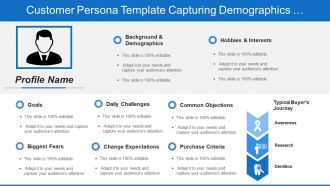
 Use this authentic customer persona template to identify the correct needs of your ideal buyer. Categorize customers based on demographics and buyer’s goals using this PPT Design. Address their pain points, daily challenges, biggest fears, and change expectations. Lastly mention their purchase criteria based on your research or other surveys conducted. Highlight how easy it is to convert such a lead into a buyer with the understanding of this PPT Template; Download now.

A Customer Persona Template to Evaluate Sales Hotspots

Evaluate customers and devise strategies for maximum business impact based on their demographics and common challenges using this PPT Layout.

PS: Download this presentation diagram to analyze customers by their segments ,value propositions, revenue stream, and targeting.

FAQs for Customer persona template capturing demographics goals

Definitely start with the basics - age, gender, location, income, education, and job title. Household size and marital status are surprisingly useful too since they actually influence buying decisions a lot. Oh, and employment stuff if it matters for your product. Honestly, the trick is only focusing on demographics that make sense for your business. Like if you're selling luxury cars, someone's income is way more relevant than whether they have kids, you know? Start simple with these core ones, then add more specific details once you figure out what really drives your customers' decisions.

Personas are honestly a game-changer for targeting. You get this super clear picture of who you're talking to instead of just throwing stuff at the wall. So you can actually pick the right platforms - like Instagram vs LinkedIn makes a huge difference depending on your audience. Your messaging gets way more dialed in too. Pain points, tone, timing - all that becomes obvious when you know your persona inside and out. I'd honestly just start by looking at your current campaigns and asking "would my persona actually care about this?" You'll probably catch some stuff that's totally off-brand.

Honestly, dig into what's actually driving your customers crazy day-to-day. Start with their biggest headaches around products like yours - stuff that makes them want to scream "this is way too complicated" or "why does everything take forever?" Budget issues, workflow mess-ups, not having the right skills on their team. But here's the thing - don't just list problems. Figure out the emotional weight behind them. Nobody wants to look stupid in front of their boss or blow another deadline. Sometimes it's feeling totally overwhelmed by options (been there!). Get specific about why each pain point actually matters to *them* personally, not just what's broken.

Honestly, behavioral traits are what make personas actually work instead of just being useless demographic data. Two 35-year-old managers might look identical on paper but one's an impulse buyer while the other reads every single review. That's huge for your strategy. How people think and make decisions matters way more than their age or job title. Focus on mapping their decision patterns and what frustrates them - that's where you'll find the good stuff. Oh and their brand loyalty habits too. This intel helps you figure out which messages will actually land and what features they'll care about.

Honestly, customer feedback is like a reality check for your persona template. You can guess all day about what drives your customers, but real feedback shows you what's actually happening. I've watched teams build these super detailed personas only to find out they were totally wrong about everything! Fresh voices from surveys and support tickets help you nail down the demographics better. Your persona isn't set in stone either - you've got to keep updating it when you spot new trends or priorities shifting. Short story: treat it like a living doc that needs regular feeding.

Honestly, you've gotta treat those personas like they're alive and kicking. Every 6-12 months, dig back into your customer surveys and CRM data - stuff changes way faster than people think. Social media is where you'll find the real goldmine though, since that's where people actually say what they mean instead of giving polite answers. Post-pandemic especially (ugh, remember when everything went sideways?), everyone's priorities got completely reshuffled. I always set calendar reminders or I'd totally forget. Don't get precious about your original personas either - split them, merge them, whatever the data tells you. Your campaigns will actually convert when they're targeting real people.

Honestly, just mix different approaches to get the real story. Your analytics and sales data are super helpful for spotting patterns. But customer interviews? That's where the magic happens - people will tell you stuff you'd never guess from spreadsheets alone. Focus groups work too if you've got the cash. Don't forget your customer service folks either, they hear everything firsthand. Social listening tools catch what people actually think when they're not being polite. Oh, and your sales team probably knows your customers better than anyone. Throw it all together and you're golden.

Dude, you've gotta add visuals to those personas. Nobody wants to read through paragraphs of data - that's just brutal. Throw in a stock photo so your persona has an actual face, then use icons for their hobbies or whatever they're into. Charts work great for showing pain points too. I swear people's eyes just glaze over with text-heavy stuff. Color-coding helps during meetings when everyone's scanning quickly. Start basic though - photo, some icons, maybe a bar chart for their main challenges. Oh, and infographics are clutch if you're feeling fancy.

Honestly, just start with **HubSpot's free persona tool** - it basically holds your hand through the whole thing. **Canva** has some really nice templates if you want yours to look professional (which, let's be real, always helps). For research, **Typeform** or **SurveyMonkey** work great to actually survey your customers. **Google Analytics** shows you what people are doing on your site. Oh, and if your whole team wants to brainstorm together, **Miro** or **Figma** are solid choices - way better than trying to do it over Zoom. My advice? Get one persona done with HubSpot first, then worry about the fancy stuff later.

So basically, B2B personas are all about work stuff - job titles, company size, who controls the budget, what's stressing them out professionally. B2C is way more personal though. You're looking at their actual lifestyle, what they do for fun, their values, what makes them tick emotionally. The buying process is totally different too. B2B decisions usually involve like 5 different people and take forever because everyone's being "strategic." B2C? People just buy stuff they want, often on a whim. Honestly, just think about whether you're fixing a business headache or helping someone with their personal life - that'll tell you which direction to go.

Honestly, this is a game changer. Look at your transaction data from the last 6 months - you'll start seeing clear patterns. There's your big spenders, bargain hunters, impulse buyers, the research-everything-first crowd. Each group shops completely differently, so why hit them with the same messaging? Don't waste discount codes on people who already buy full-price - that's just leaving money on the table. Instead, tailor your approach to match how they naturally shop. The conversion rates alone make it worth the effort, plus you'll build better long-term relationships since you're actually speaking their language.

Honestly, just think about who's actually using your site instead of making it look Instagram-perfect. Pick your main customer type and walk through what they'd want to do. Busy executives? Put the important stuff right at the top since they won't scroll forever. Test different layouts based on how each person actually thinks and moves around online. I'd start by pretending you're one of your customers and see where you get annoyed or confused - that's usually where the problems are hiding. Make your buttons and content match what they're trying to accomplish, not what looks cool.

Oh man, the worst thing you can do is make them super vague - like "busy mom, 25-45" tells you literally nothing useful. Focus on actual behaviors and pain points instead of just age/income stuff. I've seen so many teams wonder why their messaging sucks when their personas are basically cardboard cutouts. Don't go crazy either - 2-3 personas max or you'll lose focus. And please don't just guess what customers want! Get real data from interviews first. The other huge mistake? Making them once and forgetting they exist. Update quarterly as you learn more.

Honestly, A/B test different messages first - that'll show you real quick if your personas are accurate. User interviews are gold too, plus dig into your website analytics to see how people actually behave. I've seen so many teams skip validation and then scratch their heads when nothing lands. Try running targeted campaigns for each persona and see which content gets better engagement. Surveys work, focus groups if you have budget. Oh and don't forget social listening - people say wild stuff when they think brands aren't watching. Start with one persona, test specific assumptions about their pain points, then tweak based on what you learn.

Honestly, personas are like your product's North Star - they show you what users actually want instead of what you think looks cool. I map my feature backlog against them all the time and it's crazy how many gaps pop up. They help you prioritize what's worth building and catch pain points you'd totally miss otherwise. When you're stuck debating features during sprints, just ask "does persona X actually need this?" Saves so much time. Plus they're great for spotting those hidden opportunities competitors aren't thinking about. It's like having focus group insights without the hassle.

Ratings and Reviews

80% of 100
Review Form
Write a review
Most Relevant Reviews
  1. 80%

    by Chi Ward

    Great designs, Easily Editable.
  2. 80%

    by Edmundo Watkins

    Enough space for editing and adding your own content.

2 Item(s)

per page: