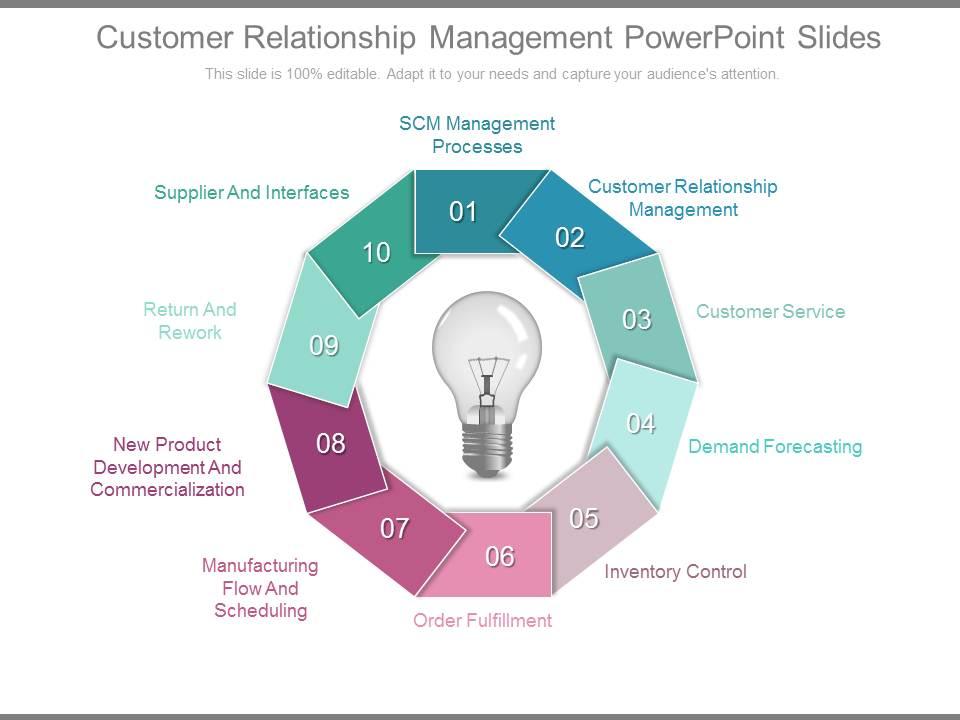
Customer relationship management free powerpoint templates slides
You must be logged in to download this presentation.
Try Before you Buy Download Free Sample Product
Audience
Editable
of Time
Really worried about the next big presentation? Quality Customer Relationship Management free Powerpoint template Slides are available to help make sure it goes smoothly.
People who downloaded this PowerPoint presentation also viewed the following :
Customer relationship management free powerpoint templates slides with all 7 slides:
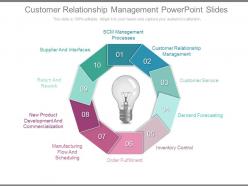
Flag mark the road ahead with our Customer Relationship Management Powerpoint Slides. They will unfurl your brilliant plans to your audience.
FAQs for Customer relationship management free
So you need customer data management and sales pipeline tracking - that's your foundation. Automated communication workflows are huge too. Lead scoring helps you focus on the best prospects instead of chasing everyone. Analytics show what's actually moving the needle. Oh, and make sure it plays nice with your email and marketing tools - nobody wants to manually enter data twice. My advice? Start small. Pick maybe two features, nail those, then build from there. I've seen too many teams try to do everything at once and just end up frustrated.
Honestly, your CRM is gold for this stuff. Pull data on what people bought before and how they behave, then group them by where they are in the customer journey. Send campaigns that actually make sense for each group - like product recs based on purchase history or those cute anniversary emails (some brands do this really well). Track what's getting engagement and what's flopping. The whole point is making customers feel like you get them, not just blasting them with random promotions. I'd start with your best customers first and build experiences that'll bring them back. Short, punchy campaigns usually work better than long ones anyway.
Dude, automation literally changed everything for me with CRM stuff. I started with the boring tasks - email sequences, lead scoring, follow-ups. Game changer. Now the system moves prospects through my pipeline automatically and sends personalized messages based on what people actually do. The predictive stuff is wild too - it'll tell you which leads might actually buy. I probably spend like 60% less time on data entry now? Honestly just pick your most annoying repetitive task first and automate that. You'll wonder why you waited so long.
So your CRM basically sorts customers automatically - by what they've bought, how they act, demographics, all that stuff. I love filtering for customers who dropped $500+ last quarter or finding people who've gone MIA for months. Way more satisfying than it should be, honestly. But here's the thing - don't just blast everyone with identical emails. Create different messages for your big spenders versus your once-in-a-while buyers. Start simple with obvious groups first, then test what actually gets people to respond. Different segments need totally different approaches.
Honestly, getting people to actually use the thing is your biggest headache. Your team will cling to their spreadsheets like security blankets. Data migration is brutal too - all those messy customer records with duplicates everywhere will make you want to scream. Plus your existing systems probably won't play nice together. Budget always goes over because training takes forever and nothing works exactly how they demo it. Oh, and customization? That's where time goes to die. Do yourself a favor and test with just a few people first. Clean up your data before you flip the switch or you'll regret it big time.
Dude, CRM is honestly a game changer for small businesses. No more digging through random emails trying to remember what that one prospect said three weeks ago. You can actually track your leads properly and set up automatic follow-ups so nobody falls through the cracks. Most of them are pretty cheap now too - like $20-30/month kind of cheap. The best part? You'll actually know which marketing stuff is working and which isn't. I'd say start basic with just contact management and lead tracking, then add more features later. Trust me, you'll wonder how you survived without it.
So basically CRM systems let you track every single prospect from when you first meet them until they actually buy (or don't). The automation stuff is seriously helpful - it'll ping you for follow-ups and score leads without you having to remember everything. You can see exactly where deals get stuck and which parts of your process are taking forever. Real-time reporting makes forecasting way less of a guessing game too. Oh, and definitely get your pipeline stages set up first before anything else. The tricky part is getting everyone to actually log their calls and meetings consistently.
Honestly, good CRM personalization is a game changer - your customers stop feeling like just another ticket number. Pull up their buying history and preferences so you can actually help them with stuff they care about. No more making people repeat their whole story to three different reps (seriously the most annoying thing ever). Your team can suggest products they'll actually want and solve problems way faster since they've got context. Oh and they can match how each customer likes to communicate too. Set up some basic segments first based on what people buy and how they behave, then make sure your team actually uses that info when they're talking to customers.
Honestly, just stick to the basics that actually matter. Customer acquisition cost, lifetime value, and retention rates - that's your holy trinity right there. Sales cycle length and conversion rates are solid too. I'd throw in customer satisfaction scores because unhappy customers will tank everything else anyway. But seriously, don't track like 20 different things or you'll drive yourself nuts analyzing data instead of actually improving stuff. Pick maybe 5-7 metrics max that match what you're trying to accomplish. Get those dialed in first, then you can get fancy with more advanced tracking later.
Yeah, basically every CRM worth using has APIs or built-in connections for marketing tools and analytics stuff. The data syncs both ways too - your CRM pulls campaign stats while sending lead scores back out. Once you get it running, it works pretty smoothly. Zapier's your backup if things don't connect naturally (which honestly happens more than it should). I'd start by figuring out what data needs to go where first. Then just check what your current CRM already connects to. Way easier than doing it backwards.
Dude, your field team needs mobile CRM apps yesterday. They can check customer history right during meetings instead of scrambling to remember details later. Plus they'll quote prices on the spot and update records instantly - no more "I'll get back to you" moments. Real-time syncing keeps everyone updated, which honestly saves so much headache. Your reps can actually follow up on hot leads immediately instead of letting them go cold. I mean, the productivity boost alone makes it worth it. Zero lag time on data entry is huge when you're trying to close deals.
Lock down your CRM with role-based access first - only let people see what they actually need. Two-factor auth is non-negotiable for everyone, and encrypt everything (data sitting around AND moving between systems). I can't stress this enough: run regular security audits because that's where most companies mess up. Your team needs proper training on data handling since honestly, people cause way more problems than hackers do. Oh, and don't forget automated backups plus a solid incident response plan. GDPR/CCPA compliance matters too depending where you're operating.
Honestly, AI automation is where it's at right now - your CRM can actually predict what customers want before they even ask. Pretty wild stuff. Mobile-first design is huge too since we're all glued to our phones anyway. Social media integration is getting better, and those chatbots don't suck as much as they used to (some actually get context now). Voice stuff is there but... eh, still feels weird to me. Oh, and real-time messaging is becoming standard. My advice? Start playing around with whatever AI features your current system has first.
Honestly, skip the boring slides and just let everyone mess around with the actual system - use dummy data if you have to. Pick a few tech-savvy people from each team to be your unofficial helpers because people *will* forget how to do everything within a week, guaranteed. Quick cheat sheets work great for stuff like adding contacts or moving deals through stages. Oh, and don't try teaching them every feature right away - that's just torture. Focus on what they'll actually need day-to-day. The fancy bells and whistles can wait until they've got the basics down.
Honestly, just automate as much validation as you can upfront - email formats, duplicate checks, all that stuff. Your team needs to update contact info right after every call or meeting, not later when they've already forgotten half the details. I learned this the hard way after sending three different pitches to the same person lol. Run monthly clean-up audits and make someone actually own each account's data quality. Oh, and start with your biggest customers first since those matter most. Short sentences work better than trying to fix everything at once.
-
nice
-
great
-
Good
-
Best way of representation of the topic.
-
Top Quality presentations that are easily editable.
-
nice
-
VERY USEFUL FOR EMPLOYEES IN POOR COUNTRY.
-
Thanks I liked the free service you offer.