Customer Relationship Management System Data Flow Diagram
Try Before you Buy Download Free Sample Product
Audience
Editable
of Time
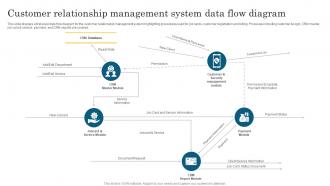
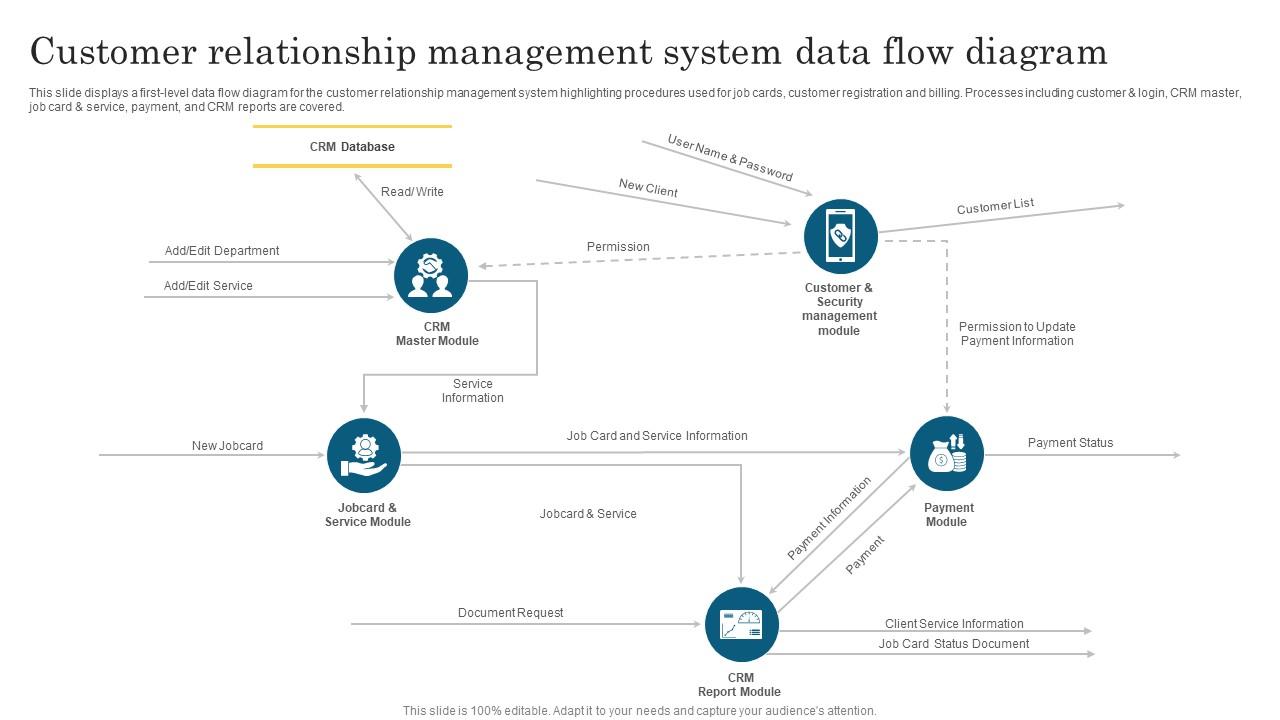
This slide displays a first level data flow diagram for the customer relationship management system highlighting procedures used for job cards, customer registration and billing. Processes including customer and login, CRM master, job card and service, payment, and CRM reports are covered.
People who downloaded this PowerPoint presentation also viewed the following :
Customer Relationship Management System Data Flow Diagram with all 6 slides:
Use our Customer Relationship Management System Data Flow Diagram to effectively help you save your valuable time. They are readymade to fit into any presentation structure.
FAQs for Customer Relationship Management System
Honestly, real CRMs track your whole sales process - pipeline, lead scoring, automated emails, all that stuff. Basic contact apps? They're just glorified address books. What you actually want is something that follows customers from first contact through closing the deal. The good ones integrate with your marketing tools and give you proper reporting dashboards. My old boss always said the workflow automation is where you really save time. Look for systems that let your whole team see interaction history - that's where you'll actually make your money back.
Honestly, CRM data is a game changer because you're looking at actual behavior instead of just guessing based on age or location. Look at your top 20% customers first - what do they have in common? Then you can build similar segments from there. My friend's company doubled their email opens just by doing this right. You'll spot buying patterns you never noticed before, and suddenly your campaigns actually connect with people. Way better than throwing stuff at the wall and hoping it sticks. Once you have those segments, finding lookalike prospects gets so much easier.
So CRM automation is like having someone handle all the boring stuff you don't want to do. It logs customer calls, sends those follow-up emails automatically, updates contact details - basically the grunt work that eats up your day. You'll save hours on data entry alone, which is honestly mind-numbing anyway. Lead scoring happens based on how people interact with your site too. The best part? Way fewer mistakes than when you're manually entering everything at 4pm on a Friday. Focus gets shifted back to actually talking with customers instead of wrestling with spreadsheets. I'd start with whatever manual task annoys you most.
Honestly, CRM is like having superhuman memory for all your customers. Instead of just seeing what they bought, you get their whole story - complaints, preferences, weird requests, everything. I set up follow-up reminders constantly because otherwise I'd forget everyone. You can actually personalize stuff based on what bugs them or what they care about. The cool part? You'll start noticing patterns - like when someone's about to bail or when they're ready to buy more. My advice: focus on actually helping people solve problems rather than just selling them crap. They notice the difference.
Ugh, CRM implementations are rough. Data migration is always a nightmare - your old system's data will be a complete mess. But honestly? The real killer is getting people to actually use the damn thing. I've watched companies blow tons of money on fancy CRMs that just sit there unused. Integration with your current tools gets messy too. Plus everyone suddenly wants their own special features once the project starts. Here's what worked for us: pick a small team first, clean up your data beforehand, and don't skimp on training. Seriously, get people excited about it early or you're screwed.
So your CRM becomes like the main connection point for everything else you're using. Marketing tools can dump leads straight into your pipeline automatically. Support tickets pull up the customer's whole history - super handy. Email platforms, social media, your online store, they all talk to each other through the CRM. Honestly the hardest part is just figuring out which integrations to tackle first. I'd map out where your team wastes the most time jumping between different apps, then start there. Once it's all synced up it's actually pretty amazing how smooth everything runs.
Okay so first thing - train everyone properly and actually explain why this CRM won't suck like the last one probably did. People get so annoyed when they think it's just busy work, you know? Find those tech-savvy people on your team who pick things up fast and get them excited about it. They'll help convert the skeptics way better than management can. Oh, and don't make people re-enter all their old data - that's honestly cruel. Migration is key. During rollout, actually listen when people complain (some complaints will be valid). Show them real benefits they'll see every day, not just theoretical stuff.
Honestly, I'd start with the big three: customer retention rate, how long your sales cycles are, and lifetime value. Lead conversion rates matter too, plus response time - people get impatient way faster than they used to. Customer satisfaction scores are obvious but still worth tracking. Here's what nobody talks about though: check if your sales team is actually using the CRM. I've seen companies obsess over metrics while half their data sits empty because nobody's entering it. Pick maybe 3-4 metrics that match what you're trying to accomplish instead of drowning in spreadsheets.
Look, CRMs are pretty adaptable once you dig into them. Real estate folks need property tracking and commission stuff, while healthcare has to deal with patient scheduling and all that HIPAA compliance nonsense. Manufacturing? They're more about supply chain connections and service contracts. Think of it like mixing and matching - you can grab industry-specific add-ons, build custom reports for your actual metrics, and set up workflows that actually make sense for how you sell. Honestly, I'd start by writing down what you're doing now, then hunt for a CRM with the right modules. Way easier than forcing a square peg into a round hole.
Honestly, you've gotta set up data entry rules and actually follow them - that's like 80% of it. Make sure everyone formats names, addresses, phone numbers the same way. We once had people entering company names 15 different ways and it was a total mess! Set up validation rules in your CRM so it catches stupid mistakes before saving. Do monthly cleanups to find duplicates and merge them. Also, don't let just anyone edit the important fields. Train your team properly and write down your standards so everyone's on the same page. Trust me, a little upfront work saves tons of headaches later.
So your CRM basically becomes psychic with AI - it predicts which leads will actually buy stuff and automates all the boring tasks. You'll get chatbots answering questions 24/7, plus emails that change based on how customers react. The predictions get scary accurate once you dump enough data in there. What really saves your butt though? Sentiment analysis catching pissed-off customers before they bail. Oh, and don't go crazy trying to automate everything right away - pick one feature first and see how it goes.
Honestly, mobile CRM is a game-changer for sales teams. Your reps are never actually at their desks - they're bouncing between client meetings, stuck in traffic, or camping out at Starbucks. Being able to update deals on the spot is huge. They can pull up customer info right before walking into a meeting and jot down notes while everything's still fresh. Trust me, waiting until you're back at the office means forgetting half the good stuff. Real-time syncing keeps everyone in the loop too. Oh, and definitely get something that works offline - cell service can be sketchy sometimes.
So basically, CRM systems track everything - every call, purchase, what people like, all in one spot. Sarah always orders winter stuff in September? Your system remembers that. Mike hates phone calls but loves email? You've got it covered. When customers contact support, your team already knows their whole history instead of making them repeat everything (which is honestly so annoying). The trick is actually doing something with all that info. Tailor your emails, suggest products they'd want, treat them like individuals instead of just another sale. Makes a huge difference.
Definitely need encryption for data sitting around and moving between systems. Role-based access is huge - only let people see what they actually need for their jobs. Multi-factor auth saved our butts when we got hit with that phishing attempt last year, so don't skip it. Your CRM vendor better be SOC 2 compliant and handle GDPR/CCPA stuff properly. Activity monitoring helps you track who's poking around in what data. Oh, and automated backups obviously. Start by checking current permissions though - I bet half your team has access to way more than they should. Regular security audits are worth the hassle too.
Honestly, just go with HubSpot's free version or Zoho to start - they're solid and won't cost you anything upfront. You really only need the basics: contact management, sales tracking, maybe email stuff. I made the mistake of going overboard with features I never touched, so learn from my pain lol. Get all your customer info in one place first. That's like 80% of the battle right there. Then you can mess around with automation once everyone's actually using it. Way better to start simple and add stuff later than to build some crazy system nobody wants to deal with.
-
Fantastic collection. Loved how we can personalize these templates as per the requirements.Â
-
Understandable and informative presentation.