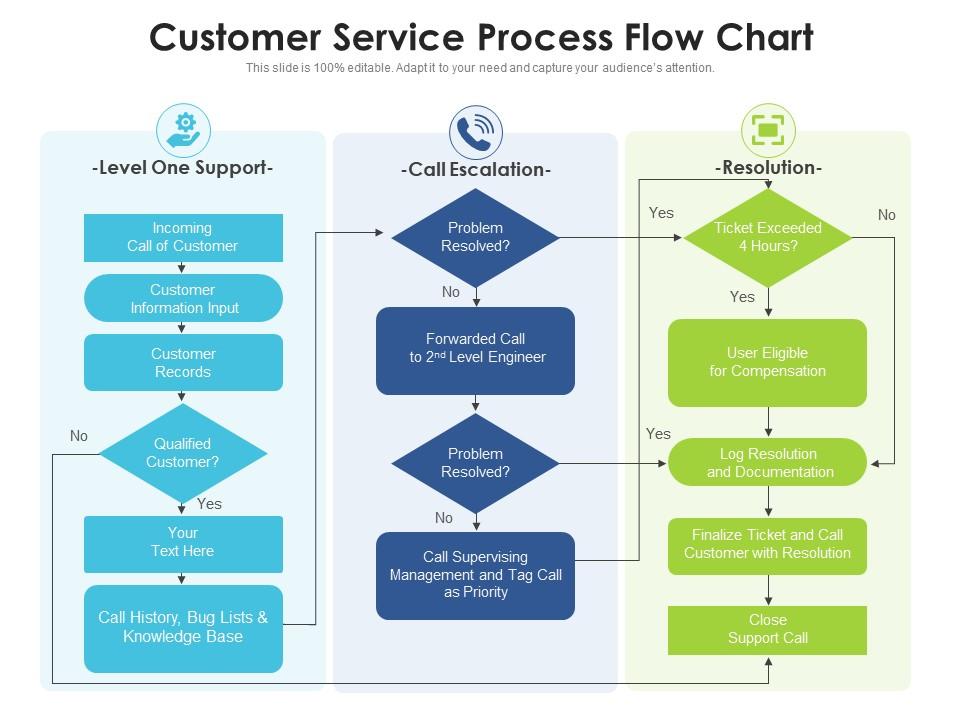
Customer service process flow chart

Rating:
80%
Customer service process flow chart
Slide 1 of 2
Favourites Favourites

Try Before you Buy Download Free Sample Product

Audience Impress Your
Audience
Editable 100%
Editable
Time Save Hours
of Time
The Biggest Sale is ending soon in
0
0
:
0
0
:
0
0
Rating:
80%
Presenting our set of slides with name Customer Service Process Flow Chart. This exhibits information on three stages of the process. This is an easy to edit and innovatively designed PowerPoint template. So download immediately and highlight information on problem resolved, customer information input, problem resolved.

FAQs for Customer service

So there's basically four main parts: first contact, figuring out what's wrong, actually fixing it, then checking back in. When someone reaches out, get all the details upfront - seriously saves you from playing phone tag forever. Figure out what kind of problem you're dealing with and who needs to handle it. Then do whatever needs doing - troubleshooting, escalating, refunds, whatever. The follow-up part is huge though. Most people skip it but honestly? That's what makes customers remember you in a good way. It's like the difference between decent service and the kind people actually tell their friends about.

Start by mapping your whole customer service flow, then track metrics at each step. Response times spiking? Tickets backing up? Satisfaction scores tanking? Those are your problem spots. Honestly, the best thing I ever did was go through the process as a fake customer - data lies sometimes, but frustration doesn't. Check your resolution times, escalation rates, where people bail out. Oh, and don't forget to actually ask your team what's driving them crazy. They'll tell you stuff the numbers miss. Once you've got your hot spots, dig into surveys to figure out why things suck there.

Honestly, tech is a game-changer for customer service stuff. Chatbots can knock out the basic questions right away. Then you've got CRM systems that pull up customer history instantly - no more digging around. Ticketing software automatically sends issues to the right people too, which is clutch. The AI prediction thing is actually pretty cool, like it knows what customers want before they even ask. Really though, it just cuts out all those annoying manual steps that make everyone wait around forever. I'd say figure out where you're getting the most backup first, then find tools to fix those specific problems.

Honestly, just stick feedback collection right where customers are already interacting with you - quick surveys after calls, rating buttons, follow-up emails. Don't overthink it. Make it super easy when the experience is still fresh. I've watched teams overcomplicate this stuff and it never works as well. Set up automatic triggers after you close tickets or finish service calls. Review everything weekly as a team and actually do something with what you learn. Oh, and definitely tell customers when their feedback changed something - people love knowing they made a difference.

Honestly, you need both speed and quality stuff to really know what's going on. Track response time and how fast issues get resolved - first-contact resolution is huge for this. CSAT scores and NPS will tell you if customers are actually happy. Oh, and don't ignore your team's burnout levels because miserable agents = terrible service, no matter what your other numbers look like. Agent satisfaction matters more than people think. Start with maybe 4-5 metrics tops or you'll drown in data. I'd go with CSAT and response time first, then build from there once you've got those down.

Honestly, good training is a game-changer for customer service. Your team gets way more confident handling difficult situations when they know the actual steps to follow. They solve problems faster too. I've seen places where untrained staff just wing it - total disaster. But when people know proper communication techniques and escalation procedures, everything runs smoother. Customers leave satisfied instead of furious, which is huge. Document processes better and you'll see fewer mistakes overall. Oh, and start by figuring out where your current system falls apart - that's where you focus first.

Honestly, speed matters most at first - hit them back within 2 hours even if you're just saying "got it, digging in now." Then shut up and let them rant. Seriously, half these people just need someone to listen before you start fixing anything. Write everything down in whatever system you use so if someone else picks it up later, they're not lost. But here's the thing everyone forgets - you gotta circle back in a day or two to make sure they're actually happy. That follow-up is pure gold for keeping customers.

So it really depends on what industry you're looking at. Retail is super straightforward - people want quick fixes for returns or basic questions. Healthcare and finance though? Totally different game since there's so much regulation and verification involved. Tech companies love pushing everything through chatbots and self-service stuff (honestly sometimes too much), while B2B usually gives you an actual person to work with. The processes basically mirror how much risk each industry can handle and what their customers expect. I'd definitely look at how your specific industry normally does things before jumping in.

Honestly, just use whatever your team already has - don't overthink it. Lucidchart and Visio are obviously the go-to tools since they're made for this stuff, but Miro works fine too if you're already paying for it. Figma's decent for flowcharts even though it's technically a design tool. The whole point is getting your process down visually so you can actually see where things get stuck or weird handoffs happen. I spent way too long comparing features once and it was such a waste of time. Pick one and start drawing boxes!

Honestly, start with your 5 most common customer situations and build solid processes around those first. Don't overthink it. Write up some scripts or guidelines, but keep them flexible - nobody wants to deal with someone reading robotically off a sheet. Get everyone using the same knowledge base and make sure they know when to escalate stuff. I'd probably have weekly check-ins too, just to catch any weird inconsistencies before customers start noticing. Oh, and document what's actually working! Sounds obvious but teams skip this all the time. Regular training helps, but it doesn't need to be fancy.

Honestly, bottlenecks are your worst enemy - requests just stack up like crazy. Then you've got teams doing messy handoffs and agents scrambling without the right info. Communication fails hit hard too. Sales will promise the moon and support's left going "uh, we can't actually do that" (classic move). Throw in tickets with wildly different complexity levels, people calling out sick, plus those ancient processes nobody wants to update. Map out your whole flow first though - that's clutch. Track where resolution times drag and you'll spot the real problem areas fast.

Dude, automation is seriously clutch for this stuff. Your team can stop doing the mind-numbing work - ticket routing, status updates, those same FAQ answers over and over. Chatbots handle the basic questions, emails get auto-sorted, triggered responses take care of common problems. I swear it makes such a difference once you nail the setup. Response times get way faster. Your people actually get to do interesting work instead of drowning in repetitive crap. Oh and don't try to automate everything at once - that's a nightmare. Pick whatever's sucking up the most time first.

Honestly, having a solid process makes such a huge difference for customer satisfaction. Your customers get consistent service instead of that annoying "well, it depends on who helps you" experience. Resolution times speed up too since everyone knows the steps. Here's what I'd do - map out whatever you're doing now first. Then figure out where people usually get frustrated or stuck waiting around. That's where you'll see the biggest improvements. Plus you can actually track what's working once you have clear steps down. The whole thing just becomes way more predictable for everyone involved.

So basically you'll want to map out different customer paths based on who they are - like VIP customers, newbies, enterprise clients, that kind of thing. VIP folks might get direct phone lines and super quick turnarounds, while regular customers hit the knowledge base first. Don't overthink it though, seriously. Pick your top 2-3 customer types and figure out what they actually need. Build your workflows around that. I'd definitely test it with real scenarios before rolling anything out - you don't want people getting stuck in some weird loop where they can't reach anyone.

Oh totally! Zappos is the classic example - they ditched call time limits and let reps do whatever needed to happen. One call lasted 10 hours and the customer became a lifelong fan, which is kind of insane when you think about it. Amazon's one-click returns changed everything for them. Disney's MagicBand connects all their touchpoints smoothly too. The pattern I see? They removed annoying friction points and gave their frontline people actual power to help. You should probably pick whichever company matches your industry size and dig into their specific changes instead of trying to copy everyone.

Ratings and Reviews

80% of 100
Review Form
Write a review
Most Relevant Reviews
  1. 80%

    by Corey Patterson

    Design layout is very impressive.

1 Item

per page: