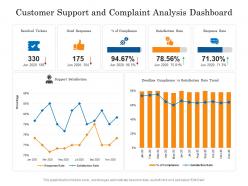
Customer support and complaint analysis dashboard
Try Before you Buy Download Free Sample Product
Audience
Editable
of Time
Our Customer Support And Complaint Analysis Dashboard are topically designed to provide an attractive backdrop to any subject. Use them to look like a presentation pro.
People who downloaded this PowerPoint presentation also viewed the following :
Customer support and complaint analysis dashboard with all 2 slides:
Use our Customer Support And Complaint Analysis Dashboard to effectively help you save your valuable time. They are readymade to fit into any presentation structure.
FAQs for Customer support and
Track your first response time and resolution time - those are huge. Customer satisfaction scores and ticket volume trends too. Escalation rates are honestly where you'll spot training issues fast, so don't skip that one. Also look at resolution rates by channel since people act totally different on email vs chat. But here's the thing - pick like 5-7 metrics tops. More than that and you're just drowning in spreadsheets. Start with response times and customer satisfaction. If those look good, you're probably on track.
Dude, sentiment analysis is a game changer for customer support. You'll actually see how people *feel* about your interactions, not just ticket stats. Like, you can spot which agents consistently make customers happy, or what issues are pissing everyone off before they blow up. Honestly, the data surprised me when I first looked into it - way more revealing than I expected. The best part? You can jump on problems early. If customers are getting super frustrated about some product bug, you can either fix it faster or at least prep your team with decent responses. Pretty solid investment tbh.
Honestly, real-time data is a game changer because you can spot problems while they're still small. Like when ticket volume suddenly jumps or wait times start creeping up - you'll see it happening instead of discovering pissed off customers three hours later. Your team can actually do something about it: move people around, flag urgent stuff, maybe even reach out before someone gets really frustrated. The trick is setting alerts for stuff that matters to your day-to-day work, not just random metrics that look impressive. Way better than those useless dashboards that just sit there looking pretty, you know?
Mix quantitative and qualitative metrics to get the real picture. CSAT scores, NPS, and Customer Effort Score give you solid baselines. But honestly, numbers only tell half the story - you need to dig into support ticket sentiment and resolution times too. First-contact resolution rates are huge. Segment everything by customer type, product, whatever makes sense for your business. Oh, and set up automated dashboards because pulling reports manually every week? Yeah, that'll drive you insane fast. Don't skip the qualitative stuff though - it's where the gold is.
Don't get sucked into vanity metrics like response times - resolution quality matters way more. Also, stop cherry-picking the good stuff to make your team look amazing. A ticket spike might seem terrible but could actually mean customers trust you enough to complain instead of just leaving (which is honestly worse). Never look at metrics alone without context. Oh, and segment your data by customer type and issue complexity or you're basically flying blind. Figure out what success actually looks like for your customers first, then build everything else around that.
Dude, just set up tools that auto-collect and categorize all your ticket data. Sentiment analysis, automatic tagging, real-time dashboards - the works. Seriously, you'll kick yourself for not doing this sooner. Connect your helpdesk to analytics tools that can read natural language and spot patterns in complaints. Oh, and start with automated reports on response times first - those are super easy wins that'll make your boss happy. I spent way too long doing this stuff manually before I figured out how simple automation could be.
Track the usual suspects first - response times, resolution rates, CSAT scores, cost per contact. Each channel needs its own metrics too, like first contact resolution for phone calls or how often chat gets escalated. Customer effort scores are honestly underrated but super telling about where people get stuck. Phone surveys about channel preferences can be eye-opening since customers don't always use what they claim to prefer. Oh, and definitely set up side-by-side dashboards comparing everything - makes it way easier to see which channels actually work best for different problem types.
Honestly, feedback loops are game-changers for making your analytics actually mean something. You get the real story behind those numbers - like why your satisfaction scores look okay but customers are still pissed about checkout issues or whatever. I always tell people to close the loop though. Collect feedback regularly, then actually check if your fixes worked by watching how the data shifts. Cross-reference what people tell you with your hard metrics. Sometimes the numbers lie, but customers don't. It's basically giving your dashboards a reality check so you're not just guessing what's broken.
Looking at your support data over time is honestly a goldmine. You'll catch patterns in recurring problems that your product team should probably fix. Seasonal trends pop up too - like certain issues spiking during busy periods. Response times and resolution rates show how your team's doing. The data tells you which channels customers actually prefer and peak contact hours, which helps with scheduling (learned that one the hard way). New feature launches? Track if ticket volume jumps - usually means something's confusing users. Start simple though - pull monthly reports on your biggest issue types and response times first.
So customer segmentation is basically dividing your support data by groups that actually make sense. Your enterprise customers probably need totally different help than someone on the free plan, you know? Break it down by stuff like subscription level, company size, how much they use your product - whatever. You'll start seeing patterns you missed before. Maybe your big clients always complain about the same weird bugs, or your small businesses are way happier overall. Then you can actually fix support for each group instead of just... hoping one approach works for everyone. It's honestly pretty eye-opening once you dig into it.
So response time is like your customer service report card - it shows how satisfied people really are with your support. Track two things: first response (how fast you reply) and resolution time (actually fixing the problem). Quick acknowledgment beats silence every time, trust me. Email responses can wait a few hours, but chat needs to be under a minute or people get antsy. Different channels, different expectations, you know? Use this data to find where your process gets stuck and set realistic goals your team won't constantly miss. Nothing worse than promising what you can't deliver.
So predictive analytics takes all your old customer data and tries to figure out what's gonna happen next. Past support tickets, buying habits, how people use your product - it crunches through everything. Then boom, it can tell you which customers might run into problems before they even know it themselves. You can jump in with help early or send tickets straight to the right team automatically. Honestly feels a bit like magic sometimes. Just make sure you're feeding it good data regularly or the predictions will be garbage. Oh and it gets smarter over time which is cool.
Zendesk Explore and Freshworks Analytics are pretty solid options, or Tableau if you're juggling multiple data sources. Your current helpdesk platform probably has decent built-in analytics already - most do these days. Budget's gonna be a big factor here though. Mixpanel and Google Analytics can pull customer journey stuff alongside support metrics, which is honestly where things get interesting. I'd map out what you actually need to track first. Some of these tools require you to basically become a data analyst just to get basic reports, which is annoying. Start simple and see what gaps you're missing.
Start by pulling up your top 5 ticket types from this week. I bet half are password resets and billing stuff - it's always the same things, honestly. Here's the trick: instead of just responding to tickets, dig into why they're happening. Maybe people can't find the reset button, or your pricing page is confusing. Build better help docs or tweak your product design based on what you're seeing. Oh, and track your deflection rates so you know if your fixes actually work. It's way better than playing whack-a-mole with support requests forever.
Start with time series analysis to track ticket volumes - you'll catch seasonal patterns way easier that way. Text clustering helps group similar complaints, which is honestly where the gold is. I'd also set up keyword frequency analysis since it's dead simple but surprisingly useful. Root cause charts are clutch for seeing which problems keep coming back from the same sources. Oh, and definitely create automated alerts when issue types spike above normal thresholds. That way you can tackle recurring stuff before it turns into a total mess. Even basic pattern recognition beats flying blind through support tickets.
-
Awesomely designed templates, Easy to understand.
-
Helpful product design for delivering presentation.
-
Innovative and Colorful designs.
-
Design layout is very impressive.
-
Top Quality presentations that are easily editable.