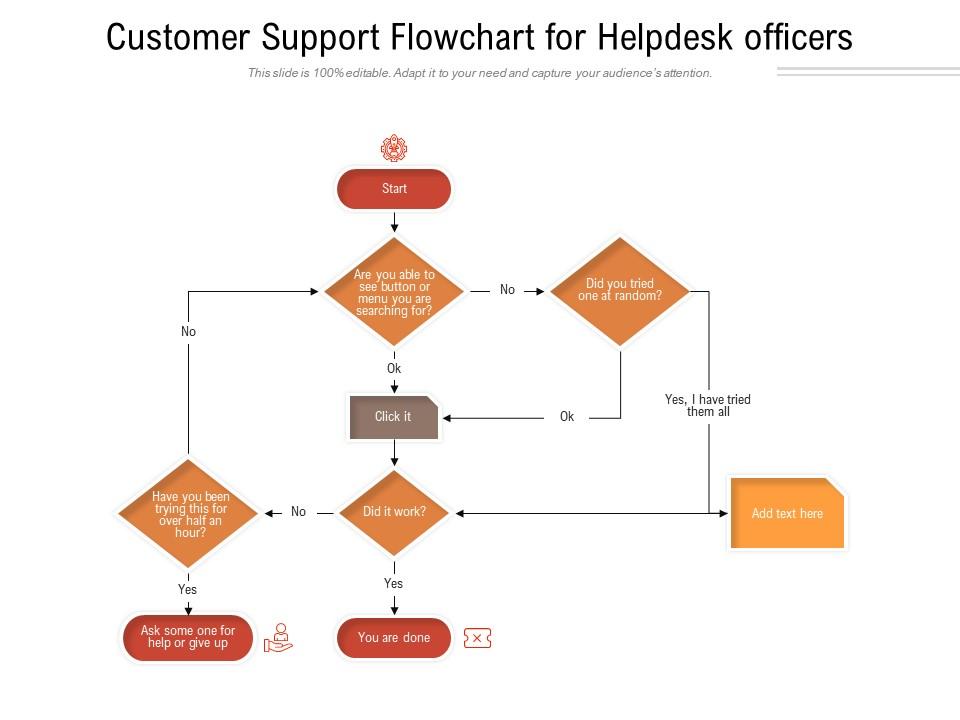
Customer support flowchart for helpdesk officers
Try Before you Buy Download Free Sample Product
Audience
Editable
of Time
Our Customer Support Flowchart For Helpdesk Officers are topically designed to provide an attractive backdrop to any subject. Use them to look like a presentation pro.
People who downloaded this PowerPoint presentation also viewed the following :
Customer support flowchart for helpdesk officers with all 2 slides:
Use our Customer Support Flowchart For Helpdesk Officers to effectively help you save your valuable time. They are readymade to fit into any presentation structure.
FAQs for Customer support flowchart
So you'll want clear entry points and decision branches first. Map out all the "if this happens, do that" logic your team actually uses. Handoff points between teams are huge too - plus SLA timers and different resolution paths based on how complex stuff gets. Oh, and feedback loops! People always forget those but they're honestly game-changers. The flow should go from identifying the problem straight through to fixing it. I'd totally sketch this mess out on a whiteboard before you try making it all digital and fancy.
Flowcharts are honestly game-changers for support teams. Your agents won't be scrambling around trying to figure out next steps anymore - they'll have a clear roadmap for handling issues. Response times drop because everyone knows what info to collect right away. No more inconsistent service where one person does refunds totally different from another (which drives customers crazy, btw). New team members pick things up way quicker too since they can literally see the process laid out. I'd start with whatever issues you get hit with most often - probably password resets or billing questions, right?
Honestly, the two big traps are overcomplicating things and not thinking about weird edge cases. Like, I've seen flowcharts that look like spaghetti - nobody can follow them. Start simple with your main scenarios first. Oh, and definitely test it with actual customer problems before you launch (trust me on this one, haha). Every path needs to go somewhere useful, not hit a dead end. Your customers' issues change all the time too, so build in spots to review and update regularly. Pick your top 3 headaches first, then grow it from there.
So basically, flowcharts stop your customers from getting ping-ponged between agents and having to explain their problem over and over. They just follow a clear path to the right solution. Your support team stays consistent too, which is honestly huge for avoiding those "wait, what was I supposed to do here?" moments. Start with whatever issues come up most often – I'd bet you'll see way fewer angry escalations pretty fast. Plus customers actually get help instead of just... wandering around your system confused. It's like giving them a GPS instead of terrible handwritten directions.
Look, feedback is what tells you if your flowchart actually works or if it's total garbage. Your support agents will be brutally honest about unclear decision points - and honestly, they should be! Customers reveal different pain points though, like getting bounced around or waiting forever. Both perspectives matter. I'd say check in monthly because new issues pop up constantly, and you'll need to add branches or fix bottlenecks. Oh, and don't ignore the agents when they say something's missing entirely. They deal with this stuff daily, so they know.
You'll want separate branches for each channel since they work totally different. Phone calls can handle complex stuff right away - lots of back-and-forth means more decision points in your flowchart. Email's trickier though, you gotta frontload everything since there's delays between responses. Those email flowcharts end up being massive honestly. Chat's the middle ground - quick clarifications but still needs structure. Map out each pathway separately first, then figure out where they can merge back together for the same resolution steps. Way easier than trying to force one flowchart for everything.
Honestly, Lucidchart is probably your best starting point - their free version is pretty decent and you can always upgrade later. Visio's solid too if you don't mind Microsoft. I've actually used draw.io (they call it diagrams.net now for some reason) a bunch and it's surprisingly good for being free. Miro works well if your team's already on there for other projects. Figma could work but that's more if you're into the design side of things. I'd mess around with Lucidchart's free tier first and see how it feels.
Just add measurement points at your key decision stages - response times at first contact, resolution rates per escalation tier, satisfaction scores after closing cases. Honestly, I always forget this part and end up scrambling to add metrics later (total pain). Each branch needs its own targets too, like first-call resolution for tier 1 support. But here's the thing - your team has to actually capture this data without it messing up their workflow. Pick maybe 3-4 essential metrics first. Build from there once you see what works.
Zappos and Amazon are pretty solid examples to steal from. Zappos keeps their decision tree crazy short since they let reps handle basically everything on the first call - must be nice having that kind of training budget, right? Amazon goes the opposite route, pushing self-service hard before escalating based on how much money's involved. Both skip those awful phone menu mazes that make you want to throw your phone. Their public help pages are basically their internal flowcharts anyway, so you can totally reverse-engineer what they're doing and adapt it for your situation.
Honestly, flowcharts are like a cheat code for figuring out where your support team keeps hitting walls. You'll start noticing patterns - like maybe everyone's drowning in refund requests or calls get crazy long during escalations. Training gaps become way more obvious too. Your team might not know when to actually transfer calls, or they're skipping troubleshooting steps entirely. I'd track it for a few weeks (boring but worth it) and you'll see exactly which skills need work. It's basically a roadmap of all your problem areas laid out right there.
Your support team can't be squinting at messy flowcharts while customers are waiting on hold. Make fonts big enough to actually read. Flow should go top to bottom - none of that spaghetti mess I've seen where arrows go everywhere. Use white space so it doesn't look cramped. Different shapes for different actions help tons. Colors should mean something, not just random decoration. Honestly, if someone can't glance at your flowchart and immediately know what's next, you've overcomplicated it. Keep decision points super obvious.
Honestly, I check mine every 3 months or so - but mostly when stuff starts feeling off. Like when your team keeps hitting dead ends or asking about scenarios that aren't covered anywhere. Big product changes are usually when I scramble to update everything too. Your frontline people are gonna catch way more issues than you will from behind a desk, so definitely loop them in. I learned that the hard way lol. New support channels throw things off balance too. Really though, if agents seem confused or you're getting weird escalations, that's probably your flowchart being outdated.
So I'd start by dropping chatbots at the front door to sort incoming tickets - they've gotten way better at figuring out what people actually want. Sentiment analysis is clutch for catching pissed off customers early and bumping them straight to humans. AI knowledge bases work pretty well too, they'll pull up relevant help articles automatically. Honestly, the trick is letting AI handle boring repetitive stuff while your team tackles the weird edge cases. Oh, and definitely look at where your agents are doing the same tasks over and over - that's where you'll see the biggest wins from automation.
Look, you gotta get your documentation sorted first before doing anything else. Go through your support tickets and see what issues keep popping up. Your FAQ responses are gold too - they show you the actual paths customers take. I'd honestly start by just auditing what you already have written down somewhere. Fill in the missing pieces after that. Trust me, jumping straight into making flowcharts without this groundwork is a recipe for disaster. You'll end up redoing everything once you realize half the decision points are wrong. Get the processes mapped out in writing, then worry about the pretty boxes and arrows.
You need different paths for B2B vs B2C right off the bat. Business customers are dealing with stuff that affects their whole team - they need more time, technical experts, account managers looped in. Consumer tickets? Speed is everything. They want self-service and quick fixes for basic stuff. The gap is honestly wild - enterprise software crashing versus someone forgetting their password, you know? Set up different urgency levels and response times for each type. Oh, and definitely check your current tickets first to spot patterns. That'll save you headaches later.
No Reviews