Daily scrum two weeks sprint calendar

Rating:
90%
Daily scrum two weeks sprint calendar
Slide 1 of 2
Favourites Favourites

Try Before you Buy Download Free Sample Product

Audience Impress Your
Audience
Editable 100%
Editable
Time Save Hours
of Time
The Biggest Sale is ending soon in
0
0
:
0
0
:
0
0
Rating:
90%
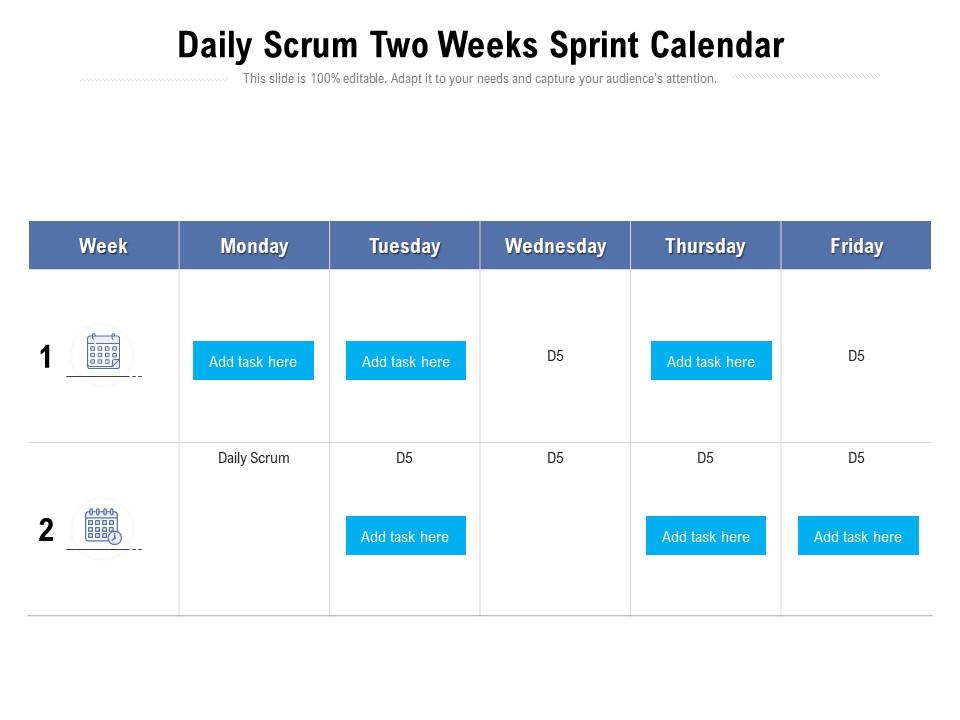
Introducing our premium set of slides with Daily Scrum Two Weeks Sprint Calendar. Ellicudate the two stages and present information using this PPT slide. This is a completely adaptable PowerPoint template design that can be used to interpret topics like Daily Scrum Two Weeks Sprint Calendar. So download instantly and tailor it with your information.

Content of this Powerpoint Presentation

Description:

The image is of a PowerPoint slide titled "Daily Scrum Two Weeks Sprint Calendar," designed for agile project management settings. It outlines a two-week sprint calendar commonly used in Scrum, an agile methodology framework.

The slide has a table representing a two-week period, with columns for each weekday and rows indicating the week number. In this template, Monday through Friday are shown, assuming a standard workweek. Each cell under the weekdays is labeled with "Add task here," indicating where daily tasks or goals should be listed. In the rows labeled "Daily Scrum," a consistent task appears, presumably the daily stand-up meeting where the team discusses progress and plans for the day.

Use Cases:

This type of sprint calendar is useful in various industries that utilize agile methodologies:

1. Software Development:

Use: Sprint planning and daily task tracking.

Presenter: Scrum Master

Audience: Development team members

2. Marketing:

Use: Managing campaigns and creative projects in sprints.

Presenter: Marketing Project Manager

Audience: Marketing team, creative staff

3. Product Management:

Use: Product development and feature roll-outs.

Presenter: Product Owner

Audience: Cross-functional product teams

4. IT Services:

Use: Infrastructure upgrades and service roll-outs.

Presenter: IT Project Lead

Audience: IT department, service management teams

5. Educational Technology:

Use: Development of educational software and content.

Presenter: Educational Project Manager

Audience: Content creators, software developers

6. Financial Services:

Use: Agile management of new financial product development.

Presenter: Financial Project Coordinator

Audience: Product developers, finance professionals

7. Healthcare Administration:

Use: Managing healthcare projects like system implementations.

Presenter: Healthcare Project Manager

Audience: Administrators, IT staff, clinical staff

FAQs for Daily scrum two

So basically a Scrum calendar maps out all your sprint ceremonies - planning, standups, retros, reviews. Game changer for keeping everyone on the same page about timing. No more "wait, when's our demo again?" moments. I literally used to scramble last-minute prepping for reviews before we got organized with this. Stakeholders love it too since they can actually plan around your milestones instead of constantly asking for updates. Just set it up at sprint start and blast it to the whole team. Trust me, you'll wonder how you survived without one - saves so many annoying scheduling back-and-forths.

So basically a Scrum Calendar stops all that confusion about when stuff is happening. Your team can see ceremonies, deadlines, sprint goals - everything in one spot. No more people showing up late to stand-ups or completely missing retros (which happens way more than it should, honestly). I'd start with blocking out all your ceremonies first, then add the bigger deliverable dates. The visual timeline thing really helps too - you'll spot conflicts before they become a problem. Makes the whole sprint feel way more organized instead of just winging it day by day.

Put all the main ceremonies on there first - Sprint Planning at the start, Daily Standups obviously, then Sprint Review and Retrospective at the end. Mark your sprint boundaries clearly too. Here's what I learned the hard way: always pad Planning meetings because they WILL run over. Every single time. Block out when stakeholders are free for Reviews, and factor in any holidays or PTO that'll mess with your capacity. Map out like 2-3 sprints ahead so people aren't scrambling. Oh, and double-check that you're not scheduling Reviews right before long weekends - learned that one too!

So basically a Scrum calendar keeps everyone on the same page about sprint stuff - when standups are, retros, planning sessions, all that. No more awkward "wait what day is our retro?" slack messages. You can block out time for ceremonies and see if anything's gonna clash with actual work. Honestly, the visual layout is pretty clutch for spotting problems early. Just use whatever calendar tool you're already stuck with at work and actually keep it updated (easier said than done, I know). It sounds boring but trust me, it saves so much confusion later.

Honestly? Just use whatever calendar your team already checks religiously - Google Calendar or Outlook usually work great. They handle recurring events without being a pain and sync everywhere. You could get all fancy with Monday.com or Notion if you want extra customization for sprint planning stuff. But here's the thing - I've watched so many teams go overboard with complicated setups that nobody bothers updating after two weeks. Keep it dead simple. Pick one tool, block out your ceremonies when each sprint starts, and call it done. Don't overthink it.

Honestly, a Scrum calendar is clutch for seeing your whole sprint laid out visually. You can catch scheduling disasters before they happen - like realizing half your team's on vacation during week two. It shows holidays, meetings, all that stuff that eats into actual work time. Makes sprint planning way more honest too, since everyone sees exactly how many hours they really have. I always forget about random company meetings until they're staring me in the face on the calendar. Set up a shared view so the whole team can see ceremonies and who's available when.

Honestly, a Scrum calendar is a game-changer for avoiding those "wait, when's the demo again?" moments. Everyone can actually see when sprints start and end, plus all the ceremonies. It helps people plan their schedules better too - no more surprise conflicts. Dependencies become way more obvious, so Product knows they need to get backlog prioritization done before sprint planning hits. Cuts down on mid-sprint interruptions since the rhythm is clear to everyone. I'd just throw it in Confluence or send shared calendar invites. Makes everything run smoother, trust me.

Dude, update that Scrum calendar constantly - not just when you feel like it. Any time scope changes or someone's suddenly unavailable, fix it immediately. Daily standups reveal a blocker? Update it then and there. I can't tell you how many teams just set it once and pretend everything's fine weeks later. Spoiler: it's not. Small tweaks beat massive overhauls every time. Your calendar needs to show what's actually happening, not some fantasy version from sprint planning. Otherwise your whole team's working off outdated info and wondering why nothing aligns.

Your Scrum Master handles all the scheduling headaches - Sprint Planning, Daily Standups, Reviews, Retrospectives. No more hunting people down or dealing with calendar conflicts. They'll actually block outside meetings during your ceremonies too, which honestly is a godsend. Think of them like a schedule bodyguard who keeps everything running smoothly. The whole thing works because they help establish that consistent rhythm teams need. Just make sure you show up to what they book! I've seen teams fall apart when people start skipping stuff. Consistency really does make or break the process.

Dude, get a Scrum calendar - it'll save you so much time vs constantly checking Jira. You can track your sprint progress visually and actually see your team's velocity patterns emerge. It shows completed story points over time, plus you'll spot blockers way earlier. Honestly, the best part is comparing what you planned versus what actually happened. Mid-sprint struggles become super obvious (we always hit a wall on Wednesdays for some reason). Your burndown patterns start making sense, and retrospectives get way more productive. Future sprint planning becomes less of a guessing game too.

Honestly, just sync up your sprints with the big company stuff first. Map them to quarterly goals and major deadlines - that way when stakeholders check in, you've got something to show. Budget cycles are clutch for this too since it makes funding talks way less awkward. Build in some buffer sprints before launches (learned this the hard way lol). Your retrospectives should happen around the same time as business reviews. Short sprints work better than long ones for this. The whole point is making Scrum work WITH your business rhythm instead of against it. Block out next quarter around your company's major dates and go from there.

Honestly, it's brilliant because nobody can hide anymore. Your sprint commitments are right there for everyone to see, plus who's delivering what and when. Daily standups become way more real when people know you'll have to explain why you're behind again. Think of it like working out with friends - you don't want to be that person who always skips leg day, you know? The peer pressure actually works in your favor here. I'd start by putting real deliverables on the calendar, not just meetings. Tie each commitment to actual names so there's no wiggle room.

Honestly, the hardest part is just getting people to stick with it. Your team will probably forget meetings or double-book sprint ceremonies - happens all the time. Distributed teams make it worse with timezone chaos. Plus stakeholders will keep interrupting with "urgent" stuff that's really not urgent at all (so annoying). Most people also underestimate how long these ceremonies actually take, so everything gets crammed together. Don't overthink it though. Start with just the basic ceremonies and get that rhythm down first. Once everyone's actually showing up consistently, then you can add the fancy stuff.

Honestly, it's been a lifesaver for our team - no more constant Slack messages asking when the next standup is. Everyone can see sprint dates, retros, and who's actually available for ceremonies. Remote folks especially love it since they don't have to guess what timezone we're talking about. Color-coding the different sprint phases makes it super easy to scan. One thing though - make sure everyone can actually edit it, not just view. I learned that the hard way when half the team couldn't update their availability and we kept scheduling over people's vacations.

Honestly, check your retro action items before you plan the next sprint calendar - I used to skip this all the time but it's a game changer. Notice any patterns? Maybe your team keeps complaining about marathon meetings or zero focus time. Use that intel to tweak your calendar template. If retros keep showing you're always rushed, build in buffer time. Need more collab sessions? Block those out too. Your calendar should evolve based on what actually works for your team, not some perfect template you found online. It's way more useful when it reflects real working patterns.

Ratings and Reviews

90% of 100
Review Form
Write a review
Most Relevant Reviews
  1. 80%

    by Edgar George

    Thanks for all your great templates they have saved me lots of time and accelerate my presentations. Great product, keep them up!
  2. 80%

    by Corey Patterson

    Helpful product design for delivering presentation.
  3. 100%

    by Liam Perez

    Design layout is very impressive.
  4. 100%

    by Coleman Henderson

    Informative design.

4 Item(s)

per page: