Driver diagram plan groundwork powerpoint show
Try Before you Buy Download Free Sample Product
Audience
Editable
of Time
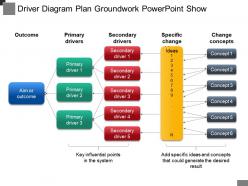
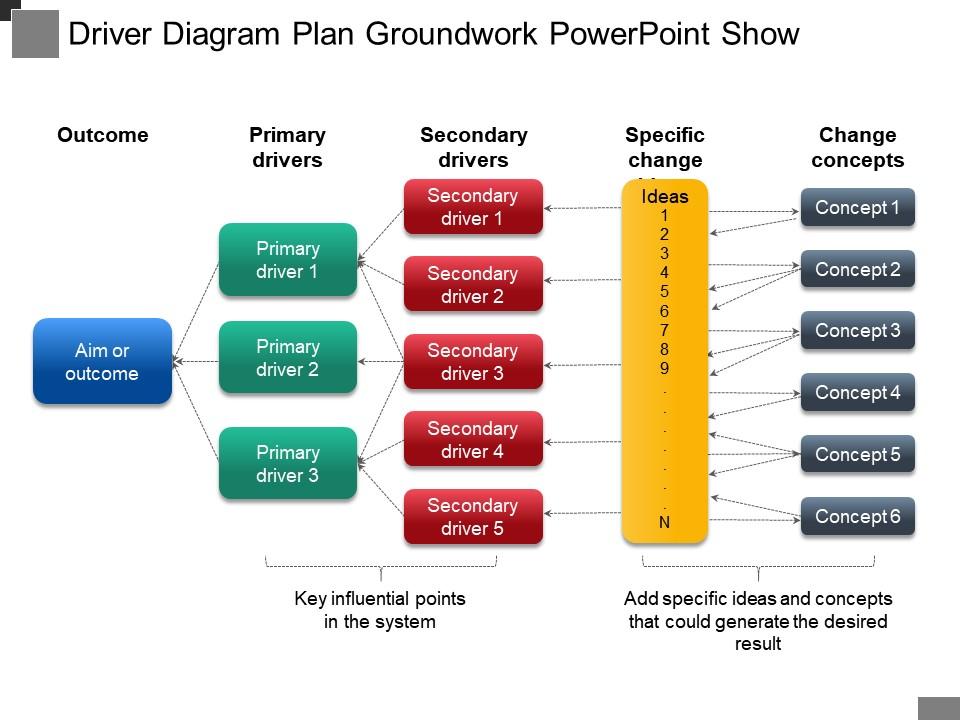
Indulge your audience into a more enthusiastic conversation through our, driver diagram plan groundwork PowerPoint show. Drive the operational and financial decisions of business through your imperative planning. We have shown a strategic planning web in the following PPT diagram to show your business key drivers. We have shown five segments in the image as, aim or outcome, primary drivers, which is further divided into five sections, secondary drivers, which is also further divided into five sections, specific ideas which can be used to include key points and change concepts which can be used to include up to six conceptual ideas. Distinct color combinations are used here for each stage to create a vivid understanding. Download our, driver diagram plan groundwork PowerPoint show., as our experts have made use of these unprecedented icons and pictures for better understanding and easy learning. Address any instability that exists with our Driver Diagram Plan Groundwork Powerpoint Show. It helps control fluctuating circumstances.
People who downloaded this PowerPoint presentation also viewed the following :
Driver diagram plan groundwork powerpoint show with all 5 slides:
Get down to the final analysis with our Driver Diagram Plan Groundwork Powerpoint Show. Focus on every aspect of execution.
FAQs for Driver diagram plan
So driver diagrams have three parts. Your **aim statement** goes at the top - that's what you're trying to hit with actual numbers. **Primary drivers** sit below that, which are basically your main levers for getting there. Then **secondary drivers** go under each primary one - these are the stuff you can actually do day-to-day. Honestly, the hardest part is usually figuring out your aim first since everything else flows from there. Once you nail that down, you just work backwards. Oh and don't overthink the secondary drivers - they should be pretty concrete actions, not more theory.
So driver diagrams are honestly great for tackling big messy projects. Start with 3-4 primary drivers - basically the main things that'll actually move your project forward. Then break those down into smaller secondary drivers that support each one. Finally, list out the specific actions you can take. It's like having a roadmap that shows how everything connects, which beats those confusing project plans nobody ever looks at. The visual setup makes it way easier to spot what you're missing and explain stuff to your team. I always forget how helpful they are until I actually use one again.
Think of it as a roadmap that connects your big goals to actual changes you can test. Start with your main aim at the top. Then add primary drivers - the major factors affecting your goal. Below that, put secondary drivers - stuff you can actually do something about. It's basically a family tree for improvement ideas, which sounds weird but totally works. The cool thing is it stops you from just throwing random changes at the wall. Oh, and definitely build it with your whole team so everyone gets how their piece fits the puzzle.
Think of primary drivers as your big themes - the main stuff that actually moves the needle on whatever you're trying to achieve. Secondary drivers are where you break those down into specific things you can actually do something about. Like if your primary driver is "boost customer satisfaction," then your secondaries might be "cut response times" or "train agents better." Primaries = the what, secondaries = the how. I honestly used to get these backwards all the time - drove me nuts. Start with maybe 3-4 primaries max, then figure out the tactical stuff underneath each one. Works way better than overthinking it.
Honestly, start with the 5 Whys - just keep asking "why" until you hit the real problem underneath. Fishbone diagrams are clutch for organizing causes by categories like people, process, tech stuff. Process mapping shows you exactly where things fall apart (though it can be tedious). But here's what I'd do first - talk to people actually doing the work. They'll tell you where it hurts way faster than any diagram will. Oh, and don't just pick one method. Mix a couple together because you'll miss stuff otherwise. The front-line folks usually have the best insights anyway.
Honestly, the worst thing you can do is overcomplicate it right out the gate. I've watched people create these insane 20-box disasters that make zero sense to anyone - total nightmare. Start simple and focus on what actually impacts your main goal. Skip the vague nonsense like "improve quality." That tells nobody what to do. Each driver should connect clearly to the next level up. Here's my test: could someone on the front lines look at this and get their role? If not, you're being too abstract. Build small first, then add complexity as you go.
So driver diagrams are basically like having everyone look at the same map. You've got your main goal, the key things that'll get you there, and all the specific actions mapped out visually. No more random conversations where people are talking about totally different priorities - you just point to the diagram and boom, there's what we're doing and why. Honestly, it's kind of genius because you can actually see how your small tasks connect to the big picture stuff. Way better than those meetings where everyone's confused about their role. Next time your team gets together, just walk through it with them and watch how much clearer everything becomes.
Driver diagrams work for any industry - you just switch out the metrics that actually matter. Healthcare might focus on cutting patient readmissions, with things like better discharge planning and medication compliance driving that goal. Education? Maybe improving student outcomes through teacher training and family involvement. The framework stays identical though, which is honestly pretty smart. You're making a visual map that connects all your improvement work to one main target. Oh, and definitely start with what "winning" looks like in your field, then trace backwards to figure out the key factors. Way easier than trying to build it forward.
Get them in workshops where they can actually build the thing together - don't just show them a finished diagram later. I learned this the hard way! Include the people doing the actual work, not just their bosses. Sticky notes and whiteboards work great for this stuff. Let them argue about what connects to what - that's where the magic happens. You'll probably go through a few versions based on their input, which is totally normal. Oh, and frontline staff usually have the best insights anyway. Make them feel like co-creators instead of just nodding along to your presentation.
So a driver diagram is like mapping out how you'll actually hit your big goal. You start with what you want to achieve, then work backwards through the key areas that need to improve (primary drivers), then get specific about changes you can make (secondary drivers). It's honestly pretty similar to planning a road trip - you can see how each step connects. The whole point is making your assumptions clear so you don't miss obvious gaps. I've seen people skip this step and wonder why their plans fall apart later. Use it to reality-check whether what you're planning will actually work.
For driver diagrams, I'd go with Lucidchart or Visio first - they've got templates specifically for this stuff and the connectors actually snap where they should. Miro's pretty solid too, especially if people are working remotely since everyone can jump in and edit at once. PowerPoint works if you're in a rush, though it's kind of clunky for anything complex. Oh, and Mural's decent but I feel like fewer people know how to use it? Main thing is making sure your whole team can actually access whatever you pick, since these diagrams always end up changing a million times anyway.
Honestly? Just track if your main drivers are actually moving your aim statement forward - that's literally why we build these diagrams. Monthly check-ins work pretty well for reviewing the data and seeing what's hitting vs. what's totally bombing. Short bursts, longer reviews - whatever rhythm works. Don't ignore those secondary drivers either since they feed everything upstream. When stuff isn't budging (and it happens), dig into which driver needs tweaking and switch up your change ideas. The whole thing falls apart if you're not consistently watching the metrics over time.
Look, I'd check it every 2-3 weeks if you're actively working on improvements. Monthly works too but honestly feels a bit slow. The thing is - and this might sound obvious - but it's supposed to change as you figure out what actually works vs what you *thought* would work. Don't wait around if you hit something unexpected though, just update it. I've watched teams get completely stuck because they treated the diagram like some sacred document that couldn't be touched. Set up a calendar reminder or whatever, but make it part of your regular team check-ins so it stays fresh.
Oh absolutely! The Institute for Healthcare Improvement did this amazing thing with their 100,000 Lives Campaign - they broke down preventing hospital deaths into specific stuff like rapid response teams and medication reconciliation. Toyota's whole production system is basically one massive driver diagram, which honestly blows my mind how organized they are. Education reform and software projects use them too. The teams that actually succeed? They keep updating their diagrams as they figure out what works. Just start simple with your first attempt and tweak it as you go.
So driver diagrams are like the strategic planning tool compared to those others. Flowcharts show you the "how" - mapping out processes step by step. Logic models connect your inputs to outcomes. But driver diagrams? They're all about the "what" and "why" behind your improvement strategy. Logic models come pretty close since they also link activities to results. The difference is driver diagrams are way more focused on actual improvement work - honestly, they're just more practical for that stuff. I'd start with a driver diagram to figure out your strategy first, then use flowcharts when you need to map the real process changes.
-
Great product with effective design. Helped a lot in our corporate presentations. Easy to edit and stunning visuals.
-
Excellent design and quick turnaround.