Driver diagram powerpoint template
Try Before you Buy Download Free Sample Product
Audience
Editable
of Time
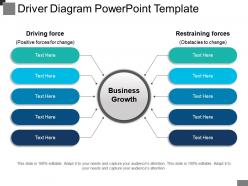
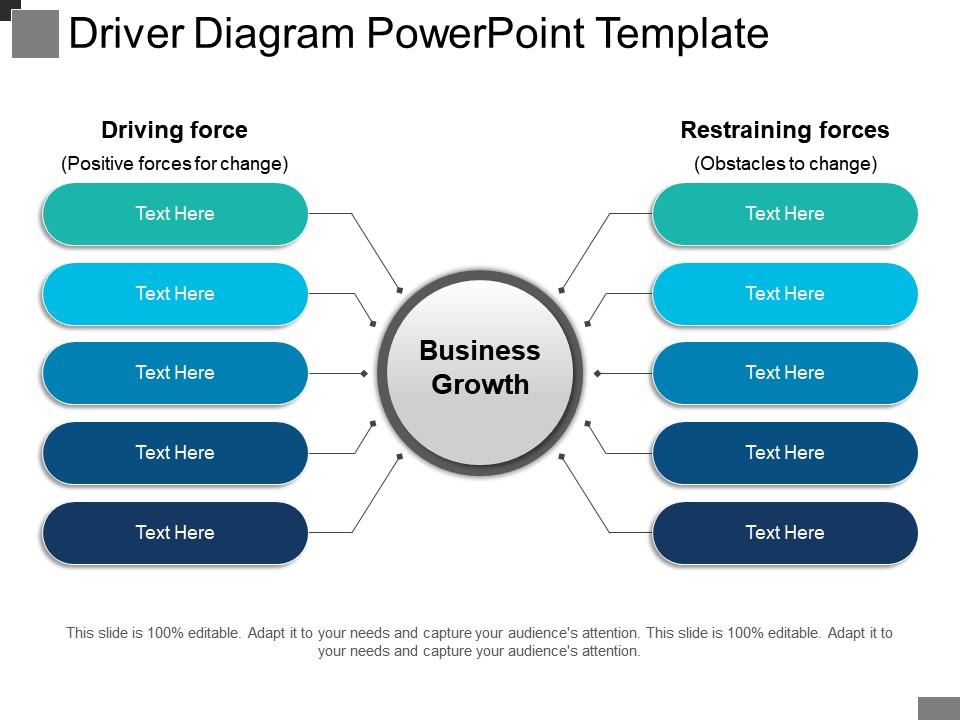
Indulge your audience into exiting conversations through our, driver diagram PowerPoint template. Drive your company's operational and financial results towards an upward growth chart. Following business drivers, PPT template shows two columns, each having five stages with the keyword, business growth in the center. Two stages shown here are, driving force and restoring force. Engaging color combinations are shown here to entice your current audience and reach newer. Use this design to boost your sales values, the number of stocks, your website traffic, number and price of products sold, units of production. Download driver diagram PowerPoint template., as our experts have made use of these unique icons and pictures for better understanding and easy learning. Employers feel like hiring you again due to our Driver Diagram Powerpoint Template. They are bound to extend your contract.
People who downloaded this PowerPoint presentation also viewed the following :
Driver diagram powerpoint template with all 5 slides:
Handle any disparity with our Driver Diagram Powerpoint Template. Give importance to ensuring equality.
FAQs for Driver
Driver diagrams include primary drivers, secondary drivers, outcome measures, process measures, and change ideas that connect strategic objectives to actionable initiatives. These components can be effectively represented through hierarchical layouts, color-coded categories, and visual connectors that streamline complex cause-and-effect relationships, with many organizations finding that well-structured templates enhance strategic alignment and accelerate implementation across teams.
Color coding in PowerPoint driver diagrams enhances understanding by visually categorizing primary drivers, secondary factors, and outcome measures, creating immediate hierarchical clarity through distinct hues for each level. This strategic visual approach enables teams to quickly identify critical pathways, prioritize interventions, and track progress across interconnected elements, with many organizations finding that color-coded templates significantly improve stakeholder comprehension and decision-making speed.
Common mistakes include overcrowding slides with excessive detail, using inconsistent formatting across diagram elements, failing to establish clear hierarchical relationships between drivers and outcomes, and neglecting to align visual elements properly. These errors undermine clarity and professional presentation, with many project managers finding that streamlined designs, consistent color coding, and logical flow patterns enhance stakeholder comprehension and decision-making effectiveness.
Driver diagram templates can be tailored by customizing primary drivers, secondary drivers, and outcomes to reflect industry-specific processes, regulations, and objectives. In healthcare, templates focus on patient safety metrics and clinical workflows, while manufacturing emphasizes operational efficiency and quality control measures, and education centers on student outcomes and learning assessments, ultimately delivering targeted improvement strategies that align with each sector's unique performance indicators.
Driver diagrams should include clear hierarchical structures with distinct color coding, intuitive arrow flows, readable fonts, and consistent spacing between elements. These visual elements enhance comprehension across diverse teams by streamlining complex cause-and-effect relationships, with many organizations finding that well-designed templates improve stakeholder alignment and strategic communication effectiveness.
Integrating data visualization tools within PowerPoint driver diagram templates enhances stakeholder engagement by creating interactive dashboards, real-time data connections, and dynamic visual storytelling that transforms static presentations into compelling narratives. These enhanced templates enable organizations to demonstrate clear cause-and-effect relationships, track progress metrics seamlessly, and facilitate collaborative decision-making sessions, with many executives finding that visual data integration significantly improves meeting productivity and strategic alignment.
**INPUT**: What are some best practices for presenting driver diagrams in workshops or meetings using PowerPoint? **OUTPUT**: Best practices include using clear visual hierarchies, progressive disclosure of diagram elements, interactive polling features, collaborative annotation tools, and dedicated discussion segments for each driver branch. These presentation approaches streamline stakeholder engagement by encouraging real-time feedback, facilitating focused discussions around specific improvement areas, and ultimately delivering actionable insights, with many organizations finding that structured driver diagram workshops accelerate strategic alignment.
A driver diagram template assists organizations by visually mapping strategic objectives to specific drivers, key changes, and actionable tasks, creating clear pathways from high-level goals to operational activities. Through structured hierarchical layouts, teams can identify critical success factors, prioritize initiatives, and ensure all organizational efforts directly contribute to strategic outcomes, ultimately enhancing alignment, accountability, and measurable progress across departments.
Animated elements in PowerPoint driver diagrams facilitate dynamic presentations by revealing complex cause-and-effect relationships progressively, maintaining audience focus through sequential content delivery, and enabling presenters to build compelling narratives around strategic initiatives. These animations enhance comprehension by guiding viewers through interconnected processes step-by-step, while helping organizations communicate transformation strategies more effectively, ultimately delivering greater engagement and clearer understanding of business objectives.
Stakeholder input ensures driver diagrams accurately reflect organizational realities, identify critical root causes, and gain buy-in for improvement initiatives. Through collaborative template development, teams capture diverse perspectives from operations, management, and front-line staff, ultimately delivering more comprehensive problem-solving frameworks and higher implementation success rates across departments.
Driver diagram templates enable progress tracking through visual mapping of primary drivers, secondary drivers, and outcome measures, creating clear accountability frameworks for dynamic projects. These templates facilitate regular strategy adjustments by highlighting performance gaps, identifying underperforming initiatives, and enabling teams to reallocate resources toward high-impact drivers, ultimately delivering adaptive project management and sustained competitive advantage.
A high-quality PowerPoint driver diagram template should include pre-designed hierarchical layouts, customizable text boxes, professional color schemes, scalable vector graphics, and intuitive formatting options. These features enable organizations across industries like healthcare, manufacturing, and consulting to streamline strategic planning processes, enhance visual communication clarity, and accelerate project implementation timelines, ultimately delivering more effective stakeholder presentations.
Feedback loops in driver diagrams can be illustrated through curved arrows, dotted lines, color-coded pathways, and circular connectors that show bidirectional relationships between drivers and outcomes. These visual elements enhance understanding by demonstrating how primary drivers influence secondary drivers, which then reinforce or modify the original inputs, with many organizations finding that clear feedback visualization improves strategic alignment and decision-making processes.
Using a standardized driver diagram template across teams delivers consistency in problem-solving approaches, enhanced collaboration through shared visual language, streamlined training processes, and improved knowledge transfer between projects. This strategic alignment enables organizations to accelerate project timelines, reduce documentation overhead, and maintain quality standards, with many finding that standardized frameworks ultimately enhance cross-functional communication and organizational learning.
Cultural considerations significantly impact driver diagram design through language preferences, visual hierarchy expectations, color symbolism interpretations, and data presentation styles that vary across regions. When creating PowerPoint presentations for global audiences, organizations must adapt their driver diagrams by incorporating culturally appropriate design elements, ensuring accessibility across different reading patterns, and selecting universally understood symbols, ultimately delivering more effective communication and stakeholder engagement worldwide.
-
Excellent products for quick understanding.
-
Excellent template with unique design.