Email marketing campaign flowchart for new customer acquisition

Rating:
87%
Email marketing campaign flowchart for new customer acquisition
Slide 1 of 2
Favourites Favourites

Try Before you Buy Download Free Sample Product

Audience Impress Your
Audience
Editable 100%
Editable
Time Save Hours
of Time
The Biggest Sale is ending soon in
0
0
:
0
0
:
0
0
Rating:
87%
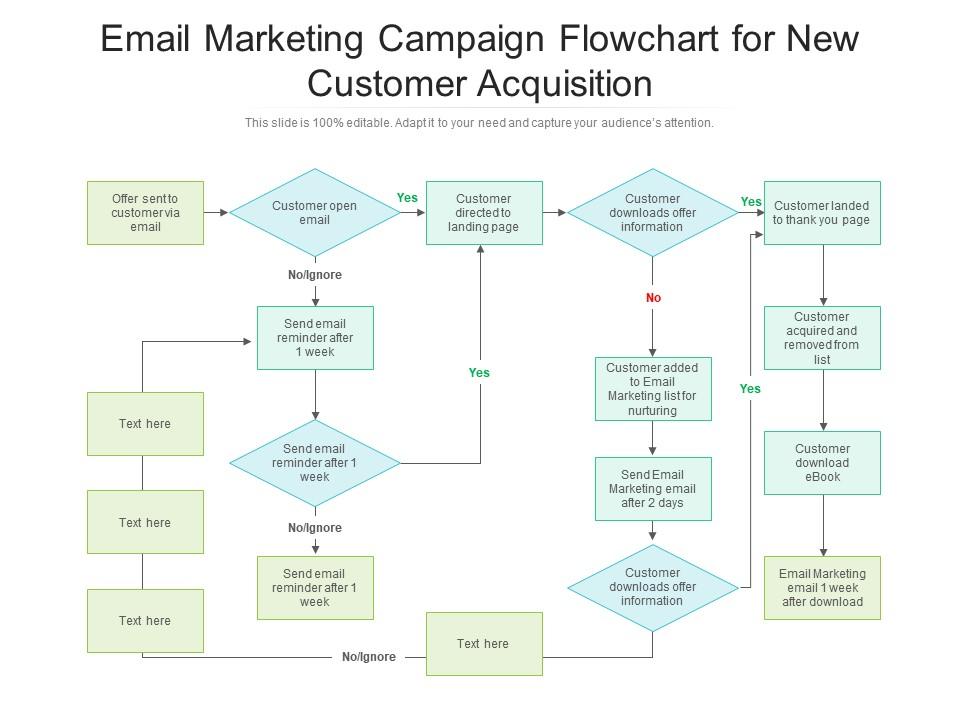
Presenting our set of slides with name Email Marketing Campaign Flowchart For New Customer Acquisition. This exhibits information on five stages of the process. This is an easy-to-edit and innovatively designed PowerPoint template. So download immediately and highlight information on Information, Marketing, Flowchart.

FAQs for Email marketing campaign flowchart for

So you'll want to map out audience segmentation first - like sorting people by what they bought or their age/location. Set up triggers next (new signups, purchases, whatever). Creating the actual emails is honestly such a pain and takes forever, but don't rush it. A/B test your send times if you can. Track everything obsessively - opens, clicks, conversions, the works. Oh and here's the thing - use those numbers to tweak your segments for next time. That's where you actually start seeing results instead of just sending emails into the void.

Think of segmentation like creating different paths in your flowchart instead of one boring straight line. You're splitting people up based on stuff like how much they buy, how engaged they are, or basic demographics. Each group gets their own tailored journey with different content and timing. Way better than blasting everyone with the same message - honestly, that approach is pretty much dead at this point. I'd start by mapping out your biggest segments first (keeps things from getting totally overwhelming), then piece them together into one master flow. Makes your flowchart more complex but actually useful.

So you'll basically hit these key split points: new vs existing subscribers, how engaged they are, and stuff like their buying patterns or what they've been clicking on your site. Timing matters too - like if someone literally just purchased, maybe don't blast them with another promo right away? That's just annoying. Then you've got your standard metrics to work with: opens, clicks, unsubscribes. Each branch takes people down different email paths. My advice? Start with your biggest subscriber differences first - those give you the clearest ways to split your flow and actually make sense.

Zapier's probably your best bet for connecting different apps that don't usually play nice together. You can also go with HubSpot, Mailchimp, ActiveCampaign, or Klaviyo - they all hook into your CRM and e-commerce stuff. I'd map out your customer journey first though, makes everything way easier. Then set up triggers like "send welcome email when someone downloads the PDF" or tag people who click certain links. Honestly, picking tools that actually work together beats trying to force random systems to cooperate. Most connect with social media and analytics too, so you'll get those behavior-based triggers working pretty smoothly.

Track your open rates, click-throughs, and conversions at each step. Set up UTM parameters so you can see exactly where people bail out - honestly, I get way too into analyzing this stuff sometimes! The biggest drop-off points? That's where you fix things first. Don't obsess over individual numbers though. Focus on what the whole story tells you. Google Analytics works great for a simple dashboard, or just use whatever your email platform has. Check it weekly and you'll spot patterns pretty quick.

Honestly, the worst thing you can do is overcomplicate it right off the bat. I've seen flowcharts that look like someone sneezed spaghetti on a whiteboard - total nightmare. Keep your decision points super clear, like yes/no stuff. Map out the boring scenarios too (bounced emails, unsubscribes, whatever). But don't go crazy trying to account for every single thing a customer might do. Start small - maybe 3-5 main touchpoints, see what actually happens, then build from there. Way better than guessing what people will do and creating some monster flowchart that nobody understands.

Right after you create your email, throw in A/B testing branches. Split your audience - half gets version A, half gets version B. Subject lines, send times, content tweaks, whatever. I always stick to testing one thing at a time though, otherwise it gets messy and you can't tell what actually worked. Once both versions go out, add a decision point to measure what matters (opens, clicks, conversions). The winner either goes to your bigger list or becomes your template for next time. Yeah, it complicates your flowchart but honestly? Makes everything way more effective.

Honestly, start with the basics - are your emails even getting delivered and opened? Those delivery/open rates tell you if people are paying attention. Click-through rates are where it gets interesting though, that's real engagement. Then obviously track conversions for whatever you're trying to get them to do. Oh, and watch those unsubscribe rates because nobody wants to be THAT person flooding inboxes. I'd just throw together a simple dashboard showing these numbers for each step. Makes it super easy to see where people bail out so you can fix whatever's broken.

Dude, personalization is everything for email flows. Seriously - it's the difference between people actually opening your stuff versus hitting delete immediately. Build it into every step of your flowchart, not just the subject line. Start with basics like names and what they bought before, then get fancy with browsing data later. I swear, even my mom responds better to emails that feel like they're actually meant for her. The stats are pretty crazy too - personalized emails just crush generic blasts. Don't make people feel like another number in your database, you know?

Honestly, user feedback is like having a crystal ball for your email flows. People will literally tell you what sucks - whether they're unsubscribing after email

Ratings and Reviews

87% of 100
Review Form
Write a review
Most Relevant Reviews
  1. 80%

    by Douglas Lane

    Easily Understandable slides.
  2. 100%

    by O'Brien Parker

    Editable templates with innovative design and color combination.
  3. 80%

    by Efrain Harper

    Innovative and Colorful designs.

3 Item(s)

per page: