Employee Headcount Snapshot Salary Survey Report
Try Before you Buy Download Free Sample Product
Audience
Editable
of Time
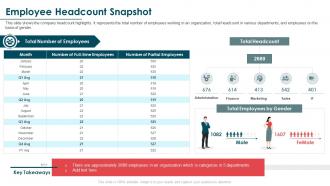
This slide shows the company headcount highlights. It represents the total number of employees working in an organization, total headcount in various departments, and employees on the basis of gender.
People who downloaded this PowerPoint presentation also viewed the following :
Employee Headcount Snapshot Salary Survey Report with all 6 slides:
Use our Employee Headcount Snapshot Salary Survey Report to effectively help you save your valuable time. They are readymade to fit into any presentation structure.
FAQs for Employee Headcount Snapshot
First thing - pick whether you're counting actual people or full-time equivalents, and stick with it. Automated reports from your HR system will save you so much headache later (learned this the hard way). Don't forget contractors and interns when you're setting this up. End-of-month cutoffs work best for consistency. Build some basic dashboards that actually update automatically - leadership loves seeing those trend lines in real time. Honestly, just start with simple headcounts by department first. You can always get fancy with metrics once you've got the foundation down solid.
Ugh, headcount changes totally screw up your budget forecasts. Labor's already your biggest cost, right? But when you're hiring fast, there's all this other stuff - onboarding, benefits, equipment, office space. Plus new people suck at their jobs initially (harsh but true), so your productivity tanks while costs spike. Layoffs aren't better - severance payments and suddenly you're understaffed. What saved my sanity was budgeting for different scenarios. I'd model 80%, 100%, and 120% of planned headcount so I wasn't freaking out when things inevitably went sideways. Makes the whole process way less stressful.
Track your basic headcount by department and month first - that's your foundation. Hire and termination rates are crucial too. Time-to-fill is honestly underrated but becomes gold when budgets tighten. I'd dig into turnover by team since some managers are just... yeah. Internal mobility tells you who's actually happy before they bail. Oh, and revenue per employee comparisons will make you look smart in meetings. Dashboard review monthly, maybe over coffee? You'll catch issues before they blow up your budget. Trust me on the turnover-by-manager thing - it's eye-opening.
Most seasonal businesses keep a core team year-round, then hire temp workers when things get crazy. Hold onto your best people during slow months - even if you cut their hours or pay temporarily. Trust me, retraining new staff every season is way more expensive than keeping good employees. Temp agencies are your friend here. Also, lots of companies bring back the same seasonal workers each year (they already know the drill). Some businesses even get creative - like ski resorts sharing workers with summer camps when their seasons flip. The key is building your talent pool before you're scrambling to fill positions.
So basically, technology does all that boring manual tracking for you. Your HRIS automatically updates headcount when people come and go, syncs everything between HR systems, creates real-time reports. It pulls data from payroll, your ATS, whatever - no more spreadsheet hell (seriously, never again). You'll get alerts when you hit budget limits, predictive stuff for planning ahead. Dashboards that actually update themselves, which is honestly pretty nice. Just make sure it's all integrated properly though, or you're swapping one mess for another. Oh, and the predictive analytics part is surprisingly helpful once you get used to it.
So basically, team size totally changes how everyone talks and works together. Smaller groups? You'll get closer relationships and quick decisions, but honestly, sometimes you miss out on different viewpoints. Big teams bring crazy good expertise - though good luck getting 50 people in one meeting without it being a disaster. I learned that the hard way once. Culture shifts too. Small feels like family, all casual. Bigger companies need way more structure or things fall apart. Really depends what industry you're in though. Just watch how info flows as you grow and tweak things when needed.
Look, first thing I'd do is audit what roles actually make you money vs just exist. Automate the boring repetitive stuff - you'll be shocked how much time that frees up. Cross-train people so one person can cover multiple areas when needed. Your data probably shows you're overstaffed in weird places you didn't expect. For project work, contractors make way more sense than full-time hires. And honestly? Upskilling your current team beats constantly recruiting new people. Just don't do random cuts during budget panic - be strategic about timing and what actually matters.
Ugh, high turnover is such a headache for headcount planning. You're literally always scrambling to replace people instead of actually planning ahead. One week you think you're good on staff, then suddenly three people quit and you're panicking. I swear it's impossible to forecast accurately when there's constant churn. What's helped me is tracking which departments bleed people the most - then you can at least see the patterns coming. Build some extra buffer into your projections based on your usual turnover rates. Otherwise you'll just keep playing this exhausting game of catch-up forever.
So here's the deal - once you hit 50 employees, FMLA kicks in and you'll also need to worry about ACA compliance. At 100+, EEO-1 reporting becomes a thing too. Each state has its own weird rules on top of this (California's always extra, obviously). Honestly, set up some kind of alert in whatever HR system you're using before you actually cross these thresholds. Trust me, you don't want to be figuring out new policies after you've already hired employee
-
“Ample and amazing variety of templates available, really helpful for making professional PPT for day to day workings.”
-
Excellent design and quick turnaround.