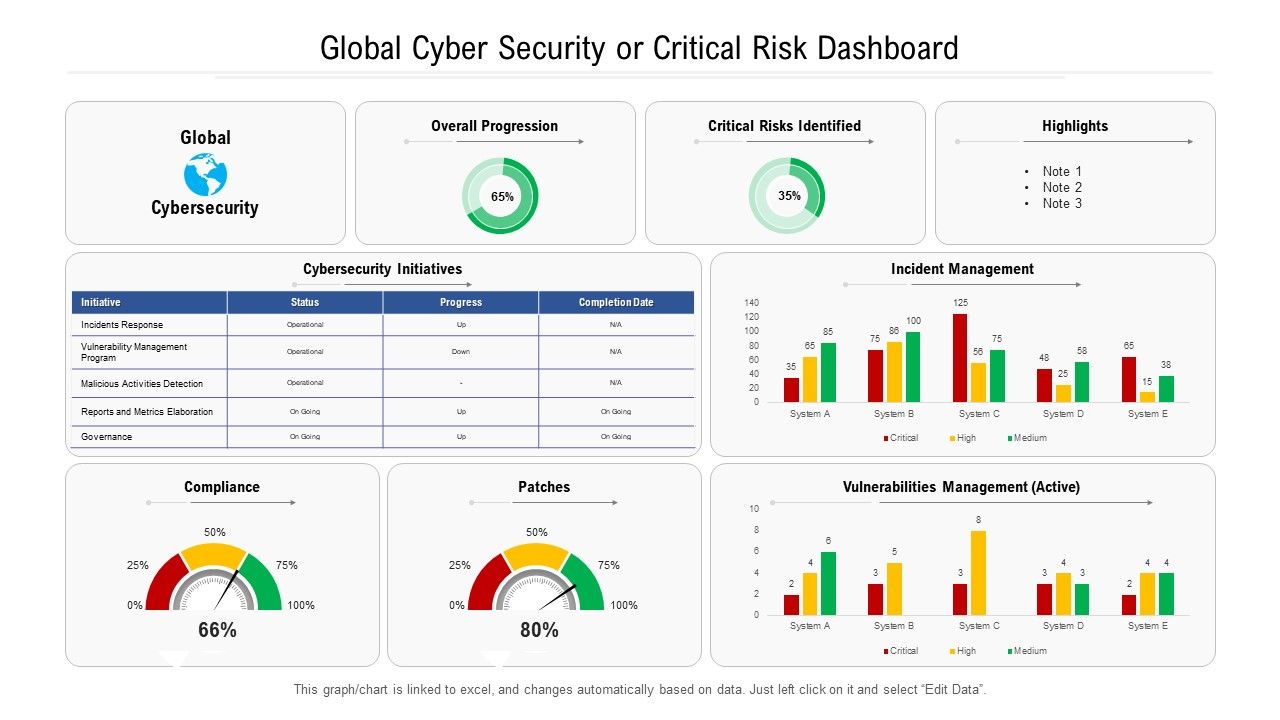
Global cyber security or critical risk dashboard

Rating:
93%
Slide 1 of 2
Favourites Favourites

Try Before you Buy Download Free Sample Product

Audience Impress Your
Audience
Editable 100%
Editable
Time Save Hours
of Time
The Biggest Sale is ending soon in
0
0
:
0
0
:
0
0
Rating:
93%
Presenting this set of slides with name Global Cyber Security Or Critical Risk Dashboard. The topics discussed in these slides are Global, Cybersecurity, Overall Progression, Critical Risks Identified, Highlights. This is a completely editable PowerPoint presentation and is available for immediate download. Download now and impress your audience.

FAQs for Global cyber security or

Start with threat volume stuff - active incidents, malware hits, failed logins. That's your real-time pulse. Geographic heat maps are clutch for visualizing where attacks come from (still think it's wild seeing everything mapped out like that). Track your breach response times and how fast patches get deployed. User behavior analytics matter too since insider threats are basically the worst. Oh, and definitely monitor mean time to detection plus remediation - speed's everything when you're getting hammered. Security tool effectiveness scores help justify budget asks. Build from these basics, then add whatever specific nightmare scenarios your CISO's worried about.

Get automated validation running first, but don't just trust whatever your security tools are telling you. Cross-reference between different sources to catch when things don't match up. I've watched way too many "everything's fine" dashboards while actual attacks were going down because one feed died. Set up timestamp checks and heartbeat monitoring. Flag it when data sources go quiet or start acting weird. Oh, and have your team do random spot-checks against the actual logs - maybe weekly? Sounds boring but it'll save your ass. The whole "trust but verify" thing isn't just corporate speak here.

Honestly, AI is a game-changer for cybersecurity dashboards. It handles all the tedious stuff automatically - scanning tons of network traffic and catching weird patterns your team would spend forever hunting down. The cool part is it learns what "normal" looks like for your network, so you get way fewer of those annoying false alarms that make everyone want to ignore alerts. It also ranks threats by how serious they are. No more getting buried in low-priority nonsense while something actually dangerous is happening. It's like having that one coworker who actually pays attention, except it works 24/7.

Honestly, get a global cybersecurity dashboard if you can - it's a game changer for incident response. You'll see threats hitting all your systems in real-time instead of scrambling between different tools when stuff breaks. Quick example: while you're putting out fires in New York, you might miss something sketchy happening at your Singapore office. The dashboard catches those patterns and shows which teams are already on what. Set up alerts for your specific scenarios beforehand though. Trust me, you don't want to be figuring out the interface during an actual crisis.

Honestly, color coding is your best friend here - red for critical stuff, green when everything's chill. Don't make it look like a damn Christmas tree though! Put the urgent alerts right up top where people can actually see them. Keep metrics simple and actionable instead of cramming every single data point on there. Real-time visuals work great for active threats, but use trend charts for the bigger picture stuff. Oh, and think about who's actually using this - SOC analysts need totally different info than executives do. Test it with real users first or you'll end up rebuilding the whole thing later.

So basically you want different views for different people. Executives just need the big picture stuff - compliance status, major risk trends, that kind of thing. Your SOC team though? They're living in the weeds with real-time alerts and incident queues. IT managers are somewhere in between, mostly caring about which systems need patches. Most platforms let you build custom dashboards with different widgets and timeframes. Pro tip - figure out what decisions each person actually makes day-to-day, then build their view around that. Way more useful than generic reports nobody reads.

Honestly, just focus on the stuff that'll actually mess up your day. Malware and phishing attempts are obvious ones - track those religiously. DDoS and ransomware can literally kill your whole operation, so those need to be front and center. Data breaches and insider threats? Those are the ones that actually scare me most. Also watch for authentication failures spiking and weird network traffic - that's usually when something's going sideways. Oh, and make it visual. Your execs won't read paragraphs but they'll definitely notice a big red dashboard screaming about critical issues.

So you basically get one screen that shows all your compliance stuff - GDPR, SOX, HIPAA, whatever you're dealing with. Pretty nice not having to jump between ten different systems when auditors show up (which is always at the worst time, obviously). You can track incidents, monitor your security controls, and pull audit reports without losing your mind. Honestly, the best part is catching compliance gaps before they blow up into actual violations. Oh, and auditors are obsessed with documentation trails, so the dashboard handles that too. Map your regulations to the dashboard metrics first - seriously, it'll make your next audit way less painful.

So first thing - figure out what security tools you're already running, then focus on the ones spitting out the most alerts. Your dashboard needs APIs that can grab data from SIEM tools, endpoint detection, vulnerability scanners, threat intel feeds, all that stuff. Most use REST APIs now which makes life easier. Look for dashboards supporting STIX/TAXII formats and both real-time plus batch imports. Honestly, the whole point is getting everything in one place so you're not jumping between like 15 different tools all day. That gets old fast.

Look at your historical data to spot patterns - attack frequencies, entry points, when things spike seasonally. Teams miss obvious stuff all the time because they're only watching current alerts. Set up automated trend analysis that compares what's happening now against your baselines from before. Honestly, anomaly detection is clutch here. First step though? Pull your top 3-5 threat types from last year and build predictive models around those. You'll start getting early warnings instead of just reacting to everything.

Look, user access controls are super important because they control who sees your sensitive security stuff and who can mess with your defenses. You definitely don't want random people disabling alerts or poking around breach investigations - that's just asking for trouble. Set up role-based permissions instead. Analysts get the day-to-day data, executives see summary reports, and only your security team leads can change critical settings. Base it on what people actually need for their jobs. Oh, and audit regularly because people love accumulating permissions they don't need anymore.

Set up a dashboard comparing your security costs to what you're actually preventing - breach costs, faster incident response, compliance stuff. The hard part? Proving what *didn't* happen, but threat intel feeds help tons with that. Track incident trends and their dollar impact over time. I'd automate quarterly reports showing security spend vs avoided losses. Short bursts work better than long explanations when you're presenting to execs. Honestly, if you can prove each dollar spent saves three in damages, you've basically won the argument. Just focus on tangible metrics they'll actually care about.

Honestly, data overload is gonna be your biggest headache. Companies dump everything onto dashboards and they become total chaos. You've gotta pick which metrics actually matter to each person - way trickier than you'd think since everyone swears their stuff is super important. Integration will probably make you want to scream because security tools hate talking to each other. Oh, and you'll burn tons of time making the visuals clear enough that people can read them fast. Start with maybe 5-7 key things and add more based on what your team actually looks at.

So basically this thing takes all the techy security stuff and turns it into charts your executives can actually read. No more awkward meetings where you're explaining vulnerability scans and they're just nodding blankly. Real-time risk scores, threat patterns, dollar amounts - all right there visually. Honestly, the automated reports alone are worth it since you won't have to manually pull numbers anymore. They can even dig deeper if something catches their attention (though let's be real, most won't). Just customize the main view around whatever keeps your leadership up at night.

Keep your dashboard modular so you can swap in new widgets when threats evolve. API integrations are clutch for pulling fresh intel feeds automatically. When attack patterns shift, you'll need to add new visualization types fast - don't get stuck with rigid setups. ML anomaly detection is honestly game-changing for catching stuff traditional rules miss. Build on a platform that lets you customize quickly instead of hard-coding everything (learned this the hard way). Oh, and check what threat categories are hot in your industry first. Make sure you can actually track those metrics with your current tools.

Ratings and Reviews

93% of 100
Review Form
Write a review
Most Relevant Reviews
  1. 100%

    by Donovan Cunningham

    Best way of representation of the topic.
  2. 80%

    by James Rodriguez

    Perfect template with attractive color combination.
  3. 80%

    by Davis Gutierrez

    Best way of representation of the topic.
  4. 100%

    by Damian Martin

    Enough space for editing and adding your own content.
  5. 100%

    by Eduardo Greene

    Amazing product with appealing content and design.
  6. 80%

    by Dalton Aguilar

    Very unique and reliable designs.
  7. 100%

    by Chester Kim

    Informative presentations that are easily editable.
  8. 100%

    by Dewitt Soto

    Easily Understandable slides.

8 Item(s)

per page: