Help Desk And Incident Management Process Flow
Try Before you Buy Download Free Sample Product
Audience
Editable
of Time
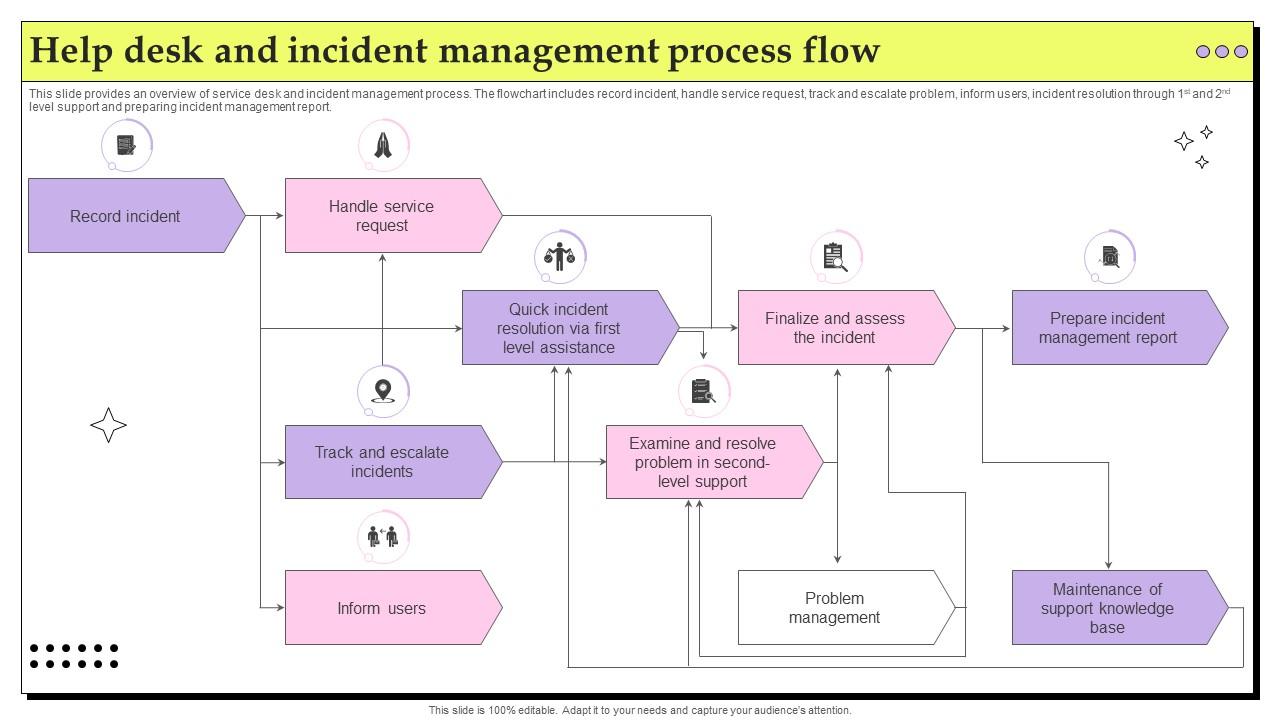
This slide provides an overview of service desk and incident management process. The flowchart includes record incident, handle service request, track and escalate problem, inform users, incident resolution through 1st and 2nd level support and preparing incident management report.
People who downloaded this PowerPoint presentation also viewed the following :
Help Desk And Incident Management Process Flow with all 6 slides:
Use our Help Desk And Incident Management Process Flow to effectively help you save your valuable time. They are readymade to fit into any presentation structure.
FAQs for Help Desk And Incident
You'll need five things to make incident management work. Start with priority levels - that's your foundation. Can't have password resets treated like major outages, you know? Then build proper escalation paths so tickets don't just sit there. Documentation is where everyone screws up honestly, but you gotta track this stuff to spot patterns. Set realistic SLAs your team can actually hit. Communication matters too - keep users and your team in the loop. I know the documentation thing sounds boring, but it's what separates good teams from chaotic ones. Get those priorities sorted first though.
So basically you wanna focus on resolution time, first-call resolution, and customer satisfaction scores - those are like the big three. MTTR shows how fast you're actually fixing stuff, and escalation rates tell you if your team knows what they're doing or if they're just passing problems up the chain. Customer surveys are super important because they show what users actually think, not just your internal stats. Oh and track ticket volume trends too. Honestly I'd start with just 3-4 metrics that actually matter to your goals because otherwise you'll drown in data. Check them weekly to catch patterns early.
Honestly, automation can save your sanity with incident management. Start with the boring stuff - automated ticket routing, priority scoring, basic troubleshooting responses. AI chatbots aren't terrible anymore for password resets and simple software issues. They'll handle those before your team even sees them. Predictive analytics is where it gets interesting though - you can actually spot patterns and stop problems before they blow up. My advice? Don't go crazy trying to automate everything at once. Just pick one annoying repetitive task your team does every day and start there.
So basically you want different response times based on how bad the issue is. Critical stuff gets like 15 min response, 4 hour fix. Less urgent things maybe 1 hour response, 24 hours to resolve. But here's the thing - those numbers are totally meaningless if your team can't actually hit them consistently. I've seen so many places set these ambitious SLAs then just... fail constantly. Figure out what your team can realistically handle first. Are you covering nights and weekends? Who escalates when someone's swamped? Build your SLAs around that reality, not some ideal world. Then actually track whether you're meeting them - otherwise what's the point?
Ugh, ticket overload is the worst part honestly. Everyone submits stuff like "computer broken" with zero details. Super helpful, right? First thing I'd do is audit whatever system you've got now - find your biggest bottleneck. Set up proper triage with clear SLAs so things get routed automatically by category. Your team needs templates for the common stuff, plus solid escalation rules so people know when to bump things up. Don't skip training either, especially the people skills part. Dealing with angry users is an art form. But yeah, start with that audit - you can't fix what you can't see.
So basically, knowledge management systems are game-changers for fixing tickets faster. Your techs can just search past solutions instead of reinventing the wheel every single time. I've watched teams slash resolution times by 40% - it's honestly pretty wild when you see it in action. But here's the thing: the database only works if it's full of actual fixes that worked, not some generic troubleshooting BS. Get your senior guys to document their favorite solutions for the stuff that comes up all the time. That's where you'll see the biggest impact.
Honestly, good categorization is a game changer. Gets tickets to the right people way faster, which obviously cuts down resolution time. You'll start noticing weird patterns too - like that email server that keeps dying every Tuesday (I swear this stuff is real). Perfect for planning maintenance before things blow up. Your metrics become actually useful for showing management what's working and what isn't. SLAs get more realistic since you're tracking different types separately instead of lumping everything together. Quick reality check though - look at your current categories. Are they helping or just making people click through more screens for no reason?
Honestly, just go with impact vs urgency matrices - they're super solid for prioritizing incidents. I'd recommend the basic 2x2 grid where you plot business impact against time sensitivity. ITIL's priority matrix is what most people use and it works really well. The main thing is setting clear definitions upfront for what counts as "high" vs "medium" so your team isn't arguing about priorities every time something breaks. You can throw in business criticality scores for different systems too if you want to get fancy. But seriously, consistency is everything here - once you define your criteria, stick with them.
Honestly, templates are a lifesaver here. Write up some standard responses for different incident types so you're not panicking about wording when systems are down. Pick one person to handle all comms - trust me, multiple people giving updates just confuses everyone. Set update intervals too, like every 30 minutes for big issues. Even if nothing's changed, say that. Oh and throw up a status board somewhere so the whole team can see what's already been sent and when the next update's due. Sounds boring but it actually works really well.
Be thorough but don't write a novel - grab the error messages word-for-word, note timestamps, and list what you actually tried. I used to rush through documentation and skip the troubleshooting steps, which was stupid because the same problems always come back. Write it down while you're doing it, not hours later when your memory's fuzzy. Your resolution needs to be clear enough that someone else could follow it (or future you at 2am). Oh, and use consistent terms so people can actually search for your fixes later. Trust me on this one.
Think of incident metrics as your IT money-leak detector. They show exactly where you're hemorrhaging resources. Network keeps going down? Time to upgrade equipment or find a new provider. Applications crashing constantly? There's your answer. Honestly, metrics beat guessing every single time. Track resolution times, root causes, and how often each system breaks - that data becomes your golden ticket for budget requests. Plus you can actually prove whether past investments worked or just ate money. The patterns tell you everything you need to know about what to fix next.
ServiceNow, Jira Service Management, and Freshservice are the main ones worth looking at. But honestly? Don't overthink it - I've seen teams spend months debating this stuff when Zendesk or PagerDuty would've worked just fine. The real trick is making sure whatever you pick plays nice with your current monitoring setup. Your help desk people shouldn't have to wrestle with the software just to log a ticket. Grab free trials of like 2-3 options and let your actual team mess around with them using real scenarios. They'll know pretty quick what feels right.
Dude, user feedback is gold for figuring out what actually matters. When people complain about slow fixes or rate their experience poorly, you'll see which incidents really mess with business stuff vs. the small annoying things. Happy users won't bug your boss constantly either - learned that the hard way! Track satisfaction after closing tickets and use it to fix your severity levels and response times. Oh, and those quick surveys after resolving issues? Total game changer. The data makes prioritizing so much clearer, plus you look more on top of things.
Definitely start with technical troubleshooting - whatever software and hardware issues hit your team most. Communication skills are massive though, like way more important than most IT people realize. Frustrated users can be brutal. ITIL basics help with proper ticket routing and escalation stuff. Oh and customer service training - I know it sounds obvious but it makes a huge difference. Don't skip documentation practices either, plus training on whatever ticketing system you're using. Maybe do a general foundations course first? Then you can see what specific problems keep coming up and train around those.
Set up monthly post-incident reviews and quarterly metric deep-dives. Track resolution times, customer satisfaction, first-call resolution - the usual suspects. Then actually analyze what's happening (crazy concept, right?). Most teams collect data but never look at it properly. Get feedback from your techs AND users since they'll complain about completely different things. Here's what actually works: pick one metric this quarter and focus on improving just that. Make changes based on what you learned, then see if it moved the needle. Oh, and don't forget to loop back and check if your "fixes" actually fixed anything!
-
“Ample and amazing variety of templates available, really helpful for making professional PPT for day to day workings.”
-
Wow! The design and quality of templates on SlideTeam are simply the best.