Hospital Performance Dashboard To Healthcare Inventory Management System

Rating:
100%
Hospital Performance Dashboard To Healthcare Inventory Management System
Slide 1 of 7

or

Favourites Favourites

Try Before you Buy Download Free Sample Product

Audience Impress Your
Audience
Editable 100%
Editable
Time Save Hours
of Time
The Biggest Sale is ending soon in
0
0
:
0
0
:
0
0
Rating:
100%
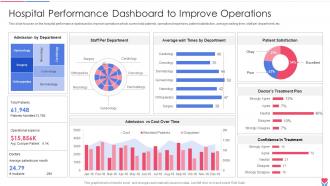
This slide focuses on the hospital performance dashboard to improve operations which covers total patients, operational expenses, patient satisfaction, average waiting time, staff per department, etc.Deliver an outstanding presentation on the topic using this Hospital Performance Dashboard To Healthcare Inventory Management System Dispense information and present a thorough explanation of Patient Management, Inventory Management, Facility Management using the slides given. This template can be altered and personalized to fit your needs. It is also available for immediate download. So grab it now.

FAQs for Hospital Performance Dashboard To Healthcare

Start with your basic stock levels - what you've got now, reorder points, how many days you're covered on critical stuff. Track turnover rates too because expired inventory is honestly the worst way to waste money. Cost metrics matter - total inventory value, carrying costs, usage patterns so you can spot weird trends. Stockouts are huge since they mess with patient care, and supplier lead times tell you when to panic. Oh, and set up alerts for when things hit reorder thresholds. You can always get fancier with analytics later, but nail these basics first.

So predictive analytics basically looks at your past usage data and patient patterns to forecast what supplies you'll need before you actually run out. COVID was a perfect example - those crazy demand spikes caught everyone off guard, but decent predictive models might've spotted the unusual patterns earlier. You can automate reorder points and stop wasting money on expired stuff sitting in storage. Plus no more scrambling when the OR suddenly needs something critical. Honestly, I'd start small though - just focus on your top 20% of expensive or must-have items first, then expand from there.

Honestly, expiration dates are gonna be your biggest headache. Medical stuff has crazy strict shelf lives and wasting expired pharmaceuticals gets expensive fast. Then you've got compliance requirements making everything 10x more complicated than normal inventory. Manual tracking is where things fall apart - supplies go missing, counts get messed up, especially when people grab stuff during emergencies without logging it. Real-time visibility across locations becomes impossible. My advice? Get automated barcode scanning set up and create alerts for expirations and low stock. It's the only way to stay sane with this stuff.

Honestly, real-time data is a game changer for catching shortages before they bite you. When the ICU suddenly burns through ventilators or the ER goes crazy busy, you'll know right away instead of finding out when it's too late. No more making decisions off some crusty spreadsheet from last week (ugh, been there). Your dashboard shows live inventory levels and demand patterns, so you can actually adjust purchasing as things happen. Oh, and definitely set up alerts for your critical stuff - way better than constantly scrambling to catch up when you're already behind.

Go with Tableau or Power BI - they're solid for healthcare dashboards. Custom React builds work too but honestly most teams overcomplicate this stuff. Your real-time ERP connection is what matters most. Get that nailed down first. Barcode scanning integration is clutch, plus you'll need automated alerts when stock runs low. Stock levels, expiration tracking, usage trends - start there. Don't try to build everything at once or you'll never launch the thing. Oh and make sure whatever platform you pick can actually talk to your current systems without being a nightmare.

Honestly, good inventory visibility is a game changer - no more scrambling when you realize you're completely out of something critical. Your staff won't waste time running around looking for supplies that aren't even there. Real-time stock levels mean you can actually see what's happening across departments. Rush orders are budget killers, so this helps you dodge those expensive emergency deliveries. The data lets you spot shortages coming before they hit. I'd start with your most critical supplies and set up those low-stock alerts first.

Inventory turnover shows how quickly you're burning through supplies - it's a solid gauge of financial efficiency. Low turnover? That cash is just sitting there doing nothing, which honestly makes finance people lose their minds. But push it too high and you'll get stockouts that mess with patient care. Different items need different speeds though. High-value stuff should move faster, while critical supplies need buffer room since you can't risk running out. I'd check it monthly and stack it against industry numbers to catch issues early. The sweet spot really depends on what you're stocking.

Honestly, the automated reorder alerts are game-changers - no more guessing when you're running low. You can see usage patterns across departments too, like how the OR burns through supplies during busy periods or when flu season hits. The predictive stuff is actually pretty solid now. I'd start with your most critical items first, then build from there. Set your min/max thresholds and it'll flag you when things get dicey. Plus you'll finally catch those slow-moving items that are just eating up storage space and budget. Way better than the old spreadsheet method we all used to suffer through.

First thing - get your data formats consistent across everything or you'll hate yourself later. Create a master dictionary that maps how each system labels products, locations, quantities, etc. APIs are your friend when they work, but honestly CSV imports can save you with stubborn legacy systems. Automated validation catches duplicates and weird outliers before they wreck your dashboard. Oh, and pick ONE system as the truth for each data type. Trust me on this - when the same product shows up three different ways, you need that single source to fall back on.

Honestly, if your healthcare dashboard isn't user-friendly, staff will just avoid using it - I've seen this happen so many times. Make sure critical stuff like expired items and stockouts jump out immediately. Nobody has time to hunt around a confusing interface when there's patients to deal with. Your team needs intuitive navigation and clear visual cues for low stock. Less time wrestling with clunky software means more time actually helping people. Oh, and definitely test it with real users first - you'll be surprised how differently they navigate compared to what you'd expect.

Start with hands-on sessions where people actually click through everything - PPE tracking, med expiry dates, whatever they'll use daily. Different roles need different training though, so don't make nurses sit through supply manager stuff. Quick reference cards are honestly a lifesaver because everyone forgets how to log in (I swear it happens every time). Check in with them regularly the first month to catch issues early. Let them mess around and break things in a practice environment first - makes it way less scary. The goal is getting them comfortable, not perfect right away.

Honestly, the easiest way is creating different views for each department. OR staff need to see surgical supplies and implants, pharmacy wants meds and controlled substances - that kind of thing. Emergency should focus on crash carts and trauma gear. Most systems let you adjust reorder points and stock levels based on how fast each department burns through stuff. Role-based access is clutch too - nobody wants to scroll through irrelevant inventory. I'd start by actually tracking what each department uses daily for like a week. Sounds boring but it'll save you from guessing wrong later. Then just build your dashboards around those patterns.

Ugh, there's honestly so much to keep track of - FDA regs, DEA stuff for controlled substances, plus whatever your state requires. Your system needs to flag expired meds and document everything properly for audits. Chain of custody is huge for controlled drugs. HIPAA comes into play too if you're dealing with patient-specific inventory. Each state's different and rules change all the time, which is annoying. I'd set up automated alerts for compliance deadlines - saves your sanity. Oh, and keep a checklist somewhere you won't lose it. Start by checking your current setup against FDA guidelines.

Honestly, those dashboards are lifesavers during emergencies. You get instant visibility into what PPE, meds, and equipment you actually have across all your locations - no more guessing games when things get crazy. The smart ones automatically reorder stuff when you hit certain levels, plus they help you move supplies around based on who needs what most. I learned this the hard way during our last shortage crisis. Set up alerts for your critical items right now, trust me. Way better than frantically calling around trying to figure out inventory when you're already swamped.

Honestly, AI and machine learning are game-changers for demand forecasting - way more accurate than the old methods. IoT sensors are getting dirt cheap now, so you can track temps and expiration dates automatically instead of doing it by hand. Blockchain's still overhyped for supply chains if you ask me, but RFID and smart shelves? Those will handle your counting and reordering without you lifting a finger. Oh, and don't rip out your whole system at once. Find stuff that plays nice with your current dashboard and build from there. Much less headache that way.

Ratings and Reviews

100% of 100
Review Form
Write a review
Most Relevant Reviews
  1. 100%

    by Cristopher Cole

    Attractive design and informative presentation.
  2. 100%

    by Dallas Medina

    Wonderful templates design to use in business meetings.

2 Item(s)

per page: