Identity and access management organizational framework

Identity and access management organizational framework
Slide 1 of 2

or

Favourites Favourites

Try Before you Buy Download Free Sample Product

Audience Impress Your
Audience
Editable 100%
Editable
Time Save Hours
of Time
The Biggest Sale is ending soon in
0
0
:
0
0
:
0
0
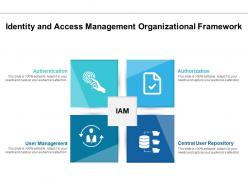
Presenting this set of slides with name Identity And Access Management Organizational Framework. This is a four stage process. The stages in this process are Identity Access, Management, Organizational Framework. This is a completely editable PowerPoint presentation and is available for immediate download. Download now and impress your audience.

People who downloaded this PowerPoint presentation also viewed the following :

FAQs for Identity and access

You'll want to focus on four main things: identity governance, authentication, authorization, and user provisioning. Governance handles who gets access to what. Authentication is the MFA and SSO stuff - making sure people are actually who they say they are. Then authorization controls what they can do once they're logged in. Honestly, most places I've seen totally botch the provisioning part because they're still doing everything manually. Also grab some privileged access management for your admin accounts. Oh, and set up regular access reviews - permissions pile up like crazy over time. Start with automating your user lifecycle stuff first though, it'll save you so much pain later.

So IAM basically handles all the access control stuff GDPR and CCPA want to see. People only get into the data they actually need for their jobs, which covers data minimization. Plus you get these detailed logs of who looked at what personal info and when - honestly, auditors eat that stuff up. The whole "privacy by design" thing? IAM helps with that too since you're building controls right into the system. And when someone wants their data deleted or asks who's been snooping around, those access logs become a lifesaver. Makes proving compliance way less stressful.

So MFA is basically like having multiple locks on your door instead of just one. Users have to verify themselves through different ways - password plus a text code, fingerprint, whatever. Passwords by themselves are honestly pretty worthless now with how often companies get hacked. Even if someone steals your login info, they'd still need access to your phone or face to get in. Most IAM systems these days make it super easy to set up too. I'd definitely turn it on for anything important - work stuff, banking, you know the drill.

So IGA is like the management layer sitting on your IAM setup - handles all the "who gets what access" decisions when you're dealing with tons of users. Your IAM does the actual login/permission stuff, but IGA covers policies, workflows, and compliance things. You know, access reviews, role management, segregation of duties - basically all that tedious compliance work auditors won't shut up about. It automates the manual identity processes that usually make security teams want to pull their hair out. Honestly, I'd start by looking at your current access review mess first - that's where you'll probably see the biggest improvement right away.

Honestly, the biggest pain points are complexity and getting people to actually use it. Legacy system integration is brutal - I swear some of these old systems are held together with duct tape and prayers. Users will complain about any login changes, guaranteed. Permission management becomes a mess when people switch roles constantly. Oh, and don't get me started on compliance requirements if you're in a regulated industry. My advice? Start with a small pilot group first. Get them on board early or you'll be banging your head against the wall trying to roll it out company-wide.

Dude, AI totally changes the game for IAM stuff. Your system starts learning how people actually behave - like when they log in, what devices they use, all that. When something looks sketchy, it flags it right away instead of you having to manually check everything. The cool part? Users get way less annoying prompts when they're doing normal stuff, but security tightens up automatically when things seem risky. Honestly, it's pretty slick - fewer password headaches and smarter logins. I'd start with behavioral analytics tools that plug into whatever you're already using. Way easier than rebuilding from scratch.

So basically, traditional IAM runs on your own servers while IDaaS lives in the cloud. IDaaS providers like Okta handle all the updates and scaling for you - honestly way less of a pain. You'll get automatic patches without your team staying up all night. Traditional IAM gives you more control but means you're stuck managing everything yourself. Most companies I know go with IDaaS now because who has time for that maintenance nightmare? Really comes down to whether your team can handle babysitting servers or if you'd rather focus on actual work.

Honestly, automate everything you can - onboarding, offboarding, the whole thing. Connect your role-based provisioning straight to HR so new people get the right access immediately. But here's where companies always screw up: offboarding. Like, someone quits and their accounts just... sit there forever? Set up workflows that kill access the second someone leaves or switches roles. Oh, and do quarterly access reviews - you'll be shocked how many zombie accounts are floating around. I know it sounds boring as hell, but think of it like good plumbing. When it works automatically, you never have to think about it.

When you're bringing people on, just give them the bare minimum access they actually need for their job. Set up automated stuff based on department/role, but make managers approve anything fancy. Offboarding's where things get sketchy though - most data breaches happen because someone forgot to cut off a former employee's access. Kill all their accounts immediately, grab their devices, revoke tokens, the works. Honestly, automate this part if you can. Connect it to HR systems so it happens automatically when someone leaves. Manual processes are how things slip through the cracks.

So basically federated identity management is like having a master key for all your work apps. Your company's system (like Active Directory) vouches for you with other platforms - AWS, Google, whatever you need. Once you log in, boom, you're authenticated everywhere. No more juggling 20 different passwords, which honestly used to drive me insane. The whole thing works through protocols like SAML and OAuth that let different services trust each other. Get it set up right and you'll never type another password again. Well, except for that one random app that still doesn't support it.

Honestly, bad IAM is like leaving your front door wide open. People end up with way more access than they actually need, which is how most internal breaches happen. Attackers love weak authentication too - once they're in, they just hop around your network freely. You can't track who's accessing what, so compliance becomes a total mess. I'd start by checking what permissions everyone actually has right now. Implement least-privilege access and you'll probably find tons of unnecessary access floating around. It's wild how much extra stuff people accumulate over time.

RBAC is your security lifeline - people only get access to what they actually need for their job. Instead of managing permissions for every single person, you create roles like "accountant" or "developer" and assign permissions to those. Way cleaner that way. When someone switches teams or quits, you just swap their role instead of tracking down twenty different permissions. Honestly, auditing becomes a breeze since you can see exactly what each role does. Without it you'll drown in permission requests and random security issues. Start by figuring out your common job functions first - that's the foundation.

So track your access request times, failed logins, privilege escalations, and how you're doing on audits. Quarterly reviews work pretty well for most places. Users will definitely tell you when stuff's broken - honestly they're your best feedback source since they deal with this daily. Compare against industry standards and your own past data to catch trends. The whole point is fewer security incidents while making legitimate access easier. Oh, and don't go overboard measuring everything right away. Pick like 3-5 core metrics first and actually stick to tracking those consistently.

Honestly, moving to cloud completely throws your IAM setup out the window. You're suddenly juggling identity management across multiple environments instead of just your old on-prem stuff. It's a pain, but you'll have to dive into federated identity and zero-trust - which sounds scarier than it actually is. The access controls get way more complicated too. At least the major cloud providers have pretty solid IAM tools already baked in. My advice? Map out your current user access first and figure out what systems actually need to connect. Trust me, doing that homework upfront will save you so many headaches down the road.

So blockchain lets you actually own your digital identity instead of depending on Google or Microsoft to prove who you are. Your credentials live on this distributed ledger that you control - no middleman needed. It's honestly pretty cool once you wrap your head around it. You get faster verification and way better privacy. Plus smart contracts can automatically handle access permissions based on what's happening in real time. I'd definitely start looking into self-sovereign identity solutions now. They're moving from tech buzzword to actual reality faster than I expected, and most companies are still sleeping on it.

Ratings and Reviews

0% of 100
Review Form
Write a review
Most Relevant Reviews

No Reviews