Market Procurement Cost Report Dashboard With Top Suppliers
Try Before you Buy Download Free Sample Product
Audience
Editable
of Time
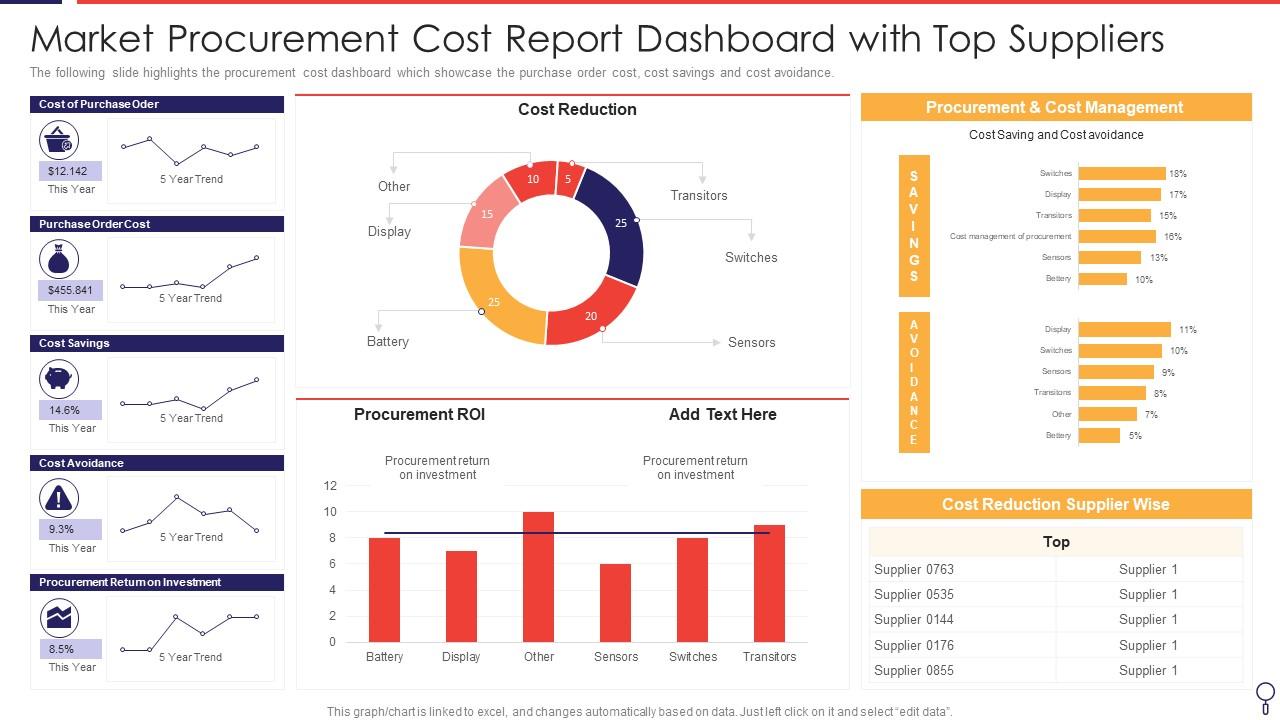
The following slide highlights the procurement cost dashboard which showcase the purchase order cost, cost savings and cost avoidance.
People who downloaded this PowerPoint presentation also viewed the following :
Market Procurement Cost Report Dashboard With Top Suppliers with all 7 slides:
Use our Market Procurement Cost Report Dashboard With Top Suppliers to effectively help you save your valuable time. They are readymade to fit into any presentation structure.
FAQs for Market Procurement Cost Report Dashboard
Definitely focus on cost savings first - both what you've actually saved and projected numbers. On-time delivery rates are huge too, along with contract compliance percentages. I'd throw in spend under management and how long your PO cycles are taking. Supplier diversity might matter depending on your company. Oh, and risk stuff is super important - like tracking supplier financial health because nobody wants that surprise bankruptcy headache! Honestly though, don't go crazy with metrics. Start with maybe 6-8 solid KPIs that actually help you make decisions. You can always add more later.
Honestly, procurement dashboards are game-changers for supplier stuff. You get real-time data on who's delivering on time, meeting quality standards, contract compliance - all that good stuff. The best part? You can catch problems early instead of scrambling later. Set up alerts for the important metrics so you're not glued to your screen all day. I'd focus on delivery performance and quality scores first - those two will completely change how you deal with suppliers. Oh, and having actual numbers during contract talks instead of just winging it? Total power move. Way better than the old "hope everything's going okay" approach.
Honestly, data viz is a game changer for procurement stuff. You'll actually see what's happening instead of drowning in endless Excel rows - trust me on this one. Spotting trends becomes instant. Same with finding problem suppliers or weird spending patterns. Clean dashboards beat messy ones every time, obviously. Focus on your top 3 KPIs first rather than cramming everything in there. I learned this the hard way after building dashboards that looked like airplane cockpits. Start simple, then add more later if you need it.
Dude, real-time data is seriously worth it for procurement. Instead of working off last week's stale reports, you're seeing actual price changes and supplier hiccups as they happen. Your inventory numbers actually mean something too. I used to waste so much time with outdated spreadsheets - honestly such a pain. Now when market prices shift or a supplier's running late, you can jump on it fast and negotiate better. My advice? Start small with your 3 biggest data sources first. Don't go nuts trying to connect everything at once or you'll hate yourself.
Honestly, I'd go with Power BI or Tableau first - they play nice with ERP systems and handle procurement data without much fuss. Excel with Power Query works too if you're comfortable there (I know, I know, but it's actually decent for basic stuff). Short sentences hit different sometimes. SAP Analytics Cloud is solid if you're already locked into their world, same with Oracle's tools. But here's the thing - whatever licenses your team already has is probably your best bet. Getting clean data flowing matters way more than the fancy dashboard tool you pick.
Here's the thing - if your procurement dashboard looks like a hot mess, nobody's gonna use it. Period. Clean layouts and smart filtering are clutch for helping people find stuff without wanting to throw their laptop out the window. Let users customize their view based on their role too. I've literally watched teams ditch perfectly good dashboards because navigating them felt like solving a puzzle. Don't make people think too hard about where to click. Run user tests early (like, really early) so you can fix the annoying bits before everyone gives up on it.
Honestly, data integration is gonna be your biggest headache. All your procurement info is probably spread across systems that hate talking to each other. Getting everything flowing cleanly into one dashboard? That's some serious IT heavy lifting right there. People will fight you on it too - stakeholders get weird about new tools and question whether the data's even accurate. Plus decent dashboard software costs real money. I'd say start with just one metric, something simple. Get a quick win to prove it works, then build from there once everyone stops being paranoid about it.
So basically you can use predictive analytics to forecast demand and spot supplier risks before they blow up. The dashboard shows which suppliers might have delays based on past data and seasonal stuff. Honestly, I think the early warning alerts are the best part - you'll catch cost overruns and quality issues way ahead of time. Historical trends help predict price swings too, which is huge. Just make sure you set up automated notifications so you're not constantly checking. It's pretty much like having a heads up on everything that could go wrong with your suppliers.
Okay so here's the thing - ask each group what decisions they're making every week, then work backwards from there. Executives just want the high-level stuff: cost savings, supplier trends, that kind of thing. Procurement managers need way more detail - spend breakdowns, contract statuses, all that nitty gritty data. Finance teams are honestly the worst about this - they'll ask for budget variance reports even if you give them everything else under the sun! Set up different landing pages for each user type. Don't dump operational details on C-suite folks who can't do anything with them anyway. Role-based filters are your friend here. Match the permissions to what people actually need to see.
Look, these dashboards basically show you where your money's actually going in real-time. Super helpful for catching overspending before it gets out of hand. You'll spot which suppliers are worth keeping around and which ones are just smooth talkers who don't deliver. Plus you can see all that random spending that happens when people buy stuff off-contract (happens way more than you'd think). Best part? Once you start doing monthly reviews with your team using real data instead of guesswork, you can push for better deals with vendors. Most companies find 5-10% savings pretty quickly.
Start with your ERP - that's got all your POs, invoices, and contracts. After that, add supplier performance data and market pricing feeds. Your inventory system matters too, obviously. If you're running Ariba or Coupa, definitely connect those since they've got the freshest workflow stuff. Honestly, most people go crazy with fancy dashboards right away, but you need solid transactional data first. Then pile on the contextual stuff - spend analytics, supplier risk databases, whatever helps you actually decide things instead of just staring at graphs. Pretty charts don't buy anything.
Oh man, procurement dashboards are honestly game-changers. You get real-time visibility into your compliance status and all the risk stuff across purchasing activities. Instead of digging through endless spreadsheets (ugh), everything's right there - vendor certifications, contract expirations, spend limits, policy violations. It flags problems before they hit you. Like when you're getting close to budget caps or accidentally working with sketchy suppliers. The automated audit trails are clutch too - no more panic when reviews pop up. Just set alerts for the critical metrics and you'll spot issues way earlier than usual.
Start with the basics - spend tracking in real time, approval workflows, and supplier metrics. That's what people actually check on their phones. Navigation needs to be dead simple because scrolling through menus on mobile is the worst. Push notifications for urgent approvals are a must-have. Oh, and don't forget basic search/filter stuff - seems obvious but you'd be surprised how many apps mess this up. Keep everything fast and clean looking. Honestly, test these core features with real users first before getting all fancy with extra bells and whistles. They'll roast you if something doesn't work right, but they'll also tell you exactly what's missing.
Honestly, looking at your historical data is a game changer for buying decisions. You'll start seeing spending patterns and which suppliers actually show up on time vs the flaky ones. Seasonal price swings become super obvious too - like, why didn't I notice office supplies always spike in August before? Pull your last 12 months of records and just scan for trends. The dashboard helps you time those big bulk orders when prices usually drop. Plus you can use past contract performance as ammunition when negotiating. Trust me, patterns will jump out that you never expected.
You need automated validation rules and regular audits to catch errors early. Connect straight to your source systems - manual Excel uploads are where good data goes to die, trust me. Set up real-time syncing when you can, plus alerts for weird stuff like duplicates or missing vendor info. Also get clear ownership established so someone's actually responsible for each data area. The trick is building these checks right into your workflow instead of playing cleanup later. Way easier to prevent bad data than fix it after it's already screwed up your reports.
-
I've been looking for a good template source for some time. I'm happy that I discovered SlideTeam. Excellent presentations must try!
-
The pricing page of this website is very sorted. I felt no pain while buying the PPTs.