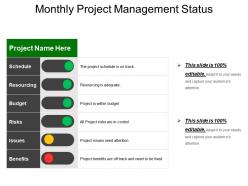
Monthly project management status example of ppt

Rating:
87%
Monthly project management status example of ppt
Slide 1 of 5
Favourites Favourites

Try Before you Buy Download Free Sample Product

Audience Impress Your
Audience
Editable 100%
Editable
Time Save Hours
of Time
The Biggest Sale is ending soon in
0
0
:
0
0
:
0
0
Rating:
87%
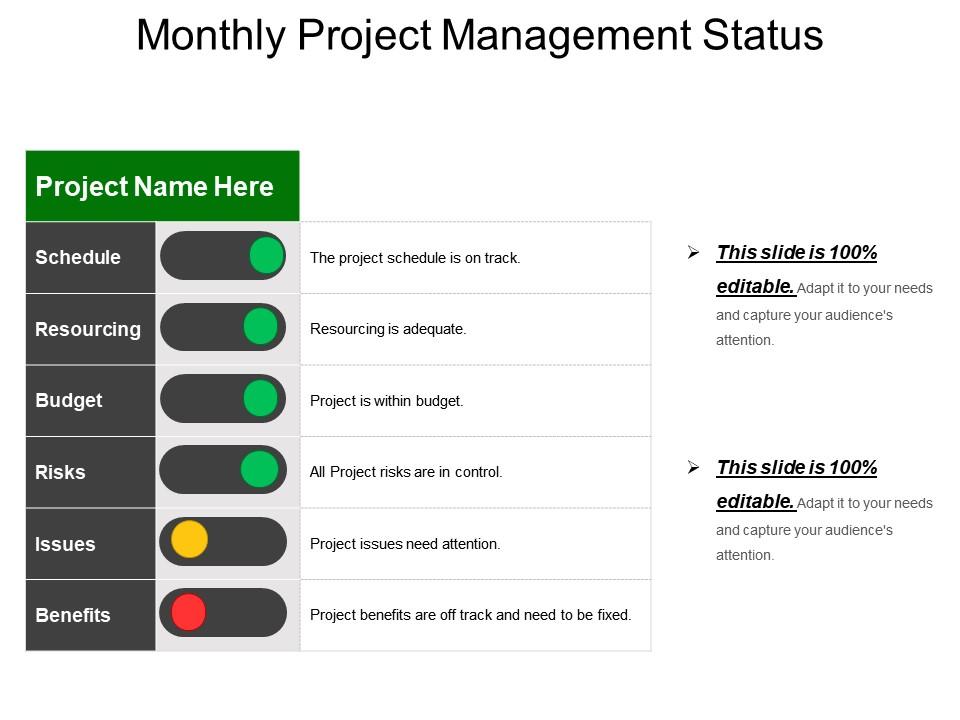
Presenting this Monthly Project Management Status Report PPT slide. This presentation table has been professionally designed and is fully editable in PowerPoint. You can customize the font type, font size, font style, colors of the diagram, and background color as per your requirement. It is easy to insert your company name and logo in the slide. The template is available in both standard screen size (4:3) and widescreen size (16:9). You can replace the dummy content in text placeholders with your presentation content. The slide is fully compatible with Google slides and can be saved in JPG or PDF format without any hassle. High quality graphics and icons ensure that there is no deteriorating in quality on enlarging their size. Fast download at click of a button.

People who downloaded this PowerPoint presentation also viewed the following :

FAQs for Monthly project management status

Here's what I'd put in there - current project health, what you knocked out this period, and what's coming up next. Blockers and risks are huge too, don't skip those. Budget and timeline updates are honestly my favorite part because stakeholders eat that stuff up. Call out any decisions leadership needs to make and flag dependencies on other teams. You want everyone to get the full picture fast. No one has time to wade through a novel, you know? Keep each chunk tight and focus on the stuff that actually moves things forward. Works every time.

Honestly, weekly is the sweet spot for most projects. Fast-moving stuff might need twice a week, and during crunch time I've seen teams do daily updates. Monthly works if it's a slower, long-term thing. But here's what I've learned - don't go overboard with reporting frequency. I watched one team burn themselves out doing daily reports when weekly would've been totally fine. You'll end up spending more time writing updates than actually working. Start weekly and see how stakeholders react. If they're constantly asking for more info between reports, bump it up. Just stay consistent so people know what to expect.

Schedule variance, budget variance, and scope completion - those are your bread and butter metrics. Track risks and blockers too because they'll bite you if you ignore them. Stakeholders eat up those red/yellow/green status dots, even though they seem kinda basic. Pick maybe 3-5 metrics tops and don't change them every week or people get confused. The whole point is telling the story of where you're at and where you're going. Oh, and consistency across reports is huge - nobody wants to relearn your dashboard every time they look at it.

Honestly, just tell people what they actually need to know - nobody reads those massive updates anyway (learned that one the hard way!). Bullet points are your friend. Put the big stuff first - hit a deadline? Major problem? Say it right up front. Keep sections simple: what's happening, what's broken, what's next. Skip the jargon unless you're only talking to techies. I always read mine out loud now because you'll catch all the wordy bits that way. Short sentences work great. Then mix in some longer ones so it doesn't sound robotic.

Honestly, visual tools are a game changer for status reports. Microsoft Project and Asana do great Gantt charts if you need timelines. Power BI is my personal favorite though - makes everything look so clean it's almost addictive. Tableau works too but it's pricier. Quick option? Trello's kanban boards are super easy to digest. Monday.com is solid if your team likes colorful interfaces. The real trick is matching whatever your stakeholders will actually open and understand. Don't overthink it - pick one tool that fits how your team works instead of cramming in features you'll never touch.

So I always tailor what I share based on who's asking. Executives just want the big picture stuff - budget, major risks, timeline shifts. Skip the tiny delays that don't matter. Your team needs all the detailed task info and what's blocking them. Clients? They're in the middle - show progress and how problems affect them, but leave out internal chaos. Honestly, I just write one main report then copy different parts for each group. Oh and always start with whatever's keeping them up at night, then add the supporting details after.

Don't be vague - "things are fine" tells nobody anything useful. Also avoid writing a freaking novel (learned that one the hard way). If you're behind or over budget, just say it straight up and explain your plan to fix it. Write like you're talking to actual people, not robots. Oh, and always be super clear about what you need from them - decisions, money, approvals, whatever. People can't help if they don't know what you want. Honestly, half the battle is just being direct about problems instead of dancing around them.

Honestly, just focus on three key things: what could go wrong, how likely it is, and how badly it'd mess up your project. I'm obsessed with the traffic light thing - red, yellow, green for risk levels because executives love anything they can scan quickly. Don't write essays about each risk either. Bullet points or tables work way better since people actually read those. Oh, and always include what you're doing to prevent each problem from happening. The biggest thing though? Update the status every single time you report. People need to see if risks are improving or getting worse, otherwise what's the point of tracking them at all.

Honestly, you can't get good status reports without your whole team chipping in. Flying solo as a PM? Recipe for disaster - I've seen reports that were basically creative writing exercises lol. Get everyone sharing blockers and progress regularly through standups or whatever works. Short check-ins beat long meetings any day. Set up some kind of rhythm so updates become automatic, not something people forget about. Maybe a shared dashboard or just consistent touchpoints. Without real input from your team, you're just guessing at project health.

Honestly, status reports work because they put everyone's work out in the open. People hate looking bad in front of the team, so when they know their progress will be documented and shared around, they actually follow through on stuff. Put names next to each task - nobody wants to be the person with red status every week, trust me. The trick is staying consistent with when you send these out and actually doing something about the blockers people mention. Don't just track what got done either. Track what people promised they'd do versus reality. That's where the real accountability kicks in.

Show three things for each milestone: name, target date, and status. Traffic light colors work great - green/yellow/red. Executives eat that up for some reason. Add quick notes about any delays or risks, but keep them short. Always include your next 2-3 milestones so everyone knows what's ahead. Here's the thing though - don't just dump everything chronologically. Pick the critical path stuff that actually moves the needle. Focus on dates people can remember and won't forget about next week.

Honestly, those status reports are goldmines if you actually dig into them. Look for patterns - same bottlenecks popping up? Time to shuffle resources or change your approach. Stakeholder feedback is huge too, they'll usually flag scope creep or misaligned expectations way before it explodes. I mean, I've watched PMs just file these reports away without really reading them, then act shocked when projects derail. Don't be that person! Set up like a 10-minute review after each report to spot what needs fixing. Think of them as your early warning system, not busy work.

Ugh, been there! Start by figuring out what went wrong - bad timeline estimates, scope getting out of hand, or just not enough people/budget? Once you know, update your plan with actual realistic dates. I know it sucks, but you gotta tell stakeholders ASAP. Trust me, they hate surprises way more than delays. Then brainstorm your options - more resources, cutting features, running stuff in parallel? The trick is coming to them with both the bad news AND a solid plan to fix it. Nobody can argue with transparency plus solutions.

Honestly, status reports are a game-changer for keeping stakeholders happy. They stop the endless "what's the update?" Slack messages - trust me on this one. Regular updates on progress and roadblocks make people feel included instead of forgotten. Make them easy to scan though, nobody wants to read a novel. I learned this the hard way, but adding a "what I need from you" section at the bottom actually gets people engaged. Suddenly it's not just broadcasting info into the void. Stakeholders can give better input when they're not confused about what's happening too.

So for agile stuff, go with visual dashboards - Kanban boards, burndown charts, anything that shows progress and roadblocks instantly. Traditional projects? Stick with formal written reports covering budget, timeline, risks, all that fun stuff. Here's the thing - agile reports are constantly changing (daily standups are basically micro status updates). Traditional ones are more like formal snapshots you take every week or month. Also depends on your stakeholders. Some execs still love those shiny PowerPoint presentations, which honestly can be a pain to create. Bottom line: match your format to what you're doing and who's reading it, but keep it clear above all else.

Ratings and Reviews

87% of 100
Write a review
Most Relevant Reviews
  1. 100%

    by Jones Cook

    Great experience, I would definitely use your services further.
  2. 100%

    by Cliff Jimenez

    Excellent Designs.
  3. 60%

    by Werner V

    ok

3 Item(s)

per page: