

Performance testing bottlenecks and challenges ppt sample file




Try Before you Buy Download Free Sample Product
 Impress Your
Audience
 100%
Editable
 Save Hours
of Time


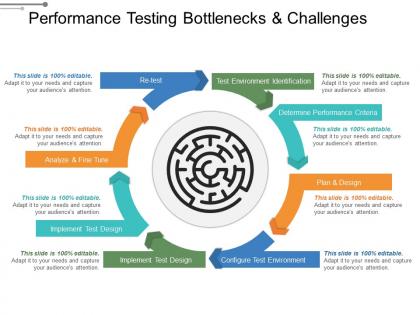
The performance testing PowerPoint slide describe is perfect to describe that it is a non-functional testing technique that usually performs to find the system parameters in terms of responsiveness as well as stability under the various workload. A user can use the performance testing tool presentation template to illustrate it measures the quality attributes of the system, like scalability, reliability, resource usage, etc. The performance testing techniques PPT slide is suitable for the presenter to highlight different techniques such as load testing, stress testing, soak testing, and spike testing. By using the performance testing attribute slide design for PowerPoint, you can share different attributes of performance testing like speed, scalability, stability, reliability, and many more. The performance testing bottleneck PPT slide is suitable for a presenter to make viewers understand that determining bottleneck is the ultimate goal of a performance tester. The bottleneck performance tester PowerPoint template explains that every time a performance issue gets fixed, another bottleneck could emerge, as well as several performance tests are going to take place until the overall performance is best for the end customer. Impressions get better due to our Performance Testing Bottlenecks And Challenges Ppt Sample File. Your image will get a definite boost.
People who downloaded this PowerPoint presentation also viewed the following :
Performance testing bottlenecks and challenges ppt sample file with all 5 slides:
Our Performance Testing Bottlenecks And Challenges Ppt Sample File are a good guide. Find the correct alignment for your thoughts.


FAQs for Performance testing bottlenecks and challenges
So basically you're trying to see if your app can handle normal user traffic without dying. Response times are huge - nobody wants to wait forever for pages to load. You'll catch bottlenecks before your users start complaining (and oh boy, will they complain). These tests show you exactly where things break down and help spot memory leaks early. Also figure out your system's limits so you're not flying blind. Honestly, the biggest mistake is waiting until launch to test this stuff. Run them throughout development or you'll hate yourself later when everything's on fire.
So basically load testing shows you where your app craps out when users actually hit it hard. You crank up the pressure and watch what breaks first - could be your database choking on queries, APIs timing out, memory going crazy, whatever. Think of it like finding the weak link before everything falls apart in production (learned this the hard way lol). The cool part is getting real numbers on response times and how much traffic you can actually handle. Just start with your main user flows and keep ramping up the load until stuff starts failing.
JMeter's probably your best starting point - it's free, handles most stuff you'll throw at it, and there's a million tutorials online. LoadRunner's solid but costs a fortune. k6 is pretty sweet if you're into JavaScript, and Gatling has nice reports (though it's Scala-based). Artillery and Apache Bench work fine for basic tests too. Look, I've watched teams spend forever picking the "perfect" tool instead of just testing their damn app. JMeter's got a huge community and works well enough for beginners. Pick whatever matches your budget and tech stack, then actually start load testing. The tool matters way less than people think.
So load testing is basically "can we handle Black Friday traffic?" - you're checking if your system works under normal peak loads. Stress testing though? That's when you crank it up to like 10x that traffic just to see where everything breaks. I'd run load tests pretty regularly, especially before big releases. Stress testing is more for when you need to figure out what'll actually kill your app and how it recovers afterward. Honestly, stress testing can be kinda fun in a destructive way - you get to break things on purpose and see what happens.
Response time, throughput, and error rates are your big three - they'll show you what users actually experience. CPU and memory usage matter too for spotting bottlenecks. Database query times can kill performance if you're not watching them. Network latency is annoying but super important for distributed stuff. Track how many concurrent users you can handle and when things start falling apart. Honestly, setting up dashboards saves so much time compared to digging through logs later when something breaks. Oh, and don't sleep on monitoring how gracefully your app degrades under pressure.
So basically virtual users copy what real people do on your site - logging in, clicking around, filling out forms, all that stuff. You can set them up with realistic delays between actions and different connection speeds too. The crazy part is you can run hundreds or thousands at once to really stress test things. I'd start with your most popular user flows first since those matter most. Then you can add more complex scenarios that match how people actually use your site. Think of them as fake users that act just like the real ones, except way more of them hitting your system at once.
Honestly, performance testing is like having insurance for your code - catches the bad stuff before users see it. I'd weave it into every part of your pipeline. Run basic tests during development so you're not blindsided later. Your CI/CD should automatically validate performance with each build. Then do final checks in staging. The whole "shift left" thing actually works - test early instead of panicking at launch (been there, not fun). Even just automating your most critical load tests in CI will save you so much stress. Trust me on this one.
Honestly, performance testing is a lifesaver because it catches all the annoying stuff - slow loading, crashes, bottlenecks - before your users hit it. You'll want to test under real conditions like heavy traffic or crappy wifi. That way you can fix what would make people bounce immediately. I mean, we're all pretty impatient with slow apps these days, right? Different scenarios help you spot problems that kill smooth interactions and response times. Oh, and definitely start with your most important user flows first - don't try to test everything at once or you'll go crazy.
Dude, the biggest pain points are usually environment mismatches, crappy test data, and figuring out where things actually break. Your test setup never really mirrors production - I learned this the hard way last year. Try matching hardware specs and network conditions as closely as you can. Synthetic data acts totally different from real user patterns, so that'll mess with your results. Finding the actual bottleneck? Good luck with that - it's brutal sometimes. Start with APM tools, set baselines early, and test stuff incrementally instead of going crazy all at once.
Honestly, figure out your scaling goals first - that's gonna drive everything else. Building for massive user spikes? Then you need serious load testing with realistic traffic patterns. More predictable growth? Basic performance tests will do the trick. I always think it's kinda pointless to test for a million users when you'll probably never hit that number, you know? Short bursts work fine for some scenarios. Match your test cases to what you'll actually face, then see if your architecture can handle it.
Testing early saves you major headaches later - trust me on this one. Set realistic performance goals based on what users actually need, not some arbitrary "faster" target. Your dev environment is probably way too clean compared to production, so test with real data volumes and network conditions. Critical user flows should be your first priority. Response time, throughput, and resource usage are the metrics that matter most. Oh, and automate these tests to run with builds - otherwise you'll catch problems way too late. Don't try testing everything at once though.
Honestly, cloud performance testing is a game changer. You can simulate thousands of users hitting your system from different locations without buying a ton of servers that'll just collect dust. The whole thing scales up instantly when you need it. What I love is you only pay for actual usage instead of maintaining hardware 24/7. Your team can jump in from anywhere too, which makes collaboration way smoother. Oh, and definitely try a small test run first - you'll be surprised how much better the data looks compared to your current setup.
Yeah, you definitely need those performance benchmarks set before you start testing. Otherwise you're just collecting random data with no clue what "good" actually looks like. I learned this the hard way - spent ages testing stuff only to realize I was measuring completely useless metrics. Response times, throughput, error rates... figure out what matters for YOUR users first. Business requirements too, obviously. But honestly? Most teams skip this step and wonder why their testing feels pointless. Set your pass/fail criteria upfront and you'll actually know if you're winning or not.
Honestly, performance testing is clutch for figuring out your capacity needs. Instead of just guessing, you get real numbers showing exactly when stuff starts falling apart - like at 1000 users or when CPU hits 80%. Way better than crossing your fingers and hoping for the best. Test different scenarios so you catch bottlenecks before they screw you over in production. Then you'll actually know if you need more servers or a beefier database. I always simulate future load then tack on 20-30% extra because things never go perfectly to plan.
Honestly, just bake performance tests right into your CI/CD so they run with every build. Most teams screw this up by using crappy test data - mirror production as closely as you can. JMeter, k6, or Gatling work great for scripting different user scenarios. Don't just test peak load either, mix up the patterns. Figure out your baselines and what counts as "failure" before you start. Oh and definitely begin with simple smoke tests first, then build up from there as you get the hang of it.
-
Enough space for editing and adding your own content.
-
Professional and unique presentations.