Project management gantt chart duration budget ppt summary example introduction

Project management gantt chart duration budget ppt summary example introduction
Slide 1 of 5
Favourites Favourites

Try Before you Buy Download Free Sample Product

Audience Impress Your
Audience
Editable 100%
Editable
Time Save Hours
of Time
The Biggest Sale is ending soon in
0
0
:
0
0
:
0
0
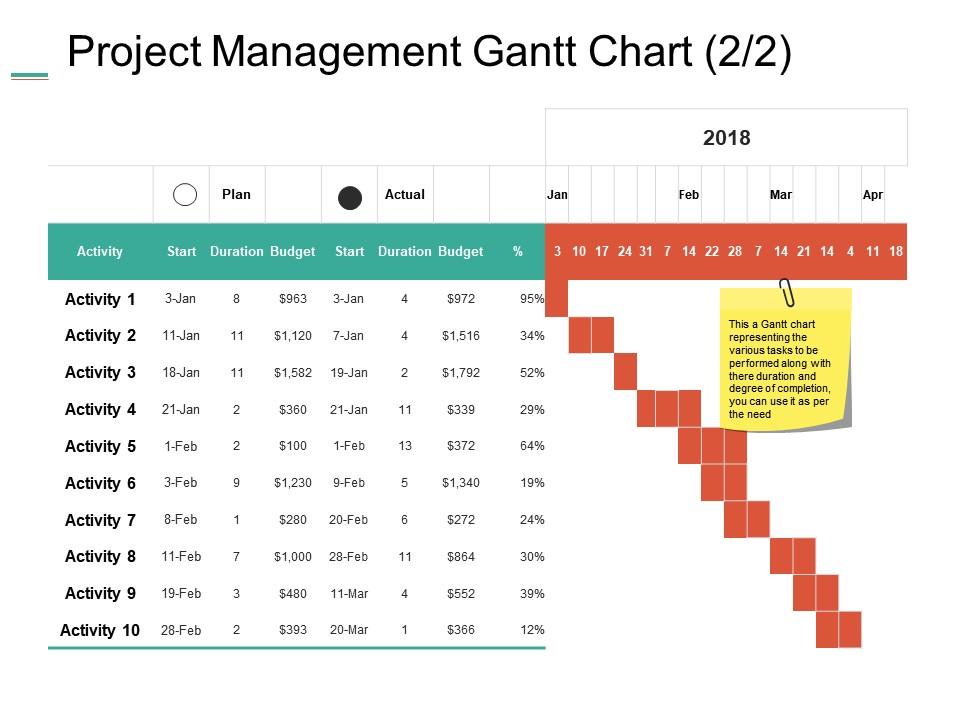
Presenting this set of slides with name - Project Management Gantt Chart Duration Budget Ppt Summary Example Introduction. This is a two stage process. The stages in this process are Activity, Budge, Planning, Strategy, Marketing.

People who downloaded this PowerPoint presentation also viewed the following :

FAQs for Project management gantt chart duration budget ppt

So basically a Gantt chart is just a visual timeline showing when your project tasks start, finish, and how they connect. Those horizontal bars make everything way clearer than spreadsheets (trust me on this one). You'll spot bottlenecks super fast and see which stuff can happen at the same time. Dependencies are the real game-changer - if something runs late, you know exactly what else gets screwed up. Even throwing together a basic one in Excel helps tons. My manager swears by them now after I showed her how much easier planning got.

Honestly, Gantt charts are game-changers for team communication. Everyone can see who's responsible for what and when things are due - no more awkward "I thought you were doing that" conversations. Dependencies become super obvious too, which is clutch for avoiding those annoying bottlenecks. I update mine every week (usually Fridays when I'm procrastinating other stuff) and drop it in our team Slack. Way better than sitting through endless status meetings where people just repeat what's already written down somewhere. You'll actually know what's happening without bugging your teammates constantly.

You need tasks with start/end dates, dependencies between them, and progress tracking. Dependencies are huge - they show which tasks can't begin until others wrap up. Miss those and everything falls apart fast. Add milestones and who's assigned to what. Your chart should display horizontal bars across the timeline showing task duration. Critical path matters too since it reveals your project's backbone. Most tools let you throw in comments which is handy. Oh, and don't go crazy with your first chart - keep it basic until everyone gets how to read these things properly.

Honestly, it totally depends who you're talking to. Executives? Just hit the big milestones and deliverables - they don't want the weeds. Your actual team needs the nitty-gritty though, like weekly or daily stuff so nobody's confused about what they're supposed to be doing. Early on, broad strokes are fine. Don't go crazy mapping every single email (learned that the hard way). Get closer to go-time and you'll want more detail. Here's what works for me: if something takes longer than however often you report progress, break it down more. Start big picture, then drill down where things get murky.

Honestly, Microsoft Project is amazing if you're managing big complex stuff, but it's way too much for most people. I'd probably go with Asana first - super easy to use and you'll have something up in like 30 minutes. Monday.com is solid too. TeamGantt has a free version that's decent, or you could even just use Excel if you're into that whole spreadsheet life (though it's kind of a pain). Really depends what you're trying to track, but Asana's my go-to recommendation.

Yeah for sure! I mean, they weren't really meant to go together originally, but tons of teams make it work now. What I'd do is use the Gantt for your big picture stuff - like mapping out sprints and major releases on a timeline. Then just stick with your normal sprint boards for the nitty-gritty daily work. Tools like Jira actually handle this pretty well these days (Monday.com too). Don't try cramming every single user story into the Gantt though - that's where people usually mess up. Keep it high-level for milestones, then dive into your regular Scrum stuff for execution.

So basically you just draw arrows between tasks to show what needs to happen first. Most tools let you drag and drop to connect them - honestly took me forever to figure that out the first time lol. The cool part is when you change one task's timeline, everything else shifts automatically. No more sitting there with a calculator trying to figure out new dates. I'd say spend some time upfront mapping out your critical dependencies though, because those are the ones that'll completely screw your timeline if something goes wrong. Trust me on that one.

Honestly, most people mess up by making it way too complicated. Don't cram every tiny task in there - it gets messy super quick. Also, you gotta update the thing regularly or it's basically useless (learned that the hard way lol). Dependencies are huge too - if you miss those, your timeline will be completely off. Oh, and we're all guilty of this - being way too optimistic about how long stuff takes. I'd rather overestimate and finish early than scramble at the end. Stick to the big milestones instead of micromanaging every detail. Keep it simple, keep it current.

Gantt charts are clutch for resource planning - they show you exactly when tasks need people or equipment. Spot the conflicts before they blow up your timeline. No more "oh crap, Sarah's already assigned to three things that week" disasters. Plus you can see gaps where resources are just sitting around doing nothing. Honestly, I probably rely on mine too much, but whatever works right? When someone calls in sick or priorities change, the visual makes it dead simple to shuffle assignments. Short version: catch your bottlenecks early and keep your team's workload balanced.

Honestly, Gantt charts are a game-changer for time estimates because they make you actually think through each task step-by-step. Breaking everything down visually helps you catch those sneaky dependencies that'll mess up your timeline - I learned this the hard way on my last big project. You can spot bottlenecks before they happen and see which tasks can run at the same time instead of one after another. Plus it's way easier to compare against similar stuff you've done before. The buffer time thing becomes obvious too when you see it all mapped out. Try it on your next project and you'll probably realize your estimates were way off in some areas.

Update it weekly or when big stuff changes. I track real progress by tweaking those completion percentages and shifting dates around. Dependencies are crucial - when one thing gets delayed, everything else falls like dominoes (trust me on this one). Most PM tools nowadays have decent real-time features that make updates less painful. Honestly, consistency is what matters most. Set a calendar reminder or you'll end up with some dusty chart nobody looks at. Short sentences work. Longer ones help break up the rhythm and keep people actually reading instead of skimming past important details.

Honestly, Gantt charts are pretty great for catching risks before they bite you. When you can see all your task dependencies laid out, it's way easier to spot where things might go sideways. Like if one task gets delayed, you'll immediately see which other tasks are gonna get screwed over too. Resource conflicts become super obvious too - suddenly you realize Sarah's supposed to be doing three things at once next week, which obviously won't work. I always pull mine up during planning meetings and run through different disaster scenarios. Then you can pad your critical tasks with some buffer time.

Gantt charts are actually pretty flexible - you can tweak time scales, task categories, and colors to fit whatever you're working on. Construction projects work well with phases like permits, foundation, framing. Software teams love showing sprints and testing cycles. Marketing campaigns? Perfect for launch dates and campaign phases. Honestly, I've seen people get creative with the visual stuff too. Different colors for priority levels, resource allocation columns, budget tracking - whatever makes sense for your workflow. The trick is just figuring out how your project naturally flows, then mapping that to the timeline format. Way more customizable than most people realize.

Gantt charts get messy fast on complex projects. Dependencies are a nightmare - change one thing and you're manually fixing everything that comes after. Super annoying. They don't show if you've accidentally double-booked someone either, which I've definitely done before. Resource conflicts just aren't visible. Time gets all the focus but what about budget constraints? Or quality stuff? They're honestly perfect for straightforward projects though. Just pair them with resource planning tools when things get complicated.

Color coding is your best friend here - use it to show different phases, teams, or priorities so people get it instantly. I always go bold for critical path stuff because it actually grabs attention. Throw in some icons for milestones and major deliverables, makes spotting key dates super easy. Progress bars beat having percentages scattered everywhere, trust me on that one. Just don't go crazy with colors or you'll end up with something that looks like a kids' art project. Stick to 3-4 colors max and make your legend crystal clear.

Ratings and Reviews

0% of 100
Write a review
Most Relevant Reviews

No Reviews