Project Management Timeline With Capacity Planning
Try Before you Buy Download Free Sample Product
Audience
Editable
of Time
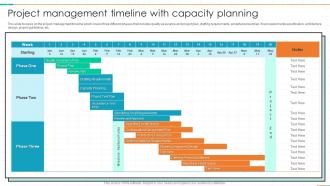
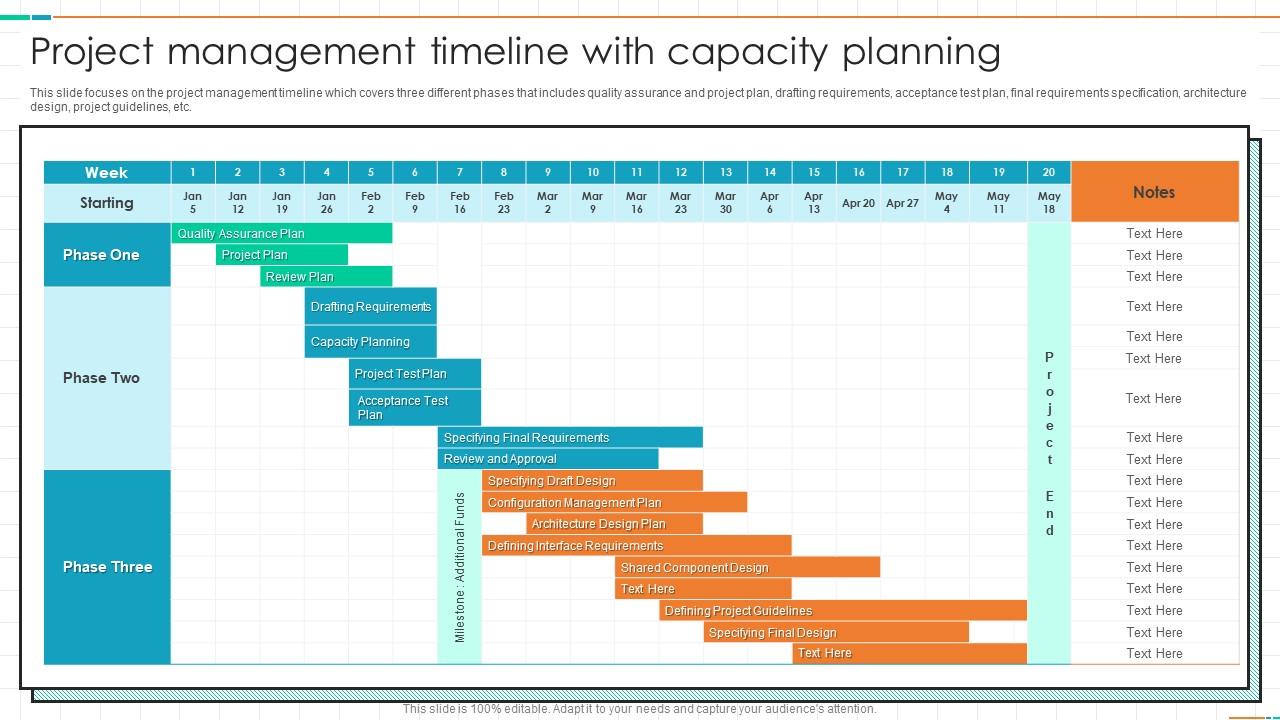
This slide focuses on the project management timeline which covers three different phases that includes quality assurance and project plan, drafting requirements, acceptance test plan, final requirements specification, architecture design, project guidelines, etc.
People who downloaded this PowerPoint presentation also viewed the following :
Project Management Timeline With Capacity Planning with all 6 slides:
Use our Project Management Timeline With Capacity Planning to effectively help you save your valuable time. They are readymade to fit into any presentation structure.
FAQs for Project Management Timeline
Honestly, start with your big deadlines and work backwards - that's the only way to catch everything. You'll need clear milestones, realistic dependencies between tasks, and figure out who's actually available when. Seriously, I can't tell you how many projects I've seen crash because someone forgot Sarah was out for her wedding that week. Build in buffer time because something always goes sideways. A simple Gantt chart works great, or even just a spreadsheet if you're not feeling fancy. The visual really helps keep everyone on the same page.
Dude, Gantt charts are seriously game-changers for project timelines. They basically show everything happening at once - tasks, deadlines, who's doing what. The visual bars make it so obvious when things overlap or you're about to miss a deadline. Way better than staring at endless task lists, trust me. You can spot bottlenecks before they screw you over, and honestly? Your boss will love how clean they look in meetings. Dependencies become super clear too - like when Task B can't start until Sarah finishes Task A. Monday.com or Asana are good starting points if you've never made one.
Honestly, Gantt charts are your best bet here - Microsoft Project, Asana, Monday.com, that whole crew. They're literally made for timelines. Though if you're already deep in other tools, Trello's timeline view is decent enough. Google Sheets works too (I've seen people do crazy impressive stuff with basic spreadsheets, not gonna lie). Just pick whatever your team won't completely ignore. Notion's solid if you want everything in one spot - timelines plus all your docs and notes. Start basic with whatever clicks for you first, then get fancy later if you need it.
So basically you're looking for the longest chain of tasks that can't be delayed without screwing up your whole timeline. Start by mapping out everything and what depends on what - I know it sounds tedious but trust me on this. Then calculate how long each possible route takes from beginning to end. Whichever path takes the most time? That's your critical path. Those tasks have zero wiggle room, so if one slips, your deadline's toast. I'd use MS Project if you have it, but honestly sketching it out first makes way more sense to me visually.
Look, you absolutely have to stay on top of stakeholder communication if you want to hit your deadlines. Regular updates mean faster decisions - nobody's sitting around waiting for approvals that take forever. I've learned this the hard way honestly. Those weekly check-ins? They're lifesavers for catching scope creep before it spirals. You know how it goes - "just one tiny addition" that somehow becomes a whole new feature. Building that trust through consistent communication pays off big time when you actually need timeline flexibility. Start your communication rhythm early and don't let it slip.
So with agile, forget that massive linear timeline you're used to. You work in these short bursts called sprints - like 1-4 weeks each. Instead of estimating hours, you'll use story points (weird at first, I know, but it actually makes more sense). Basically you plan maybe 1-2 sprints ahead in detail, then keep a loose roadmap for everything else. After each sprint you can totally pivot based on what you learned. Oh, and break your whole project into user stories first - that's your backlog. Way more flexible than traditional project planning.
Honestly, the worst thing you can do is be super optimistic with your timeline estimates. I've never seen a project actually finish early - like ever. Always tack on 20-30% buffer time because stuff just takes longer than you think. Dependencies between tasks will mess you up too. Oh, and definitely get your team involved in the estimating process from the start. People hate unrealistic deadlines that they had no say in creating. Resource conflicts are another killer - two people can't use the same equipment at once, you know? Trust me on the buffer time thing though, it'll save your sanity.
Start with your critical path stuff - anything that'll blow your deadline if it gets delayed. Dependencies are huge too; knock out whatever's blocking other people first or you'll just create chaos later. I make those urgency vs impact grids sometimes, but honestly? Usually it's pretty obvious what's on fire. Oh, and don't funnel everything through your best person - that's a recipe for burnout. Check your priorities weekly since they shift constantly, and push back on those "urgent" requests that aren't actually urgent. People love calling everything critical when it's not.
Honestly, update it the second you know something's off - don't wait around for meetings. I made that mistake once and watched everything fall apart like dominoes. Document the change and figure out what other tasks it'll mess with. Then get on the phone/Slack/whatever and tell people immediately about new deadlines. Oh, and always pad your original timeline with extra time because stuff WILL go wrong. Your timeline isn't some sacred document - it's gonna change constantly. Maybe set up weekly check-ins to catch problems before they explode?
Honestly, timelines saved my butt so many times. Map out your tasks and you'll spot the sketchy parts right away - like where things might pile up or deadlines are way too tight. Last project I did, I thought I was being smart until everything crashed at once (never again lol). Look for tasks that'll definitely cause delays and pad them with extra time. Visual stuff helps too since you can actually see the mess coming. Oh, and check your timeline every week! Catch problems while they're still small instead of scrambling later.
Focus on schedule variance first - are you hitting your planned dates? Then track milestone completion and if you're sticking to critical path stuff. Resource usage matters too since that'll kill your timeline fast. Honestly, I check these every week because I'm probably too Type A about it, but whatever works. Budget performance is huge obviously. Don't go crazy with metrics though - pick like 3-4 that actually matter for your project. Oh, and if you're doing sprints definitely measure team velocity. Start tracking from day one and review in status meetings or you'll forget.
Timeline changes are budget killers, honestly. Extended projects mean you're paying your team way longer than planned. Rush jobs? That's overtime city plus expensive contractors. Moving people around becomes this crazy juggling act - I swear it's worse than trying to coordinate a group dinner sometimes. Delayed timelines do free up resources temporarily, which isn't terrible. But accelerated ones force you to steal people from other projects or hire outside help at ridiculous rates. Update your resource planning the second timelines shift. Catch those budget overruns early so you can negotiate scope changes before everything goes sideways.
Honestly? Buffer time is your best friend - build it in from day one. I do weekly check-ins with my team because catching problems early beats scrambling later. Don't wait around hoping blockers will magically fix themselves (spoiler: they won't). Break big tasks into smaller chunks so you can pivot fast. The second you see timeline risks, tell your stakeholders. Trust me, they'd rather hear bad news early than get blindsided. Oh, and keep notes on what's working this round - future you will thank you for it.
Honestly, dig into your old project post-mortems first – that's where the gold is. I track actual vs estimated times in a basic spreadsheet and wow, we're terrible at guessing how long stakeholder reviews take. Same with integration testing. Figure out where your team always gets burned and pad those specific areas. External stuff will screw you over too – vendor delays, approval chains, all that fun bureaucracy. Pull up your last few retrospectives before you build your next timeline. You'll spot the patterns pretty quick.
Oh man, time zones are the worst for project planning. You think something'll take a few hours but then you're waiting a whole day for someone in Singapore to get back to you. I learned this the hard way on my last project - what should've been quick back-and-forth conversations turned into these painfully slow email chains. Build in way more buffer time than you think you need. Figure out who's working when before you even start. Some stuff can wait for async responses, but know which tasks actually need everyone online at once. Trust me, plan around the time differences instead of pretending they don't exist.
-
Satisfied with the way SlideTeam resolved my query regarding the right business PPTs that I was having difficulty finding. I found the perfect match with their assistance.
-
The presentations are very helpful. I am always able to get appropriate templates for the different topics related to my profession.