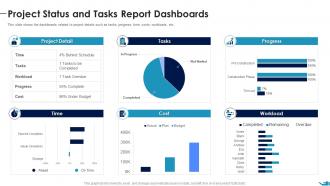
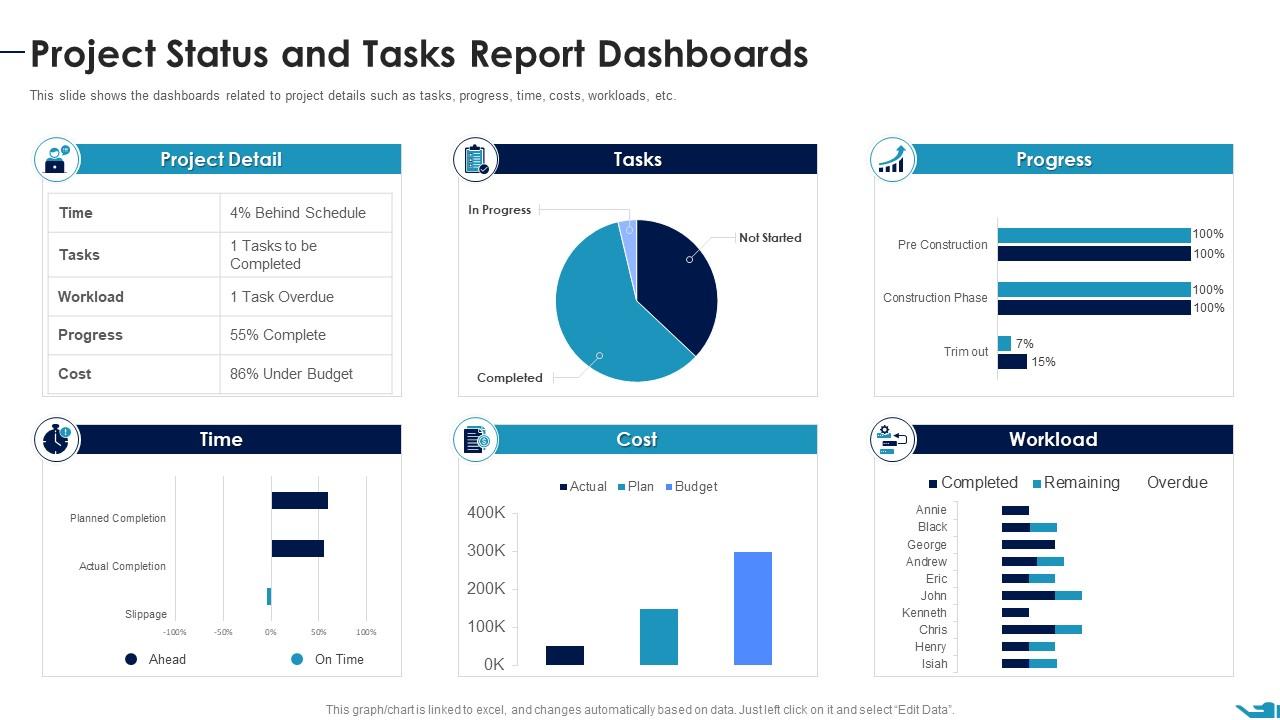
Project Status And Tasks Report Dashboards Documenting List Specific Project
Try Before you Buy Download Free Sample Product
Audience
Editable
of Time
This slide shows the dashboards related to project details such as tasks, progress, time, costs, workloads, etc.
People who downloaded this PowerPoint presentation also viewed the following :
Project Status And Tasks Report Dashboards Documenting List Specific Project with all 7 slides:
Use our Project Status And Tasks Report Dashboards Documenting List Specific Project to effectively help you save your valuable time. They are readymade to fit into any presentation structure.
FAQs for Project Status And Tasks Report Dashboards Documenting
So basically you need timeline stuff with milestones, budget tracking (what you planned vs what you're actually spending), and completion percentages for tasks. Don't forget blockers and risks - that's where things usually go sideways. Team workload is huge because nobody wants to be that person who's secretly drowning while everyone else thinks everything's fine. Charts and progress bars are your friend since people eat that visual stuff up. Honestly, the whole thing should be scannable in like 30 seconds max. If they're squinting and searching for info, you've already failed and you'll just end up in more meetings trying to explain it.
Dude, dashboards are honestly game-changers. No more "hey what's the status on X?" emails flooding your inbox every five minutes. Everyone can just check one place and see what's actually happening - progress, roadblocks, who's behind on what. The transparency thing is huge too because stakeholders can't blindside you anymore asking about stuff you didn't even know was your problem. Trust me on this one. Set it up with automated updates though, otherwise you'll be stuck manually updating everything like it's 2005. Saves you from those weird meetings where everyone just stares at each other.
Progress bars are definitely your go-to here - they show completion percentage super clearly. Gantt charts work well too if you need to show timeline stuff and dependencies. Traffic light colors (red/yellow/green) are honestly amazing for this. Stakeholders eat that up because it's so easy to scan. Skip pie charts though - they're awful for showing progress, trust me on that one. If you're doing sprints, throw in some milestone markers or burn-down charts. I'd start simple with progress bars and traffic lights first, then add more once people actually start using the dashboard regularly.
Weekly updates work for most projects, but honestly? Daily is better if things are moving fast. Just pick whatever you can actually stick to - I've seen way too many dashboards turn into useless eye candy because nobody bothers updating them. Monday mornings are pretty solid timing, or maybe end of week if that fits better. During crunch time though, you'll probably want daily check-ins. The real trick is being realistic about what you can handle, then letting everyone know your schedule so they're not constantly wondering if the data's fresh.
Timeline progress and budget burn rate are your must-haves - plus some kind of risk tracking. Resource utilization catches stuff early before it becomes a disaster. I always throw in milestone completion rates too. Quality metrics are solid if you're building anything, but honestly? Don't go overboard. I've seen way too many dashboards that look like someone threw up a rainbow and nobody actually uses them. Stick to maybe 5-7 metrics tops. Make sure they auto-update or you'll waste more time feeding the beast than actually managing your project.
Keep it dead simple - just show what people actually check every day. Put your most critical stuff at the top with those red/yellow/green indicators everyone gets instantly. I swear, the worst dashboards try cramming everything in and nobody can find anything. Test with real users constantly and ask what's confusing them. Colors and layouts should match across sections. Most important info needs to be visible without scrolling - that's non-negotiable. If someone stares at it for more than 30 seconds looking lost, you've overcomplicated things. Less is definitely more here.
Honestly, start with whatever project management tool you're already using - way easier than learning something new from scratch. Microsoft Project and Asana are pretty standard, but I've seen people make killer dashboards in plain old Excel (don't knock it till you try it). Trello's great if your team likes the card system. For fancier stuff, Tableau and Power BI are solid, though they've got a learning curve. ClickUp's been growing on me lately - your team can update things directly without bugging you constantly. Just pick something everyone will actually use consistently, not the shiniest option.
Honestly, interactive dashboards are so much better than static ones. People actually explore the data when they can click around and filter stuff. Think of it like scrolling through Netflix vs just watching whatever's on - you're way more engaged when you have control. Hover effects are super easy to start with, then add filters that let people customize what they see. Once your team can drill down into metrics they care about, they'll actually use the thing regularly instead of ignoring it. Trust me, nobody wants to stare at boring charts all day.
Figure out what each group actually needs first - execs want the big picture stuff, team leads want nitty-gritty details. Don't dump everything on everyone (learned that the hard way). Keep it to maybe 5-7 key things max and use those red/yellow/green colors so people get it instantly. Organization matters too - put the important widgets up top. You'll want drill-down capability so they can dig deeper if needed. Oh, and definitely test with a couple users before rolling it out. Trust me, you don't want to rebuild the whole thing later because nobody's using it.
Just grab whatever historical data you can find and throw it in there - trend lines, past sprint stats, budget burn rates from similar projects. Rolling averages work great too. Honestly, some teams get way too in the weeds trying to make their historical data perfect, which is kind of missing the point. What you really want is context so people can tell if your current numbers are actually bad or just normal project messiness. Past milestone comparisons are clutch for this. Don't overthink it though. Start with what you've got access to and build from there.
Honestly, getting stakeholder input early will save you so much pain later. Different people want completely different things from dashboards - execs care about big picture stuff while project managers are all about the nitty-gritty details. I learned this the hard way when I built what I thought was an amazing dashboard and literally no one used it because I never asked what they actually needed. Do some quick interviews or surveys before you start building anything. Then keep showing them drafts as you go. Don't just disappear into your cave and emerge with something - they need to be part of the process from the beginning.
So since your team can't crowd around your screen anymore, make everything bigger and more obvious. Color-code your status stuff and throw in some quick text boxes to get people up to speed fast. Interactive dashboards are clutch here - Tableau's great, but honestly even a smart Google Sheet works. People can click around themselves instead of just staring at your screen share. Oh, and definitely test your screen share first because I've learned the hard way that what's readable on my monitor looks like ant text on everyone's laptops. Send them the dashboard link too so they can follow along on their own screens.
Honestly, the hardest part is getting people to actually update their stuff regularly. Data quality becomes a nightmare when everyone enters things differently or just ghosts the whole system when projects go sideways - I've seen it happen so many times. Your best bet? Automate whatever you can by connecting it to tools they're already using like Jira. Make the dashboard dead simple to use and assign clear owners for updates. Oh, and definitely nail down what each status actually means upfront so there's no confusion. Start basic first, then build out features based on what people actually click on.
Red, yellow, green is your best bet - everyone knows what that means instantly. Throw in some icons too (warning triangles, checkmarks, whatever) because colorblind people exist and you don't want to leave them guessing. I made that mistake once and felt terrible about it. Progress bars work great if you need more detail than just the basic three statuses. Whatever you pick, stick with it across everything. Don't let yellow mean "caution" on one screen and "needs review" on another - that'll just confuse people. The whole point is quick scanning, right?
Dude, real-time data is huge for decisions because you're seeing what's happening NOW, not last week's mess. Problems get caught before they explode. Budget going off track? You'll know immediately instead of finding out in some boring Monday meeting when it's too late. Same with timeline slips and scope creep - you can actually do something about it. Honestly beats the hell out of playing catch-up constantly. Just make sure your team updates the dashboard though, otherwise you're looking at useless pretty graphs that tell you nothing.
-
It saves your time and decrease your efforts in half.
-
Great quality slides in rapid time.