Project status report timeline of product status

Slide 1 of 2
Favourites Favourites

Try Before you Buy Download Free Sample Product

Audience Impress Your
Audience
Editable 100%
Editable
Time Save Hours
of Time
The Biggest Sale is ending soon in
0
0
:
0
0
:
0
0
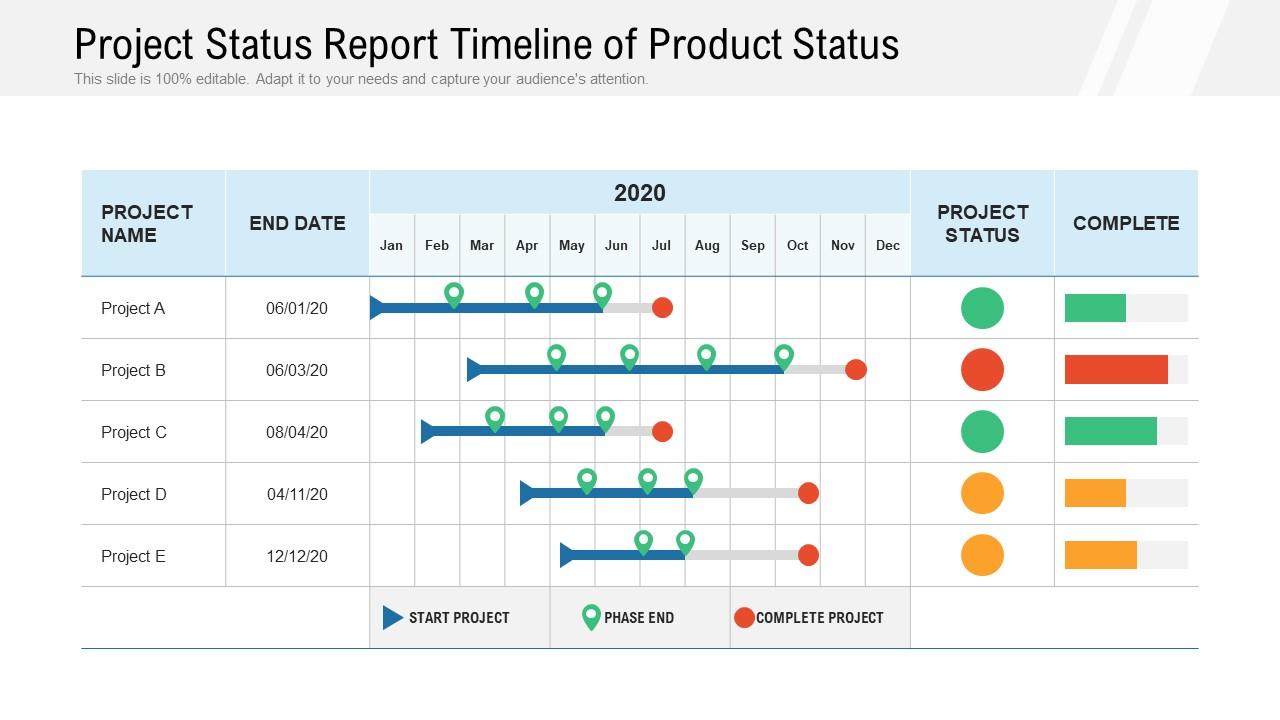
Presenting this set of slides with name Project Status Report Timeline Of Product Status. The topics discussed in these slides are Start Project, Phase End, Complete Project. This is a completely editable PowerPoint presentation and is available for immediate download. Download now and impress your audience.

FAQs for Project status report timeline

So for your timeline, throw in all the big milestones and when stuff's actually due. Critical path items are huge - if those slip, you're basically screwed. Mark who's doing what and when the higher-ups need to make decisions. External things like vendor delays or approval processes? Flag those too since they're out of your hands. Honestly, I'd add buffer time because something always goes sideways. Make it visual so people can see what's done versus what's coming up. Weekly updates keep everyone on the same page - trust me on this one.

Honestly, just grab Asana or Monday.com - even Google Sheets works if you're broke lol. List out your big milestones first, then figure out what has to happen before each one. I swear by color-coding everything by team or how urgent it is. Makes spotting problems way easier. Oh and definitely pad your timelines! Everything takes forever, trust me on this. The key is actually updating it every week and putting it somewhere your whole team can see. Otherwise you just wasted time making a pretty chart nobody looks at.

Honestly, I'd say update it every week - same day so you don't forget. Friday works great for me since you can look back at what actually happened vs what you hoped would happen (spoiler: they're never the same lol). Move dates around for stuff that's running late, add any new roadblocks that came up, check off what's done. But here's the thing - don't just push everything back a week when you're behind. Really think about what matters most and what you can cut. Be realistic about timelines instead of wildly optimistic. Set a calendar reminder or you'll definitely forget.

Yeah, scope changes will mess up your timeline every single time. Adding new features means your team has to redesign stuff, code it, test it - the whole nine yards. Plus everyone gets confused trying to fit the new requirements into what they've already built. Small changes aren't actually small, trust me on that one. The trick is updating your timeline the second those changes get approved. Don't wait until you're scrambling to meet deadlines. Shot-gun those new dates to your stakeholders immediately so nobody's sitting there expecting the impossible.

Oh man, so many good options! I'd go with Microsoft Project or Asana if you need detailed tracking. For visual stuff, TeamGantt and Monday.com are pretty slick with their Gantt charts. Don't sleep on Google Sheets though - seriously, it works better than you'd think if you get creative with it. Canva's timeline templates look super professional, way better than spreadsheet hell. Lucidchart's solid too. Honestly though? Pick whatever your team will actually stick with. I've seen fancy tools gathering dust while teams crushed it with basic spreadsheets.

Honestly, it's a game-changer for avoiding those awkward "wait, who was supposed to do this?" moments. You'll spot bottlenecks before they become disasters, and dependencies between tasks become super obvious. Way better than sitting through those painful status meetings where half the team zones out anyway. People actually stay accountable when everything's documented right there. The key is keeping it simple - clear owners, realistic deadlines, and don't let it get stale. Once your team gets used to checking it themselves, you won't need constant back-and-forth messages. Trust me, it saves so much time.

Biggest mistake? Being way too optimistic with deadlines - learned that the hard way lol. Also don't use vague milestones like "research phase done" because what does that even mean? Dependencies will screw you over if you ignore them - Task B just sits there waiting while Task A drags on forever. Buffer time is everything. I used to pack schedules super tight and it was a disaster every time. Make your deliverables specific so people actually know when something's finished. Oh and realistic cushions between tasks - seriously can't stress this enough.

Set up specific checkpoints after big deliverables - wireframes, first prototype, stuff like that. Give people actual time to review though, not like 24 hours (learned that the hard way). Block out extra time after feedback rounds so you can actually make changes before moving on. The trick is making feedback official, not crossing your fingers and hoping people speak up. Oh, and honestly? Stakeholders will always have opinions at the worst possible moment if you don't give them structured chances to share them earlier.

Honestly, start simple with just 2-3 metrics or you'll drive yourself crazy. Progress percentage against your milestones is clutch - tells you if things are actually moving. I always track budget burn rate because nobody wants that awkward "we're broke" conversation halfway through. Resource utilization shows where your team's hours are disappearing to (spoiler: usually meetings lol). Task completion velocity helps predict realistic deadlines instead of just guessing. Oh, and dependency delays - those things multiply like rabbits, so definitely keep an eye on them. Pick what matters most for YOUR specific project though.

Honestly, status timelines are game-changers for keeping stakeholders happy. They can see exactly where things stand without bugging you every day with "so what's the update?" Super helpful when you've got milestones coming up or hit some bumps in the road. People actually trust you more because they're not wondering if you disappeared with their project. I learned this the hard way - now I update mine weekly and send it out before anyone asks. Way less stressful than playing email tag all the time.

Weekly updates work for most projects, but it really depends on what you're dealing with. Fast-moving or high-pressure stuff? You'll probably need to check in daily or every few days. I always do mine on Fridays - gives me the weekend to forget about work lol. The main thing is just being consistent with whatever schedule you pick. Your team will get used to the rhythm and actually expect it. Oh, and don't stress if some weeks there's less to report than others.

Okay so basically you've got to tailor your timeline for whoever's looking at it. Execs just want the big picture stuff - major milestones and how much it's gonna cost. Your actual project team needs all the nitty-gritty details and task dependencies. Stakeholders are somewhere in between, but honestly? Don't overwhelm them with too much detail or they'll just tune out. Start with your master timeline, then slice it up differently for each group. Executive dashboards work great for leadership, Gantt charts for your team. For stakeholders, stick to key deliverables. Oh and always explain why each update actually matters to them specifically - that's the part people forget.

Honestly, your project timeline is like having a crystal ball for catching problems early. When tasks start running behind or dependencies look shaky, you'll see it coming instead of getting blindsided. I've noticed you can pick up on weird patterns too - like Sarah always missing her Friday deadlines (probably because she's mentally checked out for the weekend already) or how design reviews somehow take twice as long as planned. The trick is actually doing something when you spot these red flags. Don't just update the thing and move on - that's where most people mess up.

Colors are honestly a game changer for project timelines! I always go with green for done stuff, yellow/orange when things are moving, and red for anything that's stuck or behind. Blue works great for future tasks too - though maybe that's just my weird preference lol. The trick is sticking to the same colors throughout so everyone gets it instantly. You can even use lighter/darker shades to show if something's super urgent vs. normal priority. Don't go crazy with like 10 different colors though. Keep it to 4-5 max and make a little legend somewhere. Trust me, your team will thank you for the visual clarity!

Honestly, you'll always be way too optimistic with your first guess - I swear no project has ever finished early in the history of mankind. Build in extra time upfront, especially when teams have to hand stuff off to each other. Here's the kicker though: most people think coding will be the slowest part, but it's actually all the review rounds and getting feedback from stakeholders that murders your timeline. Start writing down where delays actually happen versus where you predicted them. That way you can see the real patterns and not get blindsided again.

Ratings and Reviews

0% of 100
Review Form
Write a review
Most Relevant Reviews

No Reviews