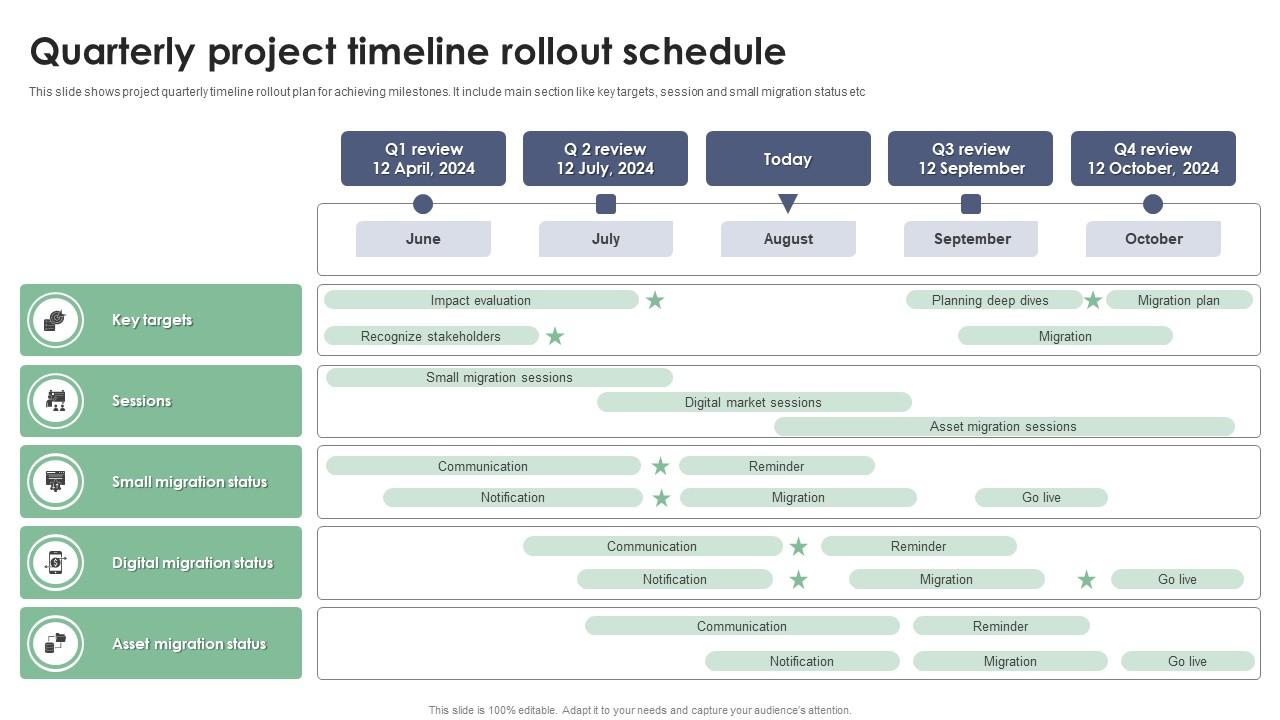
Quarterly Project Timeline Rollout Schedule
Try Before you Buy Download Free Sample Product
Audience
Editable
of Time
This slide shows project quarterly timeline rollout plan for achieving milestones. It include main section like key targets, session and small migration status etc.
People who downloaded this PowerPoint presentation also viewed the following :
Quarterly Project Timeline Rollout Schedule with all 6 slides:
Use our Quarterly Project Timeline Rollout Schedule to effectively help you save your valuable time. They are readymade to fit into any presentation structure.
FAQs for Quarterly Project
So for your quarterly timeline, start with project kickoff and getting everyone aligned. Then do a 30-day check-in to catch problems early. Around week 6-7, hit that mid-quarter review hard. Build in time for revisions before your final deadline - trust me on this one. Oh, and I always mark week 8 as my "oh shit" moment. That's when you'll know if you're actually gonna make it or not lol. Make sure you've got windows for stakeholder feedback built in too, plus any handoffs between teams. The whole point is catching issues when you can still fix them, not just watching yourself crash and burn.
Honestly, color-coding different projects is a game changer for quarterly timelines. I'd add icons for milestones too - makes everything pop. Progress bars show completion status at a glance, which your team will love. Don't go crazy with the visuals though! Gantt charts are perfect when you've got task dependencies to show. Simple milestone markers work better for key deadlines. Keep your colors consistent so people aren't playing detective every time they look at it. Try Mockingbird or Lucidchart instead of cramming bullet points into PowerPoint like a monster.
So I always chunk things into months first, then work backwards from whatever I'm trying to hit. Add like 20% extra time because honestly, stuff ALWAYS takes longer than you think. Dependencies are usually what screw you over, so figure those out early. Weekly check-ins are clutch for catching problems before they snowball. Oh, and be realistic about what your team can actually handle - not what you hope they can do. I started tracking how long tasks really take us (versus my wishful thinking) and it's helped tons with planning the next quarter.
Break down each quarter into sprints but keep things flexible - don't lock yourself into specific deliverables for three whole months. Pick your main themes and outcomes, then adjust the actual features as you go. Monthly milestones work pretty well for this. I've watched teams get way too rigid and honestly it just backfires. Start with your big quarterly goal, then plan month one in detail. Keep months two and three loose so you can pivot based on what you learn. Your sprint planning stays the same, you're just thinking bigger picture while staying agile.
Asana or Monday.com are solid picks for quarterly stuff - your whole team can jump in and update things, plus the Gantt charts are pretty clean. But honestly? If it's just a few people seeing it, don't overthink this. Google Sheets works fine, even PowerPoint if you're feeling lazy. Already using Notion at work? Perfect, just embed the timeline right in your project pages. Canva's got some decent templates too if you want it to look nice without much effort. My advice is start with whatever tool everyone already knows how to use, then switch later if you actually need the fancy features.
Dude, seasonal stuff will mess up your quarterly planning so hard if you ignore it. Look at last year's data first - you'll spot the obvious patterns. Holiday chaos, summer vacations, whatever craziness hits your industry. Build in buffer time around those peaks and valleys instead of pretending everything's smooth sailing year-round. Like if you're retail, Q4 is gonna be absolutely bonkers with holiday prep (obviously). Honestly, most people just wing it and then panic when July rolls around and everyone's at the beach. Adjust your milestones early so you're not scrambling later.
Honestly, I'd stick to tracking just 3-5 key things or you'll drive yourself crazy with data. Milestone completion rates and budget variance are obvious ones. Resource utilization too - that one's saved me so many times when people were getting overloaded. Stakeholder satisfaction is huge because unhappy stakeholders will torpedo your project faster than anything else. Oh, and definitely watch for scope creep - I learned that the hard way on my last big project. Quality stuff like defect rates matter depending on what you're building. Just throw it all in a simple dashboard you can check weekly instead of panicking at the end of each quarter.
So basically, quarterly timelines stop that chaos where nobody knows what anyone else is doing. Marketing can see when they'll get design assets. Sales knows when product updates drop. Engineering can warn support about deployments that might break things - you know how that goes. Teams have to actually talk about what they need upfront instead of scrambling later. Honestly, the biggest thing is keeping it updated though. Half these timelines just die in some Google folder where they're completely useless. Make sure people can actually find it and someone's maintaining the thing.
Honestly, the biggest trap is thinking you can cram way more into three months than reality allows. I learned this the hard way lol. Skip the fluffy goals like "better customer experience" - you need concrete stuff you can actually measure. Teams always forget about holidays and competing projects eating up time (so annoying but true). Build buffer time between big deliverables. Check progress every week instead of crossing your fingers. Oh, and list your must-haves first, then only add extras if there's genuine breathing room left.
Check your quarterly timeline every 2-3 weeks if you can manage it. Monthly is the bare minimum, but honestly that's kinda slow when things are moving fast. I learned this the hard way lol. Weekly reviews are perfect for crazy complex quarters or when you're drowning in multiple projects. The trick is spotting timeline drift before it wrecks everything. Put a recurring reminder on your calendar and don't blow it off when you get swamped. That's exactly when you need those check-ins most.
Honestly, stakeholder feedback is like your sanity check before committing to crazy quarterly deadlines. Talk to the people actually doing the work - not just the executives who think everything takes two weeks. They'll catch missing dependencies and resource conflicts you didn't even think about. I learned this the hard way last year when we completely missed a major integration piece. Make your feedback process structured though, don't just fire off a quick "thoughts?" email. Their input helps you sequence tasks better and spot bottlenecks early. Way better than scrambling mid-quarter when everything falls apart.
Honestly, quarterly check-ins are a game changer for catching problems early. You get these regular moments to spot warning signs before they blow up. Business conditions shift fast these days, so reassessing your risk tolerance every few months just makes sense. I've found it's way smoother to fold risk talks into existing quarterly planning sessions - nobody wants another meeting on their calendar. The real win? You're adjusting based on actual data instead of guessing what might happen. Makes stakeholders pay attention too since they're already expecting those quarterly deep dives anyway.
Honestly, get your team involved in building the timeline instead of just dropping it on them. People actually care when they help create the plan - weird but true. Break those huge quarterly goals into bite-sized weekly pieces so nobody feels overwhelmed. Check-ins are key, but focus on solving problems, not boring status reports. Don't forget to celebrate wins, even tiny ones. Oh, and next time you plan? Start by asking what actually worked last quarter and what totally sucked.
Honestly, the trick is working backwards from your big annual goals. Figure out what absolutely has to happen in Q4 to hit your targets, then trace back through Q3, Q2, Q1. Each quarter should basically set up the next one - think building blocks. Here's what I learned the hard way: track the stuff that predicts success, not just the final results. That way you'll catch problems before they wreck everything. I do monthly check-ins against my quarterly plans because three months is way too long to wait if something's going sideways. Keeps me from those "oh crap" moments in December, you know?
Dude, templates are a game changer. You're not rebuilding everything from zero each quarter - just swap in new dates and you're basically done. Your formatting stays consistent too, which honestly makes such a difference vs. the hot mess I used to create when I'd just make it up as I went. Oh and you won't forget stuff like buffer time or when stakeholders need to review things. Your team will love having that predictable structure since they'll know exactly where everything is. After your next solid planning session, just save that as your master template.
-
Incredibly beautiful designs that will help you get noticed! These eye-catching templates are perfect for corporate presentations that can be altered to fit any occasion or taste.
-
I downloaded some of the presentations for work. They were simple to modify and saved me a lot of time and effort.