Sequential Diagram Of Hospital Management Integrating Hospital Management System

Rating:
80%
Sequential Diagram Of Hospital Management Integrating Hospital Management System
Slide 1 of 6

or

Favourites Favourites

Try Before you Buy Download Free Sample Product

Audience Impress Your
Audience
Editable 100%
Editable
Time Save Hours
of Time
The Biggest Sale is ending soon in
0
0
:
0
0
:
0
0
Rating:
80%
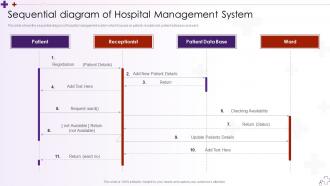
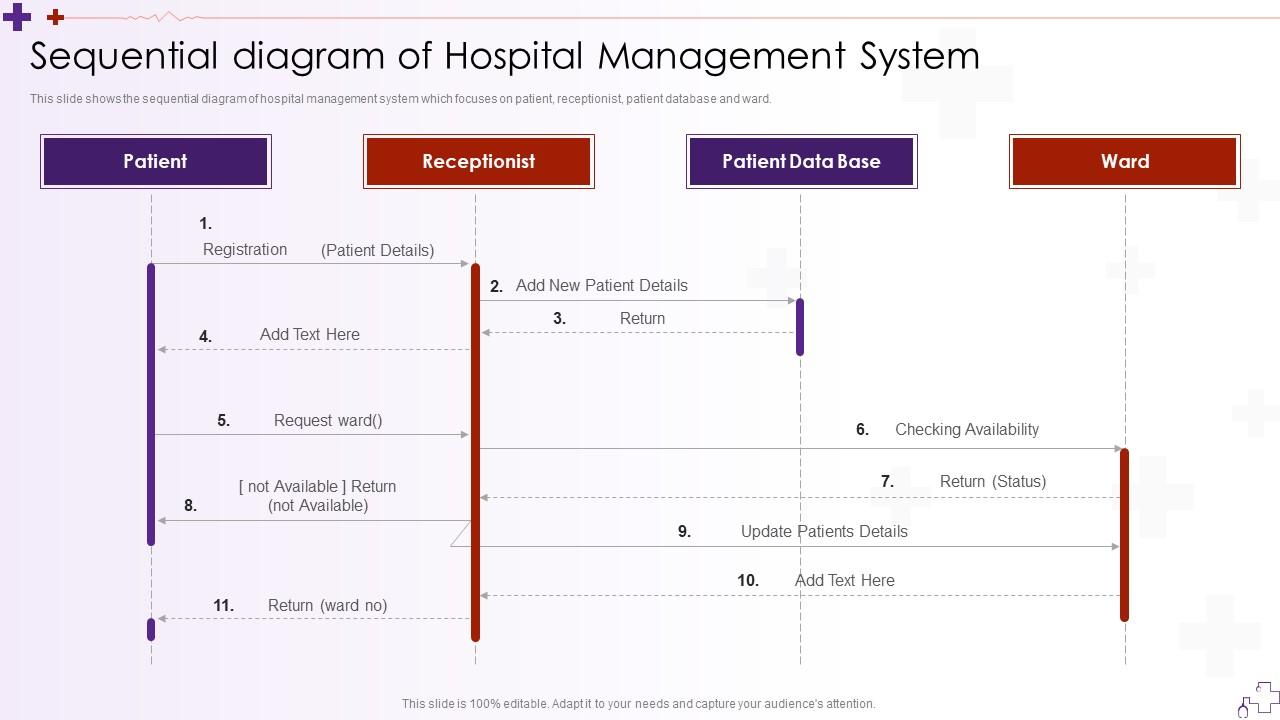
This slide shows the sequential diagram of hospital management system which focuses on patient, receptionist, patient database and ward. Deliver an outstanding presentation on the topic using this Sequential Diagram Of Hospital Management Integrating Hospital Management System. Dispense information and present a thorough explanation of Management, Receptionist, Patient Data Base using the slides given. This template can be altered and personalized to fit your needs. It is also available for immediate download. So grab it now.
FAQs for Sequential Diagram Of Hospital Management Integrating

So the big thing is making sure everything actually talks to each other - patient records, billing, lab results, scheduling, the whole deal. When a doctor orders bloodwork, the lab should get pinged automatically and results come back without anyone having to manually enter stuff. Basic systems are honestly just fancy spreadsheets that don't connect. You'll want good analytics for tracking outcomes, mobile access so staff aren't chained to desks, and compliance reporting that handles itself. Oh, and customizable dashboards are clutch - nurses need different views than billing people. Just make sure it can grow with you.

Honestly, it's a game changer because everything gets centralized - patient records, scheduling, billing, all that stuff. Your staff won't be running around with clipboards anymore. Real-time patient history means doctors can diagnose faster and make fewer mistakes. Automated scheduling cuts down wait times too (because who wants to sit there for hours?). The billing side gets way smoother with automatic insurance processing. But here's the thing - your medical staff actually gets to focus on patients instead of drowning in admin work. I'd say figure out what's driving you crazy first, then go from there.

Dude, HIPAA compliance is no joke when you're handling patient data. Encryption everywhere - that's non-negotiable. Set up role-based access so random staff can't peek at records they shouldn't see. Multi-factor auth is basically mandatory at this point. Your system should log everything users do, plus you need solid backup and disaster recovery (learned that one the hard way at my last job). Healthcare data breaches? The fines will bankrupt you. Honestly, I'd start with a security audit to see what holes you've got right now.

So basically, EHR integration transforms your HMS into something way more powerful than just booking appointments. Instead of constantly switching between different systems, everything flows together - patient histories, lab results, meds, clinical notes, all in one place. Your staff can actually make smarter decisions because they see the complete picture right away. Honestly, the billing accuracy alone makes it worth it since charges sync automatically with treatments. No more duplicate data entry either, which your team will love. I'd start by figuring out where your biggest headaches are with the current setup.

Staff will fight you on this - everyone thinks their old system works perfectly fine, why change? Data migration is honestly a mess no matter what vendor promises you. Budget for way more downtime than they tell you, because patients still need care during the switch. Training different groups gets expensive quick, and don't get me started on trying to integrate with your existing equipment. That part usually turns into a total headache. I'd definitely pilot it in one department first. Find some people who actually want the change to help sell it to everyone else before going hospital-wide.

Honestly, HMS systems are game-changers for patient communication. Your patients get secure messaging, appointment reminders, and can check their test results anytime - no more phone tag hell. They'll actually read educational stuff you send through the portal (shocking, I know). Everything gets documented in one spot, so you won't be frantically trying to remember what you discussed with Mrs. Johnson. The 24/7 access thing is huge for patient satisfaction. Oh, and get people signed up for the portal right when they register - that's when they're most motivated to do it.

Oh man, those costs pile up quick! You've got software licensing, hardware, data migration, staff training - all that upfront stuff. Training always drags on way longer than they promise, it's honestly annoying. Then you're stuck with maintenance, updates, support fees forever. Cloud vs on-premise makes a huge difference in your monthly bills, plus how many users you need. Plan for like 15-20% of initial costs every year just for upkeep. Definitely get quotes from a few vendors though - there's always sneaky costs they don't mention upfront, like downtime when you're switching over.

Oh man, demographics are huge for HMS setup. Elderly patients? You'll want bigger fonts and simple interfaces - trust me on this one. Rural hospitals have totally different needs than crazy busy urban ERs too. Start by figuring out your top 3 patient types first. Younger crowds want mobile check-ins and speed. Older folks need solid chronic disease tracking. Geography matters - what works in downtown Chicago won't work in rural Montana, you know? Don't forget about language preferences and local insurance quirks. Map out those patient segments and their biggest headaches before you configure anything.

Focus on the big four: patient flow, bed occupancy, staffing, and financials. Real-time dashboards are your friend - ER wait times, admissions, all that stuff. Revenue cycle tracking is huge because budget surprises suck. Get something with predictive features so you can see problems coming instead of just reacting to them. Clinical outcomes and quality metrics matter too, obviously. The reporting thing is key though - your board needs totally different data than department heads do. I'd probably prioritize the predictive stuff if you're choosing between systems.

Honestly, cloud HMS is the way to go. You're looking at huge savings upfront since there's no hardware to buy, plus your team can work from literally anywhere with wifi. Automatic updates happen in the background - no more IT headaches on weekends (trust me on this one). Sure, on-premise gives you more control, but most cloud providers have way better security than what hospitals can pull off themselves. The maintenance costs alone will kill your budget over time. I'd crunch the numbers on your current IT spending first, but cloud migration usually pays for itself pretty quickly. Remote access alone is worth it these days.

Honestly, mobile HMS plus telemedicine is a game changer - you'll have everything at your fingertips 24/7. I can check patient records while grabbing coffee, approve orders from the parking lot, you know? Virtual consultations run straight through the system too, so everything gets logged automatically. No more piecing together notes from different platforms (thank god). The continuity of care gets so much better when remote visits sync with your in-person data. My advice? Start simple with mobile chart access, then add telehealth features once everyone's comfortable. Trust me, your workflow will thank you.

Different people need different training - nurses focus on patient charts, admins do billing stuff, doctors want clinical features. Start with basic navigation for everyone. Then break into department-specific sessions. The learning curve's pretty brutal at first, not gonna lie. Set up super-users in each area who can help with questions. Quick reference cards are clutch too. Schedule follow-ups about a month after launch since weird issues always pop up once people actually start using it daily. Oh, and definitely plan refresher sessions whenever you update the system.

Build feedback right into your HMS with patient surveys after appointments and real-time staff reporting. Dashboards are great for spotting patterns - like which departments get the most complaints or where wait times blow up. Some systems even text patients afterward asking how things went, which is pretty smart. But here's the thing - you actually have to do something with all that data, not just hoard it like a digital pack rat. Start small with maybe post-discharge surveys. Once your team's comfortable, add more feedback tools from there.

So regulatory stuff is constantly changing your HMS - HIPAA updates, billing rules, privacy laws that just appear out of nowhere. Your system's gonna need regular updates to stay compliant. New security features, different reporting tools, sometimes they overhaul entire workflows. Honestly? It's annoying because you're always scrambling to meet compliance deadlines. The good news is these changes usually improve things - better audit trails, stronger patient data protection. Oh, and definitely pick a vendor who actually stays on top of regulatory changes and sends updates quickly. You don't want to be stuck with someone who's slow on that stuff.

So basically you get this dashboard that shows everything in real-time - bed availability, staff schedules, equipment, inventory, the works. No more hunting around for wheelchairs or wondering which department is swamped. It flags low supplies automatically and predicts what you'll need based on past data. Plus you can actually see where stuff is instead of playing guessing games every shift. Honestly, the bed management part alone pays for itself pretty quick - I'd start there first. Way better than the old "call around and hope someone knows" system most places still use.

Ratings and Reviews

80% of 100
Review Form
Write a review
Most Relevant Reviews
  1. 80%

    by O'Kelly Phillips

    I'm happy to discover your PowerPoint presentations and templates. They met my expectations precisely. Very innovative!
  2. 80%

    by Cornell Hamilton

    Their designing team is so expert in making tailored templates. They craft the exact thing I have in my mind…..really happy.

2 Item(s)

per page: