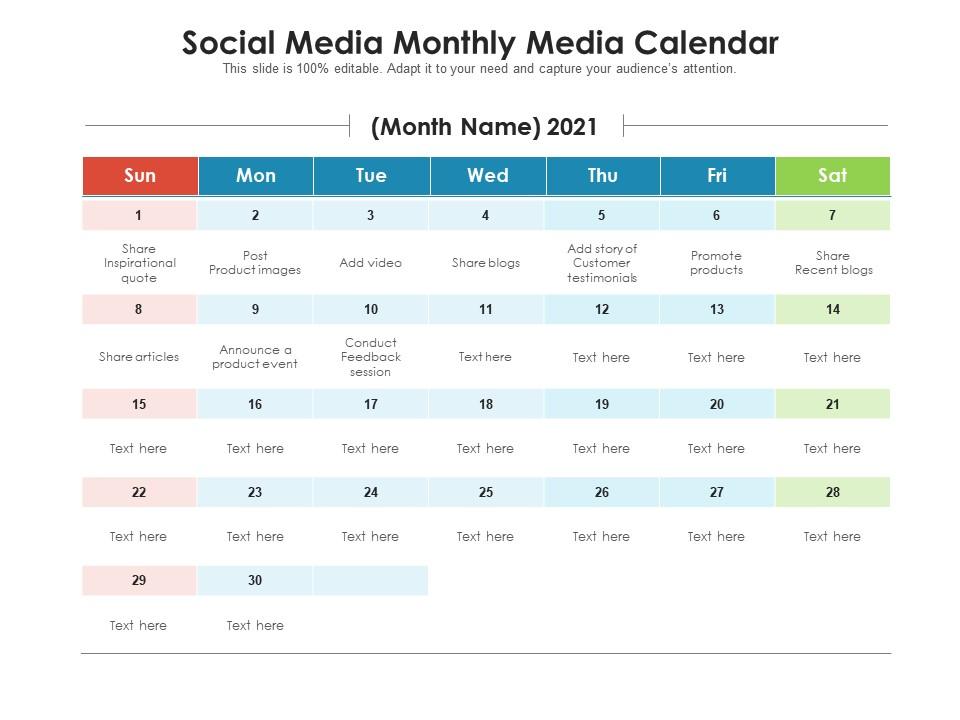
Social media monthly media calendar

Rating:
100%
Social media monthly media calendar
Slide 1 of 2
Favourites Favourites

Try Before you Buy Download Free Sample Product

Audience Impress Your
Audience
Editable 100%
Editable
Time Save Hours
of Time
The Biggest Sale is ending soon in
0
0
:
0
0
:
0
0
Rating:
100%
Introducing our Social Media Monthly Media Calendar set of slides. The topics discussed in these slides are Social Media Monthly Media Calendar. This is an immediately available PowerPoint presentation that can be conveniently customized. Download it and convince your audience.

FAQs for Social media

So basically it's just a schedule showing what you're posting and where. Honestly, it's a lifesaver because you won't be scrambling at 9pm wondering what to put on Instagram tomorrow. You can batch all your content creation instead of doing it daily (way more efficient). Plus you'll spot gaps before they happen and plan around holidays or whatever. I started with just a basic spreadsheet - nothing fancy. Google Calendar works too. The key is actually sticking with it once you start, but trust me, it's worth the effort.

Honestly, a social media calendar is a game changer for staying consistent - and the algorithm definitely rewards that. Your followers start expecting your content too, which is cool. You can time posts when your audience is actually online instead of posting at random times (I used to post at like 2am thinking it didn't matter lol). Plus you can plan campaigns that actually connect instead of just winging it every day. It helps you mix up content types too - like balancing promotional stuff with actually helpful posts. Just start by planning a week out and see what works!

So for your social media calendar, you'll want the obvious stuff first - dates, times, which platform you're posting on. Then add content type (photo, video, whatever), your actual post copy, and hashtags. Visual assets too if you're using them. Oh, and definitely include who's handling each post plus approval status. That part's honestly a lifesaver when things get crazy. I'd also throw in campaign tags so you can see what's actually working across different projects. Start basic with this stuff, then you can get fancier later when your team grows.

I do mine weekly for the quick stuff - like if something's trending or a post totally bombed. Monthly is when I sit down and really look at the bigger picture. Honestly, social media changes so damn fast that your Monday post idea might feel completely wrong by Wednesday. For the monthly deep dive, I'm talking themes, seasonal campaigns, product launches - all that strategic stuff. The trick is staying flexible without completely abandoning your plan. Oh, and actually set a phone reminder or you'll forget like I always do!

Oh man, honestly Hootsuite and Buffer are your best bets to start - both let you schedule stuff and see everything laid out nicely. If you're doing tons of Instagram, Later is actually pretty sweet for visual content. I've been using Google Sheets forever and it works fine if you don't need anything fancy. Sprout Social is solid but costs more than I'd want to pay lol. Whatever you pick, just make sure your team will actually stick with it - I've seen so many good tools go unused because nobody wanted to learn them. Try free trials for like 2-3 options first and go with whatever feels right.

So first thing - grab your main marketing calendar and highlight the big stuff. Product launches, sales, major campaigns, whatever. Build your social content around those dates instead of just winging it. Honestly, this makes such a difference because everything starts feeling connected. Use the same hashtags and messaging that your emails are pushing. Same visuals too if possible. Way better than random posts that don't match anything else you're doing. Oh, and definitely set up a shared Google doc with your team so nobody's posting something totally off-brand right before a launch. Been there!

Honestly, follower count looks impressive but it's pretty meaningless if nobody's actually engaging with your stuff. Focus on likes, comments, shares, saves - that shows people actually care. Reach and impressions tell you how many eyeballs you're getting, which is useful too. But here's what really matters: conversions. Are people signing up for your email list? Downloading your thing? Making purchases? Set up UTM codes so you can see which posts actually drive results - this part's kind of tedious but worth it. I check my metrics weekly to spot what's working. Oh, and don't forget click-through rates if you're trying to drive traffic somewhere specific.

Start planning seasonal stuff 2-3 months out so you're not stressed later. Map out the big holidays and industry events that make sense for your brand - like Valentine's for retail or back-to-school if you're in education. Honestly, I keep a list of weird holidays too because National Pizza Day posts can randomly blow up! Don't let seasonal content completely take over though. Balance it with your regular posts. Oh, and make templates for stuff that happens every year - saves so much time. Also think about what holidays actually matter to your audience since not everyone celebrates the same things.

Honestly, your audience is everything when it comes to planning your content calendar. I used to post whenever I felt like it and got zero engagement - total waste of time. Now I check my analytics religiously to see when people are actually online and what they're interacting with. That data tells you what formats work (stories vs. posts vs. reels), which topics hit, and obviously the best times to publish. Your posting schedule should revolve around those patterns, not your own convenience. Also figure out what platforms your people actually use - no point posting amazing content where nobody sees it.

Honestly, just block out specific days for it - I do "Feature Friday" or throw in customer posts for like 20% of my content. Makes life so much easier. Search your branded hashtags and mentions regularly, or straight up ask people to share their stuff with you. The key is staying on top of it instead of panicking when you need posts (been there lol). Set up saved searches so you're always collecting good content as it comes in. Then batch schedule everything like normal. Takes way less brain power than creating original stuff constantly, plus people actually trust it more.

Definitely keep like 20-30% of your calendar open for random stuff that pops up. I got burned so hard when that whole dress color thing went viral and we had zero content ready! Trello works way better than spreadsheets for this - you can actually move things around without wanting to scream. Create themes instead of planning exact posts weeks out. Stock up on evergreen backup content too. Oh and review weekly, not monthly. Trust me on that one - I used to plan everything a month ahead and it was a disaster every single time.

Okay so color-coding is honestly a game changer - you can instantly see content types, platforms, whatever without squinting at tiny text. Icons work great too for videos, polls, all that stuff. Your team won't have to guess what they're making. I learned this the hard way after mixing up post types like three times in one week (so embarrassing). Short sentences and visual timelines beat giant text blocks every day. When you're stressed and rushing, those visual cues literally save your butt from mistakes. Start with just colors first - you'll wonder why you waited so long to try it.

Don't overplan everything months in advance - you need wiggle room for trends and spontaneous stuff. Also stop copy-pasting identical posts across Instagram, Twitter, etc. That's just lazy honestly. Everyone obsesses over posting at 2pm or whatever the "perfect" time is, but being consistent beats perfect timing every time. Your calendar should have gaps for real-time content, not be some militant schedule. Oh and here's what kills me - people post what THEY like instead of researching what their audience actually wants. Start simple with a basic monthly layout. You can always add complexity later instead of building some elaborate system you'll hate using.

Honestly, a social media calendar saves you from so much chaos. Everyone knows what's going live and when, plus who's handling what. No more awkward "didn't we already post about this?" moments or two people scheduling the same type of content. You can assign stuff, leave notes on posts, track edits - all in one spot. The trick is getting everyone to actually use the same tool and keep it updated. That's like 90% of making it work, which sounds obvious but you'd be surprised how many teams mess this up.

Honestly, having a posting schedule changed everything for me. Your followers start expecting content from you, which boosts engagement. Plus algorithms love consistency - I learned that the hard way when my reach was completely random before! Different platforms have sweet spots too. LinkedIn's great in the morning on weekdays, but Instagram stories? Evening's where it's at. Oh, and you can batch create content instead of scrambling last minute (been there). I'd test maybe 2-3 times per platform and see what sticks. Way less stressful than winging it!

Ratings and Reviews

100% of 100
Review Form
Write a review
Most Relevant Reviews
  1. 100%

    by Jones Adams

    Great designs, really helpful.

1 Item

per page: