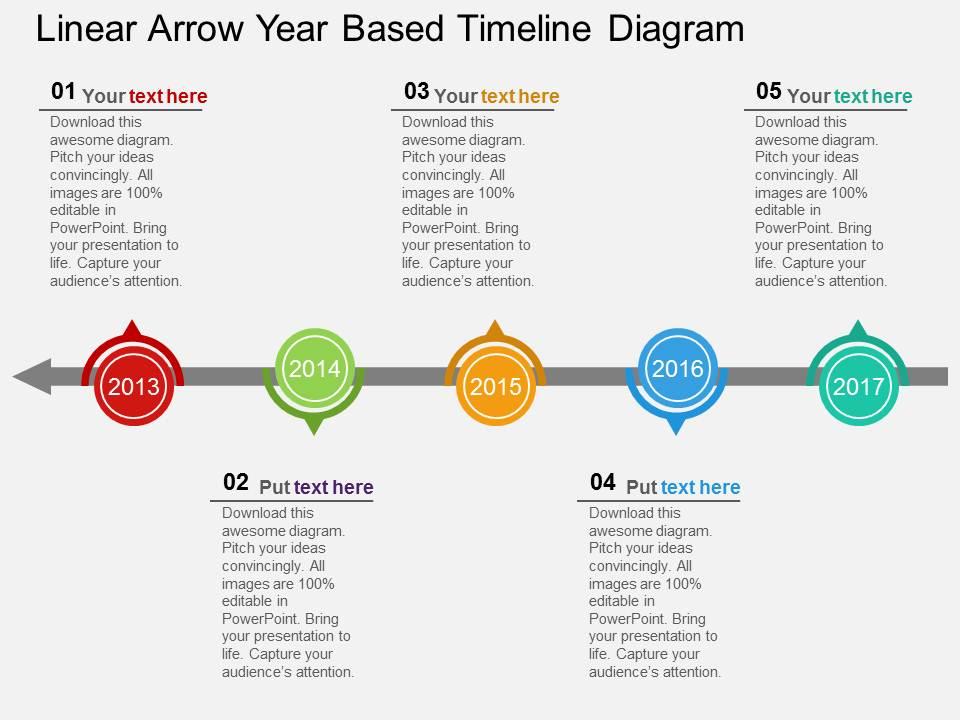
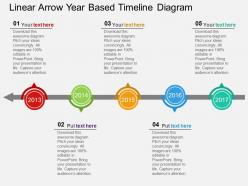
Ue linear arrow year based timeline diagram flat powerpoint design

Rating:
90%
Ue linear arrow year based timeline diagram flat powerpoint design
Slide 1 of 4
Favourites Favourites

Try Before you Buy Download Free Sample Product

Audience Impress Your
Audience
Editable 100%
Editable
Time Save Hours
of Time
The Biggest Sale is ending soon in
0
0
:
0
0
:
0
0
Rating:
90%
Presenting ue linear arrow year based timeline diagram flat powerpoint design. This Power Point template diagram has been crafted with graphic of year based linear arrow timeline diagram. This PPT diagram contains the concept of business success achievement. Use this PPT diagram for business and marketing related presentations.

FAQs for Ue linear arrow year based timeline diagram

Key features of the UE linear arrow year-based timeline diagram include chronological progression markers, directional flow indicators, milestone designation points, scalable year intervals, and visual connectivity elements. This design streamlines project planning and historical documentation by enabling clear temporal visualization, enhancing stakeholder comprehension, and facilitating strategic milestone tracking, with many organizations finding that linear timelines deliver improved communication and accelerated decision-making processes.

The UE linear arrow year-based timeline diagram enhances project planning visualization by displaying chronological milestones, dependencies, and deadlines in a clear, sequential format that stakeholders can quickly interpret. This approach streamlines project communication, enables better resource allocation across multi-year initiatives, and helps organizations identify potential bottlenecks early, ultimately delivering improved timeline management and strategic planning efficiency.

Linear arrow timelines work exceptionally well for sequential projects like product launches, construction phases, software development cycles, compliance implementations, and strategic planning initiatives. These diagrams excel in manufacturing rollouts, merger integrations, and regulatory processes where clear chronological progression is essential, ultimately delivering enhanced project visibility, improved stakeholder alignment, and streamlined execution across organizations.

Linear arrow designs create a clear directional flow that emphasizes progression and forward momentum, unlike circular timelines that show cyclical processes or vertical formats that prioritize hierarchy. This streamlined approach enhances visual clarity by guiding viewers naturally from left to right, making complex project phases, business milestones, and strategic roadmaps more intuitive to follow, ultimately delivering better audience comprehension and engagement.

**INPUT**: What software or tools are best for creating a UE linear arrow year-based timeline diagram? **OUTPUT**: Top tools for creating UE linear arrow year-based timeline diagrams include Microsoft PowerPoint, Visio, Lucidchart, Canva, and specialized timeline software like TimelineJS. These platforms streamline diagram creation through pre-built templates, drag-and-drop functionality, and professional formatting options, with many organizations finding that PowerPoint and Lucidchart deliver the optimal balance of accessibility and customization for impactful business presentations.

Linear arrow timeline diagrams can be adapted for non-linear events through branching pathways, parallel tracks, circular loops, and milestone convergence points that accommodate complex workflows. Many project management teams and process improvement specialists find these modifications particularly valuable for illustrating iterative development cycles, multi-departmental workflows, and interconnected business processes that ultimately enhance operational visibility and strategic planning.

Color coding enhances timeline clarity by assigning distinct colors to different categories, departments, project phases, priority levels, and milestone types, creating instant visual differentiation across complex timelines. This approach enables teams in manufacturing, healthcare, and financial services to quickly identify critical deadlines, track departmental responsibilities, and monitor project progress, ultimately streamlining communication and accelerating decision-making processes.

Common timeline mistakes include overcrowding information, using inconsistent spacing, poor color choices, illegible fonts, and missing key milestones. These design flaws compromise clarity and professional impact, with many organizations finding that streamlined layouts, consistent visual hierarchy, and strategic color coding enhance audience comprehension and deliver more compelling presentations.

**INPUT**: How does the timeline facilitate understanding of chronological sequences? **OUTPUT**: Timeline diagrams enhance chronological understanding by providing visual structure, clear progression markers, and contextual relationships between sequential events or milestones. Through linear arrow formats, organizations streamline project planning, historical analysis, and process documentation, while eliminating confusion around timing dependencies, ultimately delivering clearer communication and improved strategic decision-making across teams. [Word count: 54 words]

Typography plays a crucial role in linear arrow timeline diagrams by ensuring readability, establishing visual hierarchy, and guiding the viewer's eye through chronological information seamlessly. Strategic font choices, sizing, and spacing enhance comprehension while maintaining professional presentation, with many organizations finding that consistent typography across timeline elements delivers clearer communication and stronger visual impact in presentations.

Key milestones and events can be highlighted through visual emphasis techniques like bold colors, larger icons, callout boxes, varied shapes, and strategic positioning along the timeline arrow. These design elements create focal points that draw attention to critical moments, with many organizations finding that color-coding by importance, adding descriptive labels, and using size variations effectively communicates project phases, deadlines, and achievements to stakeholders.

Linear arrow timelines enhance strategic planning, employee onboarding, customer journey mapping, product development cycles, and compliance tracking across industries. These visual tools streamline communication by presenting complex sequences clearly, with healthcare organizations using them for patient care pathways, financial institutions for regulatory timelines, and retail companies for seasonal campaign rollouts, ultimately delivering improved stakeholder understanding and operational efficiency.

**INPUT**: How can the timeline be structured to accommodate varying lengths of events or phases? **OUTPUT**: Timeline structures accommodate varying event lengths through proportional scaling, flexible segment widths, multi-track layouts, and expandable phase blocks that reflect actual duration differences. These design approaches enable organizations to accurately represent project phases, product development cycles, and strategic initiatives with varying timeframes, ultimately delivering clearer project visualization and enhanced stakeholder understanding across industries. [Word count: 54 words]

**INPUT**: What audience considerations should be taken into account when presenting a linear arrow timeline? **OUTPUT**: Key audience considerations include expertise level, time constraints, visual preferences, cultural context, and decision-making authority within the organization. These factors determine complexity depth, milestone selection, and formatting choices, with presentations for executives requiring high-level strategic focus while technical teams benefit from detailed implementation timelines, ultimately ensuring maximum engagement and comprehension.

Interactive elements significantly enhance static linear arrow timelines by enabling user-driven exploration, customizable detail levels, and dynamic filtering capabilities. Organizations in project management, educational institutions, and corporate training find that interactive timelines improve engagement rates, information retention, and stakeholder comprehension, ultimately delivering more personalized experiences and better decision-making outcomes.

Ratings and Reviews

90% of 100
Review Form
Write a review
Most Relevant Reviews
  1. 100%

    by Johnson Morris

    Graphics are very appealing to eyes.
  2. 80%

    by Dominique Vazquez

    Excellent template with unique design.

2 Item(s)

per page: