Weighted Decision Matrix For Vendor Selection QCP Templates Set 1

Rating:
100%
Weighted Decision Matrix For Vendor Selection QCP Templates Set 1
Slide 1 of 6
Favourites Favourites

Try Before you Buy Download Free Sample Product

Audience Impress Your
Audience
Editable 100%
Editable
Time Save Hours
of Time
The Biggest Sale is ending soon in
0
0
:
0
0
:
0
0
Rating:
100%
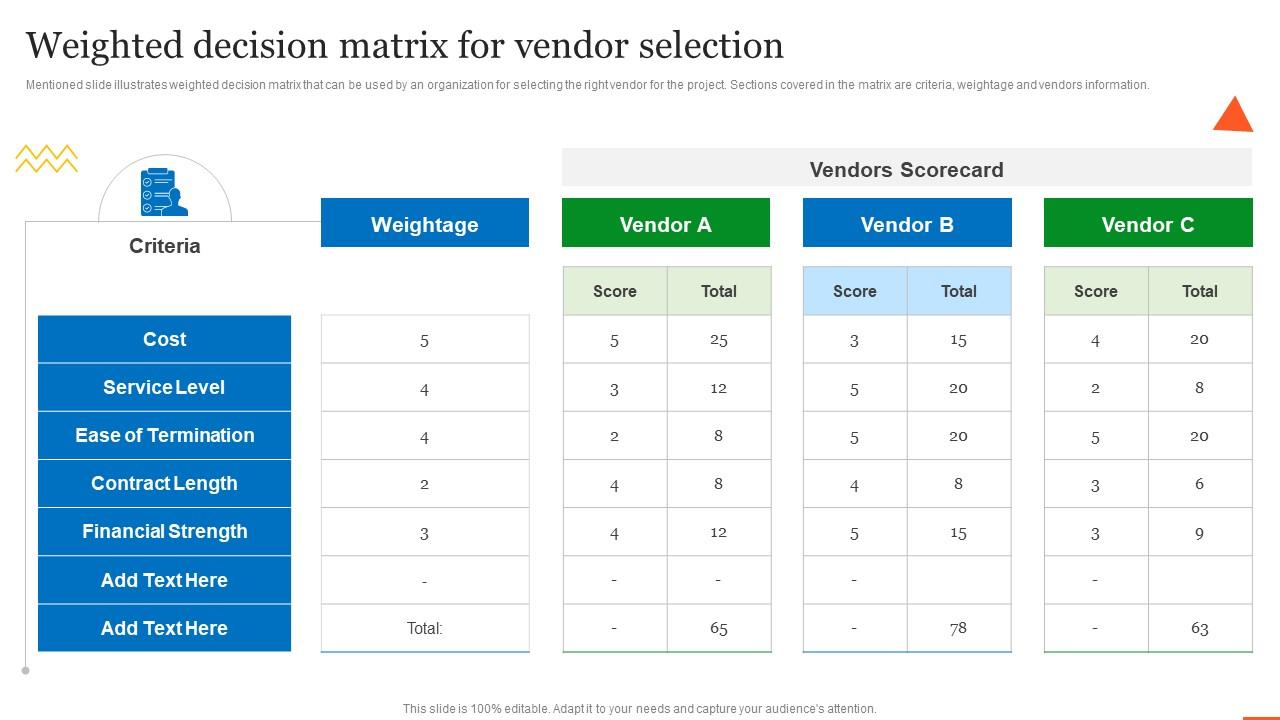
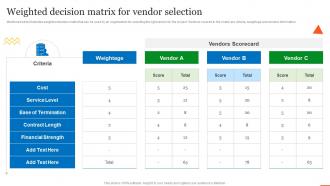
Mentioned slide illustrates weighted decision matrix that can be used by an organization for selecting the right vendor for the project. Sections covered in the matrix are criteria, weightage and vendors information.Present the topic in a bit more detail with this Weighted Decision Matrix For Vendor Selection QCP Templates Set 1. Use it as a tool for discussion and navigation on Ease Termination, Financial Strength, Service Level. This template is free to edit as deemed fit for your organization. Therefore download it now.

People who downloaded this PowerPoint presentation also viewed the following :

FAQs for Weighted Decision Matrix For Vendor Selection QCP

Honestly, the best part is it stops you from just going with whatever feels right in the moment. You actually have to think through what matters most and give each thing a score. I'm always shocked when my "obvious" pick totally bombs once I crunch the numbers lol. It also makes you way more honest about trade-offs you'd normally ignore. Plus if someone questions your choice later, you can actually explain your logic instead of just shrugging. Seriously though, next time you're torn between options, just try it – the clarity is wild.

Yeah, weighting totally makes or breaks your whole decision matrix - it's what decides the winner. Higher weights mean those criteria matter more, and honestly? I've watched rankings flip completely just from small weight adjustments. You really need to nail down your weights from the start though. Like if cost genuinely matters twice as much as convenience, weight it that way. But here's the thing - tiny changes can swing your results big time. Always do a quick sensitivity check afterward to see if your decision holds up. Trust me, you don't want to realize later that changing one weight by 10% suddenly makes option C the winner instead of A.

There are a few good ways to figure out those weights. Expert judgment is probably your easiest bet - get your team to rank what matters most and assign percentages. If you want something more structured, try pairwise comparison (the AHP method works great here). You compare each criterion against the others to build consistent weights. Survey-based weighting is solid too when you need input from lots of people. Honestly though? There's no perfect approach. I'd just start with expert judgment if you're short on time - way faster and you can always tweak things later. Pick whatever feels right for your situation.

Get multiple people to score separately, then compare - catches so much bias that way. Make sure everyone's using the same definitions for what a "3" vs "4" actually means for each thing you're rating. I've literally seen teams where everyone was scoring totally different stuff lol. Blind scoring works great initially so people aren't influenced by others. Pull in your subject matter experts for the technical bits. Write down why you gave each score - you'll thank yourself later when someone questions your ratings. Oh and definitely do a final reality check on the results because sometimes the numbers lie.

Honestly, these work great when you're juggling multiple options and the criteria don't all carry the same weight. Like picking software vendors or deciding project priorities - stuff where you can't just go with your gut. The real game-changer is getting your team to hash out what matters most before you start scoring. No more arguing about whether cost trumps features after you've already done the work. It makes everything way more transparent too, which I actually love. The scoring thing helps cut down on bias. Only worth the time investment if the decision actually matters though - don't use it for picking lunch spots.

Yeah, they're used everywhere! Hospitals evaluate medical equipment this way - weighing cost against patient safety and efficiency. Tech companies do it for deciding which features to build next, balancing user impact with how long development takes. HR uses them for hiring too, though honestly that feels pretty cold when you're the one being scored. Manufacturing companies pick suppliers this way - quality vs price vs delivery speed. The trick is figuring out what factors actually matter for your situation. Getting those weights right from the start makes all the difference.

Get your team together and just start throwing ideas around - whiteboard, sticky notes, whatever works. You'll want to grab both the obvious stuff (cost, timeline) and the less obvious things like how users will actually feel about it. I always look back at similar decisions we've made before because you forget things, honestly. Here's what I've learned: run your final list by someone totally fresh to the project. They'll spot what you missed. Then test it - would these criteria actually help you pick between your worst option and your best one? If not, keep tweaking.

Honestly, the biggest mess-ups happen with weighting and scoring. Don't make your criteria weights too similar - kinda defeats the whole point. Watch out for one person hijacking the scoring process too. I've seen way too many teams reverse-engineer their scores to match what they already wanted (so tempting but don't!). Your criteria should actually be independent from each other. Keep scoring simple - 1-5 or 1-10 works fine. Get the right people involved in both setting weights AND scoring options. Then stick with your method even if the results are weird. Trust the process you built.

So the weighted matrix thing is actually super useful when you've got like 3+ options to pick from. SWOT's more for big picture strategy stuff, and cost-benefit is just about money really. But with the matrix, you can score everything against what matters to you - cost, timeline, risk, whatever. I used it last month for picking contractors and it was a lifesaver. Way more organized than just making pros/cons lists. SWOT's still good for early planning though. And cost-benefit works fine if you're just doing a simple yes/no decision. Try the matrix next time you're comparing vendors or something - you'll actually see the differences clearly.

Dude, you really need stakeholder input for this - they're the ones who know what actually matters. Don't just wing it on the criteria and weights, because you'll probably miss something huge. Get them involved upfront to figure out what to evaluate and how much each thing should count. Otherwise you end up with this perfect-looking matrix that totally ignores what drives real results. I'd map out who needs a voice in this first. Then just run a quick session to hash out priorities - saves you from looking like you built something in a vacuum, you know?

Honestly, just use Excel or Google Sheets for this stuff. The automatic calculations will save you from those annoying math mistakes we all make when doing it by hand. There are fancier tools like Decision Lens if you want to get serious about it, but I'd start simple. What's cool is you can play around with different weights and see how it changes your results instantly. Oh, and if you're working with a team, Google Sheets lets everyone jump in at once. Trust me, even a basic Excel template will save you tons of time and make everything way clearer.

So here's what works well - get everyone to fill out their own matrix first, then compare results afterward. The differences are honestly pretty eye-opening! Average out the weights and scores, but definitely talk through any big disagreements before you finalize anything. I'd also have different people research specific criteria so nothing gets missed. Just make sure everyone's clear on what each criterion actually means upfront, otherwise you'll get wildly different interpretations. A shared Google sheet is perfect for this since people can watch the results update live.

Honestly, bar charts are your best bet for this stuff - they're dead simple and show total scores really clearly. Everyone knows how to read them. If you want to get fancy, radar charts let you see how each option stacks up across all your criteria simultaneously, but they get messy fast with too many factors. Heat maps are cool too since they use colors to show where each choice is strong or weak. I'd probably just start with the bar chart thing first, then throw in a heat map later if people want to dive deeper into the specifics. Way less overwhelming that way.

Check your matrix every quarter or when big stuff changes - new budget, different priorities, whatever. Honestly, I've watched teams use the same old weights for months while everything around them shifted. Then they're confused why decisions feel wrong. Market conditions change, stakeholders want different things, your six-month-old criteria might be totally irrelevant now. Set a calendar reminder to ask "what's actually different since last time?" Don't just review the numbers - question if your weights still make sense. Quick quarterly check beats wondering why everything feels off later.

Cultural stuff totally changes how you prioritize criteria in decision matrices. Like, individualistic cultures weight personal achievement way more, while collectivist ones care about team harmony and getting everyone on board. Risk tolerance is all over the map too - some cultures will score uncertainty factors completely differently than others. Time orientation's another big one. I've literally watched great matrices bomb because nobody thought about these cultural blind spots. Long-term vs short-term thinking varies so much between cultures it's crazy. Before you lock in your criteria and weights, definitely bounce them off people from different backgrounds. They'll catch things you missed.

Ratings and Reviews

100% of 100
Review Form
Write a review
Most Relevant Reviews
  1. 100%

    by Cordell Jordan

    Huge collection of high-quality templates. Worth each penny. 
  2. 100%

    by Charles Nguyen

    I was really impressed with the presentation I created with their templates. I’ll be using their services moving forward. 

2 Item(s)

per page: