





 0 Comment
 Customer Reviews

The training deck's sitting in the shared folder. Has been for a week.
Not because it's bad—probably covers everything it should. Features, benefits, positioning, competitive landscape. But there's this thing that happens when product launches. Everyone nods along during development, signs off on requirements, approves the go-to-market timeline. Then somebody has to teach the sales team how to actually sell it.
That's when the gaps show up. Not in the product. In the explaining.
Sales Training wants to know what to say when prospects push back. Support needs scripts for the calls that'll start coming. Partners need talking points that don't sound like marketing wrote them. And somewhere between "here's what it does" and "here's why they'll buy it," the Product Training Program has to bridge a gap that feels bigger than anyone expected.
The product manager knows the features backward. Marketing knows the messaging. But neither knows how to turn months of internal conversations into something that lands cleanly in a 90-minute session. How to make complex Product Knowledge feel simple. How to prepare people for questions that haven't been asked yet.
Bad training doesn't just slow adoption. It kills confidence. One confused demo, one fumbled objection response, and suddenly the launch feels shaky.
So people build templates. Not because Sales Enablement is rocket science—though it can feel like it. Because the stakes are real and the audience is skeptical and you don't get many chances to make it stick.
SlideTeam's new product training templates exist for this exact moment—when you need structure that works, not structure that looks impressive. Ready-made frameworks that handle the progression from features to value without losing people along the way.
Here are the Training Materials that work when launch day doesn't wait for perfect training materials.
Template 1: New Product Training Plan Template PPT Slides
You need a Product Training Program that actually works (not another "revolutionary framework" nobody follows). This pre-designed PPT template systematically covers training objectives, audience analysis, market positioning, delivery methods, scheduling, and evaluation metrics. Project managers, training coordinators, and team leads can use these PowerPoint slides for real training. Each PPT preset delivers actionable frameworks that transform scattered training materials into measurable learning outcomes. Download now!
[product_image id=1486899]
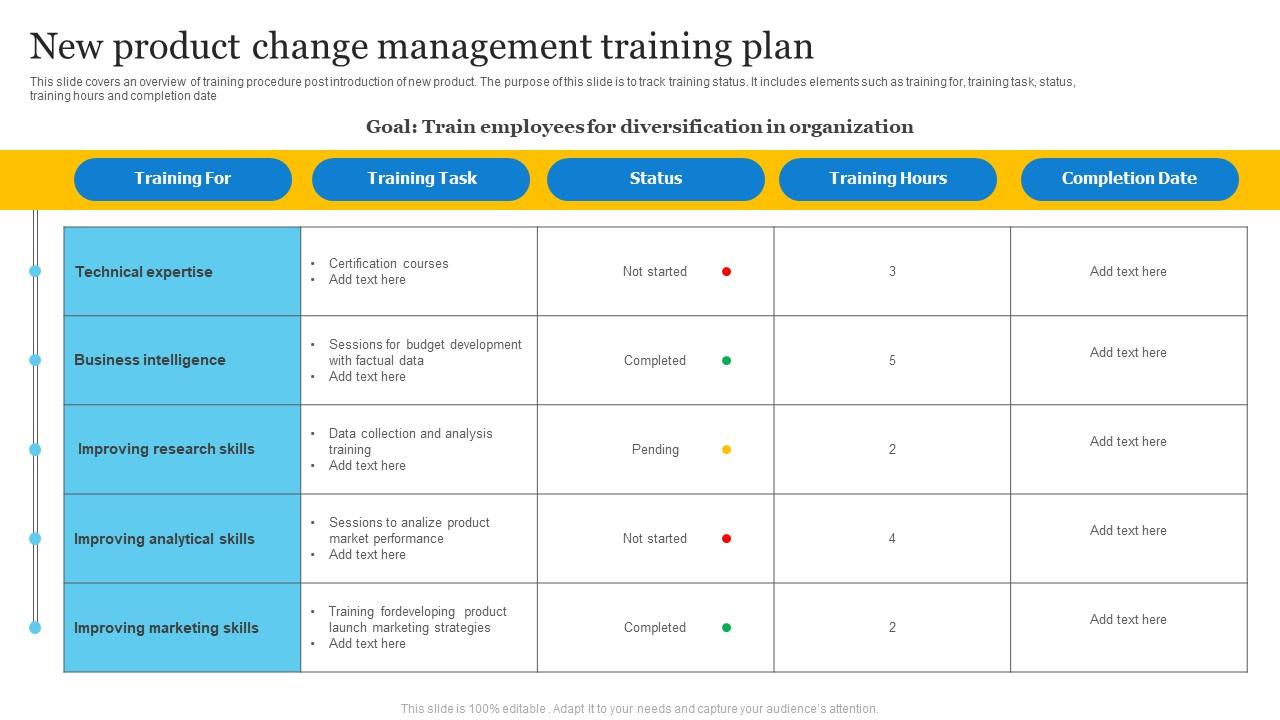
Template 2: New Product Change Management Training Plan
This PPT template tracks employee diversification initiatives during product launches. The PowerPoint slide delivers actionable columns covering training focus, tasks, status indicators, hours, and completion dates. Other essential data points for change management monitoring are included. Project managers and HR teams can customize this PPT preset for strategic planning sessions or performance reviews as part of their comprehensive Product Training Program. Download this slide to streamline your diversification training oversight and enhance your Employee Onboarding processes
Download this PowerPoint Template
Transform Your New Product Training Plan with SlideTeam
SlideTeam's PowerPoint templates are the best in the industry for developing comprehensive new product training plans. These content-ready slides provide structured frameworks that save valuable preparation time while ensuring professional delivery of critical Product Knowledge. Our ready-made templates include all essential Sales Enablement components from product features to implementation strategies. Deploy these PowerPoint slides to accelerate your training program launch and ensure successful product adoption across your organization.
FAQs on new product training plan
What are the key objectives to focus on when designing a new product training plan?
Focus on three core objectives for your Product Training Program. First, ensure trainees can demonstrate actual product use within real scenarios. Second, equip them to handle common customer questions and objections confidently. Third, measure their ability to identify which customers need this product. Skip lengthy feature lists in your Training Materials. Instead, practice hands-on demos and role-play customer conversations. Use Training Evaluation through simulations, not written exams.
How can product training plans be customized for roles within the sales and support teams?
Segment teams by customer interaction level through a comprehensive Product Training Program. Sales teams need pricing, competitive positioning, and objection handling content as part of their Sales Training. Support teams require technical troubleshooting, feature details, and resolution workflows through Customer Support Training. Create role-specific modules with relevant scenarios. Sales gets pitch practice and demo training. Support gets hands-on product testing and escalation procedures. Deliver content through preferred channels - sales wants quick reference cards, support needs detailed documentation.
What metrics should be used to measure the effectiveness of a new product training program?
Track completion rates to see who finishes the Product Training Program. Measure knowledge retention through pre and post-training tests. Monitor sales performance data before and after training rollout. Use participant feedback scores to identify gaps in Training Evaluation. These four metrics tell you if people are learning, applying Product Knowledge, and driving results. Focus on numbers that connect training to actual product sales and customer outcomes.


