

ChatGPT IT Powerpoint Presentation Slides




Try Before you Buy Download Free Sample Product
 Impress Your
 Audience
 100%
100% Editable
 Save Hours
 of Time


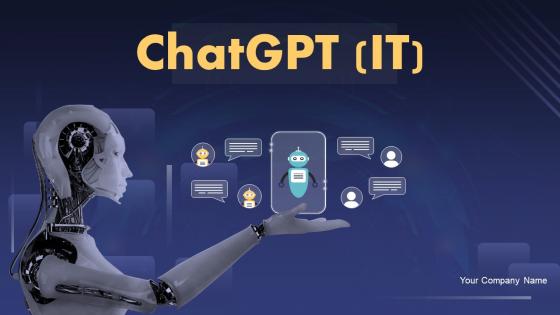
Chat GPT multitasks by picking up on and naturally expressing more than one aim at a time. Grab our professionally curated ChatGPT IT template. It includes an introduction, advantages, and features of OpenAIs ChatGPT model and discusses the price and availability of its enhanced version, called ChatGPT Pro. Our ChatGPT deck represents the working and architecture of ChatGPT technology, including a large language model and self-attention mechanism. Additionally, it demonstrates the various applications of ChatGPT in several domains, such as education, medicine, research, information technology, advertisement, banking, finance, etc. Our chatbot using GPT-3 PowerPoint presentation represents the three reinforcement learning from human feedback models supervised fine-tuning, reward, and reinforcement learning. Furthermore, it discusses integrating the ChatGPT model into web applications and best practices for successful deployment. Moreover, our ChatGPT integration into the web applications module contains sections about the impact of ChatGPT on social media and artificial intelligence tokens. Lastly, this chatbot using GPT-3 deck comprises a roadmap, a timeline, a 30-60-90 days plan, a checklist to integrate OpenAIs GPT-3 model into web applications and a case study on mental health and ChatGPT collaboration. Get access now.
People who downloaded this PowerPoint presentation also viewed the following :
Content of this Powerpoint Presentation
Artificial Intelligence (AI) has the capability to bring about multiple positive improvements in society, such as higher production, better healthcare, and access to education for a greater number of people. AI-powered technology also helps find solutions to complex challenges and make our daily lives more accessible and convenient. However, we observed significant shifts with the advent of the ChatGPT.
ChatGPT is an AI chatbot that uses natural language processing to imitate human-like conversational communication. The language model responds to enquiries and creates written material such as blogs, social media postings, essays, code, and emails.
Effective communication is vital in the IT field. From communicating complicated technical concepts to providing progress reports, the ability to explain ideas effectively and engagingly is paramount. ChatGPT IT PowerPoint Templates help professionals create presentations with clarity and impact.
Our content-ready PPT Templates are essential in IT presentations because they engage the audience visually and assist in content retention. They offer a structured framework that guides information flow and ensures coherence. Concise slides simplify complicated information while improving communication and accessibility. These professionally curated slides convey authenticity and professionalism while creating a lasting impression. These ChatGPT IT PowerPoint templates are 100% editable and customizable, providing a slick design that enhances presentations, allowing you to communicate complex ideas with clarity and impact.
Let’s explore our top slides from this PowerPoint catalog.
Template 1: About OpenAI Research Organization- Overview and Key Features
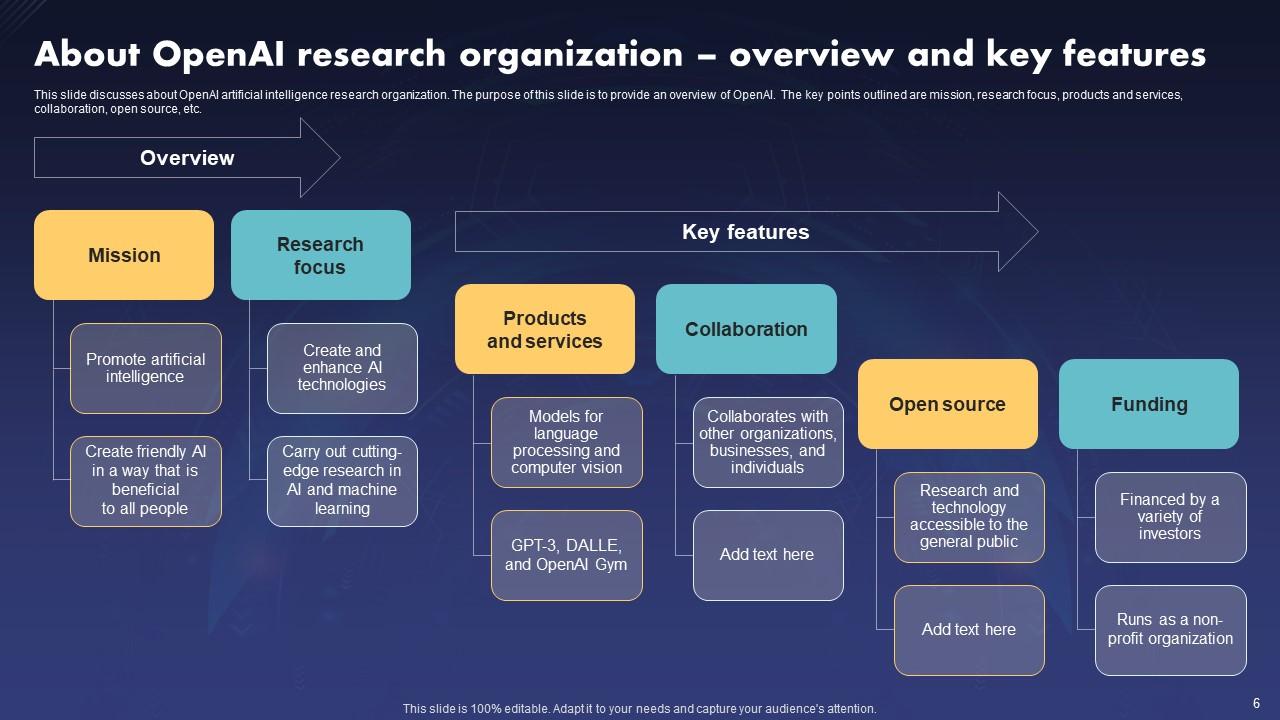
This PPT Slide encapsulates the organization's core objectives, specialized areas of focus, products, and services offered, collaborative initiatives, and commitment to open-source principles. This detailed overview not only informs the viewer about OpenAI's relevance in the field of AI, but also emphasizes the company's collaborative spirit and commitment to improving technology for the benefit of society. The presentation provides a quick yet thorough introduction to OpenAI's critical role in AI research and development.
Template 2: Generative Pre-Trained Transformer (GPT)- Overview and Types
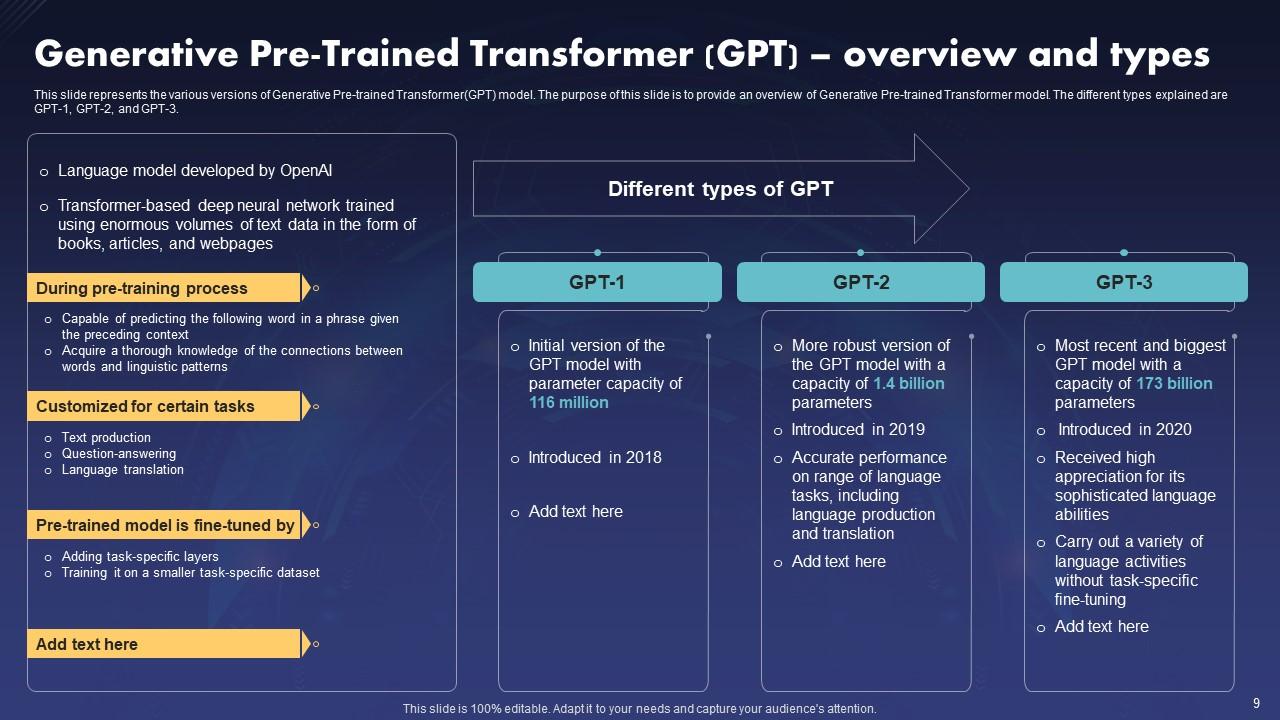
This PPT Template provides an overview of the model and its variations (GPT-1, GPT-2, and GPT-3). It aids in communicating the evolution and advancements of GPT, emphasizing differences and improvements throughout time. Such a slide delivers information to a wide range of people, promoting comprehension and conversation. Cohesively capturing significant ideas improves comprehension and recall of facts regarding ChatGPT and its variations, allowing for more informed decision-making and investigation in natural language processing.
Template 3: Benefit of Using ChatGPT OpenAI Model
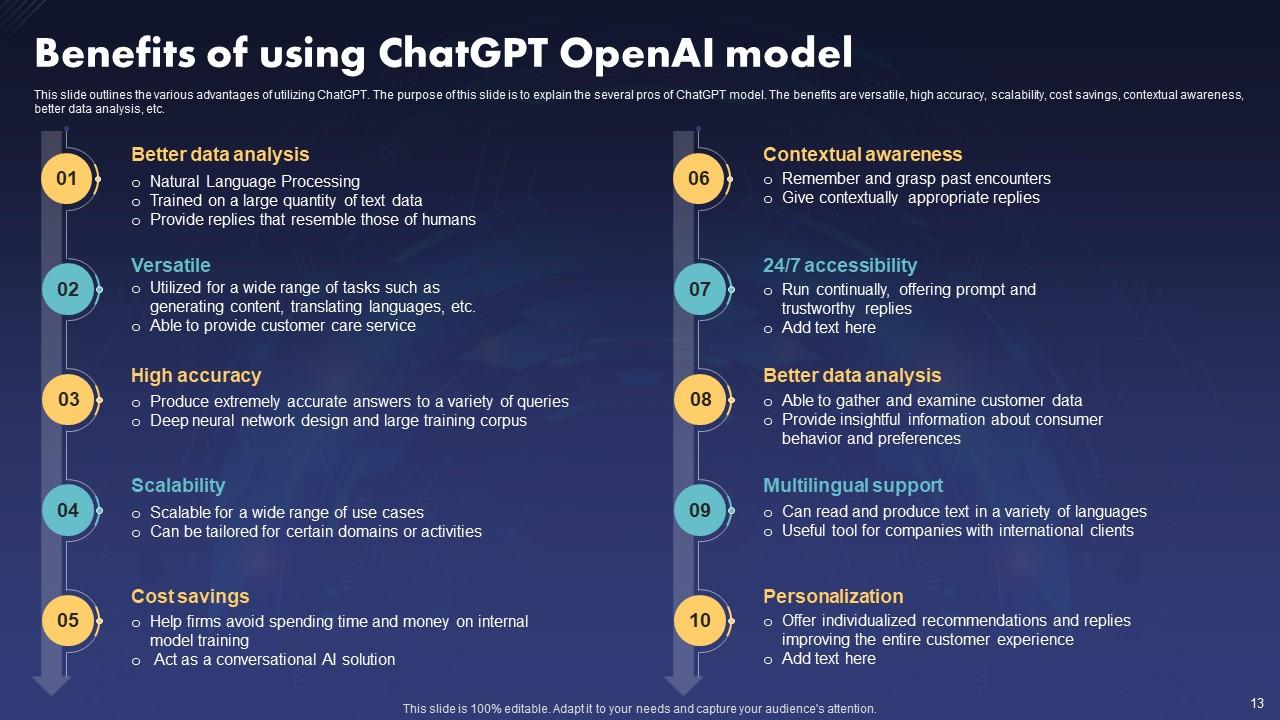
This PPT Slide outlines the advantages of using ChatGPT. The benefits are versatility, high accuracy, scalability, cost savings, contextual awareness, better data analysis, etc. This PowerPoint slide effectively persuades stakeholders by showcasing ChatGPT's capabilities in a structured format, fostering understanding and buy-in.
Template 4: Working Process of ChatGPT OpenAI Model
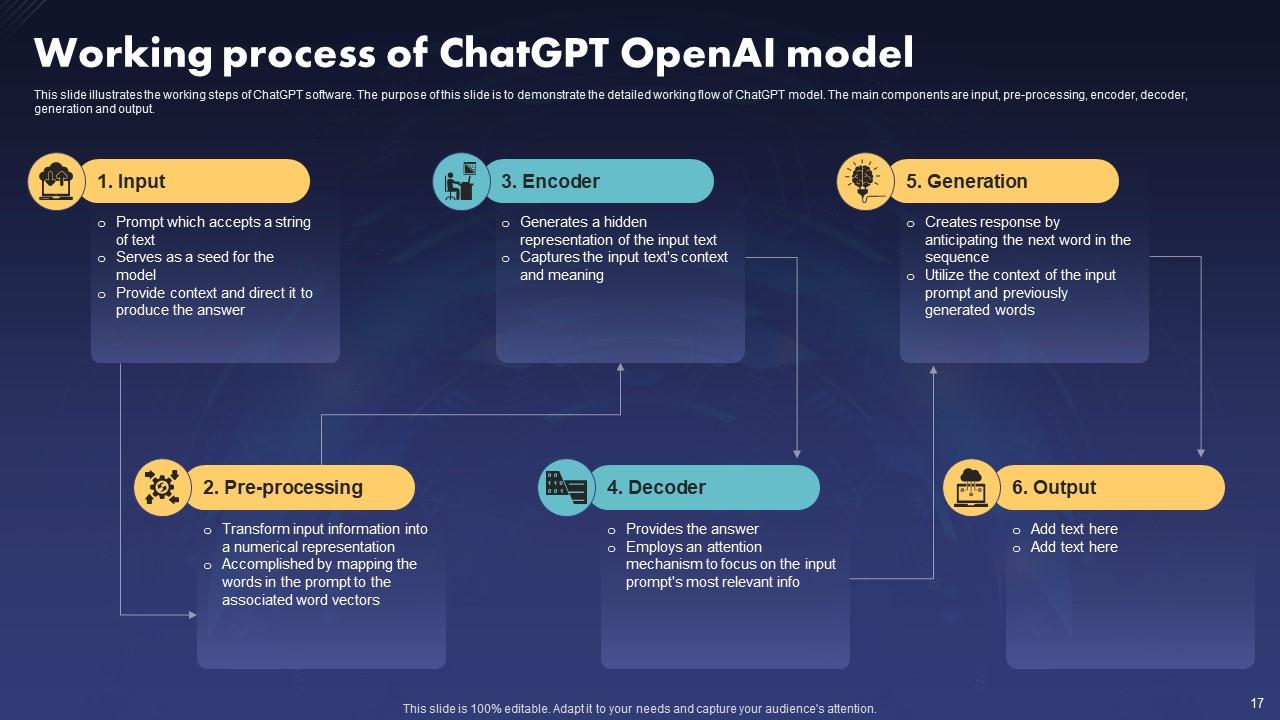
This PowerPoint Slide illustrates the working steps of ChatGPT software. The purpose of is to demonstrate the detailed working flow of the ChatGPT model. The main components are input, pre-processing, encoder, decoder, generation, and output. It serves as a roadmap, guiding discussions, training sessions, and presentations about ChatGPT's functionalities, capabilities, and advancements. Thus, they streamline communication, enhance understanding, and enable effective collaboration among researchers, developers, and stakeholders using and developing ChatGPT.
Template 5: How ChatGPT Enhance Code Quality
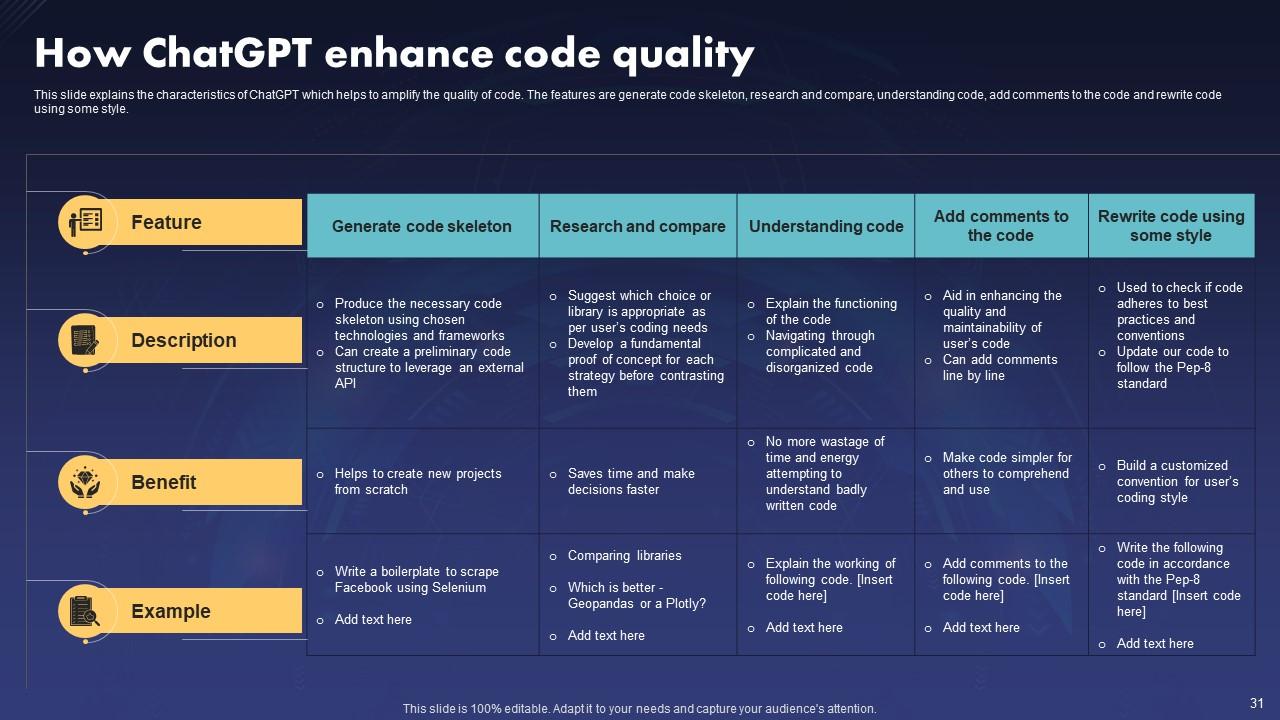
The PowerPoint slide mentioned explains ChatGPT's characteristics, which help amplify code quality. The features are to generate a code skeleton, research and compare, understand code, add comments to the code, and rewrite code using some style. It highlights ChatGPT's role in code quality improvement, aiding comprehension for diverse audiences. The slides can outline ChatGPT's capabilities in code analysis, debugging assistance, and code generation, showcasing its potential to streamline development processes and reduce errors.
Template 6: ChatGPT Applications and Benefits for IT Sector
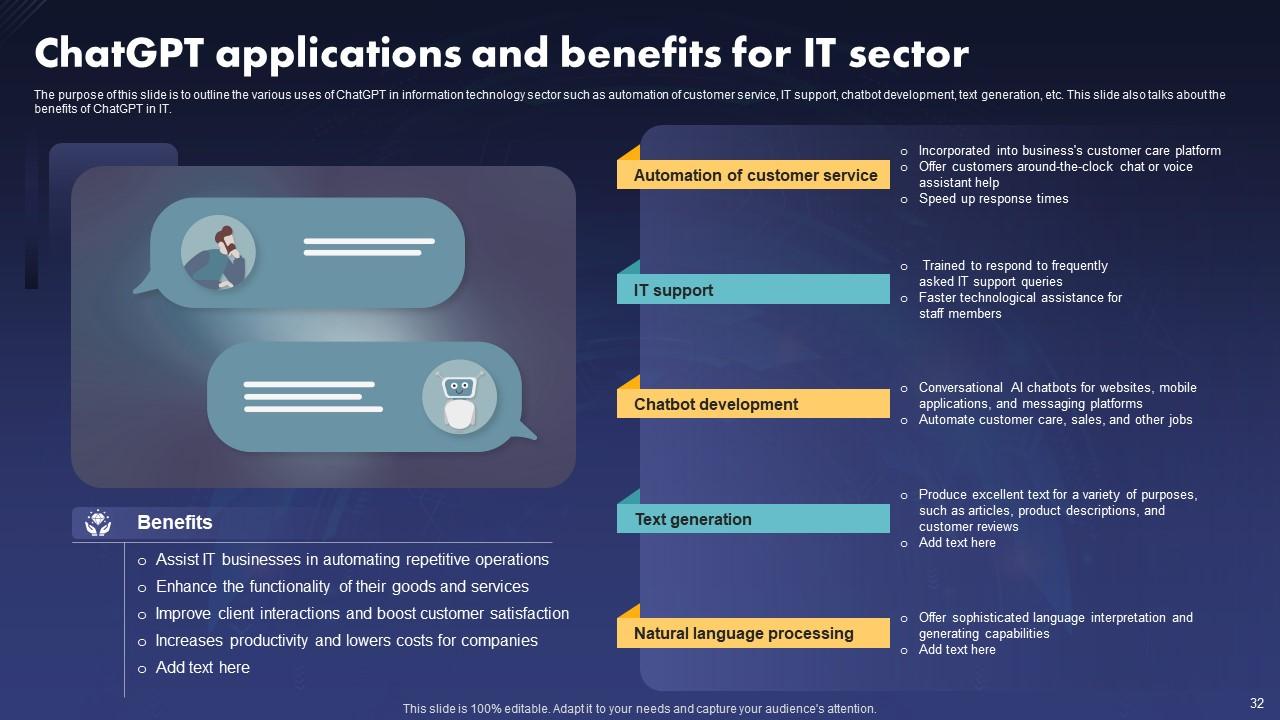
This PPT Template highlights ChatGPT's role in the IT sector and underscores its applications, including automating customer service, IT support, chatbot development, and text generation. This slide communicates benefits ChatGPT offers in streamlining processes, enhancing efficiency, and improving customer experiences. Showcasing its versatility and effectiveness in handling tasks within the IT domain facilitates informed decision-making and adoption of ChatGPT solutions.
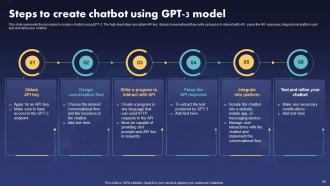
Template 7: Steps to Create Chatbot using GPT-3 Model
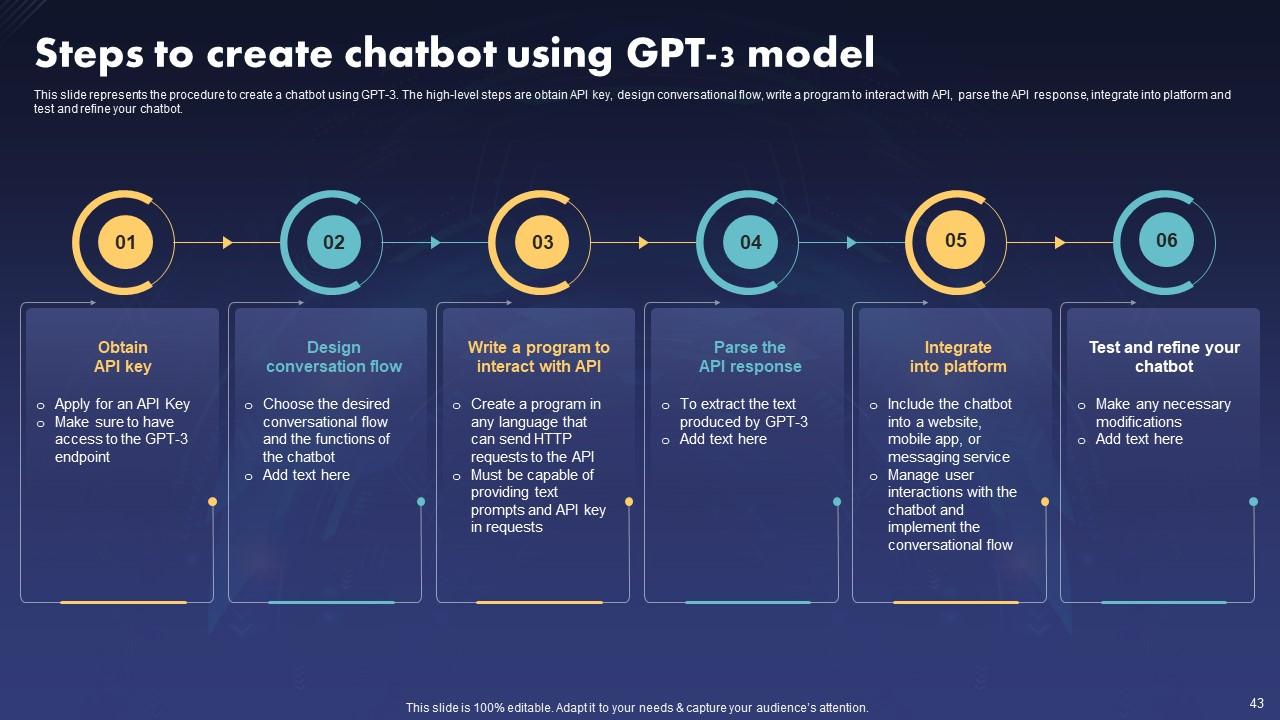
This slide shares details about the steps to create a chatbot using the GPT-3 model. It serves as an important roadmap for developers. It outlines stages such as obtaining the API key, designing conversational flow, programming interactions with the API, parsing responses, integration, and testing. This streamlines the development process, ensuring clarity and direction for developers. Each step's importance is underscored, guiding creators through the intricate process of chatbot construction with GPT-3.
Template 8: Future Role of ChatGPT OpenAI Model
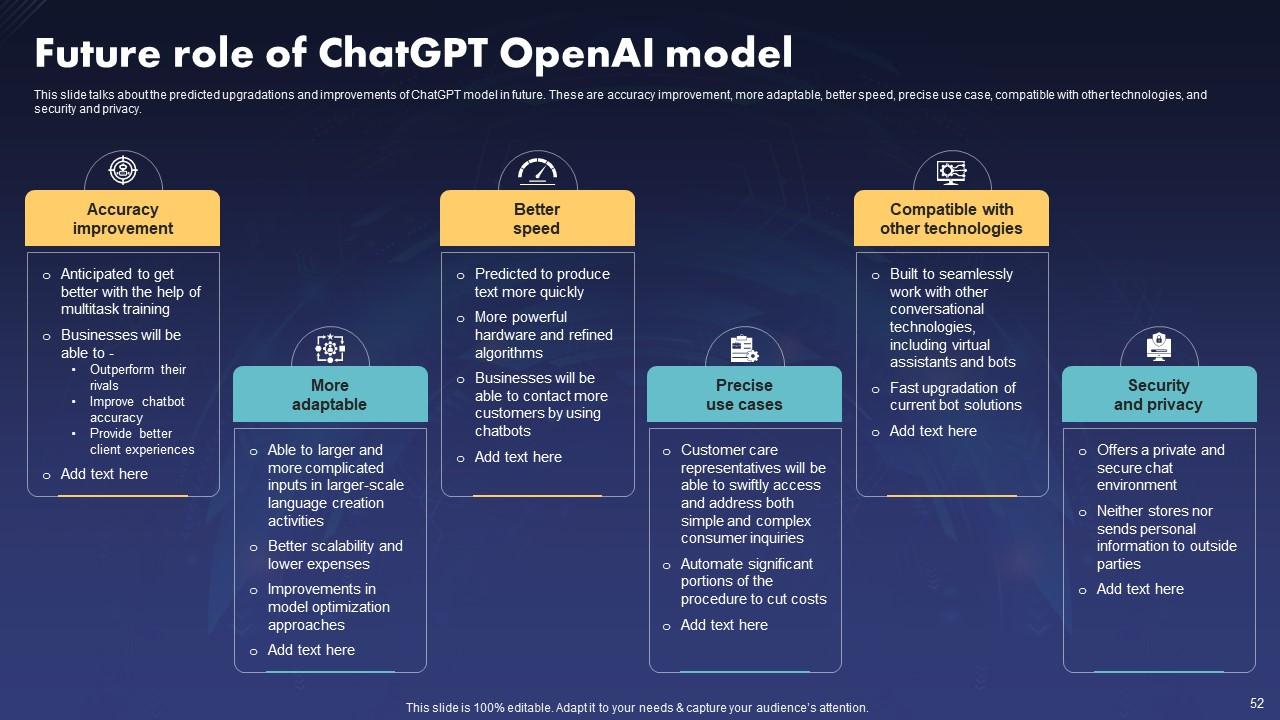
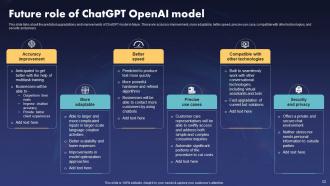
The future role of the ChatGPT OpenAI Model demonstrates foresight and adaptability, showcasing the organization's commitment to leveraging cutting-edge technology. This slide discusses the predicted upgrades and improvements of the ChatGPT model. . These are accuracy improvement, more adaptability, better speed, precise use case, compatibility with other technologies, and security and privacy. It offers insight into potential advancements, reassuring stakeholders of continued innovation and competitiveness. Addressing the model's future role fosters transparency and builds audience trust by illustrating long-term vision and goals.
Template 9: Checklist to Integrate Open AI’s GPT-3 Model into Web Applications
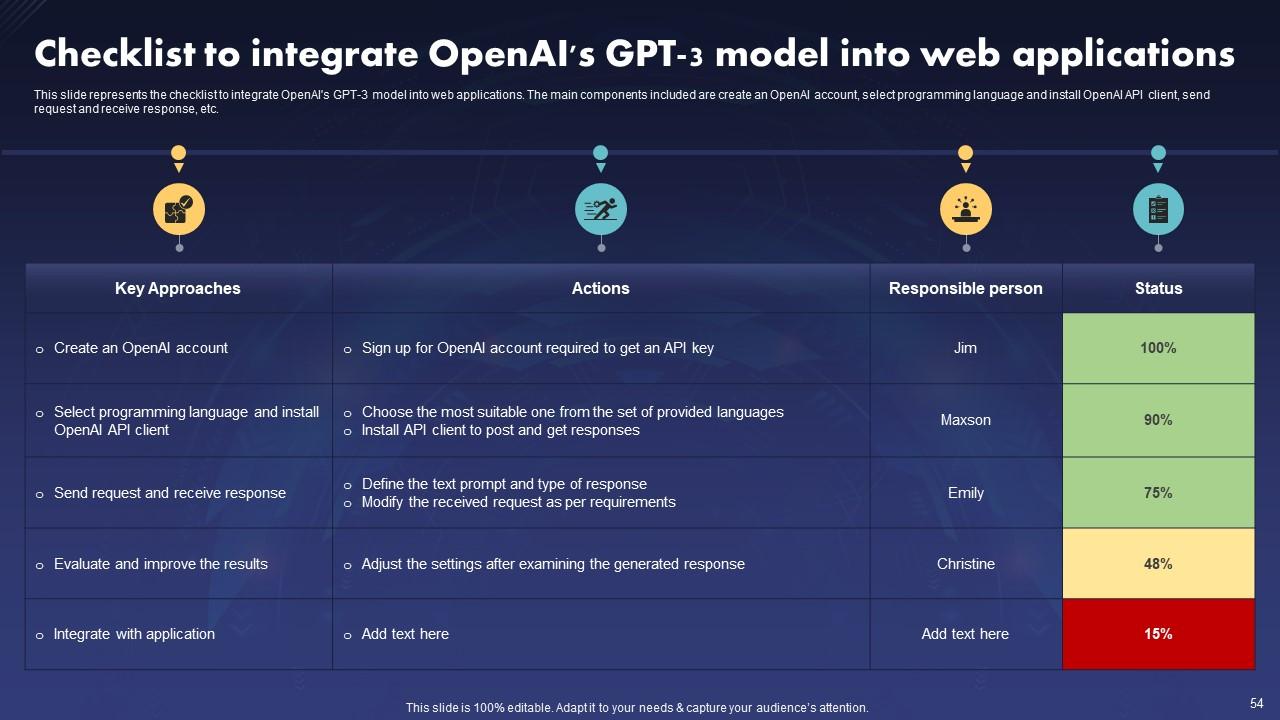
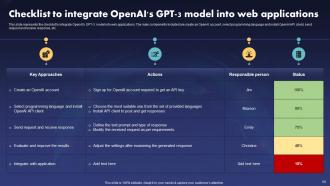
This PPT Slide represents the checklist for integrating OpenAI's GPT-3 model into web applications. The main components included are creating an OpenAI account, selecting a programming language and installing the OpenAI API client, sending requests and receiving responses, etc. The checklist ensures a systematic approach, minimizing errors and oversights during the integration process. This ensure that developers adhere to best practices, ensuring the efficient utilization of the model's capabilities.
Template 10: Case Study- Mental Health and ChatGPT Collaboration
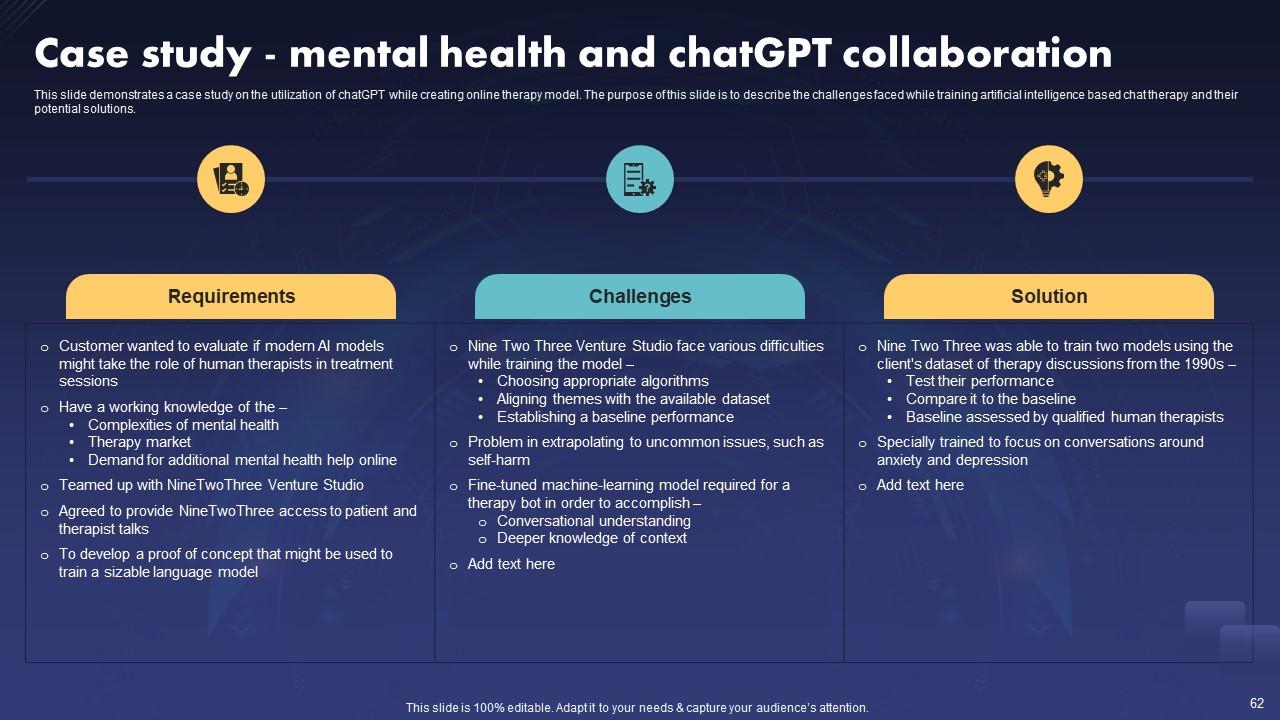
Including a case study on the collaboration between mental health and ChatGPT in a presentation is crucial for highlighting AI's practical application and effectiveness in therapy. This PPT slide showcases real-world challenges in training AI for mental health support and the innovative solutions devised. This offers insights into the complexities of integrating technology into the domain and demonstrates how ChatGPT can enhance accessibility and efficacy in online therapy models.
Smarter Solutions, Powered by ChatGPT
ChatGPT transforms IT by providing enhanced language capabilities, assisting with code production, debugging, and automating repetitive processes. Its adaptability boosts productivity, encourages creativity, and streamlines workflows. ChatGPT's capacity to grasp complicated IT ideas makes it an invaluable aid, enabling professionals to manage difficulties. ChatGPT IT PowerPoint Templates enable you to clarify complicated topics by improving visual engagement, facilitating organized structure, and promoting improved communication.
ChatGPT IT Powerpoint Presentation Slides with all 77 slides:
Use our ChatGPT IT Powerpoint Presentation Slides to effectively help you save your valuable time. They are readymade to fit into any presentation structure.
-

ChatGPT IT
-
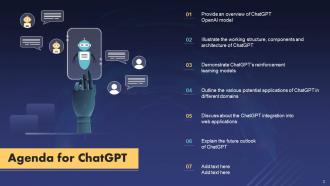
Agenda for ChatGPT
-
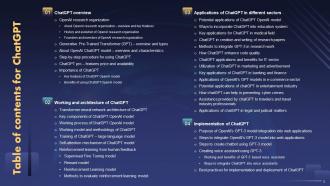
Table of contents for ChatGPT
-
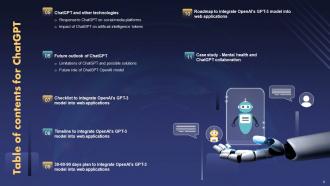
Table of contents for ChatGPT
-
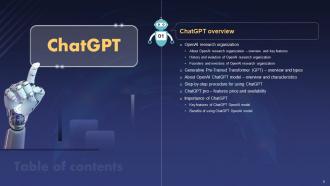
ChatGPT overview
-
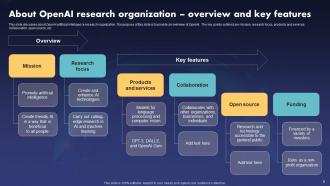
About OpenAI research organization overview and key features
-
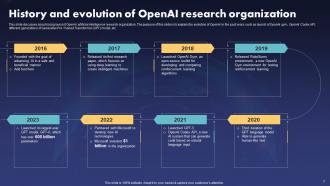
History and evolution of OpenAI research organization
-
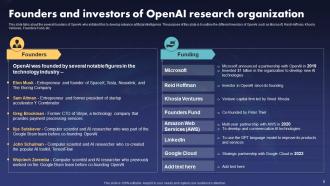
Founders and investors of OpenAI research organization
-
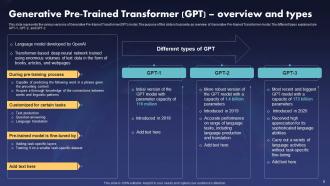
Generative Pre Trained Transformer GPT overview and types
-
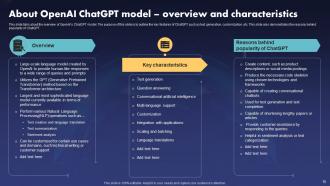
About OpenAI ChatGPT model overview and characteristics
-
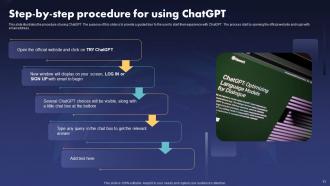
Step by step procedure for using ChatGPT
-
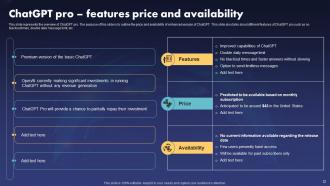
ChatGPT pro features price and availability
-
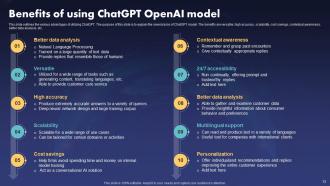
Benefits of using ChatGPT OpenAI model
-
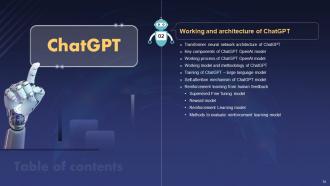
ChatGPT Working and Architecture
-
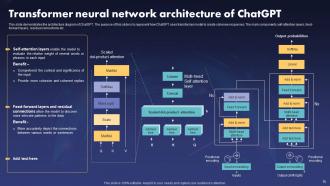
Transformer neural network architecture of ChatGPT
-
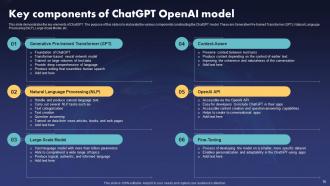
Key components of ChatGPT OpenAI model
-
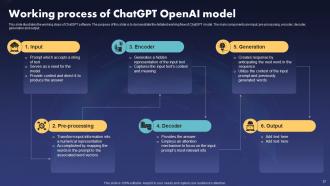
Working process of ChatGPT OpenAI model
-
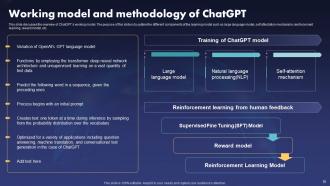
Working model and methodology of ChatGPT
-
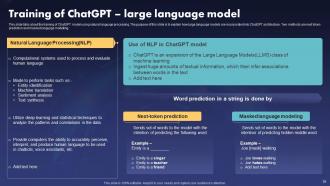
Training of ChatGPT large language model
-
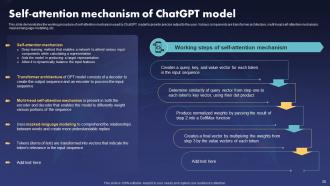
Self attention mechanism of ChatGPT model
-
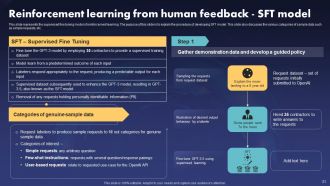
Reinforcement learning from human feedback SFT model
-
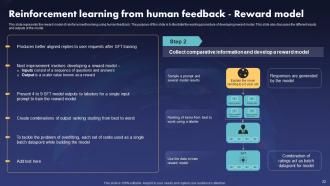
Reinforcement learning from human feedback Reward model
-
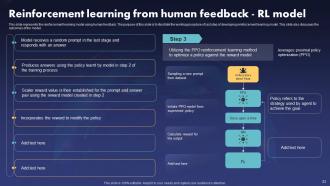
Reinforcement learning from human feedback RL model
-
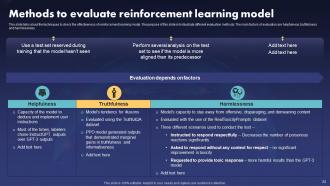
Methods to evaluate reinforcement learning model
-
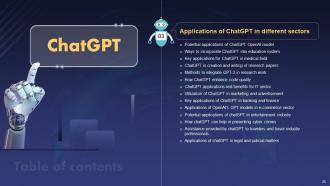
ChatGPT Applications in Different Sectors
-
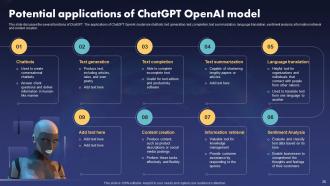
Potential applications of ChatGPT OpenAI model
-
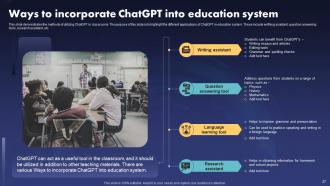
Ways to incorporate ChatGPT into education system
-
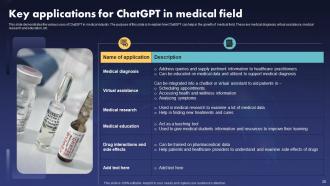
Key applications for ChatGPT in medical field
-
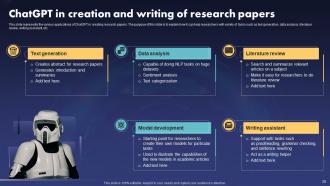
ChatGPT in creation and writing of research papers
-
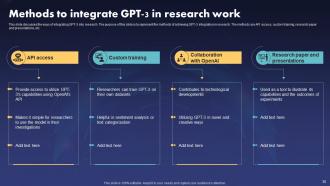
Methods to integrate GPT 3 in research work
-
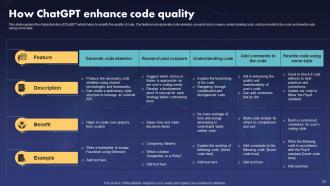
How ChatGPT enhances code quality
-
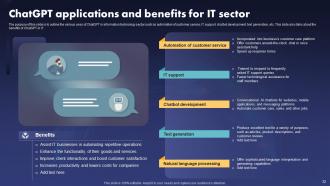
ChatGPT applications and benefits for IT sector
-
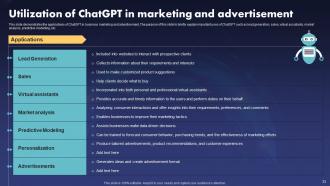
Utilization of ChatGPT in marketing and advertisement
-
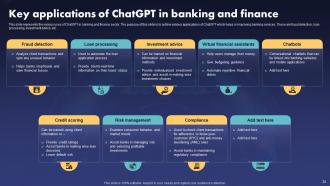
Key applications of ChatGPT in banking and finance
-
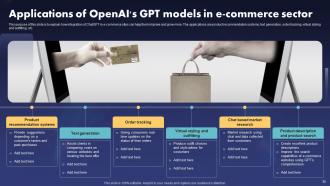
Applications of OpenAI s GPT models in e commerce sector
-
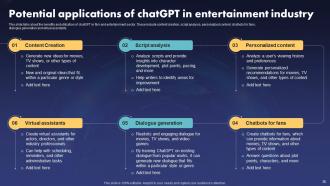
Potential applications of chatGPT in entertainment industry
-
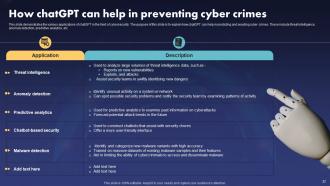
How chatGPT can help in preventing cyber crimes
-
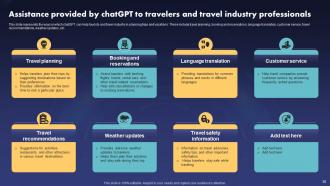
Assistance provided by chatGPT to travelers and travel industry professionals
-
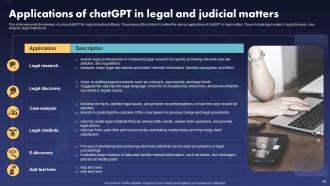
Applications of chatGPT in legal and judicial matters
-
Implementation of ChatGPT
-
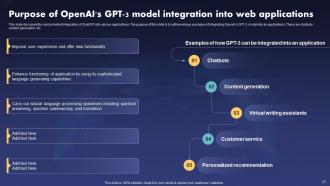
Purpose of OpenAI s GPT 3 model integration into web applications
-
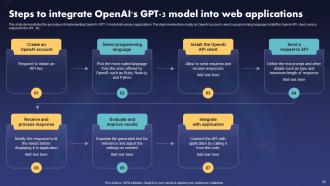
Steps to integrate OpenAI s GPT 3 model into web applications
-
Steps to create chatbot using GPT 3 model
-

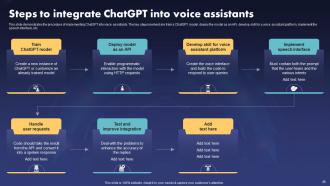
Working and benefits of GPT 3 based voice assistant
-
Steps to integrate ChatGPT into voice assistants
-
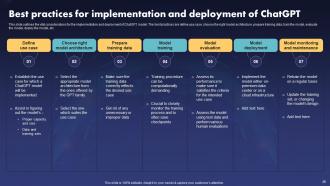
Best practices for implementation and deployment of ChatGPT
-
ChatGPT and other technologies
-
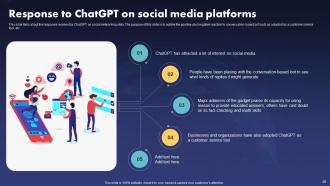
Response to ChatGPT on social media platforms
-
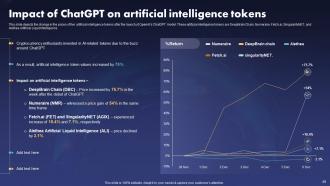
Impact of ChatGPT on artificial intelligence tokens
-
ChatGPT
-
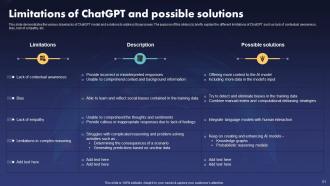
Limitations of ChatGPT and possible solutions
-
Future role of ChatGPT OpenAI model
-
Checklist to integrate OpenAI s GPT 3 model into web applications
-
Checklist to integrate OpenAI s GPT 3 model into web applications
-
ChatGPT
-
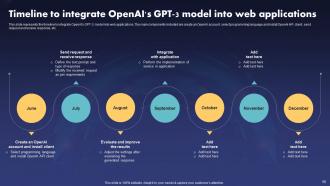
Timeline to integrate OpenAI s GPT 3 model into web applications
-
ChatGPT
-
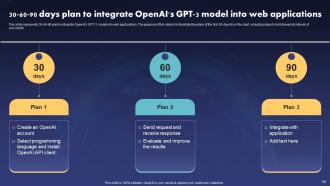
Chatgpt IT
-
ChatGPT Roadmap to Integrate OpenAI s GPT 3 Model into Web Applications
-
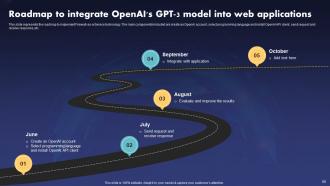
Roadmap to integrate OpenAI s GPT 3 model into web applications
-
ChatGPT
-

Case study mental health and chatGPT collaboration
-
Icons slide for ChatGPT
-
Additional slides
-
Post it notes
-
Meet our team
-
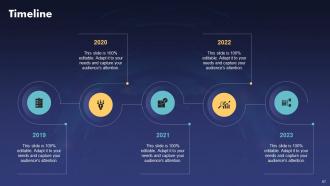
Timeline
-

Venn
-
Puzzle
-
Circular diagram
-
Our Goal
-
Thank you for watching
-

-

-

-

-

FAQs for ChatGPT IT
Honestly, the biggest game-changer is having something available 24/7 that actually knows what it's talking about. Your customers get instant help with password resets and basic troubleshooting instead of waiting around. It handles the repetitive stuff consistently too - no more Monday morning attitude from tired support reps, lol. Scales way better than hiring more people. What I'd do is pick your 10 most annoying repeat tickets and train it on those first. You'll see your ticket volume drop pretty quick, plus it gets better at sorting issues before they hit your team.
Dude, ChatGPT is honestly a game-changer for coding. I use it constantly for code reviews and generating all that boring boilerplate stuff. It's pretty solid at explaining messy functions to newer devs too. Perfect for drafting docs or when you're completely stuck on some weird bug - which happens to me way too often lol. The coolest part? It translates tech jargon into normal people language for clients. Just double-check its work though, sometimes it gets creative with solutions that don't actually exist. Try it on your next review, you'll wonder how you lived without it.
Honestly, it's been a game-changer for log analysis - just paste in weird network traffic and it'll catch stuff you'd probably miss at 2am when you're half-dead. Great for writing up incident response docs too, which is usually such a pain. Your junior folks will love how it breaks down complex vulnerabilities into normal English instead of security jargon. Oh, and it cranks out decent phishing training content way faster than doing it yourself. Just don't get lazy with verification - still run everything through your actual security tools first. And obviously never paste real sensitive data into it, but you knew that already.
Honestly, we've been using ChatGPT tons for training new people and it's been a game changer. Instead of the usual chaos of scattered wikis and bugging senior devs with basic stuff, people just ask it directly. Works great for explaining weird concepts or building custom learning plans based on what someone already knows. The documentation time savings alone is crazy - like probably 70% of routine questions get handled instantly. My advice? Start small with common support scenarios and see how it goes. I was skeptical at first but damn, it actually works way better than expected.
Yeah, ChatGPT's actually pretty solid for coding stuff. I use it all the time for writing functions, debugging weird errors, or just cranking out boilerplate when I'm feeling lazy. Works well across most languages too. Just don't trust it blindly - sometimes the code looks perfect but has sneaky bugs hiding in there. I learned that the hard way lol. Think of it more like having a really knowledgeable teammate who occasionally gets things wrong. Start small with it first, maybe some basic functions or algorithm explanations. Once you get a feel for where it trips up, you can throw bigger problems at it.
Dude, just throw your raw notes or ticket info at ChatGPT and it'll structure everything into proper technical docs, incident reports, runbooks - whatever you need. Those awful weekly status reports? Takes like 2 minutes now instead of an hour. It's pretty solid at keeping formatting consistent across your whole team too, plus it can turn technical specs into actual user guides people might read. Obviously you gotta review what it spits out since it doesn't know your specific context, but honestly it does most of the grunt work for you.
First things first - create clear rules about what people can and can't do with ChatGPT. Don't let anyone dump customer data or company secrets into it (learned that one the hard way). Train your team on AI bias because honestly, these tools aren't as neutral as they seem. Regular check-ins help you see if people are actually following the rules. Oh, and be upfront with everyone about when you're using AI - transparency matters. Start with a small pilot group first. Way easier to fix problems before the whole company's involved.
Yeah, ChatGPT's got some gaps when it comes to IT stuff. Can't pull real-time data, so don't expect live system updates or current troubleshooting. The training cutoff means newer tech and recent security holes just aren't there. Obviously it can't run actual commands either - probably smart tbh. Sometimes it'll make up technical details or suggest outdated fixes too. I'd use it for brainstorming ideas and general direction, but definitely double-check everything against current docs. And test in dev environments first, not production!
Honestly, ChatGPT's been a game-changer for my support work. I use it for drafting responses to customers - saves me probably an hour daily just on emails. Works great for turning technical stuff into normal people language too. Password resets and basic software problems are perfect starting points. You can dump error logs into it and get decent diagnostic suggestions, plus it'll help write up KB articles from tickets you've already solved. Just double-check everything first though - sometimes it makes up fixes that sound legit but aren't. My boss would kill me if I sent out bogus solutions.
Dude, don't put customer data, passwords, or any company code into ChatGPT - that stuff can get stored or used for training. Make some rules for your team because honestly, people are terrible at remembering this. Strip out identifying details when you can, or use fake data for testing. For really sensitive stuff, maybe look into local AI models instead? I learned this the hard way lol. Just think of ChatGPT like posting on Reddit - would you share that info publicly? If not, keep it out.
Honestly, it's like having a coding buddy who never gets tired of your dumb questions. I use it to debug messy code and break down frameworks I don't get yet. The error message explanations alone are worth it - way better than googling random Stack Overflow threads. You can practice coding challenges or even mock interviews without the pressure. What I love is exploring new tech at my own speed. Maybe try asking it for beginner tutorials on something you've been curious about? Oh, and it won't judge you for asking the same concept three different ways until it clicks.
Microsoft saw their dev teams get 55% more productive after adding it to their tools. GitHub Copilot helped millions of devs code 40% faster too. Stack Overflow had to change their whole policy because ChatGPT was answering questions so well - kinda wild when you think about it. Shopify and Duolingo use it for debugging and documentation stuff. Honestly, I'd just try a small pilot with your team first. See what happens before going all-in.
Honestly, I've been using ChatGPT for project stuff and it's pretty solid. Break down big projects into smaller chunks, set up timelines that actually make sense. It's weirdly good at catching bottlenecks I totally miss - like when I'm too close to see the obvious problems. Feed it your current status and ask what could go wrong or what to tackle next. Also helps write those awkward emails to your boss about why things are delayed (we've all been there). Just be super specific when you ask it stuff. Vague prompts = useless answers. The more details you throw at it, the better.
Honestly, you're gonna run into three big headaches. First off, your security folks will lose their minds over data handling - and they should, since you're basically shipping company info to OpenAI. Rate limits are annoying too, plus the API goes down sometimes at the worst moments. Costs are sneaky though - that's what'll bite you if you're not watching. Oh, and response times are all over the place, which screws with performance. I'd definitely test it out on something small first. Way better to find the weird bugs in a sandbox than when everyone's watching.
Honestly, I use ChatGPT all the time for breaking down confusing tech stuff - like when I was trying to figure out edge computing last month, it was a mess until I asked it to explain it like I'm 5. You can get it to compare new trends to things you already know, or brainstorm how something might work in your setup. It's solid for keeping up with AI/ML developments and security frameworks too. Obviously double-check anything important through real sources, but it's perfect for getting your bearings first. Way better than drowning in white papers right off the bat.
-
Wonderful presentations! This chatgpt PowerPoint templates are a secret gem that gives us a competitive advantage.
-
The acme of professionalism! These IT presentations demonstrate the specialists' dedication to quality and accuracy.
-
A pleasure templates that improved my IT presentation. Extremely pleased!
-
The most beneficial investment for professional presentations. Thank you very much, Slideteam!
-
Aesthetically Pleasing! The ChatGPT PowerPoint presentation is brilliantly crafted, fascinating, and engaging.
-
The presentation highlights ChatGPT's AI magic, which is altering our interactions with technology.
-
Kudos to slides! They saved me hours of work and made my presentations look professional and polished thanks to the pre-designed templates.
-
The ChatGPT slides are fantastic! They made it easier for me to express hard topics, and the audience appreciated the visual appeal.
-
Insightful and empowering! The 'ChatGPT IT' PPT is extremely empowering for IT enthusiasts in my opinion. It's an essential tool for anybody.
-
A fantastic learning tool! The PowerPoint slides 'ChatGPT ' provide a well-organized and systematic introduction to ChatGpt fundamentals. I strongly recommend it for self-paced learning or as a team training resource.
