

Project management timeline gantt chart





Try Before you Buy Download Free Sample Product
 Impress Your
 Audience
 100%
100% Editable
 Save Hours
 of Time


Schedule your next business project with our Project Management Timeline Gantt Chart PowerPoint template. Managing project is crucial for business growth. There are many stages included in the project management such as initiation, planning, execution, control and closing the work. This presentation design enables you to check the work progress at every stage and make changes in your strategy if require. Project Managers can use this PPT slide to assign the task, monitor it and even share it with the senior management. Every project has a deadline and it is important for business firms to deliver it at a right time. By downloading this PowerPoint presentation, you can manage your work in an effective manner and then don’t need to bother about its deadline as you will achieve them every time. Our Project Management Timeline Gantt Chart are pretty clear cut. Help your ideas be easily understood.
People who downloaded this PowerPoint presentation also viewed the following :
Content of this Powerpoint Presentation
Description:
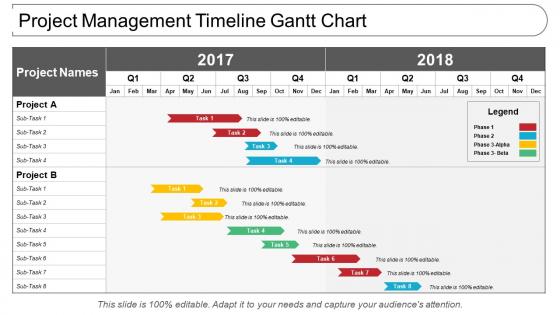
The image is a Gantt chart, which is a popular project management tool used to provide a visual representation of a project's schedule. The chart illustrates two projects, labeled "Project A" and "Project B," each with a list of sub-tasks.
For both projects, the timeline spans two years, 2017 and 2018, and is divided into quarters (Q1, Q2, Q3, Q4) and months. Each sub-task is represented as a colored bar across the timeline, indicating the start and end dates. The length and position of the bars correspond to the duration and timing of the sub-tasks within the overall project schedule.
The colors of the bars correlate to different phases of the project, as explained in the Legend on the right side of the chart. The Legend distinguishes between Phase 1, Phase 2, Phase 3-Alpha, and Phase 3-Beta, likely indicating different stages or types of work being completed.
Use cases:
Gantt charts are essential tools for project planning, allowing visualization of timelines and progress across tasks in various industries.
1. Construction
Use: Tracking project phases, from groundwork to final construction.
Presenter: Project Managers.
Audience: Contractors, Stakeholders.
2. IT and Software Development
Use: Scheduling software release cycles and development stages.
Presenter: IT Project Coordinators.
Audience: Development Teams, Investors.
3. Event Planning
Use: Organizing event components from planning to execution.
Presenter: Event Planners.
Audience: Clients, Vendors.
4. Manufacturing
Use: Outlining production timelines, machine maintenance, and delivery.
Presenter: Operations Managers.
Audience: Production Staff, Suppliers.
5. Marketing and Advertising
Use: Campaign development, market research, and launch activities.
Presenter: Marketing Managers.
Audience: Marketing Teams, Clients.
6. Healthcare Administration
Use: Managing healthcare projects, like facility upgrades or system implementations.
Presenter: Healthcare Administrators.
Audience: Medical Staff, Department Heads.
7. Education
Use: Planning academic and administrative projects, such as curriculum development or campus improvements.
Presenter: Academic Project Managers.
Audience: Faculty, Administrative Staff.
Project management timeline gantt chart with all 5 slides:
Your eminence gets firmly established with our Project Management Timeline Gantt Chart. They help acquire authority.
FAQs for Project management
So basically, Gantt charts have your tasks listed down the left side, with a timeline across the top. Then you've got horizontal bars showing when each task happens and how long it takes. Dependencies are those connecting lines between tasks - they show what has to be done before something else can start. Fair warning though, these get crazy messy on big projects. You'll see milestones too (usually diamonds) marking major deadlines. Most charts show who's assigned to what task. Oh, and find your critical path first - that's the chain of tasks that'll make or break your timeline if anything goes wrong.
Dude, Gantt charts are honestly amazing for project stuff. You get this visual timeline where everything's laid out, so spotting bottlenecks becomes way easier. Dependencies are huge too - you'll see which tasks block others before it becomes a nightmare. Clients eat up those colorful progress bars, which is nice because they stay informed without you having to explain every little detail. I always mess up and try to map out everything at first, but seriously just start with your big milestones. You can add the smaller tasks later once you get the hang of it.
Honestly depends what you're after. Microsoft Project's the beast if you want all the bells and whistles, but Asana or Monday.com are way easier for teams - plus they've got free plans which is nice. I've actually thrown together some decent Gantt charts in Excel when I was being cheap, works better than you'd think. Smartsheet and TeamGantt are solid middle-ground options too. I'd probably start with Asana since it won't overwhelm you but still does the job. Just pick whatever plays nice with the stuff you're already using.
Honestly, it depends on what kind of chaos you're dealing with. Gantt charts show everything on a timeline - super helpful when Task A has to finish before Task B can even start. You can see how one delay screws up everything downstream (learned this the hard way). Kanban's more like those sticky note boards - "To Do, In Progress, Done" - great for ongoing work where stuff just flows through different stages. Hard deadlines and connected tasks? Definitely go Gantt. But if you're just managing a steady stream of work where things don't really depend on each other, Kanban's way less stressful.
Ugh, Gantt charts turn into absolute chaos with complex projects. The interdependencies alone will make you want to pull your hair out - every little change means updating a million task relationships. Resource conflicts are another headache. Like, you'll see Sarah needs to work 40 hours on Task A, but good luck spotting that she's already swamped with three other projects. The visual clutter gets insane too when you're managing multiple workstreams. Honestly? Try mixing it with resource tools or just switch to kanban boards. Way more flexible for messy projects.
Yeah totally! Gantt charts are super flexible - you just tweak them for whatever industry you're in. Construction folks track site prep, foundation work, inspections, plus they build in buffer time for when weather screws things up (which it always does). Software teams break everything into sprints, testing, deployment stuff like that. The details are where it gets interesting though. Construction might track permits and material deliveries, while dev teams focus on code reviews and QA cycles. Pick a tool that lets you customize the task types and dependencies. Once you match it to how your team actually works, it's pretty solid.
Honestly, less is more with Gantt charts - don't cram every tiny detail in there or it'll look like a hot mess. Color coding is a game changer for tracking different teams. Make sure your task names are consistent and mark dependencies clearly so people know what's holding things up. Oh, and always add buffer time because projects *never* go as planned (learned that the hard way). The biggest thing though? Keep it updated and somewhere everyone can actually find it. Nothing's more annoying than working off old timelines when half the dates have already shifted.
Honestly, color-coding your Gantt chart is a game changer. Green for done, yellow for in-progress, red for overdue - basically a traffic light that nobody has to think about. Way better than those mind-numbing status emails everyone ignores. Update it weekly with completion percentages for each task. Share it in meetings or send it around with a quick note about what's going well and what's stuck. The key thing is keeping it current though. Once people catch you slacking on updates, they'll stop checking it entirely. Oh, and percentages really help - gives people actual progress instead of vague "almost done" nonsense.
Getting input from your stakeholders is honestly a game-changer for Gantt charts. They catch stuff you miss - like resource conflicts or those deadlines that look fine on paper but are totally unrealistic. The people actually doing the work know way better than you how long things take. I found this out the hard way when devs warned me about an "easy" integration. Did I listen? Nope. Three weeks later... yeah. Set up regular check-ins and actually update your chart when they give feedback. Trust me, it beats those painful "so why is everything late" conversations.
Yeah, Gantt charts can totally work with agile! Just don't try to plan your whole project upfront like the old days. Focus on individual sprints instead - they're great for seeing how user stories connect and depend on each other. I honestly find them way more helpful than I expected for tracking sprint progress. The trick is staying flexible though. You've got to update them constantly as priorities change during planning sessions. Digital tools are your friend here - being able to drag tasks around quickly makes all the difference when your backlog keeps shifting every iteration.
Honestly, the worst mistake is treating your Gantt chart like gospel. Projects change all the time, but people forget to update their charts - then you're working off ancient info. Don't make dependencies too strict either, and for the love of god, build in buffer time. Delays happen. Also, resist the urge to cram every tiny detail in there. Makes it impossible to read. I learned this the hard way on my last project. Keep it high-level for stakeholders, update when scope changes, and pad those timelines. That extra time will be a lifesaver when everything goes sideways (and it will).
So you just draw lines between tasks that depend on each other - super straightforward. When you move an earlier task, everything downstream shifts automatically. The critical path is basically your project's spine - it's the longest chain of connected tasks that determines your finish date. Most tools make it obvious by highlighting it in red or whatever. Here's the thing though: if ANY task on that critical path gets delayed, your entire project timeline gets screwed. I learned this the hard way on my last big project. Add some buffer time if you can, and definitely keep tabs on those critical tasks during your daily check-ins.
Dude, Gantt charts are actually everywhere! The London Olympics used them to juggle thousands of tasks across all those venues. NASA relies on them for space missions - tracking rocket assembly, launch windows, the whole thing. Even Spotify uses them when launching new features to keep dev, testing, and marketing teams in sync. Honestly, I never realized how common they were until I started paying attention. They're super helpful when tasks depend on each other. Next time you've got a crazy deadline, try one out. You'll be shocked how much clearer everything becomes - like suddenly you can actually see what needs to happen when.
Honestly, Gantt charts are a game-changer for team stuff. Everyone can actually see what's happening and when things are due. Like, no more awkward "oh wait, you needed that from me?" conversations. Dependencies become super clear too - you'll know exactly when Sarah has to wrap up her design before you can jump into development. I love how obvious delays become since it's all visual - nobody can really hide behind "I'm working on it" anymore. Oh, and you can catch scheduling conflicts before they blow up your timeline. Just throw it in something like Asana or Monday so people can update their progress. Trust me on this one.
Honestly, AI's gonna handle most of your Gantt chart stuff soon - auto-updating timelines based on real progress, predictive warnings when things might go sideways. Real-time collaboration tools are making those old static charts look pretty dated already. IoT sensors will probably start feeding completion data directly into your charts too. Everyone's managing projects from their phones now, so mobile design keeps getting better. Cloud-based tools that adapt fast are your best bet - I mean, who has time to manually update charts anymore? That whole process is becoming obsolete anyway.
-
nice
-
amazing
-
nice
-
nice
-
Innovative and attractive designs.
-
Easily Editable.