

New Mobile App Development Powerpoint Presentation Slides






Try Before you Buy Download Free Sample Product
 Impress Your
 Audience
 100%
100% Editable
 Save Hours
 of Time


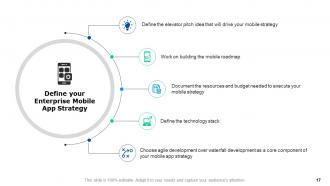
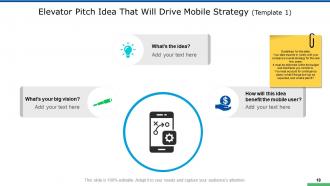
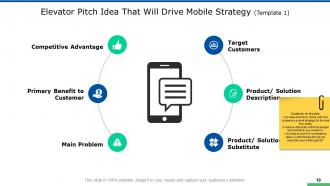
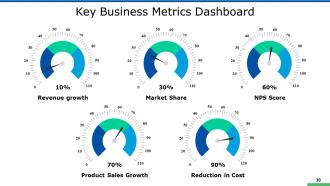
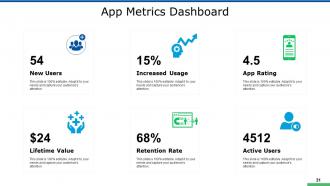
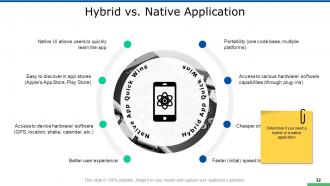
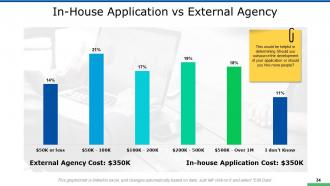
Select our content ready New Mobile App Development Powerpoint Presentation Slides to focus on enterprise mobile app strategy. The mobile app design PowerPoint complete deck covers professional slides such as product/service overview, key statistics, understand the company’s overall strategy dependencies & competitors, , executive summary, mission vision value, target for the next business quarter, establish a value proposition, strategic objectives to be achieved, understanding competitive landscape, product feature comparison, current customer journey, mobile is a touchpoint and not a platform, elevator pitch idea that will drive mobile strategy , mobile strategy roadmap, resources needed for execution, budget required for implementing strategy, enterprise mobility stack, enterprise mobility stack, define the single product/app strategy, choose the right product strategy, product/service positioning, target audience, key business metrics dashboard, app metrics dashboard, hybrid vs. native application, determine the first platform, in-house application cost, marketing strategy with a flow marketing process, tactics, lead generation activities, lead generation funnel, etc. Download this mobile marketing presentation deck to showcase marketing budget, product management, and implementation plan. Get a balanced feel with our mobile app development proposal ppt. They engender a lot of harmony.
People who downloaded this PowerPoint presentation also viewed the following :
Content of this Powerpoint Presentation
“The mobile revolution is not about technology. It’s about the way we live our lives.” —Gary Vaynerchuk.
This quote by marketing guru Gary Vaynerchuk encapsulates the transformative power of mobile apps. They've become woven into the fabric of our daily lives, from ordering takeout to managing finances. But with millions of apps vying for attention, how do you make yours stand out?
Remember Flappy Bird? A viral sensation for a hot minute, then gone faster than you could blink. The mobile app market is littered with these one-hit wonders. But what separates fleeting fads from enduring titans like WeChat and Uber?
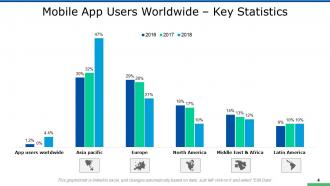
The reality can be a bit shocking, especially for those involved in app development. Industry research shows that a staggering 25% of mobile apps are downloaded and used only once. This statistic makes any app developer want to crawl under the covers.
Understand how to create the most-persuasive mobile app pitch deck with a click here.
But with proper management and regular interaction, you can craft a powerful mobile app that the audience will love. And that's where our New Mobile App Development PowerPoint Presentation Slides come into play.
Get best-in-class mobile apps screen design templates with a click here.
Forget generic templates filled with clip art. This template covers everything from crafting a compelling elevator pitch to nailing down your marketing strategy. In short, this template can help you easily manage your mobile app development project.
Template 1: Establish a Value Proposition
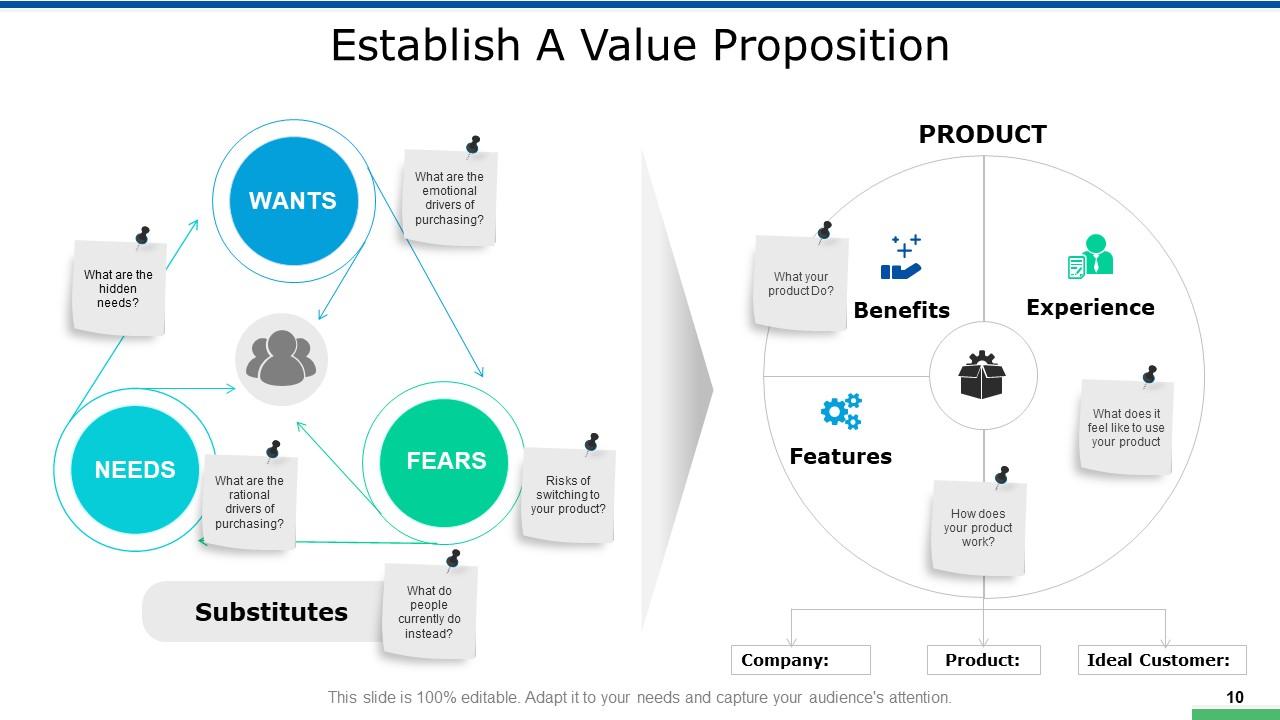
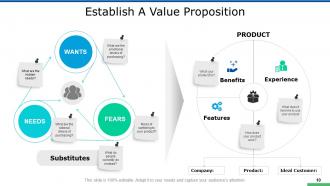
This PPT Template dissects the core aspects that make a mobile app invaluable to users. It breaks down the user's 'Wants,' 'Needs,' and 'Fears' while considering the 'Substitutes' they might resort to. This helps the leadership and the team understand market position and consumer behavior. This template also focuses on 'Benefits,' 'Features,' and 'Experience,'. The aim is to offer a holistic view of what the app offers and its operational mechanics. Such a comprehensive analysis is pivotal in pinpointing what makes your app the preferred choice, enhancing its longevity in a saturated market.
Template 2: Understanding Competitive Landscape
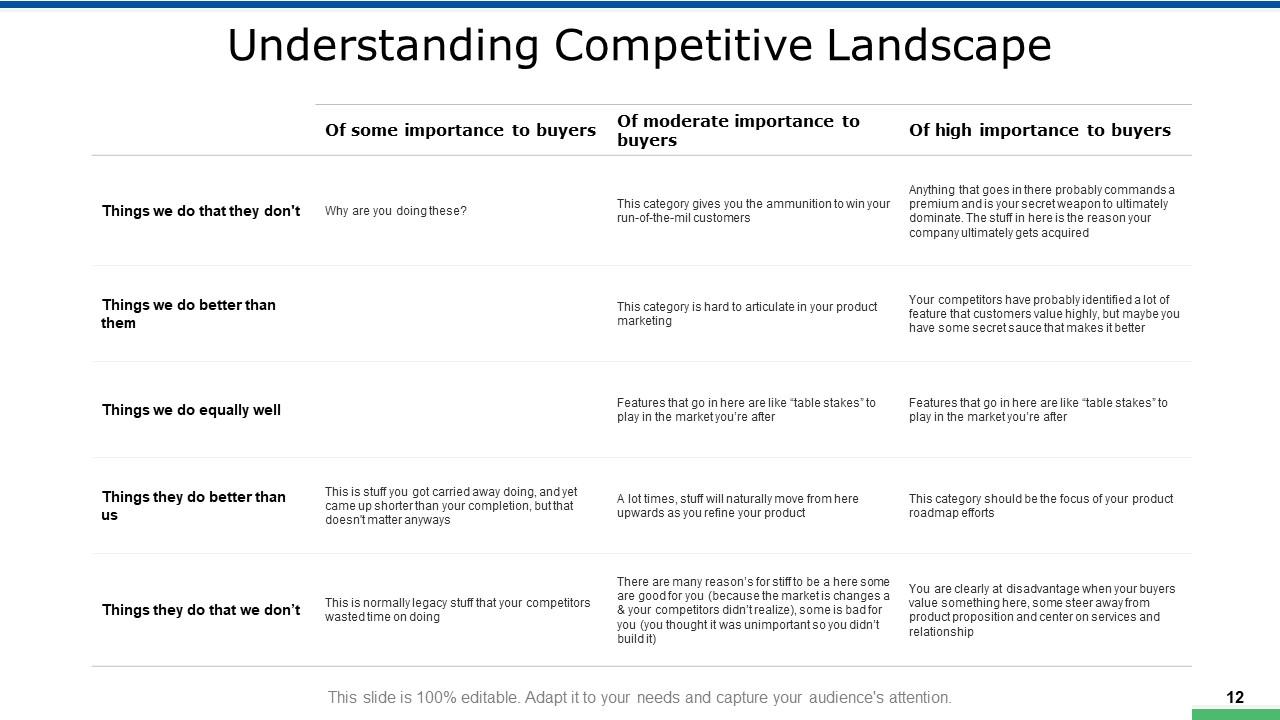
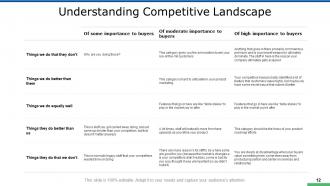
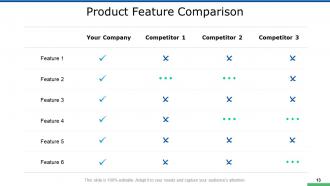
This slide is a comparative analysis framework that maps out your mobile app's features against the competition. The multiple quadrant helps you identify and evaluate what your app does that competitors don't, where you have the edge, where you're on a par with them, and where competitors might outperform you. Such a detailed reality check can help you determine your market positioning, and highlight areas for improvement and potential innovation. Developers can gain insights into advantages and potential gaps. Overall, this template can offer a pathway for product development and refinement tailored to what truly matters to buyers.
Template 3: Mobile is a Touchpoint and Not a Platform
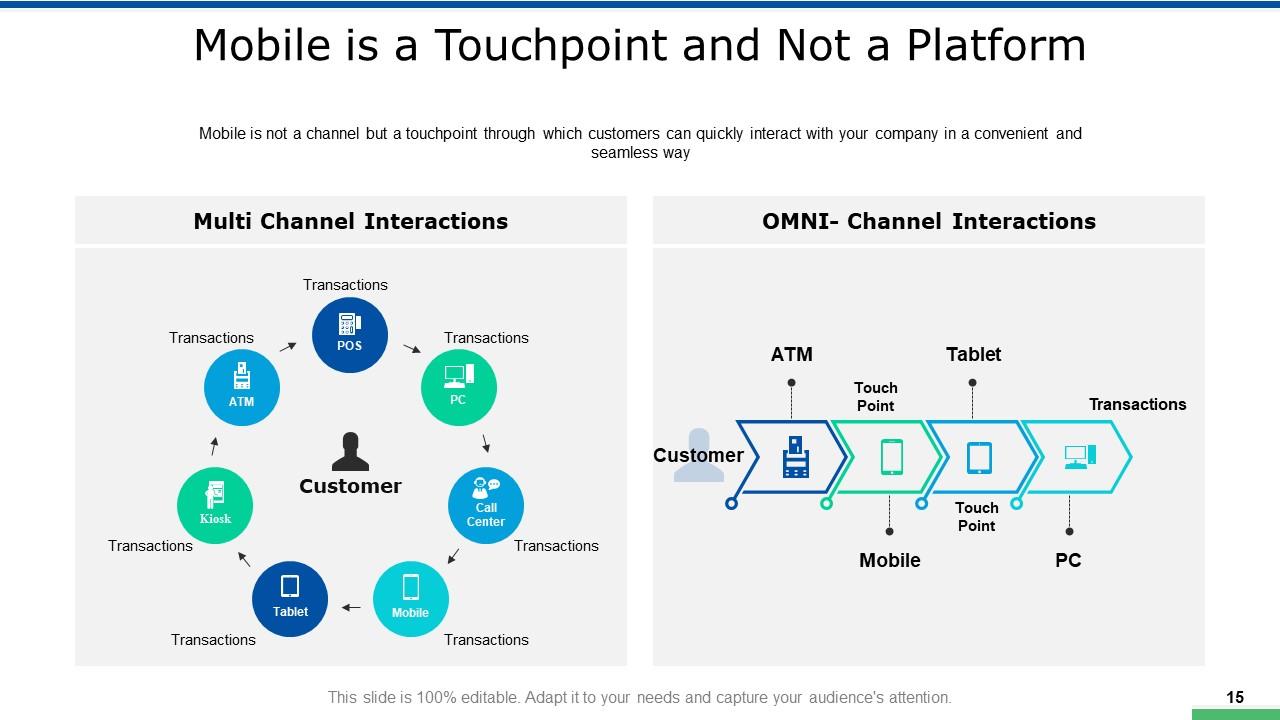
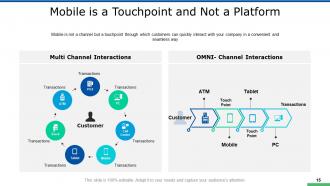
This template highlights the essential differences between Multi-Channel and OMNI-Channel interactions and how mobile is not a platform. The template clarifies that while multi-channel may involve platforms — from ATMs to mobile devices — these often operate in isolation. In contrast, the OMNI-Channel strategy is about creating a cohesive customer experience.
Template 4: Mobile Strategy Roadmap
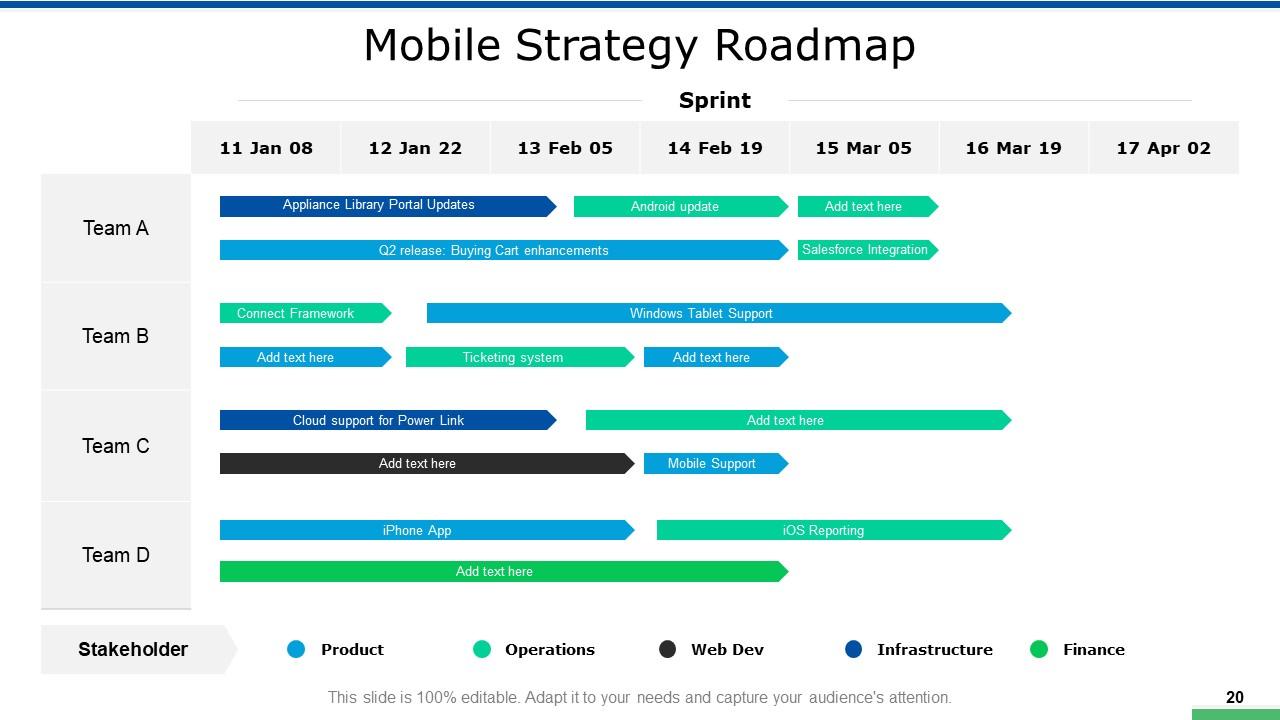
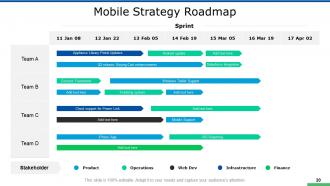
Use this PPT Template to provide a visual timeline for app development teams. The Gantt-chart-style roadmap categorizes tasks across teams—A through D—and aligns them with specific dates for a clear timeline of deliverables. The bars represent the progress and duration of each task, such as "Appliance Library Portal Updates" or "Android update." The best part? Key development areas are color-coded for reference and indicate focus like Product, Operations, Web Development, Infrastructure, and Finance. This enhances cross-functional visibility and coordination. In short, this slide enables viewers to grasp the project's scope, deadlines, and resource allocation at a glance.
Template 5: Budget Required for Implementing Strategy
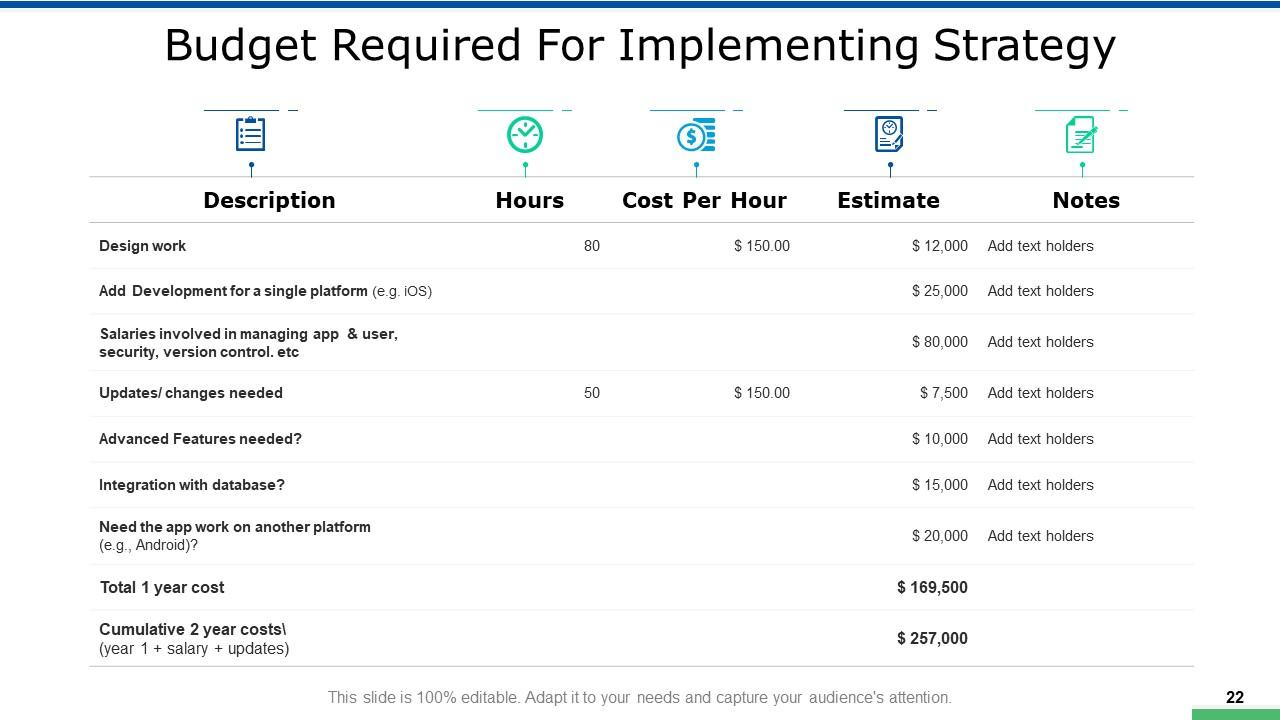
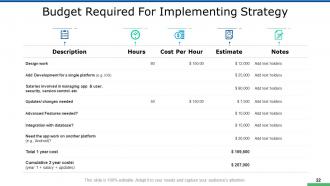
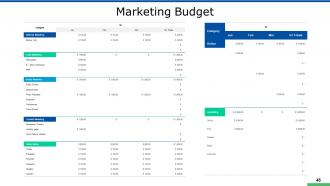
Budget is a key factor in strategic planning for effective app development. This slide offers a breakdown of financial planning in app development. The slide consists of a tabular layout and details tasks, projected hours, costs per hour, and total estimates. Such a granular management of budget allocation across various stages of the development process ensures the project never shoots over budget. The 'Notes' section on the right offers space for custom annotations. Overall, this slide helps ensure transparency in cost management, which is critical for stakeholders as they monitor financials and adjust strategies.
Template 6: Product/Service Positioning
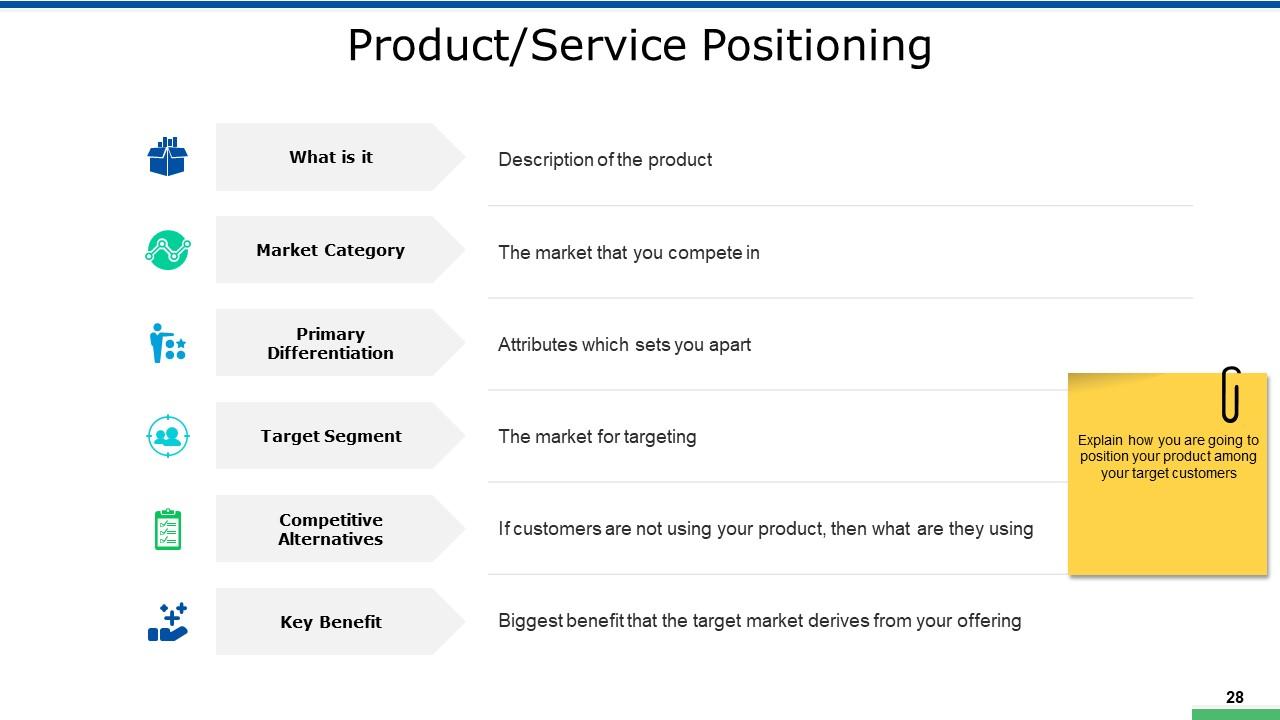
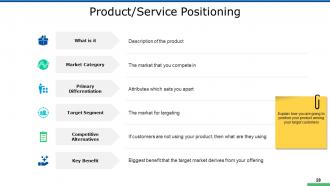
This slide can help define and communicate the place that your mobile app holds in the market. This slide provides a structured approach to outline key elements such as the app's description, market category, and primary differentiators. It focuses on the evaluation of the target segment and competitive alternatives. This ensures a deep understanding of where the product stands. On the top, this slide highlights the app's key benefits and underscores the main value proposition to the customer. This slide is crucial for strategizing how to position your product distinctively for your target customers.
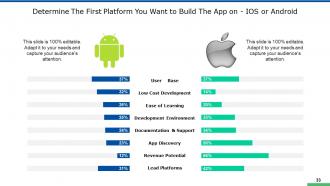
Template 7: Determine The First Platform You Want to Build The App on – IOS or Android
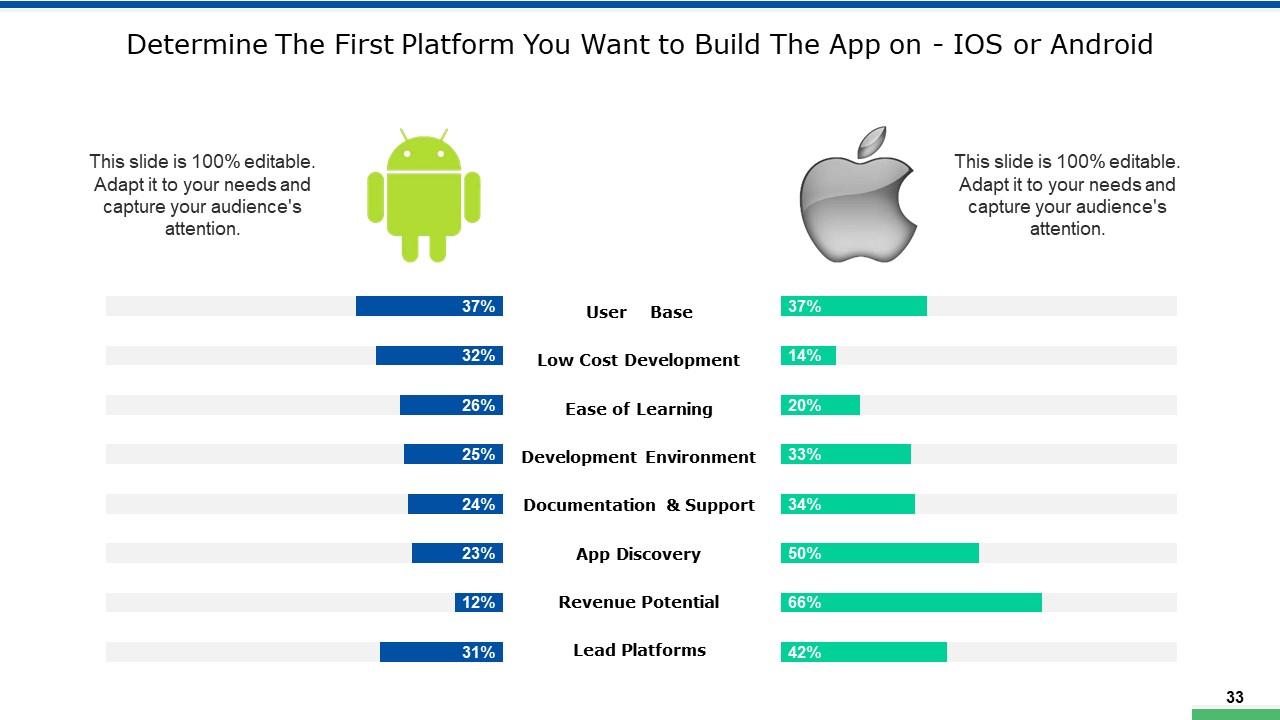
This template presents a comparative analysis of critical factors affecting the choice between the two leading platforms as this template features side-by-side bar graphs that compare aspects such as user base, development cost, ease of learning, development environment, documentation and support, app discovery, revenue potential, and lead platforms. Such a format helps developers weigh the pros and cons of each platform in context with their project's goals and target audience. In short, this template ensures an informed decision-making process to initiate app development to maximize reach and return on investment.
Template 8: Marketing Strategy
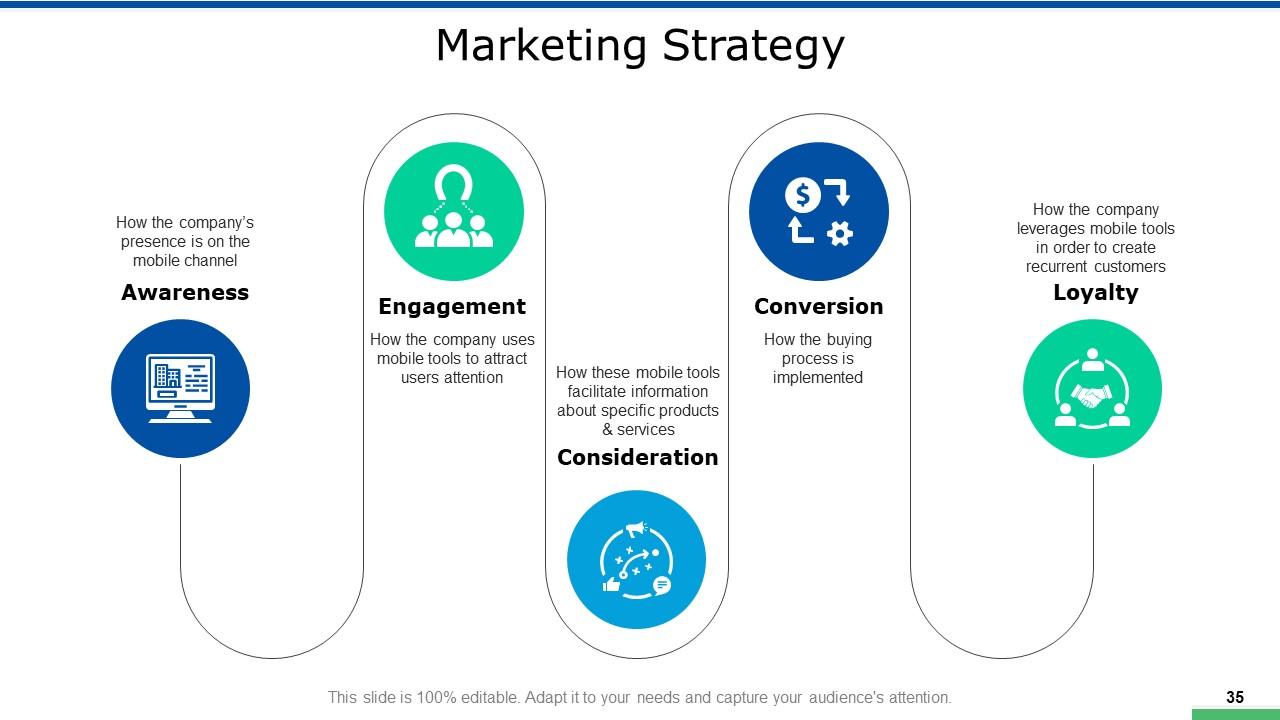
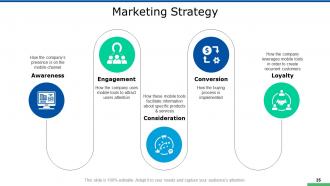
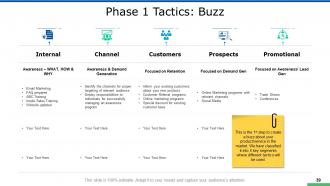
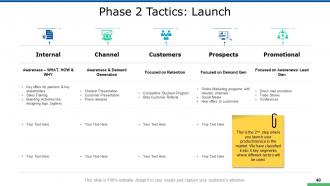
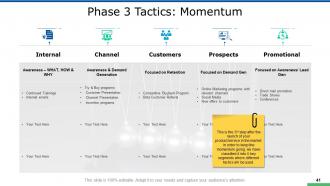
This PPT Template highlights the stages of customer interaction in the app development space. The slide is segmented into four key components: Awareness, Engagement, Consideration, and Loyalty. Each segment is paired with an icon that encapsulates its essence. 'Awareness' focuses on how the company's presence is established on mobile channels. 'Engagement' explains the strategies for capturing user attention. 'Consideration' addresses how mobile tools provide information about products and services and guide users through decision-making. Finally, 'Loyalty' looks at how the company fosters repeat engagement to build a loyal customer base.
Template 9: Launch Planning: Key Steps and Tools
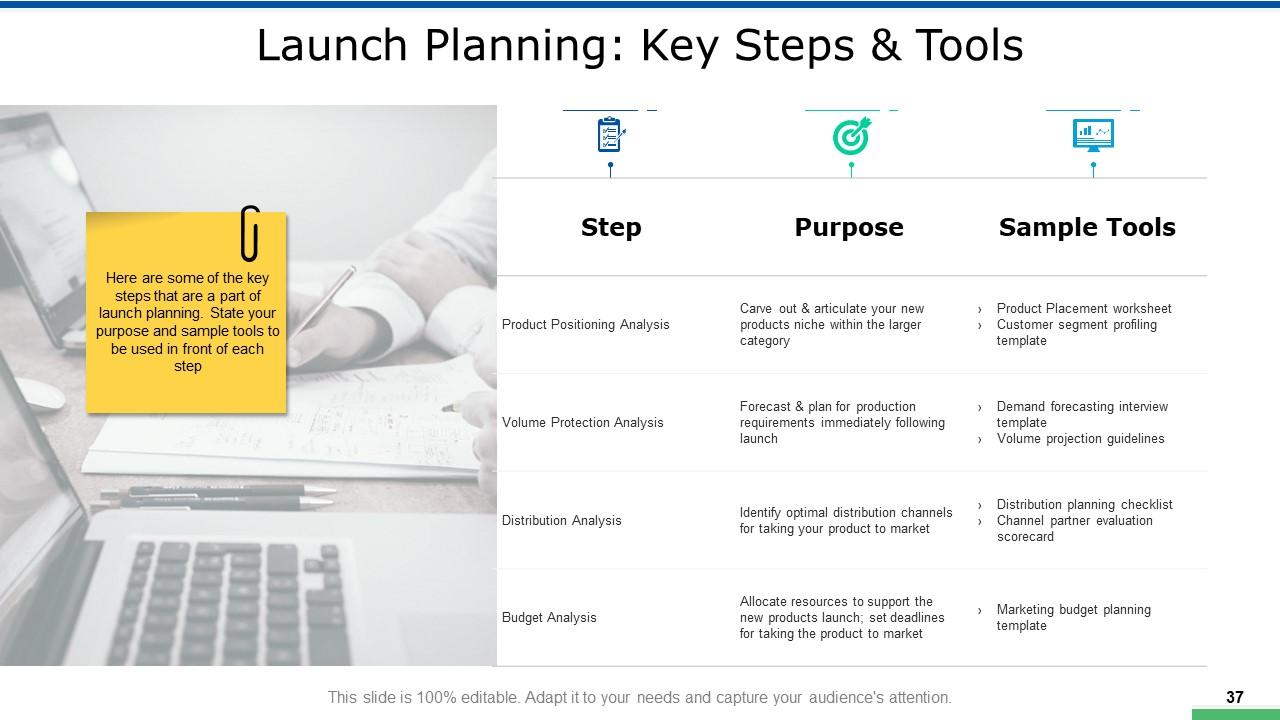
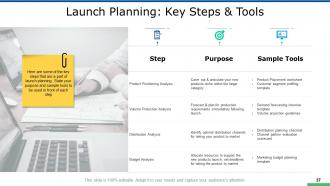
This slide can act as a practical guide for organizing the go-to-market strategy for mobile apps. It details steps like Product Positioning Analysis, Volume Protection Analysis, Distribution Analysis, and Budget Analysis. For example, the product positioning analysis defines the app's niche, which is supported by tools like a product placement worksheet. This slide could be a great tool for app developers and marketers. It provides a structured approach to each phase of the launch and ensures that your strategic objectives align with operational execution.
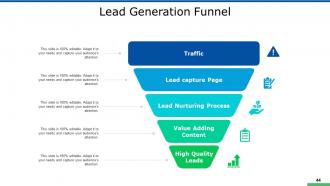
Template 10: Lead Generation Funnel
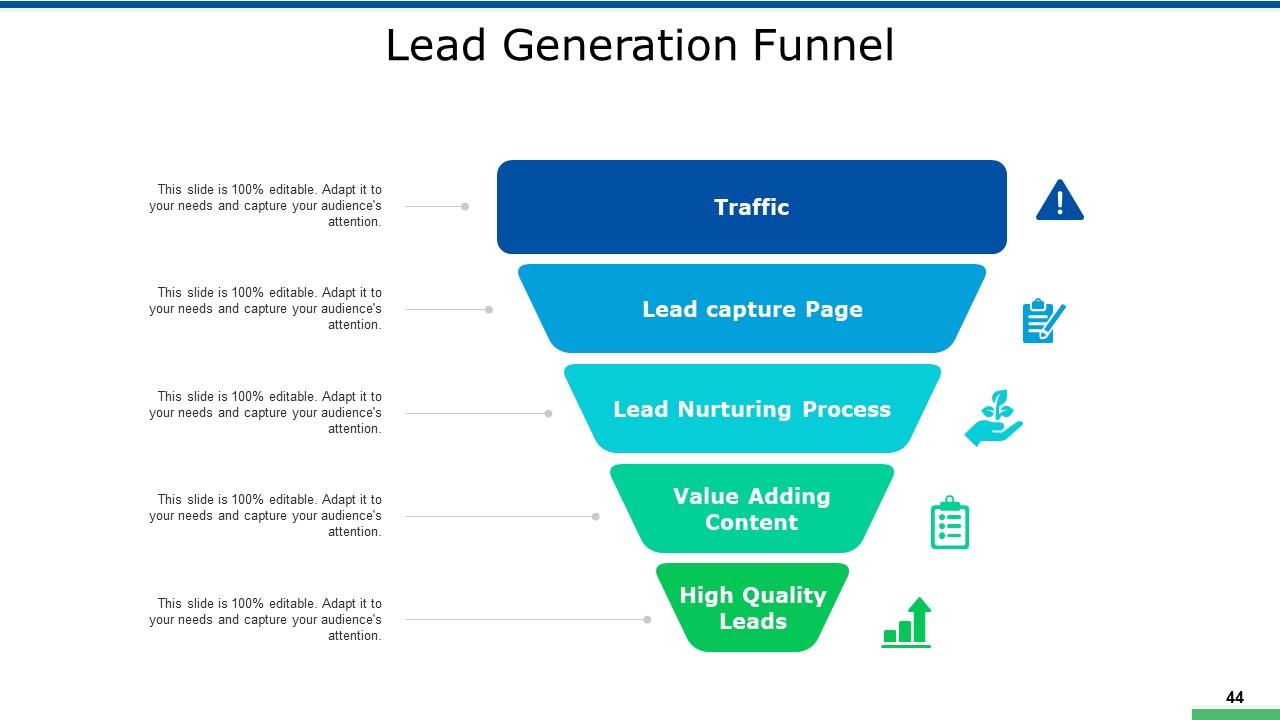
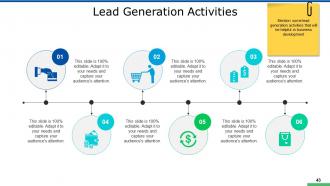
This slide represents the journey from initial customer awareness to the acquisition of high-quality leads. The funnel shape shows the narrowing process as potential customers are guided through various stages: from 'Traffic' awareness, capturing interest at the 'Lead capture Page,' nurturing relationships through the 'Lead Nurturing Process', providing 'Value Adding Content,' and finally, securing 'High-Quality Leads.' This slide equips marketers with a clear structure for developing their lead generation strategy and emphasizes the progressive steps necessary to transform general interest into a solid customer base. The icons add a visual cue, making the funnel informative and intuitive.
Make Apps That Matter!
We live in a time when hundreds of mobile apps come and go every day. If you want to make an app that can stand out in such a saturated market, you need a deep understanding of consumer behavior, strategic differentiation, and a commitment to delivering value at every touchpoint. And that’s exactly what this template can achieve for you. It covers aspects of mobile app development and ensures your app turns out to be amazing.
PS Having a mobile app project development dashboard helps improve your progress and resolves risks and issues faster. Find this template and others of its click here.
New Mobile App Development Powerpoint Presentation Slides with all 63 slides:
Use our New Mobile App Development Powerpoint Presentation Slides to effectively help you save your valuable time. They are readymade to fit into any presentation structure.








FAQs for New Mobile App Development
Okay so first you gotta nail down who you're building this for and what features actually matter - seriously, I've seen too many projects spiral because people kept adding "just one more thing." Start with ideation and planning, then move into UI/UX design and mockups. Development comes next (both frontend and backend), followed by testing on different devices. After that it's deployment to the app stores. But honestly? The real work starts after launch. You'll be doing constant updates, squashing bugs, and adding features based on what users actually want. Oh, and definitely create a roadmap upfront so you don't blow your budget halfway through.
Honestly, it depends what matters more to you - performance or getting something out fast. Native's gonna give you the best results and all those platform features, but you're basically building two apps. Flutter and React Native are actually pretty good now though, so you can share most of your code and still get solid performance. Hybrid's kinda falling out of favor these days - it's just okay at everything but great at nothing, you know? I'd probably go native if speed is make-or-break, otherwise cross-platform works for most business stuff. Maybe try building one simple feature first to see how it feels?
Honestly, UX can make or break your app. I've watched beautiful apps completely bomb because nobody could figure out how to use them - it's painful to see. Think about it: users are ruthless. If they can't navigate smoothly or accomplish what they need quickly, they're gone in seconds. Small screens make everything trickier too. You've got to map out those user flows first, before diving into code. Trust me on this one. Where will people tap? What might confuse them? Getting that foundation right saves you from redesigning everything later when users hate it.
Honestly, start with a security audit of what you've got - that'll show you the worst problems first. Three big things to nail down: encrypt everything (data moving around AND stored data), get multi-factor auth working properly, and validate every single user input to stop injection attacks. Don't store sensitive stuff locally either - people drop their phones in toilets more than you'd think. Regular pen testing and code reviews are clutch too. Oh, and secure coding practices throughout development, obviously. It's a lot but you can't really skip any of it these days.
Honestly, start with profiling your app using Xcode Instruments or Android Profiler - you'll be shocked at what's actually slowing things down. Memory leaks are brutal and will straight up crash your app, so fix those first. Compress your images and ditch any dead code to shrink the app size. For network stuff, cache data and batch your requests together. Oh, and test on some crappy old device if you can find one - nothing exposes performance problems faster than a phone that's hanging on by a thread. Background processes are battery killers too, so keep those minimal.
Honestly, app stores run the show when it comes to marketing your app. You'll need to nail ASO keywords so people can actually find you, then hustle for those first reviews since nobody downloads apps with zero stars. Apple's obsessed with pretty screenshots while Google cares way more about your ratings - kinda annoying how different they are. I'd split your budget between organic growth and maybe some store ads if you've got cash. Oh and watch their editorial calendars for launch timing. Start there, then worry about other marketing stuff later.
So first thing - pick your platform. Swift/Xcode for iOS or Kotlin/Android Studio for Android will give you the best performance. Cross-platform? React Native or Flutter are pretty decent, saves time building twice (though honestly Flutter can be annoying sometimes). You'll need backend stuff too - Firebase is super easy to start with, or AWS if you want more control. Oh and grab the basics: Git for version control, Figma for designs, Crashlytics for when things inevitably break. My advice? Just pick one platform first, see if people actually want your app, then worry about expanding later.
Don't wait for perfection - throw together wireframes or rough prototypes and start testing immediately. TestFlight works great for iOS, Firebase for Android. Mix your target users with random outsiders (honestly, they spot the weirdest issues). Watch what people actually do, not what they claim they'll do. Record everything if you can. Ask open questions and notice where they pause or look confused - that's gold. Oh, and test constantly in small chunks rather than doing some massive reveal at the end. You'll save yourself so much headache.
Ugh, third-party APIs are such a pain. Documentation is always wrong or missing half the details you need. Rate limits will randomly kick in and break everything. Authentication is needlessly complicated too - like why does it take 5 steps just to get a token? Version updates happen without warning and suddenly your code stops working. Network timeouts make your app look buggy even when it's not your fault. Oh, and my personal favorite - when the actual response doesn't match what's in their docs at all. Build good error handling from the start though. Always test in staging first, and yeah... keep those API keys organized because you'll be juggling sandbox/production constantly.
Honestly, the language you pick makes a huge difference down the road. Swift and Kotlin perform great and debugging's way easier, but you're stuck maintaining two separate codebases - which kinda sucks. React Native or Flutter sound amazing since you write once and deploy everywhere, though they can get sluggish when your app gets really complex. Here's what nobody tells you: hiring matters more than you think. Popular languages mean way more developers to choose from, so you won't be scrambling to find someone who actually knows what they're doing. Just go with what your team already knows well.
Honestly, start with onboarding - if those first few minutes suck, people bounce immediately. Push notifications work great but seriously don't overdo it. I made that mistake once and watched my retention tank lol. Personalized content based on what they actually do in your app is clutch. Throw in some gamification too - streaks and badges are surprisingly addictive. Oh, and keep pushing out updates with new stuff so it doesn't feel stale. But first? Figure out exactly where users are dropping off. Fix the biggest problem spots and you'll see way better numbers.
Dude, mobile users basically expect AI and AR features now - it's wild how fast that shifted. You can add voice commands, smart recommendations, all that stuff with AI. AR opens up crazy possibilities for shopping apps and games too. The tools are way better than they used to be, though you'll burn through battery faster and need beefier processing power. ARKit and TensorFlow Lite are solid frameworks to check out. My advice? Pick just one feature for your next project and mess around with it first.
Honestly, retention rates are everything - Day 1, 7, and 30 tell the real story. Daily/monthly active users matter too, obviously. Crash rates will kill you if they're high. User reviews are brutal but necessary feedback. Firebase or Mixpanel work great for tracking this stuff. App store conversion rates are worth watching, but I'd say focus on whether people stick around first. That's what actually matters, right? Oh, and check your support tickets regularly - you'll spot patterns in what's frustrating users. Start simple with these basics, then dive deeper into specific features once you've got the foundation down.
Look, accessibility isn't optional anymore - you're literally locking out millions of people otherwise. Plus legal requirements are getting stricter. WCAG 2.1 is your baseline, but don't forget platform-specific stuff like Apple's guidelines too. Building it in from day one saves you SO much headache later. Trust me on this. Key things: good contrast ratios, proper labels for screen readers, big enough touch targets. Oh, and keyboard nav support. Quick test? Turn on your phone's screen reader and try using your app. You'll find problems fast.
Honestly, AI stuff is everywhere now - every app's gonna have ChatGPT-style features baked in. Cross-platform development is finally not terrible, so you won't need huge separate teams anymore. AR and VR are actually useful now instead of just flashy demos. Privacy regulations are making everyone redesign how they handle data, which is... a pain but whatever. 5G means you can build way more data-heavy features without users hating you. My advice? Start messing around with AI APIs in whatever you're building now. Even basic stuff will put you ahead when clients inevitably start asking for it.
-
I discovered this website through a google search, the services matched my needs perfectly and the pricing was very reasonable. I was thrilled with the product and the customer service. I will definitely use their slides again for my presentations and recommend them to other colleagues.
-
Very unique, user-friendly presentation interface.