

E Commerce Application Development Powerpoint Presentation Slides




Try Before you Buy Download Free Sample Product
 Impress Your
 Audience
 100%
100% Editable
 Save Hours
 of Time


Get your e commerce application development journey started with our comprehensive E commerce Application Development PowerPoint presentation. This presentation is designed to guide you through the different aspects of app development and help you develop a user case scenario for the app development process. The presentation begins by introducing the app development and marketing solutions company and its major clients from various industries. The deck also covers details about the project, such as project goals, proposed solutions, results, site mapping, and app promotion strategies. The PPT also helps analyze competitors applications based on design, price, performance, and quality. In addition, our e commerce application development module represents the app development process, including app specifications, potential requirements, and technologies used for app development. It also describes UX UI visual designs, app store strategies, and an overview of the beta program. Furthermore, investments needed for app development, post production support services, app development project execution roadmap, and various app promotional activities are also covered. Lastly, the presentation highlights the timeline for the app development and marketing process and app performance tracking dashboards. Our 100 percentage editable e commerce ppt templates can be customized with assistance from our highly skilled research or design team. Download now to kickstart your e commerce application development journey.
People who downloaded this PowerPoint presentation also viewed the following :
Content of this Powerpoint Presentation
Slide 1: This slide introduces E-Commerce Application Development . State your company name and begin.
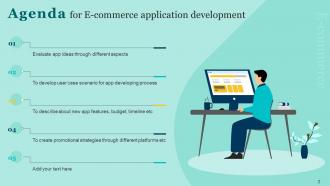
Slide 2: This slide depicts the Agenda of the presentation.
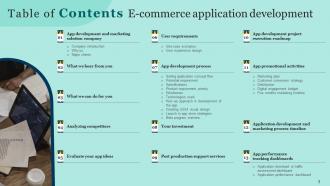
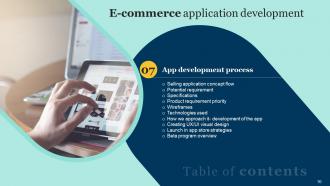
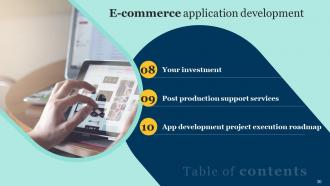
Slide 3: This slide shows Table of Content for the presentation.
Slide 4: This slide highlights title for topics that are to be covered next in the template.
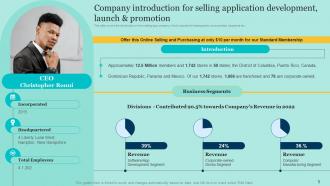
Slide 5: This slide displays the Company introduction for selling application development, launch & promotion.
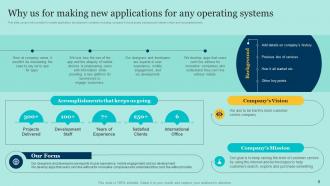
Slide 6: This slide deals with the Company's supremacy for making new applications for any operating systems.
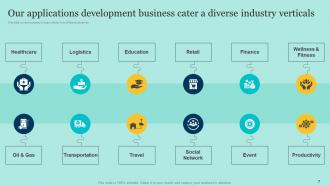
Slide 7: This slide highlights the company’s major clients from different industries.
Slide 8: This slide elucidates the Title for the Ideas to be discussed in the upcoming template.
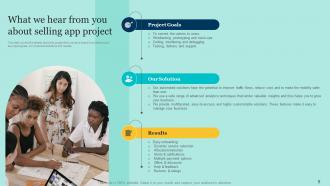
Slide 9: This slide covers the details about the project that the Organization heard from clients about selling app project.
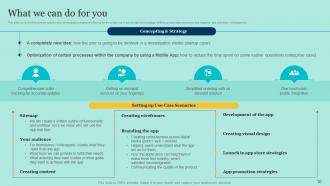
Slide 10: This slide states the possible solutions that the Company offers for the project.
Slide 11: This slide incorporates the Heading for the Contents to be discussed next.
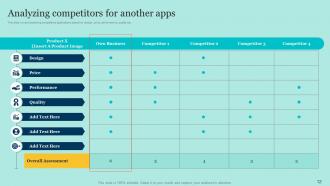
Slide 12: This slide deals with Analyzing competitors for another apps.
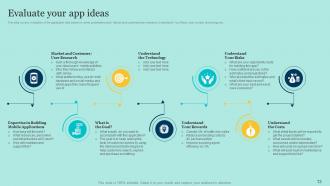
Slide 13: This slide takes into consideration Evaluating the app ideas.
Slide 14: This slide contains the Title for the Ideas to be discussed in the forth-coming template.
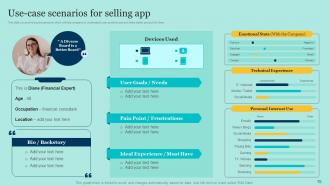
Slide 15: This slide emphasizes on Use-case scenarios for selling app.
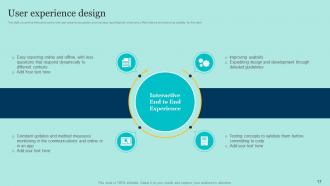
Slide 16: This slide illustrates User experience design.
Slide 17: This slide reveals the Heading for the Contents to be covered next.
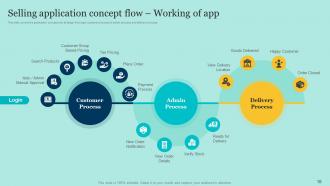
Slide 18: This slide highlights Selling application concept flow and Working of app.
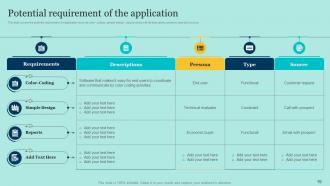
Slide 19: This slide depicts the Potential requirement of the application.
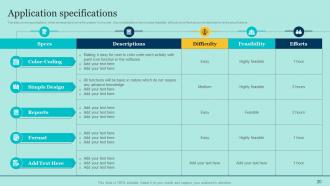
Slide 20: This slide elucidates Application specifications.
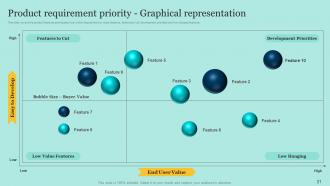
Slide 21: This slide features the Product requirement priority through Graphical representation.
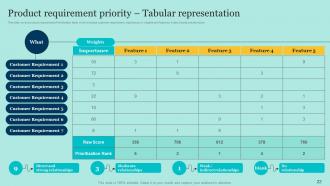
Slide 22: This slide depicts Product requirement priority by Tabular representation.
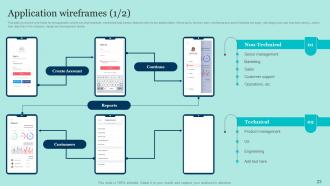
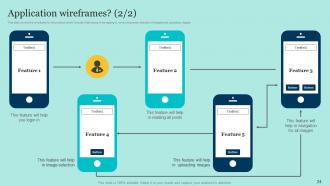
Slide 23: This slide exhibits Application wireframes.
Slide 24: This is yet another slide depicting Application wireframes.
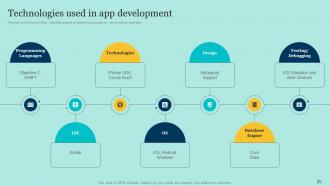
Slide 25: This slide shows the Technologies used in app development.
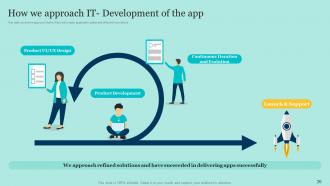
Slide 26: This slide displays the approach towards Development of the app.
Slide 27: This slide deals with Creating UX/UI visual design.
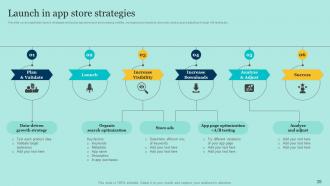
Slide 28: This slide incorporates Launch in app store strategies.
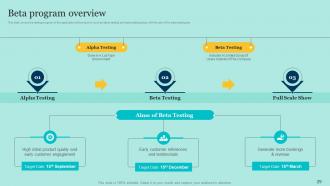
Slide 29: This slide presents Beta program overview.
Slide 30: This slide includes the Title for the Contents to be discussed further.
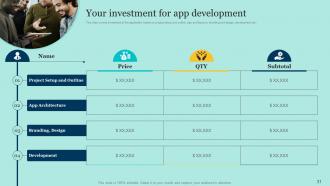
Slide 31: This slide showcases the investment for app development.
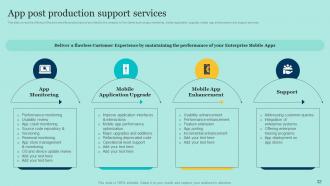
Slide 32: This slide elucidates App post production support services.
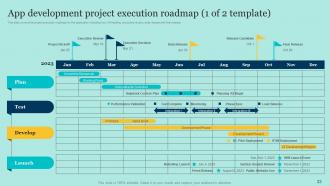
Slide 33: This slide represents App development project execution roadmap.
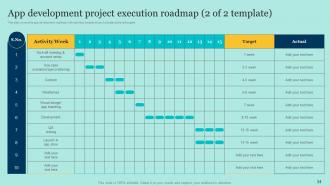
Slide 34: This is the slide of continuation for App development project execution roadmap.
Slide 35: This slide depicts the Title for the Topics to be discussed in the forth-coming slide.
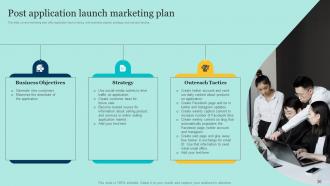
Slide 36: This slide focuses on the Post application launch marketing plan.
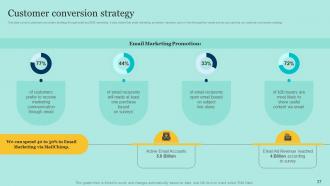
Slide 37: This slide emphasizes on Customer conversion strategy.
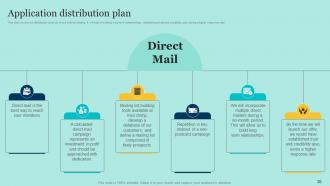
Slide 38: This slide shows the Application distribution plan.
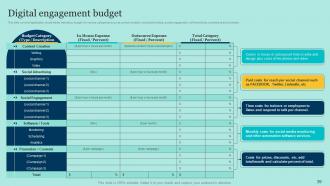
Slide 39: This slide illustrates the Digital engagement budget.
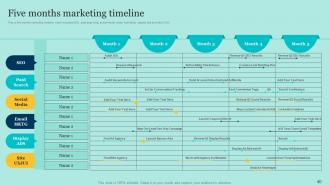
Slide 40: This slide displays the Five months marketing timeline.
Slide 41: This slide provides information about the Heading for the Ideas to be further discussed.
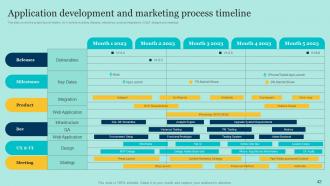
Slide 42: This slide reveals the Application development and marketing process timeline.
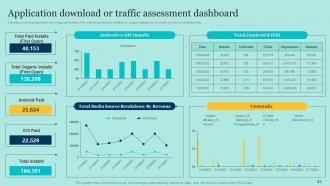
Slide 43: This slide exhibits the Application download or traffic assessment dashboard.
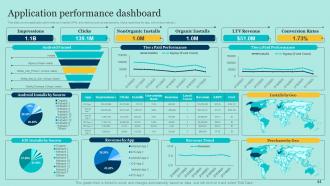
Slide 44: This slide elucidates the Application performance dashboard.
Slide 45: This slide contains all the icons used in this presentation.
Slide 46: This slide is titled as Additional Slides for moving forward.
Slide 47: This slide shows Post It Notes. Post your important notes here.
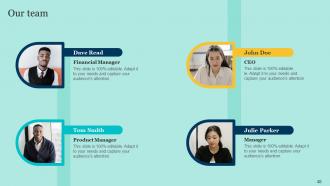
Slide 48: This is Our Team slide with names and designation.
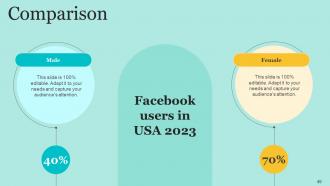
Slide 49: This is a Comparison slide to state comparison between commodities, entities etc.
Slide 50: This is Our Mission slide with related imagery and text.
Slide 51: This slide depicts Venn diagram with text boxes.
Slide 52: This slide provides 30 60 90 Days Plan with text boxes.
Slide 53: This is a Timeline slide. Show data related to time intervals here.
Slide 54: This slide displays Mind Map with related imagery.
Slide 55: This is a Financial slide. Show your finance related stuff here.
Slide 56: This is an Idea Generation slide to state a new idea or highlight information, specifications etc.
Slide 57: This is a Thank You slide with address, contact numbers and email address.
E Commerce Application Development Powerpoint Presentation Slides with all 62 slides:
Use our E Commerce Application Development Powerpoint Presentation Slides to effectively help you save your valuable time. They are readymade to fit into any presentation structure.








FAQs for E Commerce Application Development
Okay so first things first - your navigation has to be dead simple and search needs to work fast. People literally leave if they can't find stuff in like 30 seconds. For checkout, keep it under 3 steps max, offer different payment methods, and let people buy without creating accounts. Good product photos are huge, plus you need solid descriptions and reviews. Mobile is basically non-negotiable now since everyone shops on their phone (I'm guilty of this too lol). Don't forget order tracking and wishlist features - oh and make returns super easy. Build these basics first, then see what people actually want next.
Honestly, payment gateways are a huge pain and will mess with your timeline more than you think. Stripe's amazing to work with - their docs are clean, APIs make sense. PayPal though? Ugh, it's like they designed it to confuse developers. You've got PCI compliance to worry about, webhooks that need handling, and each provider formats data differently. Oh, and some have terrible sandbox environments that barely work. Here's what I'd do: choose maybe 2-3 gateways max and build an abstraction layer right away. Trust me, you'll thank yourself later when you need to swap providers or add new ones.
Honestly, start with HTTPS and SSL - get that certificate sorted first. Input validation is huge too, don't trust anything users send you. For payments, seriously just use Stripe or PayPal, never store card info yourself (learned this the hard way). Multi-factor auth is pretty much mandatory now. Oh and encrypt everything - data sitting around and data moving between servers. Your dependencies will bite you if they're outdated, so keep those updated. Session management matters more than people think. Security audits aren't fun but they'll save your ass. These basics will block most attacks you'll actually face.
Honestly, start planning for scale way before you think you need it. Design your database for sharding early on - trust me on this one. Microservices beat monoliths when things get crazy busy. Load balancing might seem overkill at first, but you'll be so glad you set it up ahead of time. Your database schema needs serious thought upfront because migrations suck when you're swamped with orders. Cloud stuff like AWS auto-scales nicely, which is clutch for payment spikes. Oh, and monitor everything religiously so you catch problems before customers start complaining.
Dude, your mobile game better be on point or you're toast. Customers will literally bounce if your app loads slow or the buttons are tiny. I've watched businesses tank 40% of their sales just from crappy mobile design - it's honestly painful to see. Fast loading is huge, obviously. But also make those buttons big enough for thumbs, streamline that checkout flow. Different screen sizes need to work seamlessly too. Oh and test on real phones, not just your computer! Desktop simulators lie to you about how things actually feel. Most people shop on mobile now anyway.
So start with basic product recommendations - that's your foundation. AI can analyze what people buy and browse to suggest stuff they'd actually want, kinda like Netflix does. Dynamic content is huge too - your homepage and product pages adapt to each visitor. Chatbots handle customer service way better than you'd think, honestly. Email campaigns work so much better when you segment customers and send targeted stuff based on their preferences. Once you've got data flowing, add personalized search results and maybe dynamic pricing. The key is building it up gradually rather than trying to do everything at once.
React and Next.js are crushing it right now for e-commerce frontends. The server-side rendering is clutch. Most teams I know are going headless - using Shopify Plus, Strapi, or Medusa on the backend. Node.js is still huge for APIs, but serverless is gaining ground fast with Vercel and Netlify functions. Way easier deploys. Mobile? React Native or Flutter if you want cross-platform without the headache. Oh, and literally everyone's using Tailwind now for styling - kind of wild how quickly it took over. Definitely check out some headless commerce demos since that's where everything's moving for better performance.
Honestly, just think about how you'd want to shop on it yourself. Make categories super obvious and stick that search bar where people expect it. Those add-to-cart buttons? Make them pop - I've seen way too many sites where you're hunting around like it's a treasure hunt or something. Good product photos are huge, and your filters should actually be helpful instead of just adding clutter. White space is your friend here. But really, get some actual people to test it out before you launch. They'll find the weird stuff that makes perfect sense to you but confuses everyone else.
Security holes will bite you first - payment stuff especially. APIs love dying at 2am too, so that's fun. Performance tanks when traffic spikes, and don't get me started on inventory sync issues. Mobile responsiveness is a nightmare across different devices. SEO vs page speed is this constant balancing act that'll drive you nuts. International means dealing with currencies and tax headaches. Oh, and always set up backup payment processors from the start - learned that one the hard way. Plan big from day one because scaling later sucks.
Dude, data is like your cheat code for building stuff people actually want. Track drop-off rates to see where users bail, check what devices they're using, find the bottlenecks in checkout. I've seen people abandon carts just because a shipping calculator took forever to load - wild, right? Purchase patterns tell you exactly when to send those push notifications. Honestly feels like cheating sometimes. Pain points you'd never think of just pop up in the data. My advice? Start tracking everything from day one, even if you're not diving deep into analysis yet. You'll thank yourself later.
Honestly, start with your images - they're probably killing your load times. Compress everything and switch to WebP if you can. Lazy loading is a game changer too, especially for product pages with tons of items. Why load 50 products when someone might only scroll through 10? Also grab a CDN for your static stuff and cache your popular product data. I'd tackle images first though - that's where you'll see results fast. Oh, and don't forget mobile users are probably suffering the most with slow images.
Honestly, social media integrations are a game changer - I've seen engagement jump 20-30% when you nail it. Let people sign in with Facebook or share their purchases easily. That user-generated content becomes free advertising, which is pretty sweet. Don't go overboard though. Simple social logins and share buttons work great to start. You can get fancy with social proof widgets later, but I'd test the basics first - see what your people actually use. Oh, and make sure it feels smooth, not like you're shoving every social button possible in their face.
GDPR and CCPA are your biggest headaches right now - gotta handle those before anything else. PCI DSS compliance matters if you're taking credit cards (and who isn't these days?). Each region has different consumer protection rules, but transparent pricing and solid return policies are basics everywhere. WCAG accessibility guidelines trip up so many devs it's not even funny. Oh, and your terms of service need to be actually readable. I'd start by figuring out which markets you're targeting, then build a compliance checklist for each one. Sounds boring but beats getting sued later.
Cloud hosting can make or break your e-commerce performance, honestly. Page load speeds are where you'll notice it most - especially when traffic suddenly jumps during sales events. I've seen sites completely tank on Black Friday because they couldn't handle the surge. Auto-scaling is a lifesaver here since it prevents crashes when you get hit with 10x normal visitors. CDNs help too, can literally halve your load times depending on where your customers are. Start with AWS or Google Cloud (both are pretty solid), and set up monitoring right away. Oh, and don't cheap out on this - slow sites kill conversions faster than anything.
Honestly, customer feedback is like having a cheat sheet for your app development. Users will straight-up tell you what's broken - maybe your checkout process is confusing or the search function sucks. Way better than building features nobody actually wants (been there!). Collect feedback through in-app surveys, reviews, support tickets, user testing - whatever works. But here's the thing people miss: tell users when you fix something they complained about. It makes them feel heard and they'll keep giving you honest input. Pretty simple but makes a huge difference.
-
Thank you for showering me with discounts every time I was reluctant to make the purchase.
-
Well-designed and informative templates. Absolutely brilliant!