


E commerce marketing powerpoint presentation slides





Try Before you Buy Download Free Sample Product
 Impress Your
 Audience
 100%
100% Editable
 Save Hours
 of Time


Reach your customers everywhere by taking the assistance of our E-Commerce Marketing PowerPoint Presentation Slides. Highlight optimized lead generation strategies, email marketing, content marketing, and ROI reporting strategies with the assistance of our digital marketing PPT slideshow. Study the effectiveness ratings of b2b marketing and the channels used in b2b marketing by employing our online marketing PPT templates. Utilize SEO strategy to enhance your business’ presence in the global market. You can prepare a detailed record of the leads, pipeline, and sales by taking the aid of our e-tailing PowerPoint presentation. Making a performance evaluation dashboard allows you to do the risk analysis for the company. Thus, save your time and efforts by utilizing this professionally made e-business PPT design for your business plan. Download our customizable and adaptable interactive e commerce ppt layout and make use of the available and editable icons, images, and shapes. Give your presentation an interesting outlook that makes any complex topic easy to understand.
People who downloaded this PowerPoint presentation also viewed the following :
Content of this Powerpoint Presentation
Slide 1: This slide introduces E-commerce Marketing. State Your Company Name and begin.
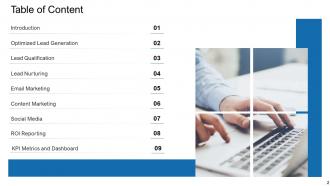
Slide 2: This slide shows Table of Content for the presentation.
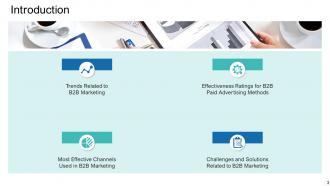
Slide 3: This slide shows Introduction describing- Trends Related to B2B Marketing, Most Effective Channels Used in B2B Marketing, etc.
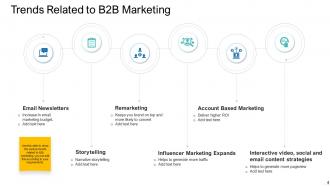
Slide 4: This slide presents Trends Related to B2B Marketing describing- Account Based Marketing, Email Newsletters, Remarketing, Influencer Marketing Expands, etc.
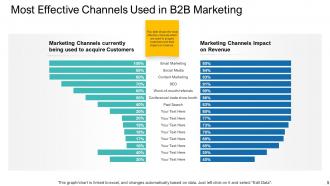
Slide 5: This slide displays Marketing Channels currently being used to acquire Customers.
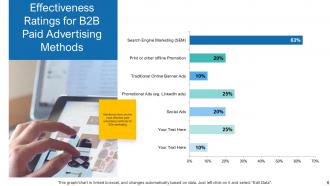
Slide 6: This slide represents Effectiveness Ratings for B2B Paid Advertising Methods.
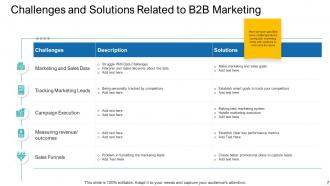
Slide 7: This slide showcases Challenges and Solutions Related to B2B Marketing describing the most effective paid advertising methods for B2b marketing.
Slide 8: This slide shows Optimized Lead Generation describing- Lead Generation Strategy, Lead Generation with Marketing Automation Strategies, Lead Generation Funnel.
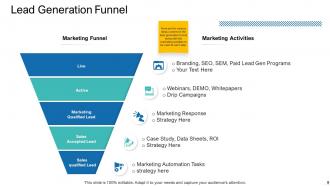
Slide 9: This slide presents Lead Generation Funnel with various marketing activities.
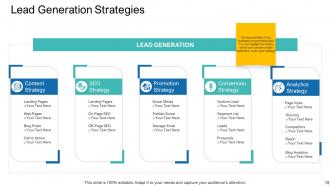
Slide 10: This slide displays Lead Generation Strategies describing- Conversion Strategy, Content Strategy, Analytics Strategy, etc.
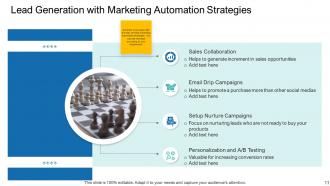
Slide 11: This slide represents Lead Generation with Marketing Automation Strategies.
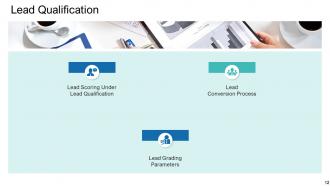
Slide 12: This slide showcases Lead Qualification describing- Lead Scoring Under Lead Qualification, Lead Grading Parameters, and Lead Conversion Process.
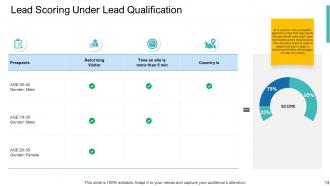
Slide 13: This slide shows Lead Scoring Under Lead Qualification.
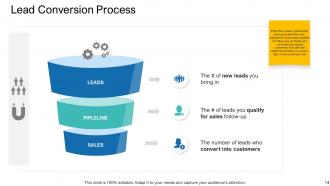
Slide 14: This slide presents Lead Conversion Process describing- Leads, Pipelines and Sales.
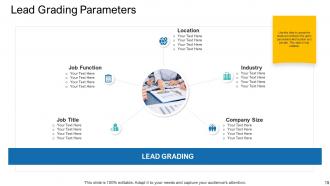
Slide 15: This slide displays Lead Grading Parameters like- Location, Industry, Company Size, etc.
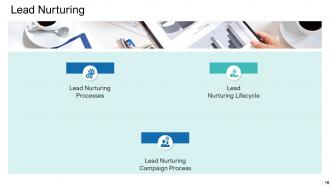
Slide 16: This slide represents Lead Nurturing describing- Lead Nurturing Processes, Lead Nurturing Lifecycle, and Lead Nurturing Campaign Process.
Slide 17: This slide showcases Lead Nurturing Processes describing process to build a good relation with the buyer at every stage of the sales funnel.
Slide 18: This is another slide showing Lead Nurturing Processes.
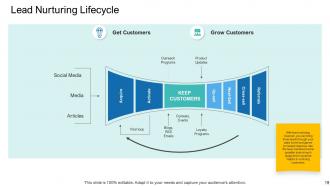
Slide 19: This slide presents Lead Nurturing Lifecycle describing- Social Media, Media, Articles, etc.
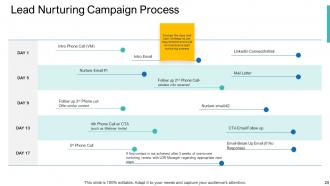
Slide 20: This slide displays Lead Nurturing Campaign Process comparing various days data.
Slide 21: This slide represents Email Marketing describing- Email Marketing Mediums, Email Marketing Effectiveness Under B2b Marketing, Email Marketing Plan, etc.
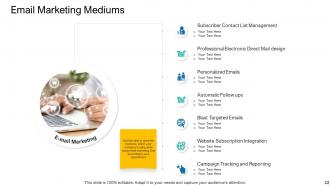
Slide 22: This slide showcases Email Marketing Mediums describing- Subscriber Contact List Management, Professional Electronic Direct Mail design, Personalized Emails, etc.
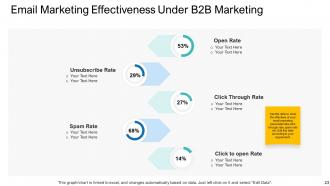
Slide 23: This slide shows Email Marketing Effectiveness Under B2B Marketing describing- Open Rate, Click Through Rate, Spam Rate, etc.
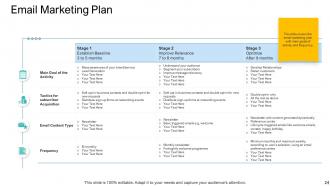
Slide 24: This slide presents Email Marketing Plan with main goals of activity and frequency.
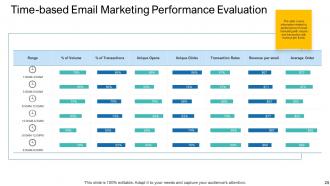
Slide 25: This slide displays Time-based Email Marketing Performance Evaluation.
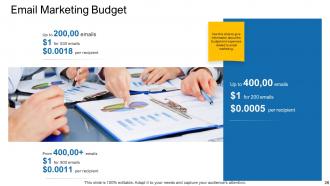
Slide 26: This slide represents Email Marketing Budget with related imagery.
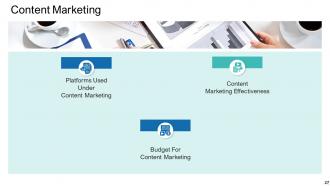
Slide 27: This slide showcases Content Marketing describing- Platforms Used Under Content Marketing, Content Marketing Effectiveness, and Budget For Content Marketing.
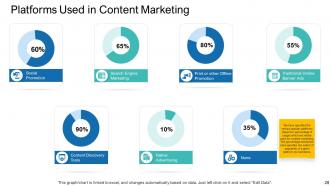
Slide 28: This slide shows Platforms Used in Content Marketing like- Social Promotion, Search Engine Marketing, Traditional Online Banner Ads, etc.
Slide 29: This slide presents Content Marketing Effectiveness showing data in bar graph to know how much content marketing effects the business.
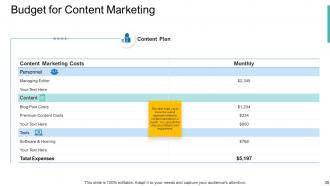
Slide 30: This slide displays Budget for Content Marketing to know the overall expenses related to content marketing in a month.
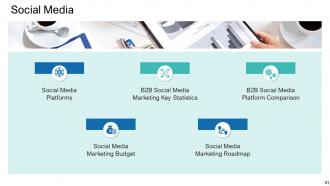
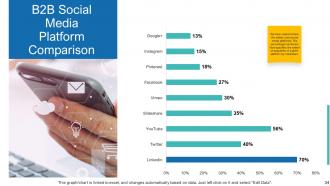
Slide 31: This slide represents Social Media describing- Social Media Platforms, B2B Social Media Marketing Key Statistics, B2B Social Media Platform Comparison, etc.
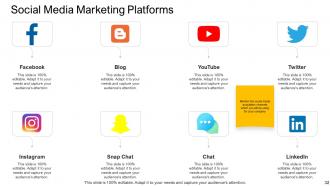
Slide 32: This slide showcases Social Media Marketing Platforms like- LinkedIn, Blog, Snapchat, etc.
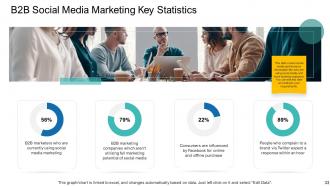
Slide 33: This slide shows B2B Social Media Marketing Key Statistics with data in percentage.
Slide 34: This slide presents B2B Social Media Platform Comparison with the help of bar graph.
Slide 35: This slide displays Social Media Marketing Budget with different platforms and time schedules.
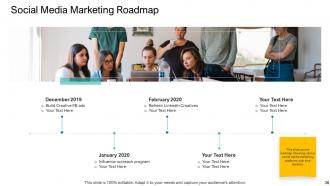
Slide 36: This slide represents Social Media Marketing Roadmap showing various social media marketing platforms with time duration.
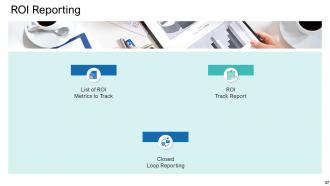
Slide 37: This slide showcases ROI Reporting describing- Closed Loop Reporting, ROI Track Report, List of ROI Metrics to Track, etc.
Slide 38: This slide shows List of ROI Metrics to Track like- Bounce Rate, Sharing Stats, Open Rate, etc.
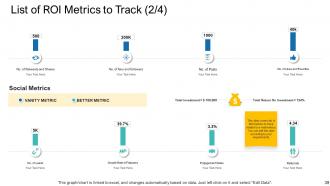
Slide 39: This slide presents List of ROI Metrics to Track describing- No. of Retweets and Shares, No. of fans and followers, No. of Posts, etc.
Slide 40: This is another slide displaying List of ROI Metrics to Track describing- Impressions, Ad position, Cost per Impression, etc.
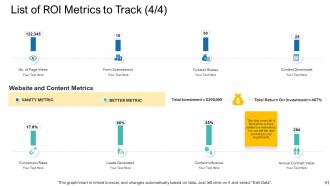
Slide 41: This is another slide representing List of ROI Metrics to Track describing- Conversion Rates, Leads Generated, Content Influence, etc.
Slide 42: This slide showcases ROI Track Report showing data in tabular form.
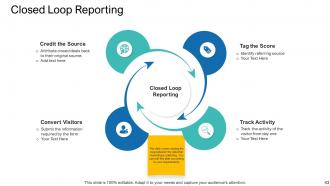
Slide 43: This slide shows Closed Loop Reporting describing- Track Activity, Credit the Source, Convert Visitors, etc.
Slide 44: This slide presents KPI Metrics and Dashboard with related icons.
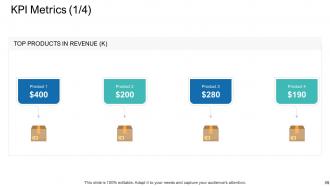
Slide 45: This slide displays KPI Metrics showing allocation of budget with different platforms and time schedules.
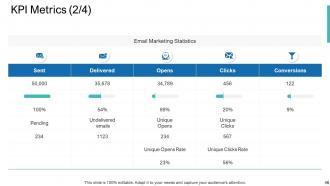
Slide 46: This slide represents KPI Metrics showing Email Marketing Statistics.
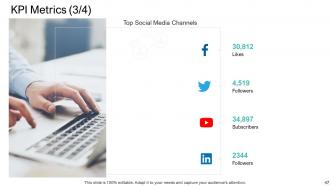
Slide 47: This slide showcases KPI Metrics showing Top Social Media Channels.
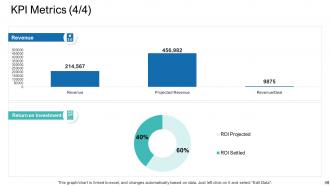
Slide 48: This slide presents KPI Metrics showing Return on Investment.
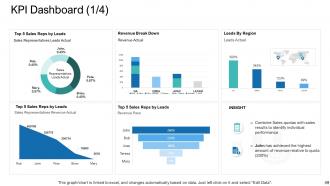
Slide 49: This slide displays KPI Dashboard describing- Top 5 Sales Reps by Leads, Sales Representatives Leads Actual, Sales Representatives Revenue Actual, etc.
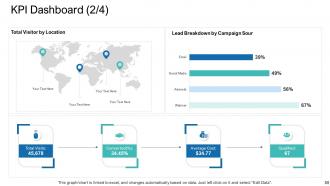
Slide 50: This slide represents KPI Dashboard describing- Total Visitor by Location, Total Visits, Average Cost, etc.
Slide 51: This is another slide showing KPI Dashboard describing- List Performance, Campaign Monitor List Stats, etc.
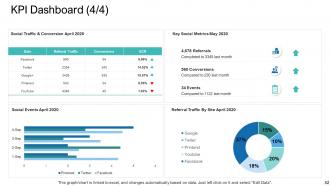
Slide 52: This is another slide displaying KPI Dashboard showing- Social Traffic & Conversion, Key Social Metrics, Social Events, etc.
Slide 53: This slide displays E-Commerce Marketing Icons.
Slide 54: This slide is titled as Additional Slides for moving forward.
Slide 55: This slide shows Stacked Bar chart with two products comparison.
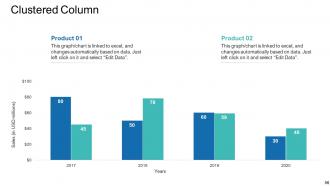
Slide 56: This slide displays Clustered Column chart with two products comparison.
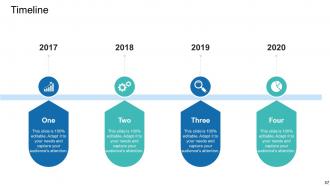
Slide 57: This is a Timeline slide. Show time intervals related data here.
Slide 58: This is Our Mission slide with related imagery and text.
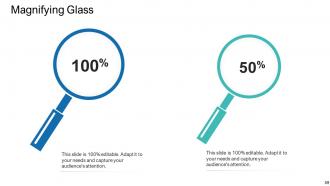
Slide 59: This slide shows Magnifying Glass to highlight information.
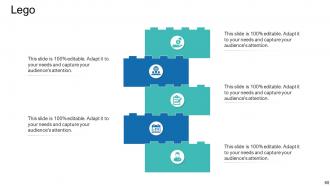
Slide 60: This is a Lego slide with related icons and text.
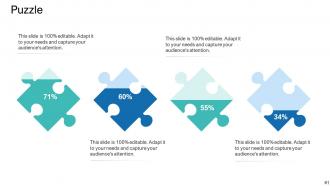
Slide 61: This slide shows Puzzle with additional text boxes.
Slide 62: This is a Thank You slide with address, contact numbers and email address.
E commerce marketing powerpoint presentation slides with all 62 slides:
Use our E Commerce Marketing Powerpoint Presentation Slides to effectively help you save your valuable time. They are readymade to fit into any presentation structure.












FAQs for E commerce marketing
Email's your best bet - those abandoned cart sequences actually make money. Facebook and Instagram ads work great for getting people to discover your stuff, plus you can retarget visitors later. SEO content is solid too since people searching are ready to buy. Influencers are kinda random honestly - some work, others are a waste. Oh, and definitely optimize your product pages for Google searches. That organic traffic converts like crazy. If you can only pick one thing though, start with email campaigns. They're consistent money makers.
Okay so first thing - do keyword research before writing any product titles or descriptions. Most people just use their own company lingo instead of what customers actually type into Google, which is honestly kind of dumb. Get your product images alt text sorted too. Blog posts work great for catching people earlier - like styling guides or whatever makes sense for your stuff. Oh and definitely check your site speed because Google's picky about that now. Mobile optimization matters too since everyone shops on their phone. Set up Google Search Console if you haven't yet, it's free and actually useful.
Honestly, user-generated content is like having your customers do the selling for you. People trust real reviews and unboxing videos way more than fancy ads - it's just more believable coming from actual buyers. Think about it: would you rather hear from a salesperson or someone who actually bought the thing? Plus there's that whole social proof angle where seeing others use your stuff makes people less nervous about purchasing. Oh, and definitely try incentivizing customers to post photos or reviews after they buy. Maybe throw in a discount code or create some hashtag campaign to get things moving.
Honestly, just go where your people are - TikTok and Insta if you're targeting younger crowds, Facebook for the older folks. Show your stuff in action instead of boring product pics. Stories and reels are crushing it right now, way better than regular posts. Set up those shoppable tags so people can buy without bouncing around different apps. Oh, and don't forget clear call-to-actions - you'd be surprised how many people skip this. Stay consistent with posting and actually talk to your followers like real humans. Pick one platform first though. Master that before you spread yourself too thin trying to be everywhere at once.
Honestly, just track the stuff that actually matters. Conversion rate and average order value are your bread and butter - tells you if people are buying and spending decent money. CAC and LTV are huge too, especially with how expensive ads are getting these days. ROAS is obvious but still critical. Cart abandonment will make you cry but at least you can fix it. Email metrics are gold since that channel usually converts best anyway. Pick maybe 4 metrics tops and check weekly - I made the mistake of creating way too many dashboards once and it was overwhelming.
Definitely start by splitting your lists based on what people actually buy and browse - that's where you'll see real results. Get those cart abandonment emails out within 24 hours. I always recommend personalizing product suggestions based on their purchase history, and honestly? Don't underestimate seasonal campaigns. Your subject lines need urgency but not in a sketchy way. Test different send times since ecommerce people shop at weird hours compared to other industries. Oh, and make sure your buttons lead straight to product pages instead of dumping everyone on your homepage.
Dude, reviews are absolutely crucial - like 90% of people check them before buying anything. The star rating hits first, and honestly anything under 4 stars pretty much kills your sales. Positive ones build trust, negative ones aren't always bad (zero bad reviews actually look fake). I'd focus on getting your happy customers to actually write something - most people are just lazy about it. Quick ratings help shoppers skip reading tons of product details too. Oh and definitely respond to feedback when you can. It's probably one of the biggest things that'll move the needle for you.
Okay so personalization is honestly a game-changer for getting people engaged. Like when you show customers products based on what they've actually looked at before, or send emails using their name and stuff they've bought - they're way more likely to click and buy again. Makes total sense though, right? Nobody wants dog food ads when they're obviously into cats lol. The numbers back it up too - you can see 20-30% better engagement. I'd start with segmenting your email list by what people have purchased, then work on customizing product recommendations. It's pretty straightforward and you'll notice results fast.
Your headline needs to spell out exactly what problem you're fixing - I see so many people try to be witty and it just confuses everyone. Get killer product photos from different angles, show off real customer reviews right up front, and make those buy buttons pop. Break up your copy with bullet points that focus on benefits over features. Most people are shopping on their phones now, so test everything on mobile first. Oh, and your checkout process? Try different versions to see what actually gets people to complete their purchase. Speed matters too - nobody's waiting around for slow pages anymore.
Think of loyalty programs as a way to hack people's psychology - customers will literally choose your store over cheaper options just to rack up points. Pretty smart, right? You're basically giving them a reason to feel guilty about shopping elsewhere. The trick is making rewards actually worth pursuing, not like those programs where you need to spend $500 to get a $5 coupon (ugh). Points-per-dollar is the easiest way to start. When it works, people genuinely think "I should grab this here instead" rather than hunting for the best deal. It's simple but weirdly effective.
Honestly, the worst mistake is not actually knowing who buys your stuff. Like, you think it's one type of person but your data shows something totally different. Also people get obsessed with follower counts - who cares if you have 50k followers but they're not buying anything? Another huge one is dumping money into ads without tracking what works. I see this constantly. Plus everyone focuses on getting new customers while ignoring the ones they already have, which is backwards since existing customers are way easier to sell to. Before you spend anything, dig into your analytics and figure out who's actually converting. Start there.
A/B testing is honestly where the magic happens - you'll get hooked once you see real data coming in. Start simple: test two different email subject lines this week, or maybe swap out your CTA button color. The key thing is only changing one element at a time, otherwise you won't know what actually moved the needle. I usually run tests for at least a week to get solid results. Split your traffic 50/50 between versions. Landing pages, ad copy, product descriptions - you can test pretty much anything. Pro tip: product images often surprise you with how much they impact conversions.
Honestly, AI personalization is huge right now - like chatbots that actually get what customers want based on their browsing, not just basic stuff. Social commerce is killing it too. My sister literally orders everything through TikTok Shop now, it's wild. Instagram shopping is massive too. Voice ordering for repeat buys is growing fast. Sustainability messaging still matters a ton. Don't try everything at once though - pick what fits your audience and test it first. User-generated content campaigns work great if you can get people posting about your stuff.
Honestly, mobile optimization is a game-changer since like 70% of people are shopping on their phones now. Your site needs to load fast and have buttons that are actually big enough to tap without missing. The checkout process should be dead simple - I can't tell you how many times I've abandoned a cart because entering payment info was such a pain. Apple Pay and Google Pay are lifesavers for this. Images need to display properly, and text should be readable without zooming in. Just pull up your site on your phone right now and try buying something - I bet you'll find at least three annoying things that need fixing.
Okay so first thing - be super transparent about sponsored stuff and data collection. Dark patterns are honestly such a bad idea, I've watched companies completely tank their reputation doing that crap. Make sure your product descriptions aren't misleading and respect people's privacy choices. Don't go after vulnerable groups with sketchy tactics either. I'd start by looking through your current campaigns for anything that seems off. Building trust beats quick sales every time - sounds cheesy but it's true. Give customers real control over their data and you'll be good.
-
I discovered this website through a google search, the services matched my needs perfectly and the pricing was very reasonable. I was thrilled with the product and the customer service. I will definitely use their slides again for my presentations and recommend them to other colleagues.
-
Informative presentations that are easily editable.
-
Very unique and reliable designs.
-
It saves your time and decrease your efforts in half.
-
Great designs, Easily Editable.
-
Great experience, I would definitely use your services further.
-
Great quality product.
-
Professional and unique presentations.