


E Commerce Business Introduction Powerpoint Presentation Slides





Try Before you Buy Download Free Sample Product
 Impress Your
 Audience
 100%
100% Editable
 Save Hours
 of Time


We are glad to present our customized e-commerce business introduction PowerPoint presentation slides designed by our professionals. Introduce your online business plan using our visually appealing and content ready complete PPT. This internet business overview presentation slides help you in demonstrating your online business strategy to clients. Our online business description PPT templates cover various topics like emerging e-commerce trends, e-commerce environment, e-commerce business model, e-commerce sales projections worldwide, e-business marketing strategy, e-commerce key growth drivers, e-commerce participants, e-commerce features, e-business marketing solutions, e-business challenges, etc. It also covers additional templates like our vision, our best time, our goals slides which will be helpful. Our online business summary PPT slides are fully editable so that you can edit accordingly. Use our content ready scope of e-business PowerPoint complete deck to give basic knowledge of e-commerce marketing solutions. Download this internet business overview PowerPoint presentation and grab your audience's attention. Do a good balancing act with our E-Commerce Business Introduction Powerpoint Presentation Slides. Give different arguments due attention.
People who downloaded this PowerPoint presentation also viewed the following :
Content of this Powerpoint Presentation
E-commerce has followed an irregular trajectory during the previous five years. Shoppers are choosing digital shopping for its convenience and unbounded reachability. Upgraded technologies like 3D imaging, augmented reality, voice assistance, etc., are compensating for a lack of feel and touch. Options like fast delivery, doorstep dropshipping, cash on delivery, and personalized experience are making it smoother sailing.
On the business side, thanks to e-commerce, startups like Gymshark are also catching up with established brands like Nike and Adidas in terms of popularity and sales. Traditional businesses known for their brick-and-mortar stores, like IKEA, are also flourishing well with e-commerce.
This is the Right Time!
A Boston Consulting Group (BCG) report says that by 2027, e-commerce will grow at 9% CAGR and contribute to 41% of global retail sales.
E-commerce Business Introduction Templates
If you're thinking of beginning an e-commerce firm, now is the time. Even if you're new to the digital scene and don't know where to begin, SlideTeam's e-commerce business introduction templates can help. Our templates will help you with digital assets such as a website, payment gateways, inventory management software, vendor management, and more.
Prepare a comprehensive business plan for e-commerce stores, including financial projections, operation models, growth factors, and other elements.
The 100% customizable nature of these PowerPoint Designs will help you create an e-commerce business introduction presentation for partners and investors.
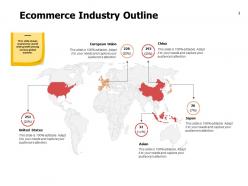
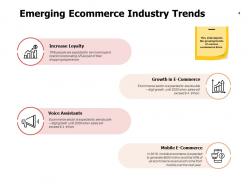
Template 1: E-commerce Industry Trends
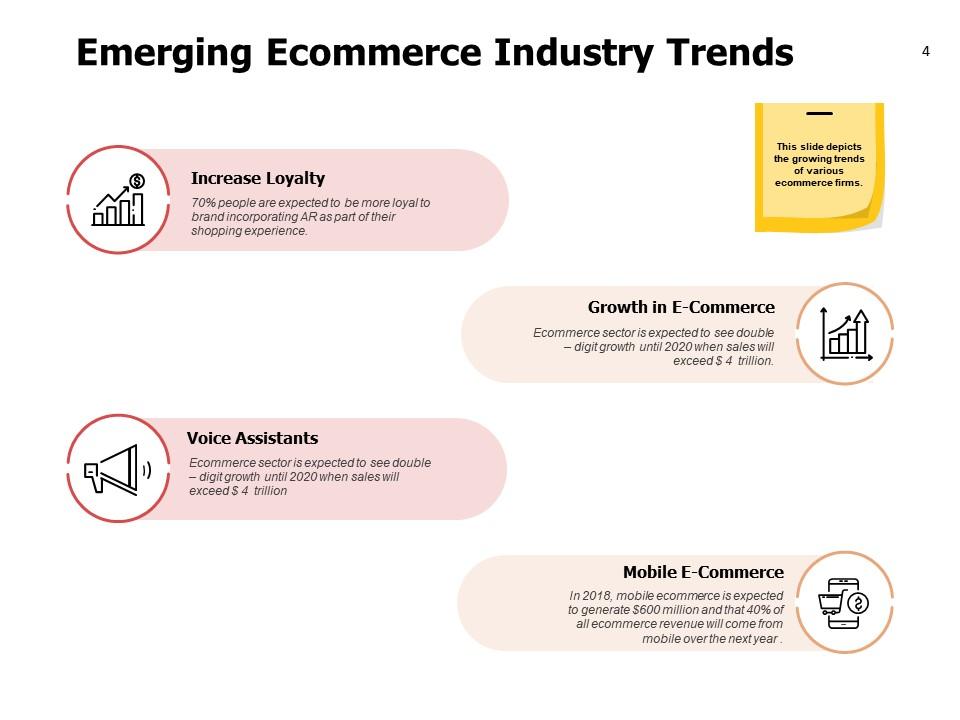
This presentation template highlights emerging e-commerce trends. It discusses the latest technology, such as Augmented Reality (AR) and voice assistants, and their impact on customer loyalty and shopping efficiency. Use it to develop business strategies to optimize your consumer experiences and align your business objectives and strategies with market.
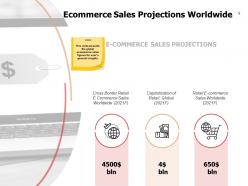
Template 2: E-commerce Sales Projection Worldwide
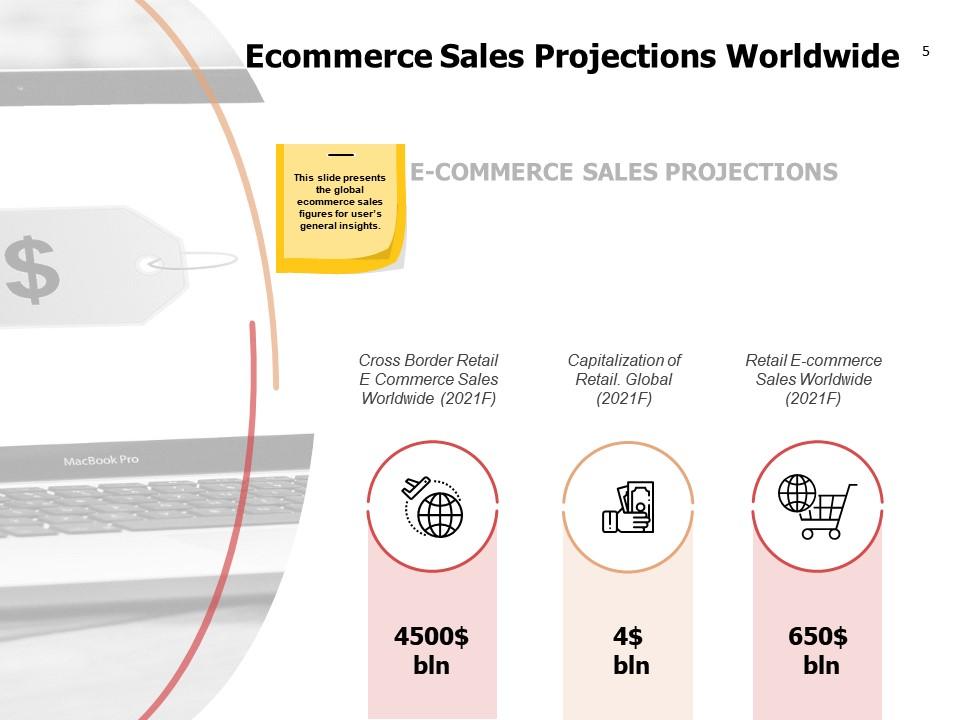
This PowerPoint Layout offers a clear visual presentation of e-commerce sales projections. It features financial figures like cross-border retail, capitalization, and sales of global e-commerce to highlight the expanding e-commerce market with financial data. This slide is a perfect tool for strategists and analysts to convey the market potential of an e-commerce business to investors and stakeholders.
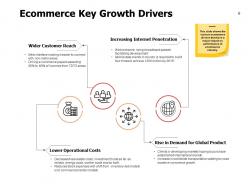
Template 3: E-commerce Key Growth Drivers
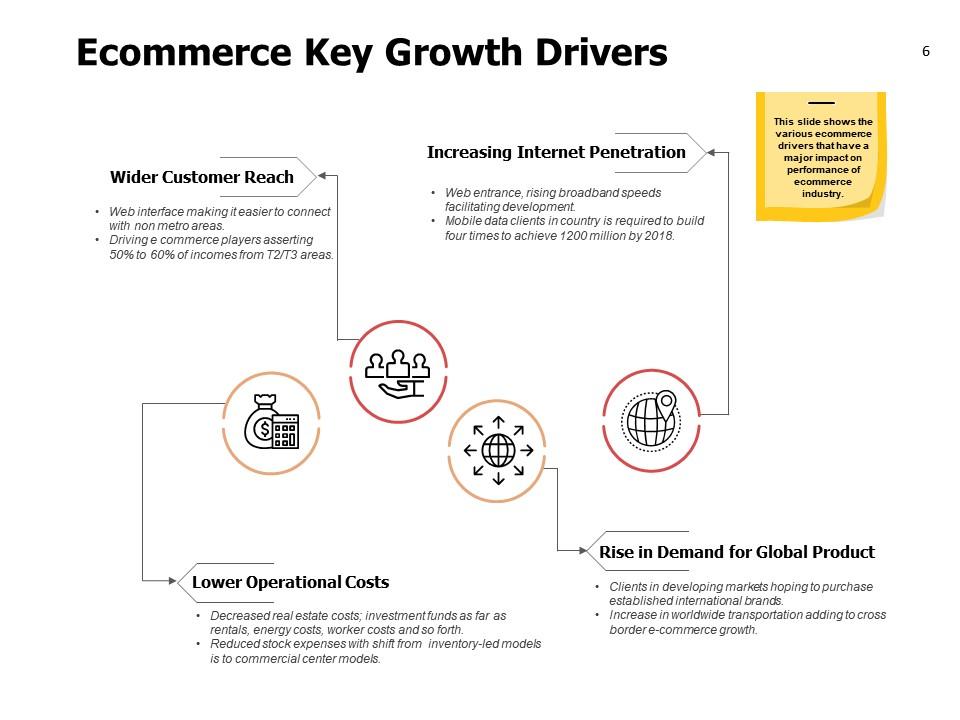
Use this PPT Template to provide an overview of the key growth drivers of the e-commerce industry. It illustrates customer reach, internet penetration, low operational costs, and a rise in demand for global products as reasons behind e-commerce expansion. The presentation slide also describes the benefits like global user engagement, reduced operational cost, increased profit margins, etc.
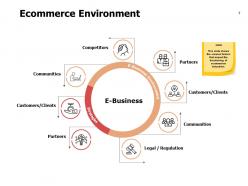
Template 4: E-commerce Environment
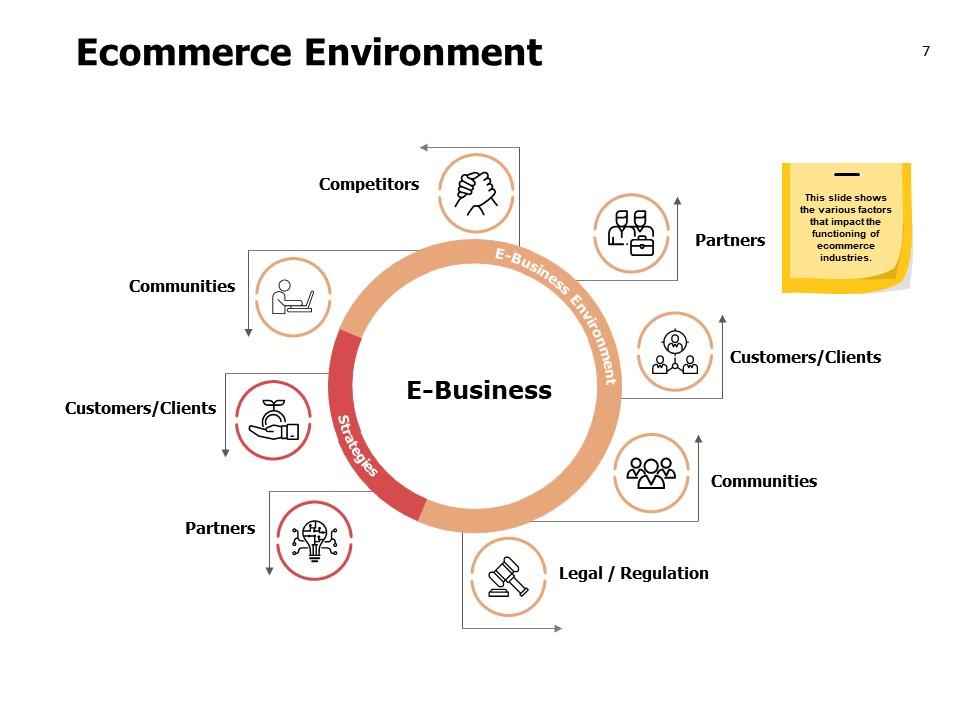
This PowerPoint Design provides a high-level overview of the e-commerce ecosystem. It emphasizes crucial areas such as competitors, partners, legal/regulation, customers/clients, and communities to demonstrate the interconnectedness of various elements in an e-commerce business. It will help with market analysis, competitive strategy, regulatory issues, and company strategy meetings.
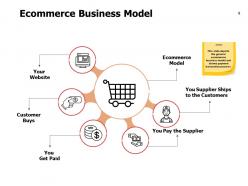
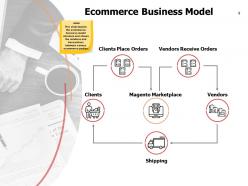
Template 5: E-commerce Business Model

This PowerPoint Layout presents a streamlined e-commerce model. It demonstrates all crucial elements from the website or storefront to order fulfillment. Use it as a foundational reference in e-commerce presentations, training, workshops, or strategic planning sessions of the drop shipping business model.
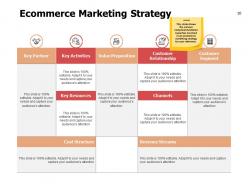
Template 6: E-commerce Marketing Strategy
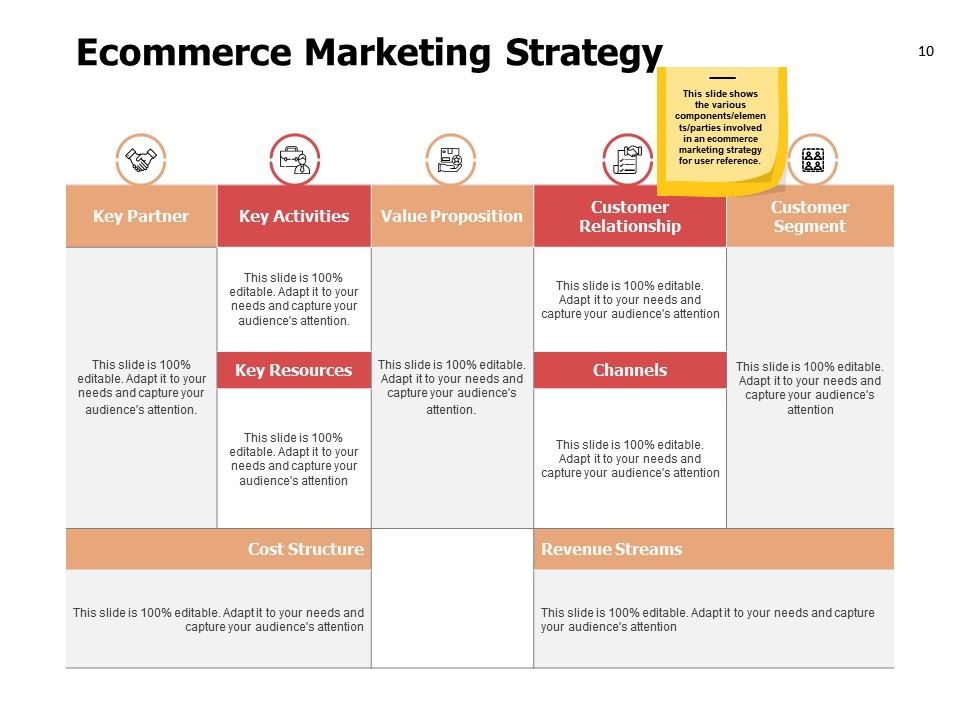
This PowerPoint Slide showcases a strategic framework for e-commerce marketing strategy. It highlights key components such as key partners, activities, value proposition, customer relationships, customer segments, channels, cost Structure, and revenue Streams, to capture market share and maintain customer engagement. Use this presentation to develop tailored marketing strategies.
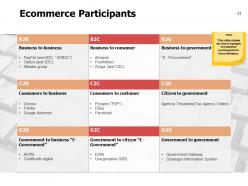
Template 7: E-commerce Participants
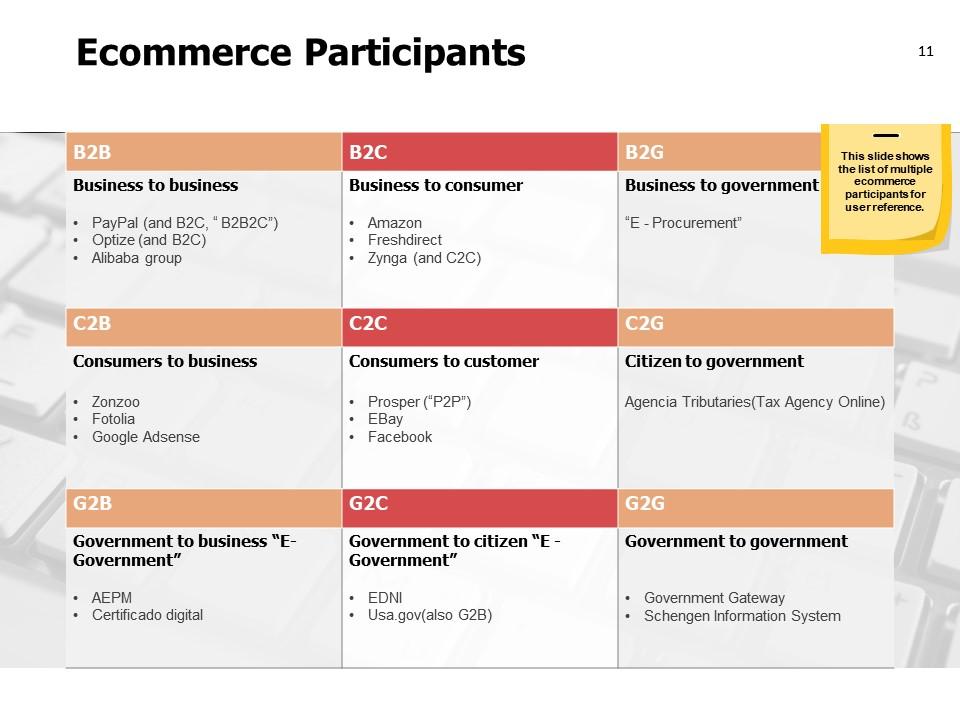
Use this presentation design to highlight the type of transaction and business models for e-commerce businesses. It includes famous e-commerce models like Business to Business (B2B), Business to Consumer (B2C), Consumer to Business (C2B), Consumers to Customers (P2P), etc. You will also find some unheard business models like Government to Government (G2G), Government to Business (G2B), etc., in this matrix. Each model is provided with a column to share its features and examples for better comprehension of the audience.
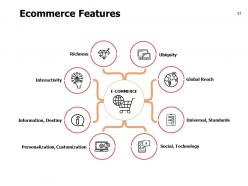
Template 8: E-commerce Features
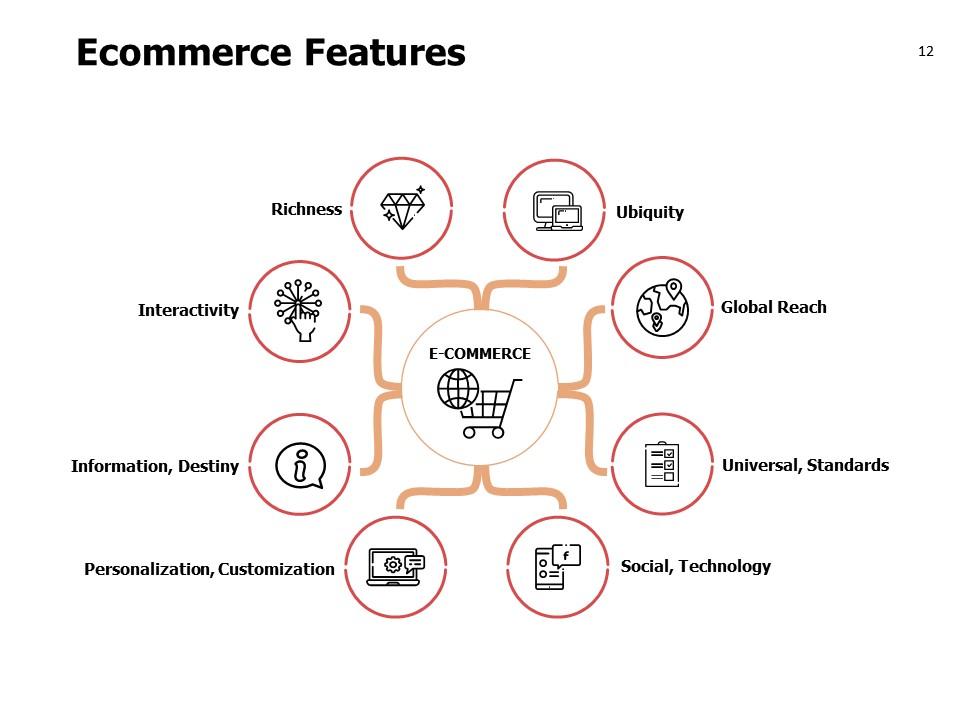
This presentation slide showcases the distinctive features e-commerce models offer a business. These include richness, ubiquity, global reach, universal/standards, and social/technology advantages. The PPT Design also highlights the benefits of interactivity, the capacity for personalization/customization, and information gathering. It can be used to educate viewers on the positive nature of online commerce and its capabilities. This PowerPoint Design will help explain why more businesses are leaning towards e-commerce or why one should think of it as a business expansion strategy.
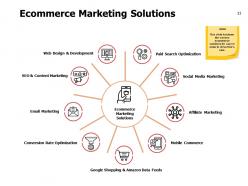
Template 9: E-commerce Marketing Solutions

Use this PowerPoint Template as a checklist to create a comprehensive digital marketing strategy. It highlights the major methods for increasing online sales, including web design, SEO, paid search optimization, social media marketing, affiliate marketing, and conversion rate optimization.
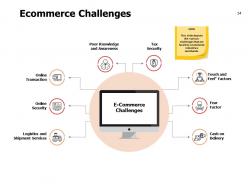
Template 10: E-commerce Challenges
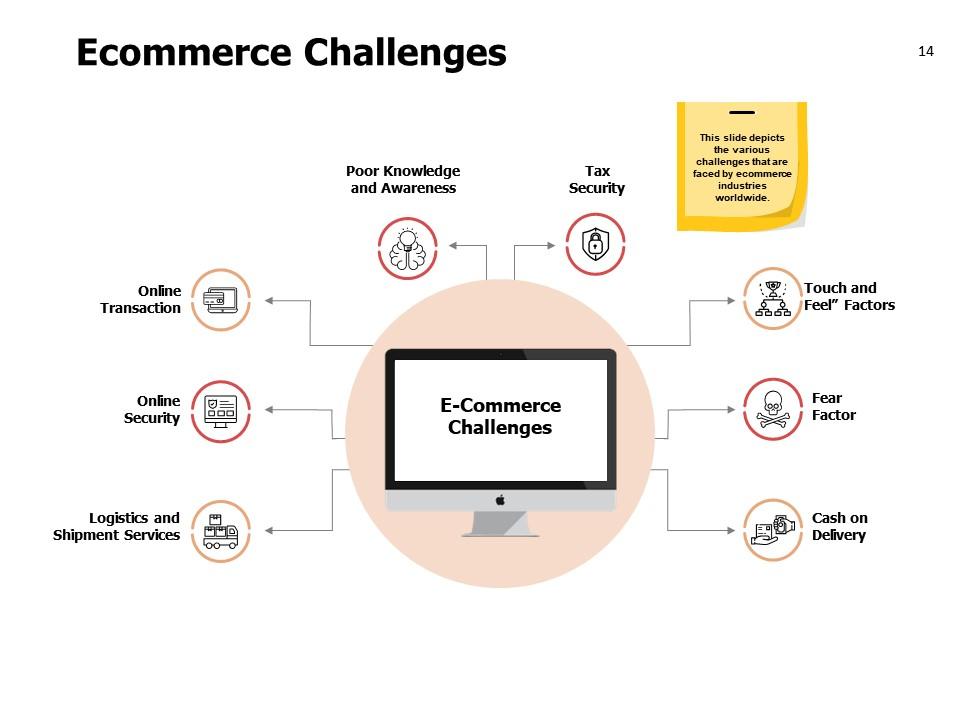
This PowerPoint Layout helps to highlight the challenges faced by e-commerce businesses. Challenges like online transaction and security concerns, logistics and shipment complexities, its tax security, customer experience issues and the fear factor associated with online shopping. Use this presentation design to discuss and find solutions for e-commerce business growth hurdles.
A Special Offer for You!
This expert-designed, comprehensive e-commerce business introduction presentation covers key elements—from the latest trends and environmental contexts to detailed business models and sales projections. These templates detail the essence of e-commerce marketing strategies. Use it to create a precise, ready-to-deploy e-commerce business strategy.s
E Commerce Business Introduction Powerpoint Presentation Slides with all 23 slides:
Our E Commerce Business Introduction Powerpoint Presentation Slides are equipped with all the facilities. They build belief that you can do it.
FAQs for E Commerce Business Introduction
You'll definitely need a good product strategy and a website that doesn't make people want to throw their phone. Payment processing has to work smoothly too. Honestly, inventory management is where most people mess up - running out of stock after someone orders is such a bad look. Customer service matters way more than you'd think. Marketing that actually converts is key, and yeah, optimize for mobile since everyone shops on their phones anyway. I'd say figure out your product-market fit before worrying about all the fancy tech stuff though.
You gotta find what you're actually into first - that passion thing isn't just fluff, you'll hate yourself later if you pick something boring. Check if people actually want it though. Google Trends is decent for this, or just see what competitors are doing. Some niches look good but the margins suck because everyone's fighting over scraps. Honestly? Don't overthink it too much. Pick maybe 2-3 ideas and test them cheap before you dump serious money in. I learned that one the hard way lol.
Honestly, UX makes or breaks online sales. If your site loads fast and checkout isn't a nightmare, people will actually buy stuff. I've watched businesses tank because their payment process was too confusing - we're talking like 70% of sales just gone. Your search bar, product pages, mobile site, reviews section... all of it matters for conversions. Oh, and definitely test your own checkout flow first. If you're getting annoyed clicking through it, your customers are probably rage-quitting halfway through. Fix the frustrating parts and you'll see way more people complete their orders.
Honestly, stop trying to sell stuff constantly and just show what you actually do. TikTok and Instagram are perfect for this - post behind-the-scenes videos, tutorials, customer photos using your stuff. Facebook ads still work if you're targeting older people (which sounds boring but whatever, money is money). Pick one platform first and stick to it for like a month. Actually engage with people who comment instead of just posting and running. User-generated content is huge right now. Maybe find some smaller influencers in your space to work with - they're usually more authentic than the big ones anyway. Track what posts people actually care about and do more of that.
Just weave your keywords naturally into titles and descriptions - like "wireless bluetooth headphones" beats "audio device" every time. People actually search for specific stuff. Don't overthink it though, I swear half the stores I see go way overboard. Put your best keywords in those first 160 characters since that's what Google shows. Use bullet points because nobody reads paragraphs anymore, they just scan. Oh and write unique descriptions for each product - copying the manufacturer's boring text is such a waste. Include the specs people care about, but make it sound human. Short sentences work. So do longer ones that actually flow together naturally.
Dude, payment options can totally tank your sales if you're not careful. Like 70% of people will literally just leave if they don't see PayPal or whatever they usually use. It's wild how picky shoppers are about this stuff. You definitely want 3-4 different options minimum - Apple Pay, PayPal, maybe some buy-now-pay-later thing. Makes checkout way smoother. I'd honestly start with PayPal and Apple Pay first since those are the big ones everyone trusts. Your conversion rates will probably jump pretty quick once you add them.
Honestly, people ditch their carts for pretty predictable reasons. Guest checkout is huge - I hate when sites force me to make an account for one purchase. Show shipping costs upfront too, because hidden fees at the end are the worst. Your site better load fast on mobile or you're toast. Most shopping happens on phones now anyway. Send those abandoned cart emails with a little discount to tempt them back. Really though, just think about what annoys you when you're buying stuff online and fix those things first.
Dude, mobile optimization can literally make or break your business. Most people shop on their phones now - we're talking like 60%+ of all online purchases. Your site needs to work perfectly on mobile or you'll just watch customers bounce. Google ranks mobile-friendly sites higher too, which is huge for getting found. I've watched businesses tank because their checkout was a nightmare on phones. Test your site on different devices first - fix slow loading, tiny buttons that are impossible to tap, weird scrolling. Those little things add up fast and cost you sales.
First thing - get SSL certificates and set up secure payment processing through Stripe or PayPal. Two-factor authentication is non-negotiable now, trust me on this one. Strong password requirements for accounts obviously. If you're handling credit cards directly, PCI compliance becomes your new best friend (though honestly most people just use third-party processors to avoid that headache). Keep everything updated and monitor for weird login attempts or sketchy purchase patterns. Oh, and backup customer data somewhere secure. SSL and payments first, then add the monitoring stuff as you scale up.
Honestly, most companies are terrible at this - they'll send surveys and then ignore everything. But here's what actually works: set up those automated emails after someone buys something, ask specific questions about their experience. Then (and this is crucial) actually do something with the responses. If three people say your checkout is confusing, don't just file it away. Route that feedback straight to whoever can fix it. I'd start small though - grab one complaint you keep hearing and tackle it this week. The patterns are usually pretty obvious once you start looking.
Dude, logistics is literally what makes or breaks your whole e-commerce thing. Like, customers don't care how amazing your product is if it shows up broken or three weeks late, you know? You're juggling inventory, fulfillment, shipping partners, returns - the whole mess. Good supply chain = lower costs and faster delivery. Bad one = angry customers leaving one-star reviews. Honestly, I'd start by just mapping out your entire process first. Figure out every step from when someone hits "buy" to when it lands on their doorstep, then find solid partners who won't flake when you start scaling up.
Honestly, abandoned cart emails are pure gold - people literally forget they wanted something and just need a gentle nudge. I'd start by segmenting your list based on what customers have bought before, then hit them with personalized recommendations. Like "hey, you bought this, you'll probably love that too." Time those follow-ups right after purchases, and throw in some VIP-only discounts to make repeat buyers feel special. Don't overcomplicate it at first though - basic automation works great, then you can get all fancy with the personalization stuff later. Trust me, making people feel like insiders with exclusive deals does wonders.
Mobile-first is everything now - people literally shop on TikTok then finish buying through Alexa (still blows my mind). You've gotta nail that omnichannel thing where customers can hop between platforms seamlessly. AR try-ons aren't fancy anymore, they're expected. Same-day delivery and sustainability messaging are non-negotiables too. Honestly, COVID pushed all this forward by like 5 years. My advice? Don't try fixing everything at once. Look at where you're weakest compared to these trends and start there. Social commerce integration is probably the easiest win if you're not doing it yet.
Platform choice basically makes or breaks how much you can grow without everything falling apart. Shopify and BigCommerce usually handle traffic spikes pretty well, but other platforms just crash when you scale up. You'll run into walls with product limits, storage caps, and integration issues - I've literally watched businesses grind to a halt because they chose poorly from the start. The pricey enterprise options aren't automatically better either. Sometimes WooCommerce gives you way more flexibility to expand. Just make sure you check traffic limits, transaction fees, and what it'll cost to migrate later if you need to switch.
Okay so first thing - pick your business structure and get it registered. LLC is usually the easiest route. Then you've got the fun paperwork: business license, sales tax permits, maybe industry-specific stuff depending what you're selling. Privacy policy and terms of service are mandatory for online stores, plus data protection rules if you're in certain states (California's super strict about this). Oh and if you're creating any brand names or logos, think about trademarks early. Honestly? Just bite the bullet and talk to a business lawyer upfront. Trust me, it's way less painful than scrambling to fix things later.
No Reviews