





 0 Comment
 Customer Reviews

The email says "training modules." The calendar blocks out four hours. Tuesday.
Nobody calls it what it is—sitting through slides while half-watching, half-pretending the camera's broken. Virtual learning that feels like virtual waiting. Like someone took a conference room presentation and stretched it across your laptop screen until all the energy leaked out.
The online learning timetable arrives as an attachment. Nine sessions. Spread across three weeks. Each one promising "interactive elements" and "engaging content." Each one landing exactly like the last online thing you sat through, wondering if anyone would notice if you just... stepped away.
It's not that the information's useless. Most of it probably isn't. But there's something about learning through a screen that makes everything feel optional, even when it's not. Even when someone's taking attendance. Even when participation counts.
The worst part isn't the content. It's the time between—those five-minute breaks that turn into ten, the "we'll wait for everyone to return" delays, the technical difficulties that eat up half the session. A two-hour block becomes three hours of your day, and somehow you learned less than you would have from reading the handout.
Companies know this. That's why the templates exist—not for the learning itself, but for creating a proper e-learning schedule. For making virtual sessions feel less virtual. For building structure when everything defaults to chaos.
SlideTeam's virtual classroom schedule templates tackle the part most people get wrong: making time visible. Not just blocked off, but organized in a way that doesn't make people want to find excuses.
Here's what works when four walls turn into four corners of a screen, and someone still needs to learn something.
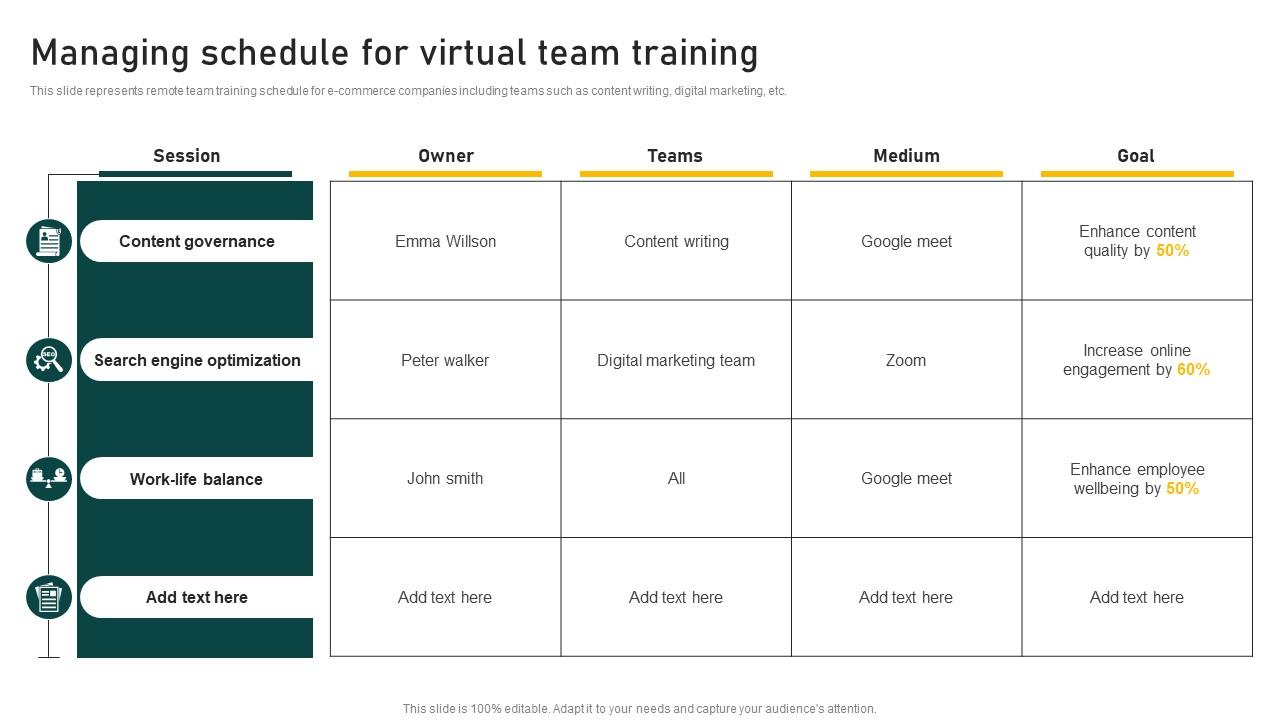
Template 1: Managing Schedule for Virtual Team Training
Use this PowerPoint slide to streamline virtual training coordination for e-commerce managers and project teams. The slides showcase organized virtual classroom schedule frameworks that track session owners, target teams and delivery methods. It also meets specific learning goals. You get actionable preset formats for training planning that eliminate scheduling chaos while maintaining clear measurability with an effective online learning timetable. Download now.
Download this PowerPoint Template
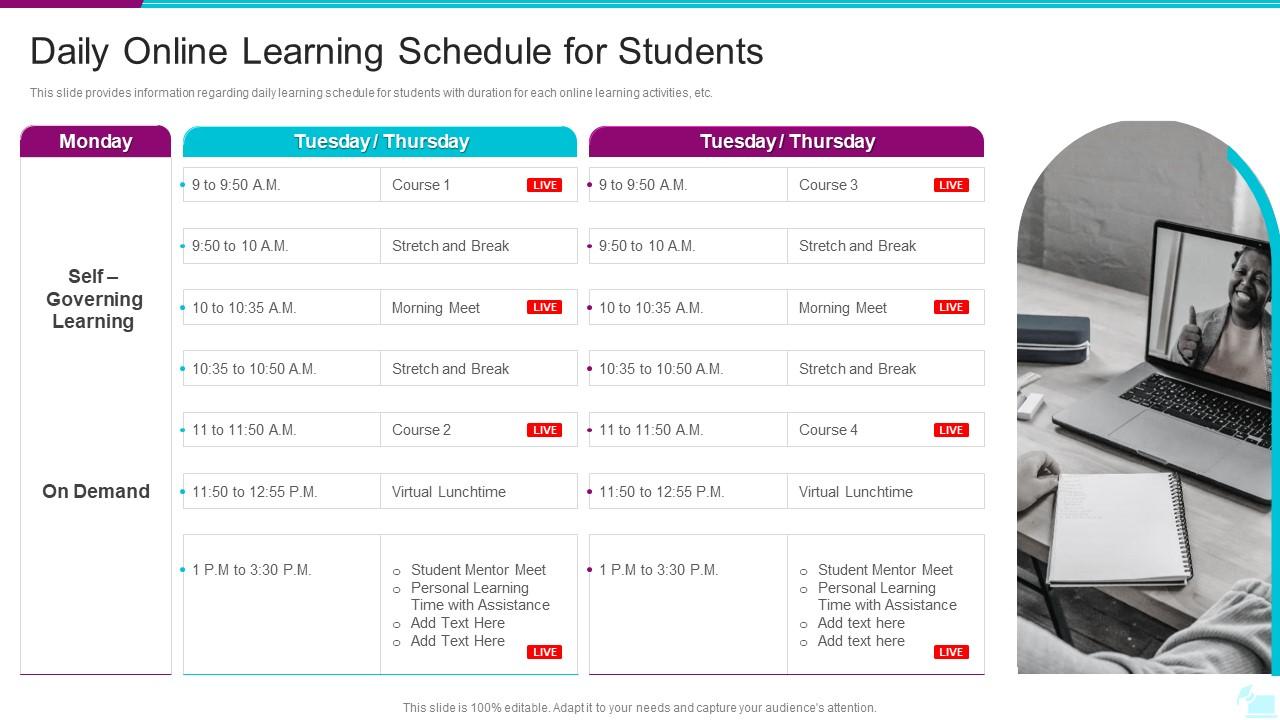
Template 2: Daily Online Learning Schedule for Students PPT
This PowerPoint slide delivers pre-designed daily schedules with structured time slots. It also depicts live sessions and breaks across weekdays using a comprehensive virtual classroom schedule framework. Educators, administrators, and curriculum planners can customize this actionable online learning timetable preset for strategic academic planning. The pre-built remote education calendar enables organized remote education delivery that students can follow. Download this practical template now.
Download this PowerPoint Template
Template 3: Virtual Learning Schedule PowerPoint Template
These PowerPoint slides are meant for virtual learning management. This PPT template delivers pre-built SWOT analysis, gap analysis, Gantt charts, and learning matrices. Virtual classroom schedule, monitoring engagement, and resource allocation are also part of the framework. Educational managers and training consultants get customizable, pre-designed tools. These clutter-free designs can be used for strategic planning and performance review. Download this PPT preset now.
[product_image id=1869985]
Virtual Learning Schedule Must be Realistic
SlideTeam's PowerPoint templates are the industry's finest for creating comprehensive virtual classroom schedules. These content-ready slides provide clear structure and professional formatting that saves educators valuable planning time. Our custom-made presentations ensure seamless organization of online learning timetables and student activities. Deploy these top-notch templates to streamline your virtual education planning and ensure academic success.
FAQs on Virtual learning schedule
What are the components of an effective virtual learning schedule?
Set fixed daily start and end times for your virtual classroom schedule. Block specific hours for live sessions, self-study, and assignments in your online learning timetable. Include 15-minute breaks between sessions to prevent screen fatigue. Schedule challenging subjects when your focus peaks, typically morning hours. Reserve one-day weekly for review and catch-up work in your remote education calendar. Keep the same routine Monday through Friday to build consistency.
How can time management skills be integrated into a virtual learning schedule?
Set fixed daily start and end times for virtual classes using a virtual classroom schedule. Use a digital calendar to block study periods and break times. Apply the Pomodoro Technique - study for 25 minutes, then take 5-minute breaks. Create a dedicated workspace separate from relaxation areas to maintain focus and routine with your online learning timetable.
What tools and resources can enhance the creation of a virtual learning schedule?
Use calendar apps like Google Calendar or Outlook to block study times and set reminders for your virtual classroom schedule. Choose learning management platforms such as Canvas or Moodle to organize course materials and track deadlines. Add productivity tools like Trello or Notion to break down assignments into smaller tasks as part of your virtual study plan. Install focus apps like Forest or Cold Turkey to minimize distractions during scheduled study periods.
How do time zones impact virtual learning schedules for international students?
Time zones create scheduling conflicts when students span multiple continents. Record all live sessions so students can access content later if they miss real-time classes. Rotate meeting times weekly in the synchronous learning calendar to share the burden of inconvenient hours . Use discussion forums and assignments during asynchronous learning hours to reduce dependence on live interaction. Set clear deadlines based on one reference timezone to avoid confusion.
What strategies can be employed to maintain student engagement during remote learning hours?
Break lessons into 15-minute segments with frequent interaction breaks in your virtual classroom schedule. Use polls, breakout rooms, and direct questions to keep students active. Record sessions so students can revisit content at their own pace. Schedule regular one-on-one check-ins in your online learning timetable to address individual concerns and maintain that personal, human connection.
How can educators incorporate breaks effectively into a virtual learning schedule?
Schedule breaks every 25-30 minutes during virtual sessions following your virtual classroom schedule. Use 5-10 minute intervals for students to move away from screens. Build in longer 15-minute breaks between subjects or major topics in your online teaching timetable. Set clear return times and use audio signals to bring students back. Consider physical movement activities during breaks rather than passive screen time to maintain a flexible learning timetable.
What role do flexibility and adaptability play in designing a virtual learning schedule?
Flexibility lets students learn at their own pace and choose optimal study times. Build buffer time between sessions for technical issues or extended discussions. Design modules that can be reordered based on student progress or events in your flexible learning timetable. Include multiple delivery formats like live sessions, recorded videos, and self-paced assignments. Allow students to repeat difficult sections without falling behind the timeline.
How can parents support their children's adherence to a virtual learning schedule?
Parents should set fixed wake-up and class times daily following the virtual classroom schedule. Create a dedicated study space free from distractions like TV or toys. Monitor your child's attendance and participation during online sessions. Take regular breaks between classes to prevent screen fatigue according to the online learning timetable. Establish consistent meal and bedtime routines that align with the remote education calendar.
What are common pitfalls to avoid when planning a virtual learning schedule?
Avoid back-to-back sessions without breaks in your virtual classroom schedule. Students need 10-15 minutes between classes to rest their eyes and refocus. Don't schedule sessions longer than 90 minutes without splitting them up in your online learning timetable. Technical issues will happen, so build in buffer time to your distance learning agenda. Keep recordings under 20 minutes when possible. Test all platforms before the first class. Have a backup communication method ready when the main system fails.
How can assessments be effectively scheduled within a virtual learning framework?
Schedule assessments at fixed weekly intervals following the virtual classroom schedule to create predictable routines. Use shorter, frequent quizzes instead of lengthy exams to maintain engagement and reduce technical issues. Provide multiple time slots across different time zones when possible within the online learning timetable. Send automated reminders 48 hours before each assessment. Keep assessment windows open for 24-48 hours to accommodate varying schedules and potential connectivity problems.


