



 0 Comment
 Customer Reviews

From the outside, teaching looks simple: explain the concept, show a slide, answer a few questions. This is until you try it! Ten minutes into a demo, attention drifts; an hour into a workshop, the message blurs. That’s not a content problem, it’s a structure problem. Clear learning doesn’t just happen; it’s planned, paced, and someone takes pains to ensure it is checked along the way.
Building an end-to-end learning journey? These Integrative Learning Design Framework Templates from SlideTeam help stitch goals, activities, and assessment into one coherent flow.
From Drift to Direction
Instructional frameworks are the map that keep a lesson focused. They lay out the route and the rest stops: Bloom’s lifts thinking from recall to creation, while the 5E cycle: Engage, Explore, Explain, Elaborate, Evaluate, keeps people doing, talking, and applying rather than just listening. In a classroom or a training room, this structure turns “here’s some info” into “here’s how we’ll use it”.
Major Instructional & Learning Design Frameworks
| Framework | Primary Purpose | Core Stages / Elements | Best Use Cases | Quick Metric |
|---|---|---|---|---|
| ADDIE | End-to-end course creation | Analyze, Design, Develop, Implement, Evaluate | Corporate L&D; multi-module programs | Time-to-competency |
| SAM | Rapid, iterative design | Prep, Iterative Design, Iterative Development | Fast pilots; agile teams | Iteration cycle time |
| Backward Design | Outcomes-first planning | Desired Results → Evidence → Learning Plan | Standards-aligned K-12; accreditation | Assessment alignment index |
| Bloom’s (Revised) | Calibrate cognitive demand | Remember→Understand→Apply→Analyze→Evaluate→Create | Objective writing; test design | % items at target Bloom level |
| Gagné’s 9 Events | Structure lesson flow | Attention; Goals; Recall; Present; Guide; Practice; Feedback; Assess; Transfer | Microlearning; workshops | Engagement per event |
| Merrill’s First Principles | Problem-centered learning | Activation; Demonstration; Application; Integration | Simulations; skills training | Task transfer performance |
| 5E Model | Inquiry-based cycle | Engage; Explore; Explain; Elaborate; Evaluate | STEM lessons; labs | Quality of Explore outputs |
| UDL | Inclusive, accessible design | Multiple means: Engagement, Representation, Action/Expression | Diverse classrooms; accessibility | Participation across subgroups |
| Kolb’s Cycle | Experiential learning | Experience; Reflect; Conceptualize; Experiment | Labs; on-the-job training | Reflection quality score |
| Kirkpatrick/Phillips | Evaluate impact/ROI | L1 Reaction; L2 Learning; L3 Behavior; L4 Results (+L5 ROI) | Program evaluation; exec reports | L3 behavior change / ROI |
What makes the plan real is what’s on the screen. The right visuals act like a runway: objectives up front, activities sequenced, quick checks built in, and space to note decisions. SlideTeam’s top Instructional Framework PowerPoint templates collection do exactly that. They help storyboard a session, tie tasks to outcomes, and make assessment a habit. Additionally, these templates are 100% editable so you can customize them to your context, and you’ll feel the difference: tighter prep, smoother delivery, and lessons people remember.
Short on time but need impact? Use these SlideTeam Instructional Strategies PPT Templates to slot proven tactics straight into your lesson plan, and align with your chosen Instructional Framework.
Template 1. Importance of Instructional Frameworks PPT Template
Lead with this slide when the room needs a clear reason to adopt a district-wide Instructional Framework that steadies teaching and keeps learning on track. It shows how guidance takes guesswork out of planning and assessment., Hence, all actions are geared toward clear targets. Point to payoffs that matter: consistent routines and tighter alignment to standards that lift results. Use the differentiation cue to explain how instruction flexes for varied learners without easing expectations. Land the message with collaboration and engagement nodes: proof that common practices make teamwork easier and coaching more focused. In short, this SlideTeam slide promises clearer goals and fairer experiences.

Template 2. Core Components of Instructional Framework PPT Template
Use this slide as your roadmap when you need teamwork, without exception. It stitches together essentials: lesson goals, checks for understanding, differentiation, teaching methods, feedback, and collaboration, so people see how each piece lifts results in day-to-day lessons. In a staff huddle, start with goals, ask “What are we measuring?”, pick two strategies to try, and end at collaboration with clear owners and dates. The flow keeps meetings tight and decisions practical. When planning, treat it like a checklist: set the objective, decide assessment, adjust for learner needs, pick the method, gather feedback, and close with team tasks.

Template 3. Designing Effective Learning Objectives PowerPoint Template
Think of this slide as the coach’s playbook for a training session. It turns fuzzy intentions into clear, measurable targets. Use this to define the finish line, then check alignment with program standards and business priorities. Specify the skills or knowledge learners will build, and how progress will be assessed. The slide lists rubrics, checkpoints, or a final task. The five-step flow: define, align, specify, assess, revise, doubles as a tidy agenda. Stakeholders see where objectives come from, how they map to outcomes, and what qualifies as success.

Template 4. Understanding Learner Needs and Context PPT Template
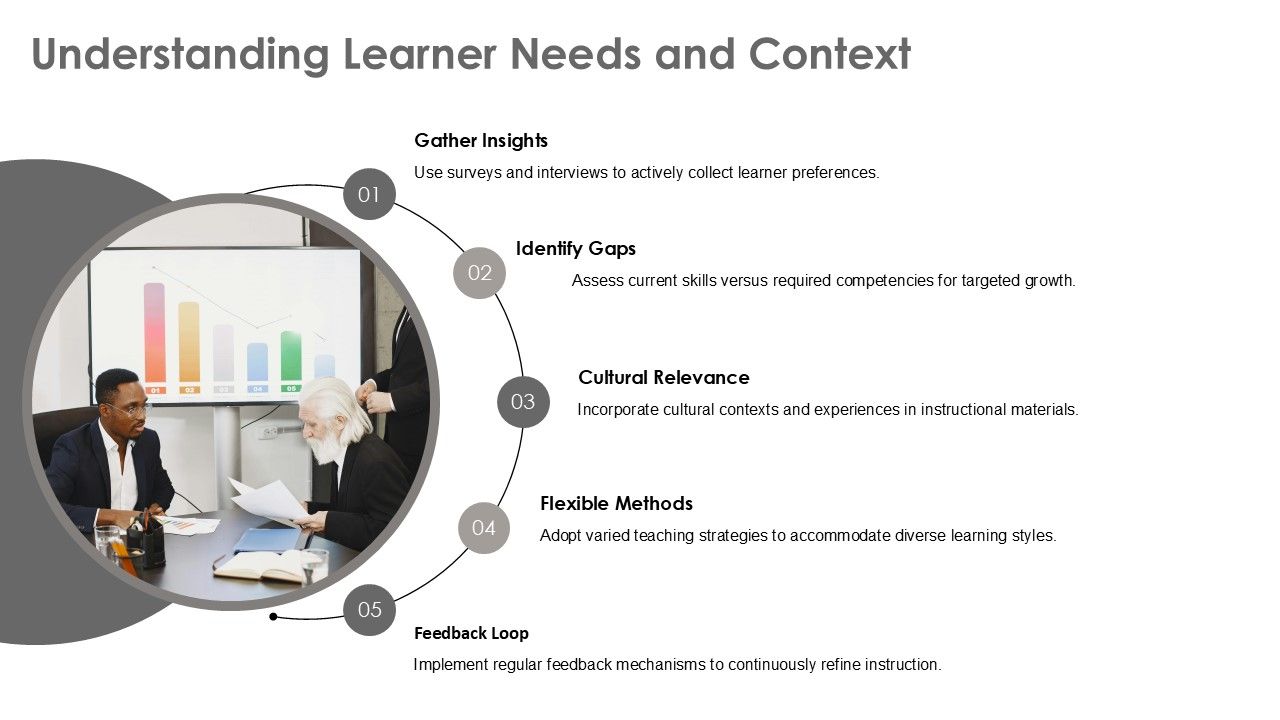
This slide is a must to walk a room through a learner-first plan you can run every term. Start with listening: fast surveys, quick interviews, a scan of work, to surface preferences and stumbling points. Use this PPT template to measure the skill gaps against program goals, and then bring in cultural touchpoints for familiarity. The arc graphic supports flexible delivery for learning styles and closes the loop with steady feedback. Bring it to sign-off meetings to frame the needs assessment and convert insight into steps.
Template 5. Instructional Strategies and Methodologies PPT Template
This SlideTeam PPT Template is a practical menu for lesson planning or quick team huddles. It puts options, such as group work, flipped lessons, projects, peer teaching, smart use of tech, and real-world links, on one page, so you can match tactics to learner needs. Instead of talking in circles, point to a strategy, note trade-offs, and agree on owners. The left-to-right flow keeps the conversation tight: choose the goal, pick two tactics to pilot, and decide how you’ll check impact. Engagement, exit tickets, or a short quiz will do. In reviews, it explains choices in plain terms and earns quick buy-in.

Template 6. Overview of ADDIE Framework PowerPoint Template
Looking for a quick map for your training plan? This slide is just for that, built around the ADDIE cycle: Analyze, Design, Develop, Evaluate. Begin with Analyze to name the business problem, the audience, and success criteria; this makes the case for time and budget. In Design and Develop, sketch deliverables, owners, and milestone dates. Close with Evaluate to show how results will be measured and how feedback rolls into the next iteration. In meetings, the slide doubles as an agenda and progress board, so leaders, SMEs, and instructors align fast.

Template 7. Assessment Strategies for Learning Outcomes PPT Template
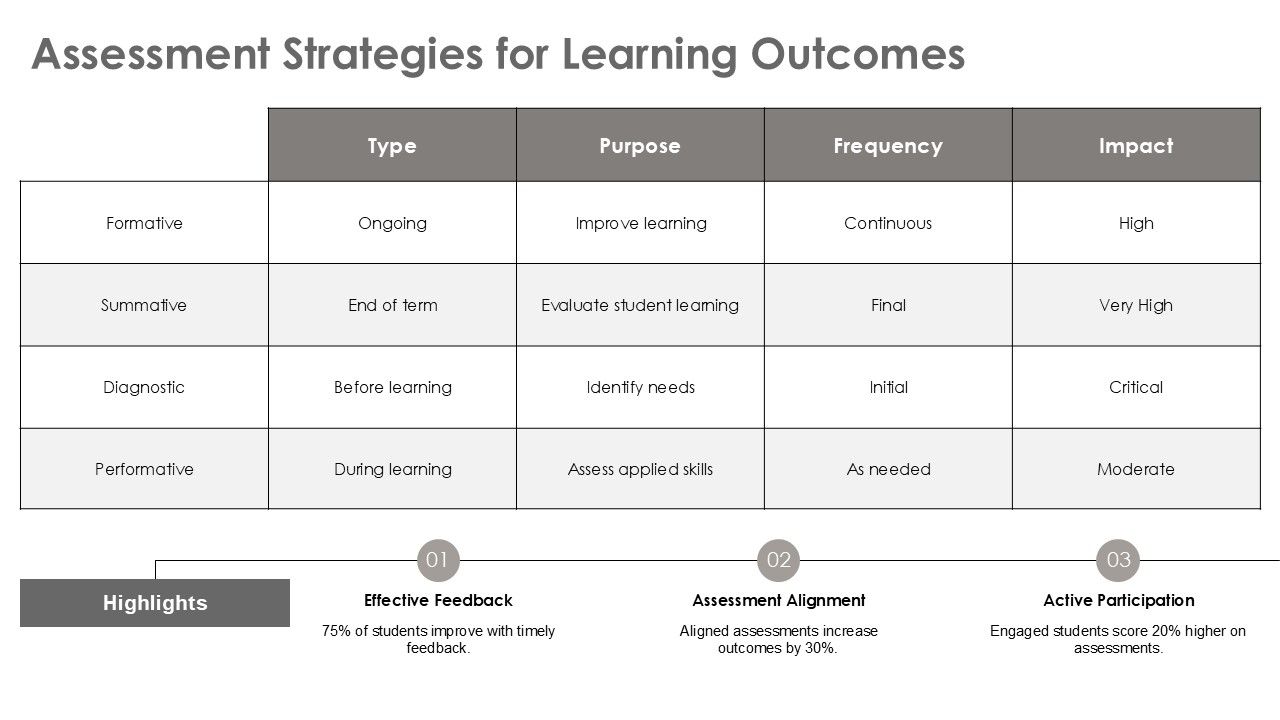
This slide is a guide on what to use when: formative for day-to-day checks, summative to close a unit, diagnostic to find a starting point, and performative to see skills in action. In one view, it shows purpose, timing, and expected impact, so teams choose the right tool. It also works as a planner: match tasks to cadence, set realistic expectations, and mark where feedback must be strongest. The highlights bar supports leadership conversations on timely comments, aligned tasks, and active participation. Bring this into planning meetings to build an assessment map aligned to your Instructional Framework and Curriculum framework.
Template 8. Feedback Mechanisms and Improvement PPT Template
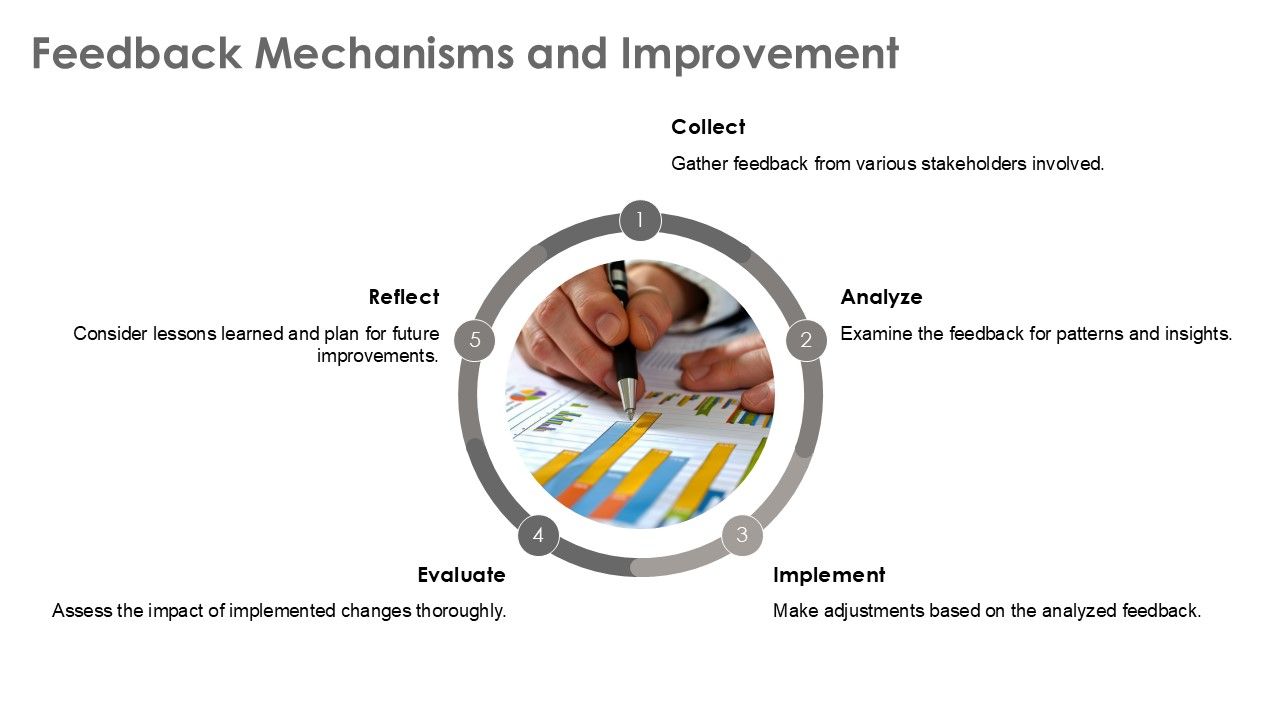
This feedback template by SlideTeam walks your team through five steps: Collect, Analyze, Implement, Evaluate, Reflect, so everyone knows who owns what, when to move, and which evidence matters. Start by gathering quick inputs, spot the pattern, agree on one change, and put a name and date next to it. Circle back to check the impact, and note what you’d keep or tweak. Keep it practical: one page, one action, one metric.
Template 9. Instructional Framework Evaluation Metrics PowerPoint Template
Use this KPI dashboard for a quick, honest read on whether the Instructional Framework is working. The top tiles surface four indicators: student engagement, teacher performance, curriculum alignment, and assessment accuracy, so priorities and trade offs are clear at a glance. The pie chart shows how each indicator contributes to the whole, while the bar chart reveals grade level patterns that guide support or coaching. Use this slide for leadership huddles or PLCs to set targets, track progress, and adjust plans in real-time. Swap placeholders with campus data so wins are visible and gaps have owners and timelines.

Template 10. Future Trends in Instructional Design PPT Template
Use this slide to show where to place the next bets: AI powered personalization, data led decisions, gamified moments, and flexible models that work online and in room. Kick off the roadmap by pairing each trend with one small pilot, one tool you already have, and one metric that matters. SlideTeam lists the metrics as completion time, engagement, or on the job use. The clean list keeps workshops moving and emphasizes doing, not daydreaming. Close with a quick vote, pick a single trend to trial this quarter, and agree on ownership and review timing. This forward looking SlideTeam slide keeps your Instructional Framework evolving with evidence.

Bring Frameworks to Life
Effective learning isn’t luck; it’s design backed by a plan and tools that make the plan easy to follow. Start with a trusted framework: ADDIE, Bloom, or 5E, to set the route, pace, and checkpoints; then make it real with visuals that show objectives, activities, and how success will be measured. SlideTeam’s template library bridges that gap from idea to delivery and supports repeatability. Use the slides to storyboard a session, tie tasks to outcomes, and add quick checks for understanding. The payoff is practical and immediate: faster prep, cleaner handoffs between trainers and SMEs, and sessions that land their message and stick with learners. If the goal is to move from “good presentation” to “repeatable results”, these layouts offer clear steps, all within a clear Instructional Framework.
PS. Ready to go beyond sessions into full programs? These Educational Program Templates help connect individual trainings to a broader, measurable roadmap.
FAQs on Instructional Framework
1. Why use a structured framework for instruction?
Think of it as a reliable playbook: everyone knows the goal, the sequence, and the standards being met. A shared approach cuts guesswork, keeps instruction consistent across classrooms, and makes decisions easier to defend with evidence. When lessons follow a clear method: hook, model, guided practice, checks, learning feels coherent, pacing improves, and results tend to rise.
2. What belongs in a strong instructional model?
Start with learner-centered outcomes stated with clear action verbs. Map the flow: concept build, practice, application, then pick strategies that get students doing, not just listening. Plan for differentiation and support, define materials, timing, and roles, and include how feedback will be gathered. Wrap it with an assessment plan that matches the objectives and your chosen Instructional Framework.
3. How is assessment woven into the framework?
Treat measurement as a running thread. Begin with a baseline to surface prior knowledge. During instruction, use quick pulses: questions, exit tickets, observations, short performance checks, to adjust pacing and clarify misconceptions. End with a summative task aligned to the original goals and rubric. Feed those results back into planning so the next lesson is tighter and more targeted.