





 0 Comment
 Customer Reviews

Have you ever tried to book concert tickets online? Let me tell you, it’s not a pleasant experience; it will have you summoning every bit of patience you have, especially if you want tickets for a high-demand event. Slow loading times, technical glitches, and server crashes are common issues users encounter on ticket booking websites.
Similarly, e-commerce websites experience performance issues during flash sales or new product launches. For example, the Black Friday sale is when websites can experience 30 times more traffic than usual, causing websites and apps to crash due to their inability to handle such high traffic.
Be it gaming apps, accounting applications, or any piece of software, they can all run into performance issues like slow response time, instability, invalid responses, and shutdowns.
This is why software should undergo performance testing to ensure it meets quality standards, responds to user requests on time, and scales to meet high traffic and load.
You can conduct performance testing early in the development cycle to proactively identify issues or before significant releases, updates, and anticipated high-traffic events. You can use test automation tools for faster and more accurate results. It will help ensure using your software won’t be as excruciating as booking concert tickets.
Do you want to start testing your application? Here are 7 test strategy templates that will help you get started.
At SlideTeam, we have extensive slides that are pre-designed for performance testing. Whether you want to present the importance of testing, its types and strategies, or technical details like the test execution plan, timeline, and results, we have a customizable option available.
Let’s explore.
Template 1: Performance Testing Strategies to Boost User Experience PowerPoint
If you want a comprehensive PowerPoint on performance testing, the presentation below is for you. It starts by providing an overview of performance testing and its different types, such as load, stress, and scalability testing. It then thoroughly explores each testing type, covering topics like their importance, strategies, and execution steps. It also includes pre-designed slides for training new employees, as well as its budget and key information required by stakeholders. The 60+ slides bundle includes timelines for executing tests and dashboards for reporting metrics. Additional icons and infographic-style slides are included for a well-rounded presentation. Download now.
[product_image id=1112183]
If you have questions about how to get started with software testing, here are our top 10 test approach templates that can help.
Template 2: One-Page Agile Test Strategy for Website Performance
An agile test strategy helps teams identify issues at every stage of development and deliver quality applications quickly. You can present your testing strategy using our one-page template below. The template design helps convey relevant information while keeping the content short for easy understanding. The slide mentions the project name and test objectives at the top, followed by team details. It then provides technical details like testing environment, tools, and workflow. Download the concise and customizable template now.

Template 3: Agile Test Strategy for Website Performance
A bi-fold design is a good way to present information while taking creative liberties with images and layout to grab viewer attention. Our bi-fold agile test strategy template starts with an image on the first side. The second side highlights details like the project name and test objectives. It is followed by a table mentioning employees in the QA team, their roles, and the testing environment. The third side includes the tool list authorized for website testing and a workflow mentioning the sprint details and timelines. On the fourth side is the Contact Us section with address, contact number, and email details. Download now.
[product_image id=350564]
Template 4: QA Strategy with Performance Test Activities and Deliverables
If you are wondering what a QA test strategy should look like, the template below can help. A sequential flow at the top explains the phases of QA testing like requirement gathering, performance test development, execution, and reporting. It is followed by a table highlighting the QA activities, tools, input, and deliverables expected from each phase. For example, in the performance test executing phase, you will perform load and stress testing, the input for which will be the testing environment and monitoring tools, and the deliverable will be interim performance test results. Grab the template today.

Template 5: Overview of Different Performance Testing Strategies
You can use the testing strategy overview template to explain the different types of strategies and their purpose to stakeholders and employees. The six strategies are presented as a linear flow with numbered icons and bold headings for emphasis. The six strategies mentioned are load, stress, endurance, scalability, spike, and volume testing. Each strategy is further explained with a one-liner; for example, the software’s performance is measured under different user loads in load testing. Download the template and introduce your audience to the concept of performance testing.

Template 6: Overview of Scalability Software Testing Attributes
Scalability testing measures a software’s ability to scale up or down as per changing demand. It is performed to ensure the software can accommodate the growing user base without compromising on experience. It helps conduct bottleneck analysis to identify issues proactively. The template below highlights the important attributes one can measure during scalability testing, with a circular layout and descriptive icons. For example, response time, throughput, memory, network, and CPU usage are the attributes to be measured. Download the customizable template now.

Template 7: Different Types of Spike Tests in Performance Testing
Spike testing aims to evaluate how an application performs when subjected to random changes in load. The template below explains the types of spike tests with graphs and text. The three types mentioned are constant, step-up, and random spike tests. For example, in a constant spike test, a similar load increase is applied at regular intervals, while in a random spike test, varying loads are applied at different time intervals. The graphs are connected to Excel, so any changes you make to the document are automatically reflected in the graph. Grab the template today.

Template 8: Budget for Performance Testing Training Program
If you want to train beginners on performance testing, you must consider the training costs. On one side of the slide is a donut chart with components marked according to the training cost distribution. For example, 58% of the price will be for instructors, whereas 23% will be for training materials. On the other side of the slide is a table with the components and their estimated cost in USD. The template can help you explain to stakeholders how you will utilize the training budget.Download now.

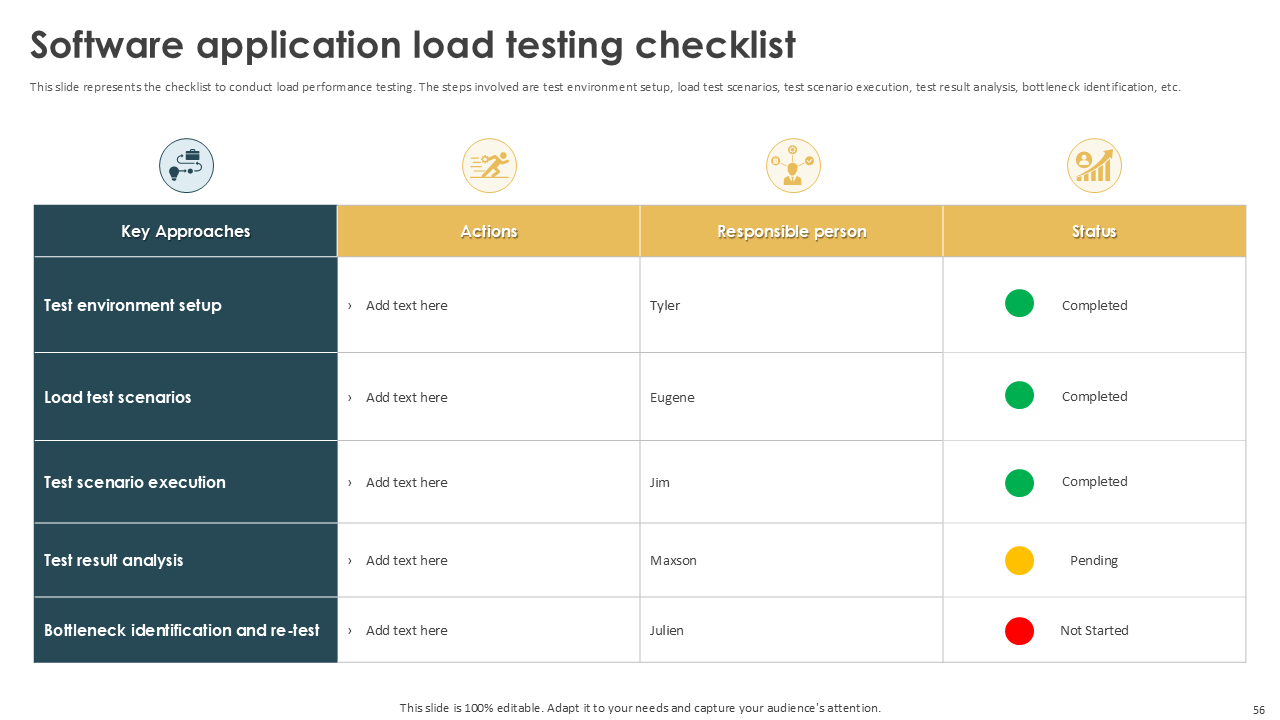
Template 9: Software Application Load Testing Checklist
Here is a template you use to track the key steps in your load testing process. It uses a simple table to highlight the key approaches in the testing strategy, actions, responsible persons, and status. The status is marked as not started (red), pending (yellow), and completed (green) with colored circles for better visualization and ease of understanding. For example, Tyler is responsible for setting up the test environment, and since the step is complete, it is marked with green. The template serves as a quick reference point for all parties involved. Get the template now.
Template 10: Performance Testing Progress Tracking Dashboard
A comprehensive dashboard is a good way to present the progress of your performance testing efforts. The dashboard below includes multiple charts and tables, each representing a reporting metric. Test case status, work items, bugs, and defects are some of the metrics presented. All the graphs are linked to an Excel. Any changes you make are automatically reflected in the graph, adding to the convenience of using our customizable templates. Grab the template today.

Improve User Experience with our Performance Test Strategy Templates
Performance testing helps measure your software’s stability, scalability, and accuracy. You can use different testing strategies to perform benchmarking and ensure the software meets set standards and regulations. Our pre-designed templates will equip you with the ins and outs of performance testing, covering concepts like importance, types, execution process, and best practices. All our slides are 100% editable, so you can customize them to meet your testing requirements.
Are you looking for some more performance testing presentations? Here are 10 other templates with examples to explore.


