





 0 Comment
 Customer Reviews

“Hey Google, turn off the lights.”
“Alexa, play my workout playlist.”
“Siri, remind me to call Mom at 6.”
Can you picture your daily life without these commands? Going back to a time without these smart assistants? A decade ago, maybe yes. However, now?
What felt futuristic is now so normal that we hardly stop to think about it. They’ve made our lives easier and also changed the way we work, live, and connect.
In industries, hospitals, factories, and even small businesses, robots are more than machines, rather they’re co-workers. They carry materials, help in surgeries, automate tasks, and a lot more. But with so many processes running, one is ought to stop and wonder: How do we keep track of it all?
That’s where Robotic Dashboard Templates step in. Similar to how the Spotify app shows what song is playing, or a smartwatch shows your daily steps, these dashboards present a clear, real-time view of what robots are doing, how they’re functioning. Moreover they highlight the areas where improvements are needed.
Whether it’s monitoring robotic sensors, tracking performance, analyzing productivity, or ensuring system health, these dashboards simplify what could otherwise be overwhelming data. Be it robotic process automation metrics or performance insights which are driven by AI, these dashboard templates bring everything together in one space.
The best part about these slides is that you don’t need to build them from scratch. These pre-designed Robotic Dashboard Templates are completely editable and customisable which provides a much needed head start.
Let's explore!
Template 1: Robotics Process Automation Software Dashboard for Small Business
Smart robotic tools are revolutionizing the way businesses function. This PowerPoint Template showcases a robotics management dashboard which presents important information. The layout has performance indicators at the top, and below that, a well-designed table with work item information. This professional template proves to a valuable tool for business owners, managers, and automation experts. Grab today!

Template 2: RPA Dashboard with Robot Utilization KPIs
To what extent are your autonomous robots used in daily operations? This PowerPoint Template comes with a robotic activity tracker that shows today's utilization hours, attended versus unattended robot data, and error analysis charts. The framework features gauge visualizations, heat maps for identifying the most error-prone robots, and statistics on busy robot processes. Daily usage comparison charts present attended as well as unsupervised robot performance patterns. Use this template to optimize robot deployment and increase automation investment returns. Download now!

Template 3: Robotic Process Automation Dashboard with Monthly Test Execution KPI
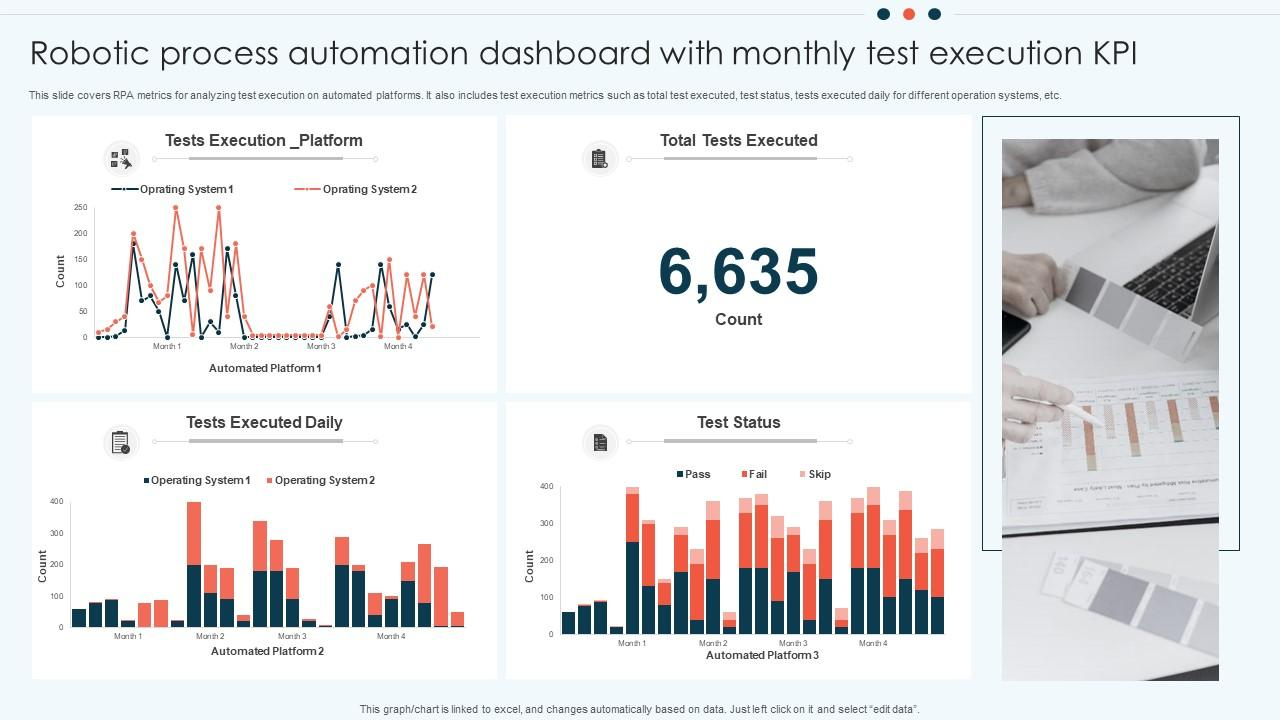
Monthly testing shows how well automated solutions can really work in today's companies. This PowerPoint Template illustrates a robotics insights dashboard which shows reach that the total number of tests has gained and gives daily execution statistics. The organized layout offers automatic performance graphs and system monitoring charts. The automation control board presents essential KPIs through visually attractive graphics and statistics summaries. Employ this template for presenting system dependability, and automation success metrics to executives and more.
Template 4: Robotic Process Analytics Dashboard for Automation
This PowerPoint Slide presents a complete analytics dashboard that evaluates robotic process performance using various KPI criteria. The template shows five essential performance indicators. It includes robot running time, monthly workforce savings, and operating expenses. It also indicates investment performance and completed tasks using trend charts. A complete process effectiveness table is shown below, demonstrating success rates and performance differences across several automated systems. This template may be used by performance specialists, automation managers, RPA analysts, and operations directors. Download today!

Template 5: Industrial Robots Performance Tracking Dashboard
How can you tell how accurate and useful industrial robots are when they're working? This PPT Template gives you a well-organized dashboard to keep track of bots that are now operating, bots that have been inducted, bots that are on tour, and bots that are at drop-off. It shows the state of the cartons, the total number of tours, and the picks, together with detailed tables for productivity analysis. The layout does a good job of showing information by using donut charts, bar graphs, and trend lines all at once. Use this template to quickly and accurately evaluate how well robots work and give realistic results. Get it now!

Template 6: Attended Robotic Process Automation Dashboard
Efficiency in automation may be precisely tracked. This PowerPoint Template showcases an attended robotic process automation dashboard with money saved, hours gained, annual targets met, and productivity accomplished. It illustrates the hours and money saved per process. This template can assist analysts, and automation teams in explaining results and successfully demonstrate automation benefits. Grab it today

Template 7: Dashboard to Measure Workflow Performance Post RPA Implementation
This PowerPoint Slide displays a workflow performance dashboard that is designed to assess outcomes. It presents ROI, the number of bots, saved hours, capital savings, and runtime in a straightforward manner. The layout incorporates visual elements such as donut charts, bar graphs, and performance data for popular flows. It also compares the completion times and savings achieved by different processes. Download now!

Template 8: Visualising Sensor Data in Robotics Dashboard
Sensors enable robots to accurately respond to their environment. With that being said, this PowerPoint Template is professionally designed by our experts to illustrate a robotics dashboard which displays real-time sensor data. It shows elements including humidity light strength, and more using graphics that are easy to understand. The layout strikes a good mix between making the information clear and displaying it off wellThis makes it easier to look at how the environment affects robots and how they respond. Download now!

Template 9: Dashboard to Measure Robotic Process Automation Bots Performance
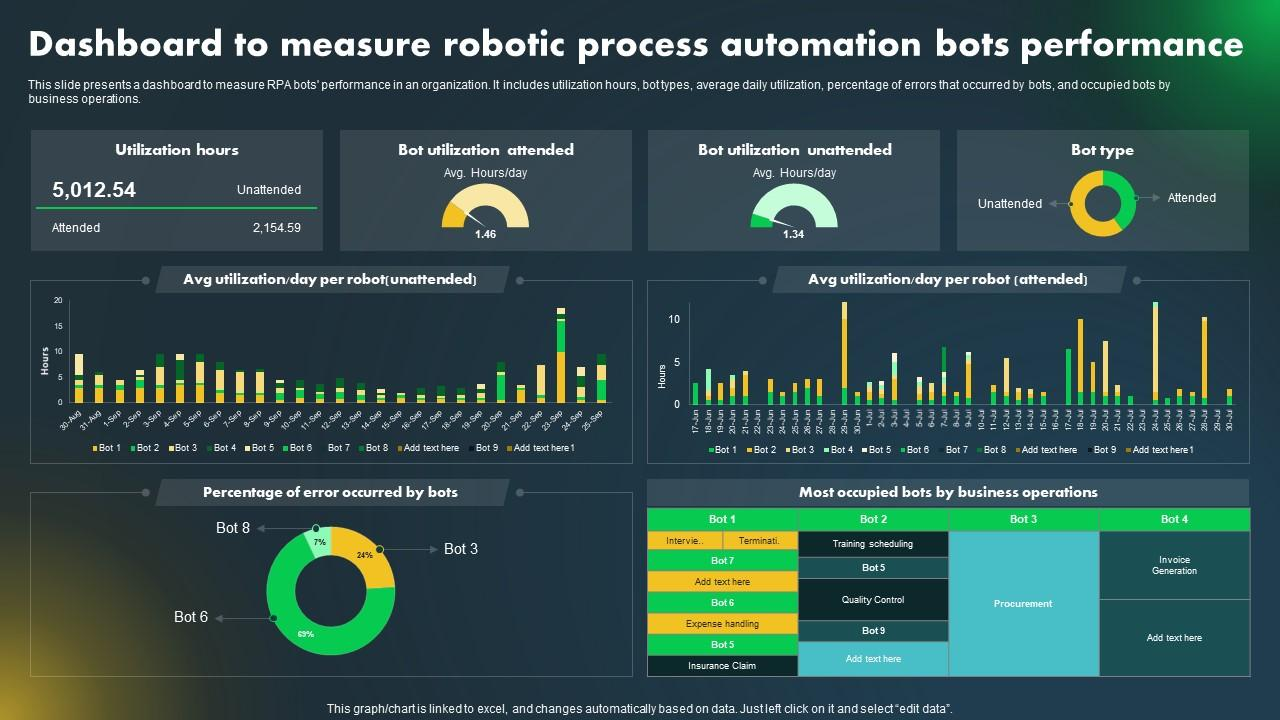
Do you ever wonder how to analyze the true performance of bots in business operations? This PowerPoint Slide features a complete dashboard for measuring bot efficiency and operation. It focuses on usage hours, attended and unsupervised bot activity, and average daily performance. The framework also monitors mistake rates and connects bots to company activities. Bar graphs, donut charts, and comparative metrics are used as visuals to enhance clarity. This template is great for process managers and consultants who need to measure productivity and show the effectiveness of programs. Download today!
Template 10: Types of KPIs for RPA
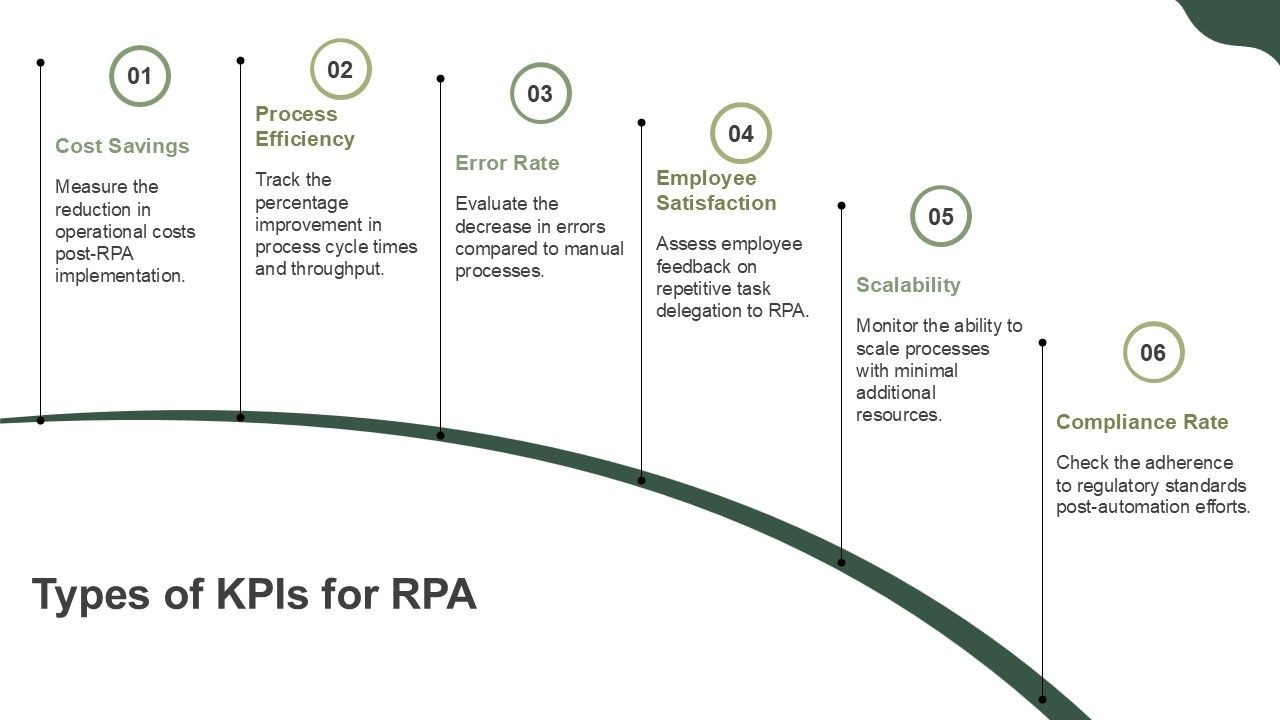
This PowerPoint Slide highlights KPIs that track success across companies. The template includes numbered areas for cost reductions and error rate evaluation. Each KPI comes with descriptions of measurement technique and adoption positive aspects. The comprehensive method helps in quantifying the return on investment of automation and enhancements in operations. Use this template to illustrate the value proposition to stakeholders and more. Download now!
Summing Up!
Technology has become a major part in our lives. However there is data behind every robotic action that needs to be analysed and understood. These dashboard templates convert complex data into simple, visually attractive format that anyone can understand. They make it easy to keep an eye on key indicators, performance, and manage workflows in multiple industries including healthcare, manufacturing, etc. This results in them making better judgments and keep operations running smoothly. FAQs on Robotic Dashboard
1. What is the primary purpose — monitoring, controlling, or analyzing robotic operations?
The primary purpose of robotic operations is a combination of monitoring, analysis, and control. Robots are designed to execute specific tasks, and control ensures that they do so at the appropriate moment. Monitoring is also important since it keeps track of how the robot is working and if there are any issues. After that, analysis is done to address problems and make things work better.
2. Which types of robots will the dashboard manage (industrial, service, autonomous, etc.)?
The dashboard can be customized to manage different types of robots based on the needs of the business. It can deal with industrial robots used for duties such as welding or packing. It can also track robots used for cleaning, delivery, and more. Some dashboards manage autonomous robots, such as drones or self-driving machines, which work with little human control..
3. What are the essential KPIs (uptime, task completion rate, energy consumption, etc.)?
Essential KPIs are easy-to-understand metrics that show how well a process or system is operating. Uptime is the amount of time a system can run without having any difficulties. The task completion rate tells you how many tasks or activities were done correctly. Keeping track of energy use helps save money and promote sustainability by showing how much electricity is being utilized.


