





 0 Comment
 Customer Reviews

The Slack message arrives: "Can you pull together what customers are saying about us on social?" Simple enough question. Except the data's in five different places, the CRM hasn't been updated in two weeks, and nobody's quite sure whose job it is to connect the dots.
That's the real problem with social CRM. Not the concept—everyone agrees it makes sense. You talk to customers where they already are, you capture what they say, you actually use that information. Clean idea. But the gap between "we should track social conversations" and "we have a system that actually does this" is where most teams get stuck.
And it's not a technology problem, exactly. The tools exist. Most companies already pay for a CRM. Most teams are already on social media. The problem is the space between them—the messy middle where a customer complaint on Twitter stays on Twitter, where a Facebook comment about a product defect never makes it into a support ticket, where the sales team has no idea what the marketing team's been hearing.
Someone makes a spreadsheet. Someone else starts a shared doc. Somebody's taking screenshots and emailing them. None of it connects.
That's why social CRM frameworks exist—because the messiness is universal. Because every company eventually hits the moment where social listening and customer data need to live in the same place, and they have nothing ready when that moment arrives.
SlideTeam's pre-designed social CRM templates handle exactly this gap—the structure you need to show stakeholders what integration looks like, to train your team on the process, or to pitch a new approach to a skeptical manager. Ready-made frameworks that cover everything from architecture diagrams to dashboard mockups to competitive tool comparisons.
Here's what's available.
Template 1: Integrated Social Network CRM Architecture
Communicate your entire social CRM architecture in one clear, structured slide. This layout maps task and data levels, CEM systems, social media analysis, and platform connections. It shows how your organization, customers, and platform providers interact. Every component is logically arranged for immediate audience comprehension. Fully editable shapes let you align the diagram with your existing tech stack. Use this to present CRM social media integration plans to technical and executive stakeholders alike. Transform your architecture presentations with clarity and confidence. Download this dynamic template now and unlock a sharper way to communicate your social CRM infrastructure.
[product_image id=1188826]
Template 2: CRM Platforms Integrating Social Media PPT Sample
Combining visual appeal with technical depth, this deck makes CRM platform integration immediately understandable. Each slide translates complex social media CRM tool relationships into clean, compelling visuals. You can effortlessly customize color schemes and elements to match your brand identity. Compatible with Microsoft PowerPoint and Google Slides, it fits any workflow. Multiple download formats—JPG, JPEG, and PNG—make sharing fast and flexible. Use this to present social CRM software comparisons and integration plans with confidence. Transform your CRM audience insights presentations today. Download this deck now and outshine every competitor in the room.
[product_image id=1834875]
Template 3: Integrating CRM with Social Media for Better Outreach PPT Structure
Structured for outreach-focused teams, this deck makes CRM and social media integration tangible. Every slide is designed to show how better outreach starts with better data connections. Customize elements and color schemes to align with your brand in minutes. It works across Microsoft versions and Google Slides without friction. Available in JPG, JPEG, and PNG for easy sharing across teams. Present your social CRM platform outreach plans with authority and visual precision. Transform your CRM social outreach presentations today. Download this template now and drive measurable audience engagement.
[product_image id=1600462]
Template 4: Integrating CRM with Social Media Insights PPT Guidelines
Deliver social media insights inside your CRM story with this polished, adaptable deck. Each slide balances simplicity and innovation to keep stakeholder attention locked in. Change color themes in seconds to match your company's visual identity. Ready-made layouts save hours of design work before every presentation. Available in JPG, JPEG, and PNG formats for flexible distribution. Use this to communicate customer social data findings and CRM audience insights to leadership teams. Transform your social listening presentations today. Download this deck now and make your CRM insights impossible to ignore.
[product_image id=1720272]
Template 5: Integrating CRM Marketing with Email and Social Media PPT Demonstration
Merging CRM marketing with email and social media, this deck captures the full customer engagement picture. Each slide grabs audience attention by connecting channels visually and logically. Use this to present integrated CRM customer engagement campaigns across departments. Transform your multi-channel CRM marketing presentations today. Download this complete deck now and deliver campaigns that land with precision.
[product_image id=1713418]
Template 6: Social CRM PowerPoint Template Bundles PPT Slide Crp
Twenty-three slides of social CRM content, ready to anchor your next expert discussion. High-quality visuals and graphics make complex topics immediately digestible for any audience. Present each topic on its own slide for maximum audience clarity. Available in both standard and widescreen formats for flexible delivery contexts. Fully editable color, font, and background options give you complete creative control. Use this bundle to cover social CRM features, benefits, and implementation planning end-to-end. Transform your social CRM presentations with this powerhouse bundle today. Download now and deliver a unique, compelling session every time.
[product_image id=1292730]
Template 7: Social CRM Icon to Improve Customer Experience PPT Example
Elevate your CX narrative with this focused social CRM icon slide. Three clearly defined stages help audiences grasp the customer experience improvement process instantly. Fully adaptable design means you can tailor every element to your brand. Use this to anchor discussions on social CRM's role in improving day-to-day customer interactions. Clean iconography keeps attention on your message, not the formatting. Download this template now and add visual punch to your customer experience presentations.
[product_image id=1294401]
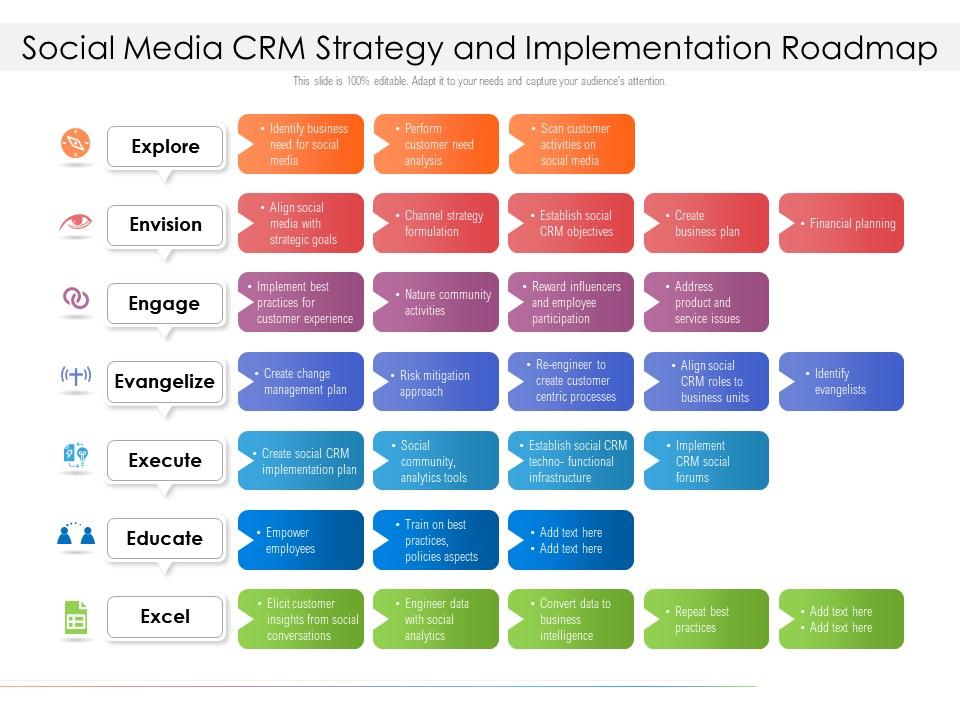
Template 8: Social Media CRM Strategy and Implementation Roadmap
Map your social media CRM strategy from vision to execution with this roadmap slide. Three key stages—Envision, Evangelize, Execute—give teams a shared language for implementation planning. Every element is fully editable for immediate customization to your timeline and goals. Use this to align stakeholders on social CRM strategy rollout and milestone tracking. Clear structure removes ambiguity from even the most complex implementation conversations. Transform your CRM strategy presentations today. Download this dynamic template now and drive your team toward confident, coordinated execution.
Download this PowerPoint Template
Template 9: Social CRM Icon to Perform Research and Development PPT
Dedicated to R&D workflows, this icon-driven slide makes social CRM research processes visual and clear. Three stages guide audiences through research and development activities with precision. An easy-to-edit design means you can update content without design expertise. Use this to present social CRM development initiatives to internal teams or leadership. Strong iconography reinforces each stage without cluttering the slide. Download this template now and bring your CRM research and development story to life.
[product_image id=1294402]
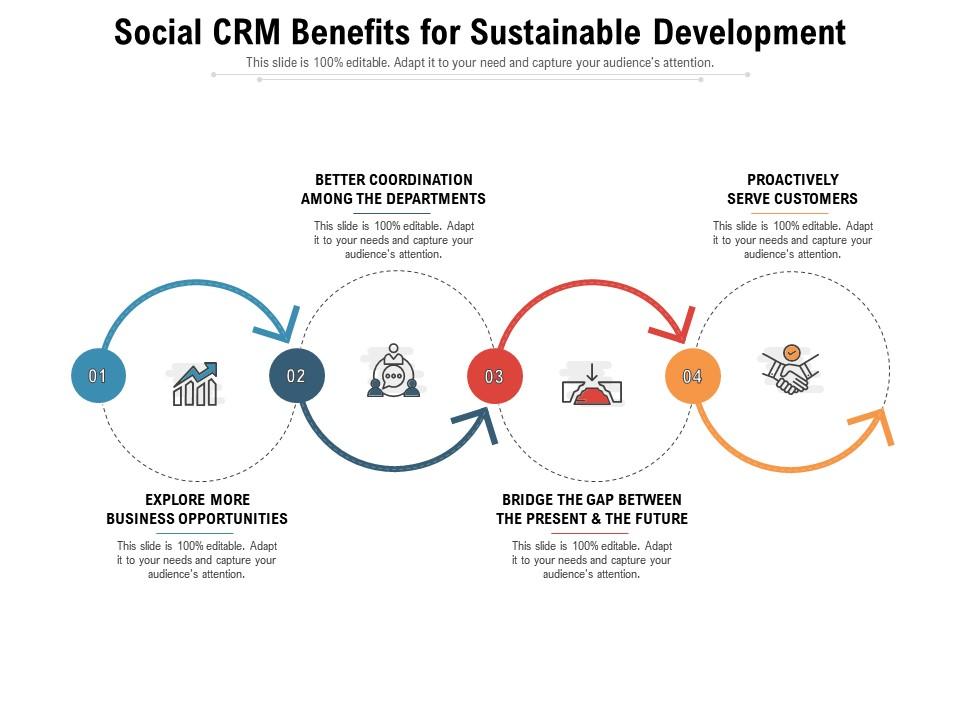
Template 10: Social CRM Benefits for Sustainable Development
Showcase the four key benefits of social CRM for sustainable development in one structured slide. Each stage presents a distinct advantage, making the case for long-term CRM investment clearly. Fully adaptable design lets you tailor content to your organization's specific sustainability goals. Use this to build the business case for social CRM benefits with executives or boards. Compelling layout keeps benefit statements front and center throughout your presentation. Download this template now and make sustainable CRM growth a story stakeholders actually remember.
Download this PowerPoint Template
Template 11: Social CRM Icon for Competitive Intelligence PPT Slide
Bring competitive intelligence into your social CRM story with this focused icon slide. Three clearly defined stages help audiences understand how CRM tools track market signals. An innovatively designed, easy-to-edit layout gives you full control over the content. Use this to present social CRM monitoring and competitive tracking capabilities to strategy teams. Sharp iconography makes abstract intelligence concepts concrete and credible. Download this template now and sharpen your competitive CRM narrative with instant visual clarity.
[product_image id=1294400]
Template 12: Solutions to Overcome Social CRM Challenges
Address the real obstacles in social CRM implementation—adapting to change, managing huge datasets, and more. This structured slide provides concrete remedies, not just problem statements. Every element is instantly editable, so you can match solutions to your organization's specific context. Use this to guide teams through common CRM challenges with practical, actionable frameworks. Clear layout ensures your audience absorbs solutions rather than getting lost in complexity. Transform your CRM challenge presentations today. Download this template now and turn implementation obstacles into structured, solvable problems.
[product_image id=1294406]
Template 13: Strategies to Maximize Social CRM Impact PPT Example
Maximize your social CRM impact with four proven tactics presented in one clean slide. From data-driven approaches to word-of-mouth advertising, each stage delivers a clear action. Fully adaptable design lets you customize stages to match your organization's priorities. Conversational chatbot integration and CRM impact strategies are framed as immediate next steps. Use this to align teams on social CRM strategy execution and performance improvement. Transform your CRM impact presentations today. Download this template now and accelerate the results your social CRM initiatives deliver.
[product_image id=1294409]
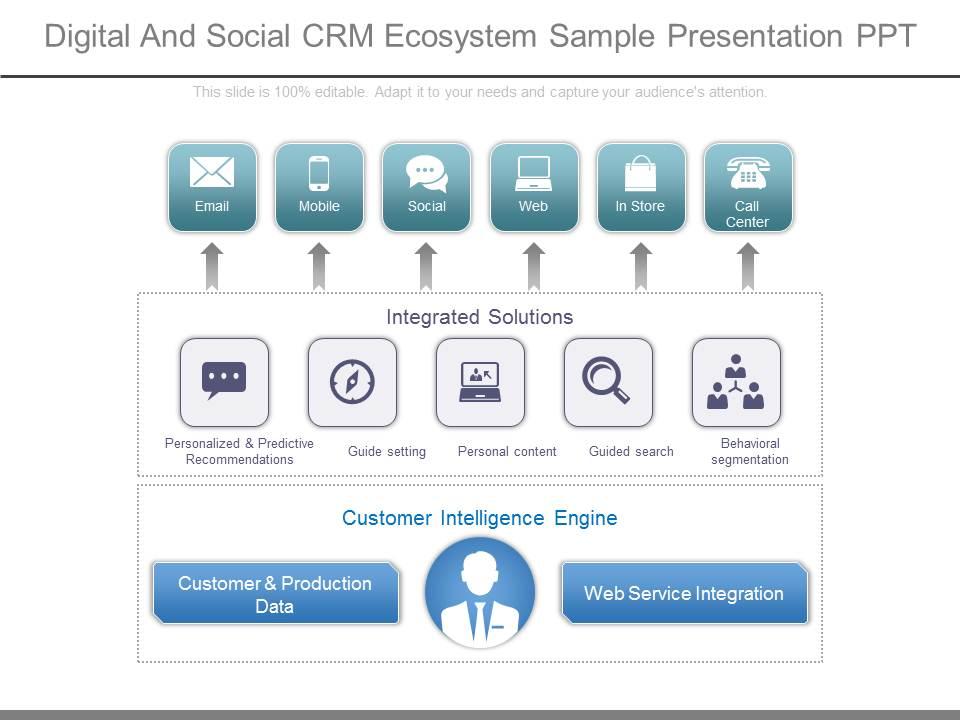
Template 14: Digital and Social CRM Ecosystem Sample Presentation PPT
Capture the full digital and social CRM ecosystem across six integrated stages in one powerful slide. Email, mobile, social, web, in-store, and call center channels are all mapped together. Personalized recommendations, behavioral segmentation, and customer intelligence engine elements are clearly visualized. Web service integration and customer and production data flows are explicitly shown. Use this to present a complete CRM social media integration ecosystem to senior leadership. Transform your ecosystem presentations with unmatched structural clarity today. Download this template now and give stakeholders the full picture of your digital CRM architecture.
Download this PowerPoint Template
Template 15: Social CRM Framework for Customer Satisfaction PPT Presentation
Establish a structured social CRM framework with a clear focus on customer satisfaction outcomes. Products, distributors, and customer satisfaction touchpoints are organized into a coherent, visual model. Instantly available and fully editable, this slide adapts to your organization's specific CRM context. Use this to present social CRM frameworks to operations, sales, or customer service leadership. Clean structure ensures your audience follows the logic from input to satisfaction outcome. Transform your customer satisfaction presentations today. Download this template now and build stakeholder confidence in your social CRM model.
[product_image id=1294399]
Template 16: Applications to Use Social CRM Platforms PPT Example
Four real-world social CRM platform applications are laid out clearly for immediate team use. From optimizing customer relationships to tailoring social content, each use case is actionable. Fully adaptable design allows you to customize stages for your industry or team function. Use this to present CRM user engagement and social content personalization plans to marketing teams. Clear stage structure makes each application distinct and easy to discuss. Transform your CRM platform presentations today. Download this template now and show exactly how your social CRM platforms create measurable business value.
[product_image id=1294390]
Template 17: Social CRM Strategies to Improve Product Marketing PPT Sample
Outline your product marketing tactics powered by social CRM in one structured, compelling slide. Keyword and hashtag tracking, branded keyword monitoring, and other tactics are framed as direct actions. Instantly available and editable, this slide fits any marketing team's presentation workflow. Use this to present social CRM strategies for product visibility and audience growth to CMOs. Clear topic organization keeps strategy conversations focused and productive. Transform your product marketing CRM presentations today. Download this template now and put social CRM lead generation at the center of your marketing plan.
[product_image id=1294404]
Template 18: Social CRM Dashboard to Improve Customer Satisfaction PPT
Monitor and improve customer satisfaction through a purpose-built social CRM dashboard slide. Interactions, positive signals, and satisfaction metrics are organized for instant analytical clarity. Fully customizable layout means you can align dashboard views with your actual CRM data. Use this to present social CRM analytics and customer sentiment analysis to operations or CX teams. Actionable insights are front and center, reducing time spent interpreting data in meetings. Transform your CRM dashboard presentations today. Download this template now and give your team a clearer view of every customer satisfaction signal.
[product_image id=1294398]
Template 19: Social CRM Conversation Centric PPT Presentation
Position conversation at the core of your social CRM model with this six-stage slide. Communication and business integration are mapped across a clean, logical flow. Fully editable design lets you adapt each stage to reflect your organization's actual conversation channels. Use this to present customer interaction management models to cross-functional teams. The conversation-centric framing resonates with both marketing and customer service audiences. Transform your CRM communication presentations today. Download this template now and make customer conversation the foundation of every CRM discussion.

Download this PowerPoint Template
Template 20: Comparative Analysis of Social CRM Tools
Compare social CRM tools side by side with this structured comparative analysis slide. Features, pricing, and social media management capabilities are examined across multiple platforms. An easy-to-edit, innovatively designed layout gives you full control over comparison criteria. Use this to present CRM tool selection decisions to IT, operations, or procurement teams. Clear three-stage structure keeps the analysis focused and stakeholder-friendly. Transform your CRM tool evaluation presentations today. Download this template now and make your next social CRM software selection a confident, data-backed decision.
[product_image id=1294393]
Elevate Your Social CRM Presentations with SlideTeam
SlideTeam's PowerPoint templates are the best in the industry for social CRM planning, integration, and stakeholder communication. These content-ready slides save hours of design work while delivering professional-quality visuals that make CRM social media integration strategies impossible to ignore. Use these ready-made frameworks to present dashboards, roadmaps, competitive analyses, and ecosystem models with confidence. Deploy SlideTeam's social CRM templates today and turn complex customer data into clear, persuasive presentations that drive real decisions.
FAQs on Social CRM
How does Social CRM differ from traditional CRM in managing customer relationships?
Traditional CRM tracks transactions and purchase history. Social CRM adds real-time social media conversations and public sentiment into the picture. You get context, not just records. The key difference: traditional CRM is reactive, social CRM is live. Teams act on what customers say publicly, not just what they log in a support ticket.
What social media platforms are most effective for implementing a Social CRM strategy?
Start with the platforms where your customers already complain, praise, or ask questions. For most B2B companies, that's LinkedIn and Twitter/X. For B2C, focus on Instagram and Facebook. Choose based on your customer demographic, not platform popularity. Two platforms done well beat five done poorly.
How can businesses measure the ROI of their Social CRM initiatives?
Track cost per resolved social interaction against your standard support channel costs. Measure lead conversion rates from social-sourced contacts versus other channels. Compare customer retention rates before and after social CRM adoption. ROI becomes clear when you attach dollar values to specific outcomes, not just activity metrics.
What role does sentiment analysis play in enhancing Social CRM efforts?
Sentiment analysis tells you whether customer mentions are positive, negative, or neutral in real time. It helps teams prioritize which conversations need immediate response. Negative spikes signal product or service issues before they escalate. Use it to trigger alerts, not just reports—action on signals is what creates value.
How can small businesses leverage Social CRM without a large budget?
Focus on one or two social platforms, not all of them. Use free tools like Google Alerts or basic CRM tiers with social listening features. Assign one person to monitor and log social interactions weekly. Small teams win by being consistent and responsive, not by having the most sophisticated tools.
What are the biggest challenges companies face when integrating social media data into their CRM systems?
Data quality is the first problem—social data is messy, unstructured, and high volume. Connecting social IDs to existing CRM records without duplicating contacts is technically tricky. Privacy and consent rules add compliance complexity. Most teams underestimate the cleaning and mapping work required before any useful insights appear.
How does Social CRM improve customer retention rates compared to conventional methods?
Social CRM lets you catch dissatisfied customers before they churn—by catching complaints publicly, not just in cancellation surveys. Faster response times on social channels directly reduce frustration-driven churn. Personalized social engagement makes customers feel seen, which builds loyalty. The mechanism is speed and visibility, not relationship philosophy.
What key metrics should businesses track to evaluate their Social CRM performance?
Track response time to social mentions, volume of resolved social service cases, and sentiment trend over time. Also measure the percentage of social contacts converted to CRM records. These four metrics cover service quality, data capture, and customer mood—the core of any social CRM performance picture.


