





 0 Comment
 Customer Reviews

The document exists. It's sitting in a shared folder somewhere, labeled something like "SysEng_v3_FINAL_actualfinal.pptx."
Nobody's opened it in two weeks.
Not because the content's wrong—it probably isn't. But somewhere between system requirements and integration testing, someone has to stand up and explain how all the pieces fit. How a design decision made in week two still holds up in week twenty. Why the architecture looks the way it does. What happened between specification and delivery.
System engineering presentations don't fail because engineers don't know their subject. They fail because the knowledge lives in heads, whiteboards, and scattered docs—and nobody's figured out how to get it onto one coherent slide deck without spending three days on formatting.
There's a specific discomfort in that gap. You know the V-model. You understand requirements traceability. You've run the integration tests. But presenting it—making it legible to stakeholders who weren't in the room for every trade-off discussion—that's the part that stalls everything. And when it stalls, timelines slip, reviews get delayed, and the technical work you've done looks less credible than it actually is.
What makes it worse: systems engineering isn't a single thing. It's requirements engineering, architecture design, hardware and software integration, lifecycle management, MBSE tools, verification, validation. Each of those deserves a clear visual. Most decks end up trying to cram all of it into bullet points that nobody reads past slide four.
So the templates exist. Not because engineers can't think—obviously they can. But because the problem of communicating complex systems design to mixed audiences is universal. Every program, every organization, every defense or aerospace or software project eventually hits this same wall.
SlideTeam's pre-designed system engineering templates handle the structural part—the part that eats time without adding value. Ready-made frameworks built for the real workflows: V-models, MBSE timelines, architecture overviews, integration stages, lifecycle controls.
Here's what's available.
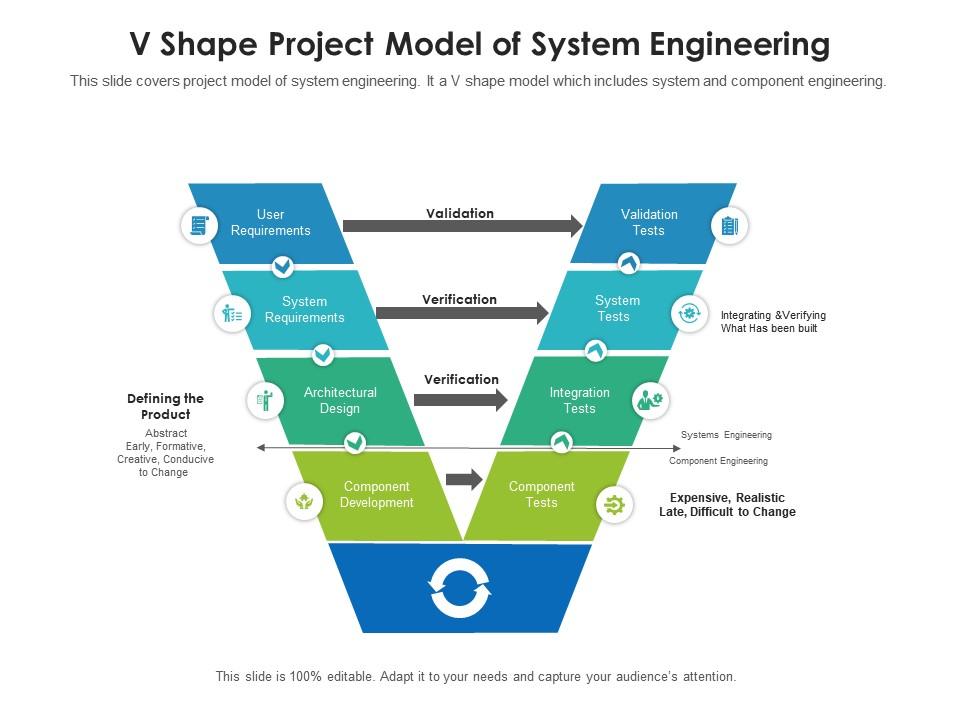
Template 1: V-Shape Project Model of System Engineering
Visualize every phase of system engineering with this structured V-Shape model. Eight clearly defined stages guide teams from architectural design through component development to integration tests. The dual-arm layout makes verification and validation relationships immediately obvious to stakeholders. Every shape is fully editable, so you tailor the flow to your project's actual structure. Color adjustments align the deck with your brand in minutes. Use this template to present complex systems engineering lifecycles with precision and confidence. Transform your V-model presentations today. Download this dynamic template now and unlock clear, stage-by-stage engineering communication.
Download this PowerPoint Template
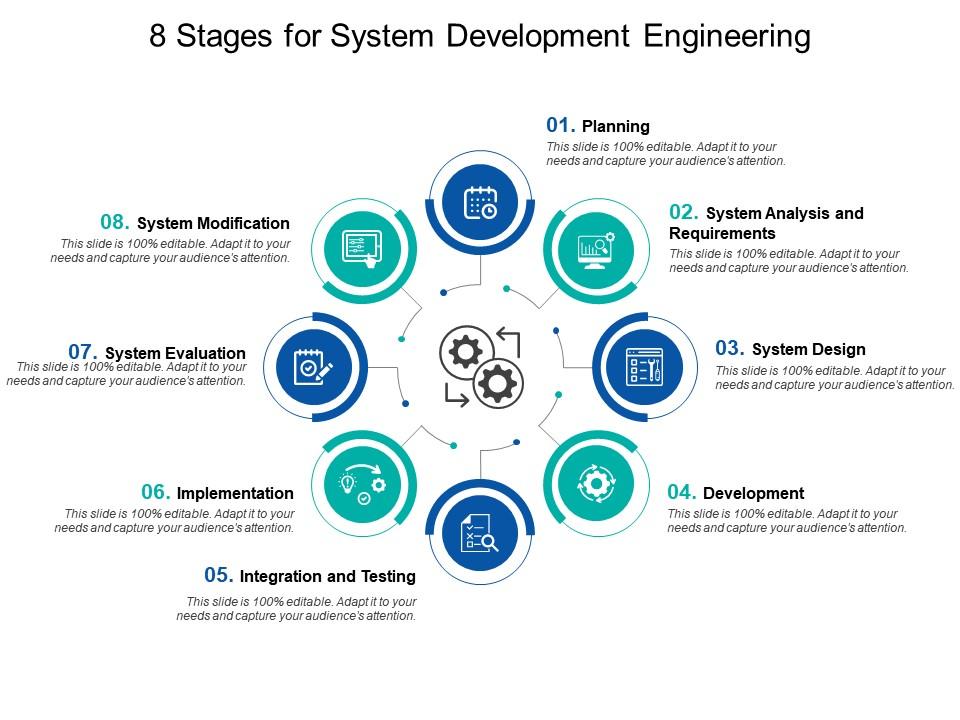
Template 2: 8 Stages for System Development Engineering
Drive clarity across every phase of system development with this eight-stage engineering framework. Each stage maps directly to a product strategy or business development milestone, keeping cross-functional teams aligned. The clean, sequential layout makes progress tracking straightforward for both technical and executive audiences. Full editability means you adapt content, colors, and labels without starting from scratch. Compatible with all major Microsoft versions and Google Slides. Present complex systems engineering processes with structure that commands attention. Transform your system development presentations today. Download this dynamic template now and impress every stakeholder in the room.
Download this PowerPoint Template
Template 3: Digital Systems Engineering Timeline to Develop System Using Model Based Systems Engineering
Accelerate your Model-Based Systems Engineering rollout with this purpose-built MBSE timeline template. Seven key steps—from defining system requirements through validating and optimizing the system model—are laid out in a clear, sequential flow. Each stage connects directly to system architecture milestones, giving teams a shared reference point throughout development. Editable elements let you adapt the timeline to your program's specific phases without design effort. This template is ideal for digital systems engineering briefings where traceability and process clarity matter. Transform your MBSE presentations today. Download this dynamic template now and deliver a timeline your entire team can execute against.
[product_image id=1115323]
Template 4: 8 Stages for System Development Engineering PPT Presentation
Systems engineering projects fail most often when lifecycle phases are poorly sequenced and undocumented. This PPT template gives systems engineers and engineering project managers a clear, stage-by-stage structure for communicating a systems engineering process end to end. It works well for walking a review board through a systems engineering framework, or aligning cross-functional teams on hardware and software integration milestones. For context, it suits aerospace systems engineering and defense systems engineering reviews equally well. The template is 100% editable and customizable.
[product_image id=1611702]
Template 5: System Integration Presentation PPT Outline
Present hardware and software integration concepts with a deck built for real technical audiences. The System Integration PPT Outline combines visual appeal with structured content delivery, so complex ideas land clearly. Every design element is fully customizable—adjust colors and layouts to reflect your organization's identity in minutes. Microsoft and Google Slides compatibility means zero friction when inserting into existing presentations. Download formats include JPG, JPEG, and PNG for flexible distribution. Whether you're briefing a program review or a client pitch, this deck holds up under scrutiny. Transform your system integration presentations today. Download this dynamic template now and make every integration briefing count.
[product_image id=1471968]
Template 6: Architecture of Model-Based Systems Engineering
Communicate MBSE architecture with the precision stakeholders expect. Explore additional system engineering PPT templates and examples to complement this slide's coverage of System Architecture Model integration and engineering workflows. Key MBSE components—architecture design, requirements, and update analysis models—are clearly mapped for fast comprehension. The layout supports discussion-driven presentations, making trade-off navigation straightforward. Fully editable elements let your team update architecture diagrams without rebuilding from scratch. Use this slide to anchor technical reviews requiring deep systems architecture design clarity. Transform your MBSE architecture presentations today. Download this dynamic template now and give your engineering workflows a visual foundation they deserve.
[product_image id=960269]
Template 7: System Optimization Using Based Systems Engineering PPT Slides
Elevate system optimization discussions with a deck designed for precision and visual impact. The System Optimization Using Based Systems Engineering PPT Slides deck blends creativity with functional structure, so technical content reaches every audience member. You customize every element—color schemes, text, and layouts—to align with your organization's identity effortlessly. Full compatibility with Microsoft versions and Google Slides fits any presentation environment. Downloadable in JPG, JPEG, and PNG for easy team distribution. Ideal for presenting complex systems design optimization in engineering project reviews. Transform your system optimization presentations today. Download this dynamic template now and ensure your engineering insights get the attention they deserve.
[product_image id=1606610]
Template 8: Traditional Systems Engineering versus Model-Based Systems Engineering
Compare traditional systems engineering and Model-Based Systems Engineering side by side with this contrast-focused slide. Diagrams cover project management, software, analysis, manufacturing, system model, structures, and communications components clearly. The visual comparison drives faster stakeholder understanding of MBSE's advantages over legacy approaches. Every element is free to edit, so you tailor the comparison to your program's actual context. Use this slide in technical briefings to justify MBSE adoption or document methodology transitions. This is a proven tool for systems engineering methodology discussions at any level. Transform your MBSE comparison presentations today. Download this dynamic template now and make the case for modern engineering approaches clearly.
[product_image id=960316]
Template 9: Understanding System Boundaries in Engineering PPT Mockup
Define and communicate system boundaries with a deck that balances simplicity and innovation. The Understanding System Boundaries in Engineering PPT Mockup empowers teams to present scope definitions with immediate visual clarity. Adjust the color theme to match your company's identity without any design expertise. Ready-made layouts save time while preserving full customization freedom across fonts and content. Available in JPG, JPEG, and PNG formats for versatile sharing across engineering teams. Built for boundary-definition briefings in complex systems design reviews and requirements workshops. Transform your system boundary presentations today. Download this dynamic template now and give your scope definitions the structure they need.
[product_image id=1775969]
Template 10: System Analysis and Tools Overview PPT Outline
Deliver system analysis and tools overviews that hold attention from the first slide. The design combines visual striking aesthetics with functional layouts, ensuring your technical content doesn't get lost in presentation clutter. Customize fonts, colors, and structures freely while staying compatible with Microsoft and Google Slides. Downloadable in JPG, JPEG, and PNG for seamless sharing across platforms and teams. From boardroom program reviews to client technical briefings, this deck adapts to every context. Built for systems engineers who need to present analysis frameworks and toolsets with authority. Transform your system analysis presentations today. Download this dynamic template now and turn complex tool overviews into compelling narratives.
[product_image id=1809479]
Template 11: System Boundary Concepts in Software Engineering PPT Structure
Capture audience attention immediately with this software engineering boundary concepts deck. The System Boundary Concepts in Software Engineering PPT Structure thoughtfully frames scope and interface definitions for technical and non-technical audiences alike. Download and adjust every element to fit your workflow, whether in Microsoft PowerPoint or Google Slides. Accessible in JPG, JPEG, PNG, and PDF formats for straightforward sharing and editing. Adapt the color theme to suit your audience's preferences without extra design work. Use this deck in software systems engineering reviews where boundary clarity determines project success. Transform your software engineering presentations today. Download this dynamic template now and ensure boundary concepts are never misunderstood again.
[product_image id=1776051]
Template 12: Next Generation of Model-Based Systems Engineering Solutions
Present the future of MBSE with a slide built around next-generation engineering solutions. Key components—standard system description, product engineering, and concept design—are clearly structured for forward-looking technical briefings. The editable layout lets your team update solution roadmaps as the MBSE landscape evolves. Free to customize for any organization's specific engineering methodology or program context. Use this slide to anchor discussions on requirements engineering improvements and product lifecycle advancement. Ideal for technical leadership briefings where next-generation systems planning is on the agenda. Transform your next-gen MBSE presentations today. Download this dynamic template now and lead the conversation on engineering's future direction.
[product_image id=960309]
Template 13: System Specification Overview Presentation PPT Slides
Deliver system specification overviews that grab attention and hold it through every slide. The engaging design captures your audience instantly, ensuring technical specification content isn't buried in generic layouts. Adjust every element freely—fonts, colors, and structures—across Microsoft PowerPoint and Google Slides. Available in JPG, JPEG, PNG, and PDF for flexible team distribution. Play with the color theme to match audience preferences and presentation context. Built for technical requirements analysis briefings where specification clarity drives project outcomes. Transform your system specification presentations today. Download this dynamic template now and ensure every spec detail lands with the impact it deserves.
[product_image id=1798832]
Template 14: Introduction to System Integration Concepts PPT Presentation
Introduce system integration concepts with a deck that makes complexity accessible. The Introduction to System Integration Concepts PPT Presentation merges visual creativity with structured content delivery for maximum audience engagement. Customize every color scheme and design element to reflect your brand identity without delay. Compatible with Microsoft versions and Google Slides, it integrates into any existing workflow. Download in JPG, JPEG, and PNG formats for easy sharing and reproduction. Use this deck to onboard cross-functional teams on integration frameworks and systems integration testing fundamentals. Transform your integration concept presentations today. Download this dynamic template now and make system integration concepts clear to every stakeholder.
[product_image id=1479041]
Template 15: System Analysis for Enhancing Software and Technology Systems PPT Outline
Sharpen software and technology system analysis presentations with this versatile, high-impact deck. The design blends creativity with functional structure, ensuring your analytical content engages rather than overwhelms. Full customization of elements and color schemes aligns the deck with your organizational brand instantly. Pre-designed layouts compatible with Microsoft and Google Slides cut preparation time significantly. Export in JPG, JPEG, and PNG for distribution across technical and executive teams alike. Ideal for systems engineers presenting software systems engineering analysis in program or architecture reviews. Transform your systems analysis presentations today. Download this dynamic template now and ensure your analytical insights drive the decisions they should.
[product_image id=1678207]
Template 16: System Integration PPT Presentation
Make every system integration briefing visually compelling with this purpose-built presentation deck. The design combines creative visuals with functional information architecture, so integration details reach every audience member clearly. Customize fonts, colors, and layouts freely while maintaining full Microsoft and Google Slides compatibility. Available in JPG, JPEG, and PNG formats for fast, flexible distribution. This deck works across boardroom reviews, client presentations, and internal program checkpoints. Built for systems engineers who present hardware and software integration status to diverse stakeholders. Transform your system integration presentations today. Download this dynamic template now and make integration briefings your strongest program communication tool.
[product_image id=1537098]
Template 17: System Architecture Overview Essentials PPT Demonstration
Deliver systems architecture overviews that leave a lasting impression on every audience. The System Architecture Overview Essentials PPT Demonstration balances simplicity with innovation, making even layered architecture concepts accessible. Adapt the color theme to your company's identity for a polished, professional result every time. Ready-made design saves hours of setup while preserving complete customization freedom. Available for download in JPG, JPEG, and PNG formats for versatile sharing. Built for systems architecture design presentations where clarity and credibility are equally important. Transform your architecture overview presentations today. Download this dynamic template now and ensure every architecture briefing drives alignment across your engineering teams.
[product_image id=1699263]
Template 18: Controlling and System Development
Map your entire system development and control lifecycle on one structured, editable slide. Seven stages—from system requirement and simulation through software integration with hardware to system integration and calibration—are clearly laid out. The sequential structure makes engineering lifecycle management reviews straightforward for both technical leads and program managers. Full editability across all stages means you tailor the flow to your program's exact process without extra effort. Compatible with all Microsoft versions and immediately downloadable. Use this template in systems reliability engineering and control process reviews. Transform your system development lifecycle presentations today. Download this dynamic template now and give your engineering controls the visual clarity they need.

Download this PowerPoint Template
Template 19: System Development Life Cycle and System Integration PPT Presentation PPT
Connect system development lifecycle and integration milestones in a single, high-impact deck. The AI-assisted design ensures visually striking output that makes technical content land with authority in any room. Customize layouts, fonts, and color schemes freely within Microsoft and Google Slides without design expertise. Download in JPG, JPEG, and PNG for fast sharing across engineering and program teams. From client pitches to internal milestone reviews, this deck adapts to any audience or context. Designed for systems engineers presenting development lifecycle and integration progress to leadership. Transform your SDLC and integration presentations today. Download this dynamic template now and turn lifecycle complexity into a clear, confident story.
[product_image id=1424845]
Template 20: Understanding System Boundary Concepts PPT Presentation
Master system boundary concept communication with this innovation-focused presentation deck. The Understanding System Boundary Concepts PPT Presentation empowers teams to define and present scope limits with both precision and visual appeal. Adapt color themes and layouts to match your company's specific communication needs with ease. Ready-made designs save significant preparation time while offering complete creative control. Available in JPG, JPEG, and PNG for straightforward distribution across engineering and stakeholder groups. Built for complex systems design reviews where boundary definition determines downstream engineering success. Transform your boundary concept presentations today. Download this dynamic template now and ensure every stakeholder leaves the room with a clear understanding of system scope.
[product_image id=1812873]
Elevate Every Systems Engineering Presentation with SlideTeam
SlideTeam's PowerPoint templates are the best in the industry for communicating complex systems engineering processes, architectures, and integration frameworks. These content-ready slides save hours of design work while delivering the professional quality that technical reviews and stakeholder briefings demand. Whether you're presenting a V-model lifecycle, an MBSE timeline, or a system integration roadmap, these ready-made frameworks give your engineering knowledge the structure it deserves. Grab these templates today and ensure every systems engineering presentation drives clarity, confidence, and results.
FAQs on System Engineering
How does model-based systems engineering (MBSE) reduce documentation overhead while improving traceability across complex system lifecycles?
MBSE replaces document-heavy workflows with a shared system model that all teams reference directly. Changes update once in the model and propagate automatically, cutting redundant documentation. Traceability links requirements, design elements, and test cases inside the same model. Teams spend less time reconciling documents and more time resolving real engineering issues.
What are the critical differences between functional decomposition and object-oriented approaches in systems architecture design?
Functional decomposition breaks a system into what it must do, organized as a hierarchy of functions. Object-oriented approaches group behavior and data around entities that mirror real system components. Functional decomposition suits requirement definition and early architecture stages. Object-oriented methods work better when system behavior is state-driven and reuse across components matters.
How do systems engineers balance over-specification risks with the need for precise requirement definition in large-scale projects?
Over-specification locks design teams into solutions before the best options are known. Under-specification creates ambiguity that causes rework during integration. The practical balance is writing requirements at the level that constrains the wrong solutions without dictating the right one. Regular requirement reviews with both engineers and end users catch drift in either direction early.
What role does interface control documentation play in preventing integration failures during system development?
Interface control documents define exactly what crosses a boundary between subsystems—signals, data formats, timing, and physical connectors. Without them, each team makes independent assumptions that collide at integration. They serve as the binding contract between subsystem developers. Keeping them updated as design evolves is what prevents late-stage integration failures.
How can systems engineers effectively manage emergent behaviors in complex adaptive systems that were not anticipated during design?
Emergent behaviors arise from interactions between components, not from any single component. The most effective response is building in monitoring that flags unexpected system states early. Simulation and model-based analysis before deployment helps surface likely interaction patterns. After deployment, rapid feedback loops between operations and engineering teams catch and address new behaviors quickly.
How does the V-model framework address verification and validation gaps in safety-critical system development?
The V-model pairs each development stage on the left arm with a corresponding verification or validation activity on the right arm. This structure ensures no deliverable reaches integration without a defined test plan. For safety-critical systems, it creates an auditable record linking every requirement to a test result. Gaps in the V become visible before they become failures in the field.
What strategies exist for managing technical debt accumulation in long-lifecycle defense and aerospace systems?
Technical debt in long-lifecycle defense and aerospace systems accumulates when short-term fixes replace proper redesigns. The primary strategy is maintaining a live registry of known workarounds, with cost estimates attached. Each program increment should retire at least some debt, not only add new capability. Architecture reviews at major milestones identify which debt items pose the highest reliability or integration risk.
How do systems engineers apply failure mode and effects analysis (FMEA) differently across hardware versus software-intensive systems?
For hardware, FMEA focuses on physical failure modes—wear, thermal stress, connector failure—with measurable detection rates. For software, FMEA targets incorrect state transitions, data handling errors, and timing faults that don't degrade gradually. Hardware FMEA ties directly to component reliability data. Software FMEA relies more on code review and test coverage analysis since failure modes aren't always predictable from physics alone.


