





 0 Comment
 Customer Reviews

The deck's been built. The strategy's approved. Now someone has to show five years of work on a single slide.
That's where things get awkward. Not because the plan is bad—it probably isn't. But because compressing three, five, or ten years of overlapping initiatives into something an executive can scan in thirty seconds is a different skill entirely. It's not about knowing the plan. It's about knowing what to show.
Most people open a blank slide and freeze. Do you go horizontal or vertical? How many milestones is too many? What happens when Q3 of year two overlaps with Q1 of year three on the same track? These aren't design questions. They're communication questions dressed up as design problems.
And the stakes aren't small. A multi year timeline presented badly looks like noise. Leadership sees boxes, arrows, and color blocks—and nothing lands. The ask for more detail, or worse, they disengage entirely. Meanwhile, the same plan, shown clearly, signals competence. It says: we've thought this through, we know the sequence, and we know where we're going.
Long range planning has always been hard to visualize. A five year plan has too many moving parts for a simple list. A Gantt chart is too tactical for a boardroom. What fits is something in between—structured enough to show sequence, clean enough to show direction. That's what multi year timeline templates are built for. Not to make the plan look pretty. To make it legible.
SlideTeam's pre-designed timeline templates handle the structure problem so you don't have to. Whether you're mapping phased implementation across departments or showing annual milestones against a long term strategy, there's a ready-made layout that fits the conversation. No starting from scratch, no formatting rabbit holes.
Here are the templates that work.
Template 1: Annual Multi-Track Timeline Roadmap Infographic PowerPoint Template
Annual planning rarely runs on a single track. This PowerPoint slide handles five parallel workflows across twelve months with clear visual separation. Each color-coded track maps one initiative, so cross-functional teams can see their workstreams without hunting for context. Program managers and department heads reach for this PPT when presenting overlapping project timelines to leadership. It fits annual milestone reviews and multi-department rollout conversations equally well. Explore more multi year timeline templates for extended planning horizons. The template is 100% editable and customizable.
[product_image id=1460418]
Template 2: Multi-Project Timeline with Parallel Task Views PPT Outline
Parallel projects running simultaneously need more than a single-track view. This PPT preset gives project leads a clean, side-by-side layout for multiple workstreams. It's the kind of slide a PMO reaches for when briefing a steering committee on concurrent initiatives. Each task view stays visually distinct, so dependencies and overlaps read clearly without cluttering the slide. Useful for long term project management reviews and enterprise roadmap presentations. The template is 100% editable and customizable.
[product_image id=1550388]
Template 3: Milestone and Timeline Tracker Overview Presentation PPT Sample
Milestone tracking often gets buried in progress reports nobody reads fully. This PPT template surfaces key delivery points in a structured, scannable layout. Operations leads and project managers use this slide to align stakeholders on what's been hit and what's coming next. It works well in quarterly reviews and program roadmap briefings where keeping the audience oriented is half the job. The template is 100% editable and customizable.
[product_image id=1725769]
Template 4: Multi-Projects 10-Year Timeline for Companies
A decade of program activity demands a view that doesn't collapse under its own scope. This template delivers a structured 10-year multi-project timeline for organizations tracking long-horizon commitments. It maps software development cycles and infrastructure upgrade programs side by side. Each project occupies a clearly defined row, making progress monitoring across years straightforward. You can align cross-functional initiatives and present strategic objectives with precision and professional polish. Transform your long term planning presentations today. Download this dynamic template now and unlock your enterprise roadmap potential.
[product_image id=1174483]
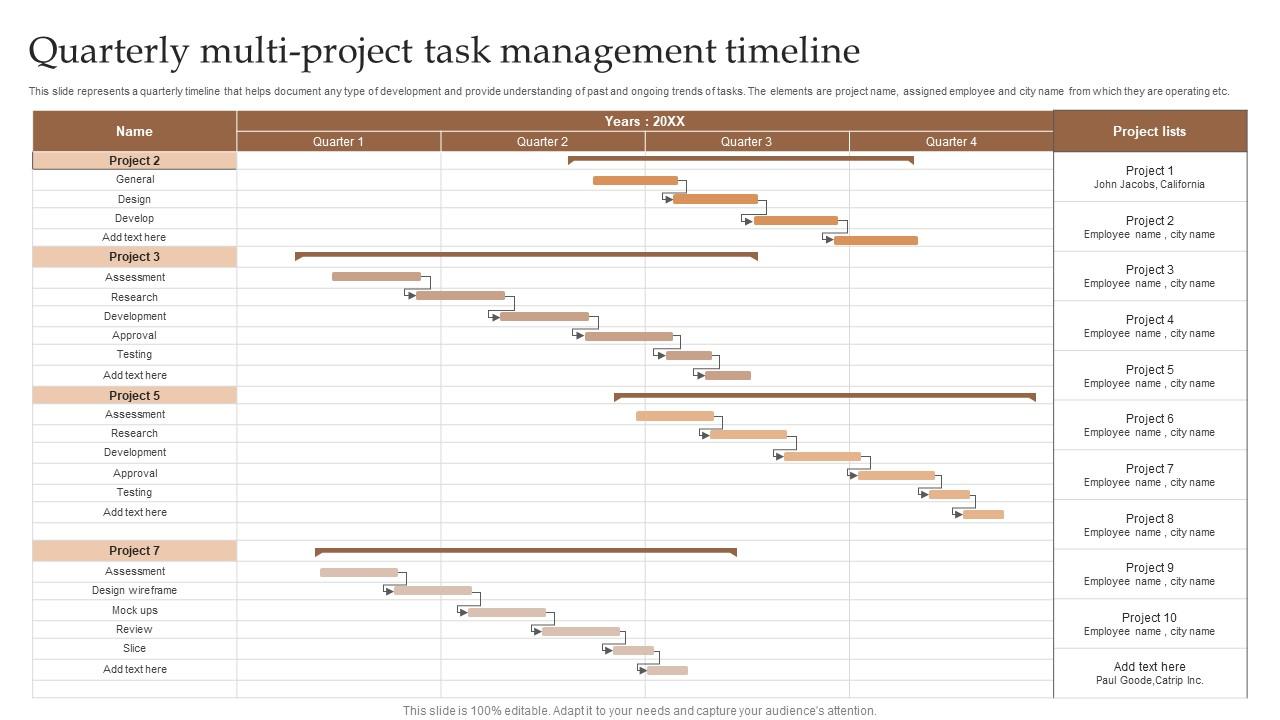
Template 5: Quarterly Multi-Project Task Management Timeline
Quarterly visibility matters when projects span teams and geographies. This PPT slide tracks task progress by project name, assigned employee, and operating location across a quarterly timeline. Team leads and operations managers use it to document ongoing trends and communicate task ownership clearly. It's a practical fit for capital planning check-ins and annual planning cycle reviews. The template is 100% editable and customizable.
Download this PowerPoint Template
Deliver on Your Long-Term Vision with SlideTeam
SlideTeam's PowerPoint templates are the best in the industry for multi year timeline presentations. These content-ready slides give your long term strategy the visual structure it needs to land clearly with any audience—executive or operational. Use these ready-made frameworks to map annual milestones, phased implementation plans, and program roadmaps without spending hours on formatting. Deploy these PowerPoint slides to communicate your plan with confidence and drive decisions forward.
FAQs on Multi-Year Timeline
What are the design principles that make a multi-year timeline easy to read and visually compelling in a presentation?
Keep the visual hierarchy strict: one primary label per milestone, consistent spacing between years, and no more than two font sizes across the slide. Use color to group, not decorate. Limit the number of tracks to what the audience genuinely needs to follow. White space is not wasted space—it helps the eye move. A timeline that breathes reads faster than one that packs everything in.
How do you determine the appropriate level of detail when mapping out events across multiple years in a single slide?
Match detail to the audience. Executive presentations need year-level or quarter-level markers, not monthly tasks. Operational reviews can go deeper. A good rule: show only the milestones that would change a decision if they slipped. Everything else is noise. If a slide needs a legend to explain what each element means, you've included too much.
What is the difference between a roadmap and a multi year timeline, and when should each be used in business presentations?
A roadmap shows direction and priorities—what you're building toward and roughly when. A multi year timeline shows sequence and duration—when specific things happen and for how long. Use a roadmap in strategy conversations where stakeholders care about outcomes. Use a multi year timeline when the audience needs to track delivery, dependencies, or progress across defined periods.
How can color coding be applied to a multi-year timeline to distinguish phases, departments, or project streams?
Assign one color per stream—department, phase, or project type—and apply it consistently across all slides in the deck. Avoid using color to signal status (red/green) unless that's the slide's sole purpose. Too many colors create noise; three to five is the practical limit. A shared color key shown once at the start of the presentation handles the rest.
What layout formats work best for displaying a multi year timeline — horizontal, vertical, or circular — and in what contexts?
Horizontal layouts work best in most business presentations—they match how audiences read and how time actually moves. Vertical formats suit process flows or staged rollouts where one phase feeds the next. Circular timelines work for cyclical programs, like annual planning cycles, but lose clarity fast when milestones exceed eight to ten. Match the format to the story, not the aesthetic.
How do you handle overlapping or concurrent events when designing a multi year timeline template?
Use parallel horizontal tracks—one per project or workstream—so overlapping timelines sit side by side rather than on top of each other. Gantt-style layouts handle this well. Where true overlap is the point, a shaded overlap zone can flag it explicitly. The goal is to make concurrency visible, not hidden. Never let two tasks share the same row if they run simultaneously.
What types of data or milestones are best suited for visualization in a multi year timeline versus a Gantt chart?
Multi year timelines suit high-level milestones: product launches, phase completions, funding rounds, or annual reviews. Gantt charts handle task-level work—dependencies, durations, resource assignments. If your audience asks 'when does each phase end?' use a timeline. If they ask 'who does what and in what order?' use a Gantt chart. The choice is about the question being answered, not the tool.
How can a multi year timeline be adapted for executive-level presentations without overwhelming the audience with too much information?
Show outcomes, not activities. Executives want to see what changes and when—not every task behind it. Limit the slide to five to seven key milestones across the full period. Use a single-track or two-track layout. Add a one-line annotation per milestone explaining the business impact. Remove anything the audience can't act on or approve. Less on the slide means more in the room.


